React-native-google-places-autocomplete: The autocomplete list doesn't appear
Please help me.
I can't see the autocomplete list that appears when I enter a search.
 mnurulhuda
All 17 comments
@mnurulhuda Please follow the issue template to show the code you are using or link to a snack.
 bell-steven
on 12 Jul 2020
bell-steven
on 12 Jul 2020
I tried to use basic example with a configuration that I have adjusted,
and the autocomplete can already appear.
but when I created it with react-native-community/react-native-maps , the autocomplete did not appear
mnurulhuda
on 12 Jul 2020
@mnurulhuda Please follow the issue template to show the code you are using or link to a snack.
👆
bell-steven
on 12 Jul 2020
React Native Google Places Autocomplete not loading auto complete list
Steps:
- Create a fresh project using react-native init
- add react-native-google-places-autocomplete
- used following example
- Added API_KEY
- Search bar appears, But nothing happens when you search
 sacmii
on 14 Jul 2020
sacmii
on 14 Jul 2020
@sacmii when I follow your steps it works fine for me.
Can you try using this snack, or link to your own?
Check the console there to see if there are any errors with your key.
bell-steven
on 14 Jul 2020
@sacmii when I follow your steps it works fine for me.
Can you try using this snack, or link to your own?
Check the console there to see if there are any errors with your key.
No errors are logged
sacmii
on 14 Jul 2020
@sacmii can you provide a link to a snack or a repository so I can try and reproduce?
bell-steven
on 14 Jul 2020
can you provide a link to a snack or a repository so I can try and reproduce?
@bell-steven I just tried on the example provided by you https://snack.expo.io/@sbell/react-native-google-places-autocomplete and filled in my API key wich I created like specified here https://developers.google.com/places/web-service/get-api-key and got no suggestions at all. Am I missing something?
 JakubOrsula
on 15 Jul 2020
JakubOrsula
on 15 Jul 2020
@JakubOrsula without a fully reproducible example, I have no way of knowing.
If something is not working for someone, please provide all the code you are using or link to a snack.
The GitHub issues should really be for bug reports, not for support. That being said, if someone is having an issue using the library (no a bug in the library), I don't mind helping out, but I have to have the information needed to help (a proper repoducible example).
This is an open source library, not a commercial project with a support team.
bell-steven
on 15 Jul 2020
please provide all the code you are using or link to a snack.
@bell-steven This is the link to the snack. https://snack.expo.io/@sbell/react-native-google-places-autocomplete
I just set GOOGLE_PLACES_API_KEY to my api key. Upon typing in search bar in the preview on the right no suggestions come up.
I do believe that this is a bug since it affects multiple people and is reproducible.
JakubOrsula
on 15 Jul 2020
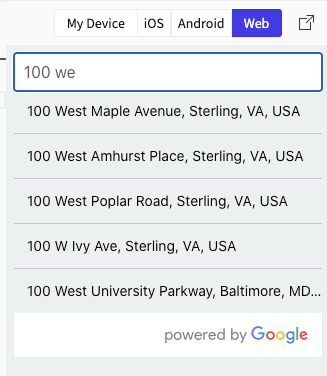
@JakubOrsula that is my snack (bell-steven = sbell 😉 ). I just tried 2 API keys with it and it works without any issues. I also use it in an app in production without issues.
>
I do believe that this is a bug since it affects multiple people and is reproducible.
That may very well be true. Or perhaps it has to do with the API key and nothing to do with the library. Maybe people aren't following the instructions properly. Maybe the docs need to be more clear. Saying "it doesn't work" isn't very helpful.
I'm going to close this because it is not a reproducible bug or usage issue. If someone wants to open a new issue and follow the issue template, I would be glad to take a look.
bell-steven
on 15 Jul 2020
Hello,
I'm sorry the problem was on my end.
@mnurulhuda maybe this can help you.
For future reference the steps I've taken to narrow down the problem:
- I tested just the key like described here https://developers.google.com/places/web-service/get-api-key#add_key
- There were some problems like browser auto-inserting url-encoded '\n' characters making google return 404
- When I finally got meaningful response (Billing not set up go to ...) I just enabled billing.
And that was it! The core problem was that billing was not enabled.
JakubOrsula
on 15 Jul 2020
@JakubOrsula that is my snack (bell-steven = sbell 😉 ). I just tried 2 API keys with it and it works without any issues. I also use it in an app in production without issues.
I do believe that this is a bug since it affects multiple people and is reproducible.
That may very well be true. Or perhaps it has to do with the API key and nothing to do with the library. Maybe people aren't following the instructions properly. Maybe the docs need to be more clear. Saying "it doesn't work" isn't very helpful.
I'm going to close this because it is not a reproducible bug or usage issue. If someone wants to open a new issue and follow the issue template, I would be glad to take a look.
My API key doesn't work. i follow the instructions carefully. What do i missing ?
 kukuandroid
on 7 Oct 2020
kukuandroid
on 7 Oct 2020
any update why google key is not working , i already enabled the Places API ...
 Salman98
on 11 Nov 2020
Salman98
on 11 Nov 2020
can try another api key and check whether the billing is enabled or not
On Wed, Nov 11, 2020 at 9:53 PM Salman Memon notifications@github.com
wrote:
any update why google key is not working , i already enabled the Places
API ...—
You are receiving this because you commented.
Reply to this email directly, view it on GitHub
https://github.com/FaridSafi/react-native-google-places-autocomplete/issues/588#issuecomment-725435202,
or unsubscribe
https://github.com/notifications/unsubscribe-auth/AFJBJR2KXWQRRV2CDO6W2ODSPKJLZANCNFSM4OXI6X4A
.>
Thanks and Regards,
MUHAMAD KHAIRUL FILHAN BIN NUSI
Co-founder / Fullstack Developer
KukuBytes Solution
kukuandroid
on 11 Nov 2020
Yes I find out that my account billing was not active thanks
Salman98
on 16 Nov 2020
To all who face this issue in the future:
Make sure you have flex: 1 on the parent container and it is not cropping autocomplete
 sasha240100
on 3 Mar 2021
sasha240100
on 3 Mar 2021
Related issues
 miguel-pm
·
3Comments
miguel-pm
·
3Comments
 lukBakTsh
·
3Comments
lukBakTsh
·
3Comments
 KhalilKhalaf
·
4Comments
KhalilKhalaf
·
4Comments
 macs03
·
3Comments
macs03
·
3Comments
 biks152207
·
4Comments
biks152207
·
4Comments
Most helpful comment
To all who face this issue in the future:
Make sure you have
flex: 1on the parent container and it is not cropping autocomplete