React-native-gifted-chat: iOS 14 - input toolbar moving up on click send
Issue Description
After updating to iOS 14, for some reason the keyboardavoidingview handler seems to be malfunctioning. When I press send the toolbar is misplaced roughly by ~20 px, if I dismiss the keyboard and click on the input again, it goes back into place. This seems to only happen when I click send for some reason.
I have also noticed that if I set the 'isKeyboardInternallyHandled' prop to false, then I don't get this problem. However, the keyboard is internally handled, so I can't do that.

Steps to Reproduce / Code Snippets
I tested this with any example, and it seems to be happening, so code snippets won't be of much help.
Expected Results
The inputToolbar shouldn't be moving up when I press send.
Additional Information
- Nodejs version: 12.16.1
- React version: 16.13.1
- React Native version: 0.63.2
- react-native-gifted-chat version: 0.16.3
- Platform(s) (iOS, Android, or both?): iOS 14
- TypeScript version: 4.0
 seeocon
All 13 comments
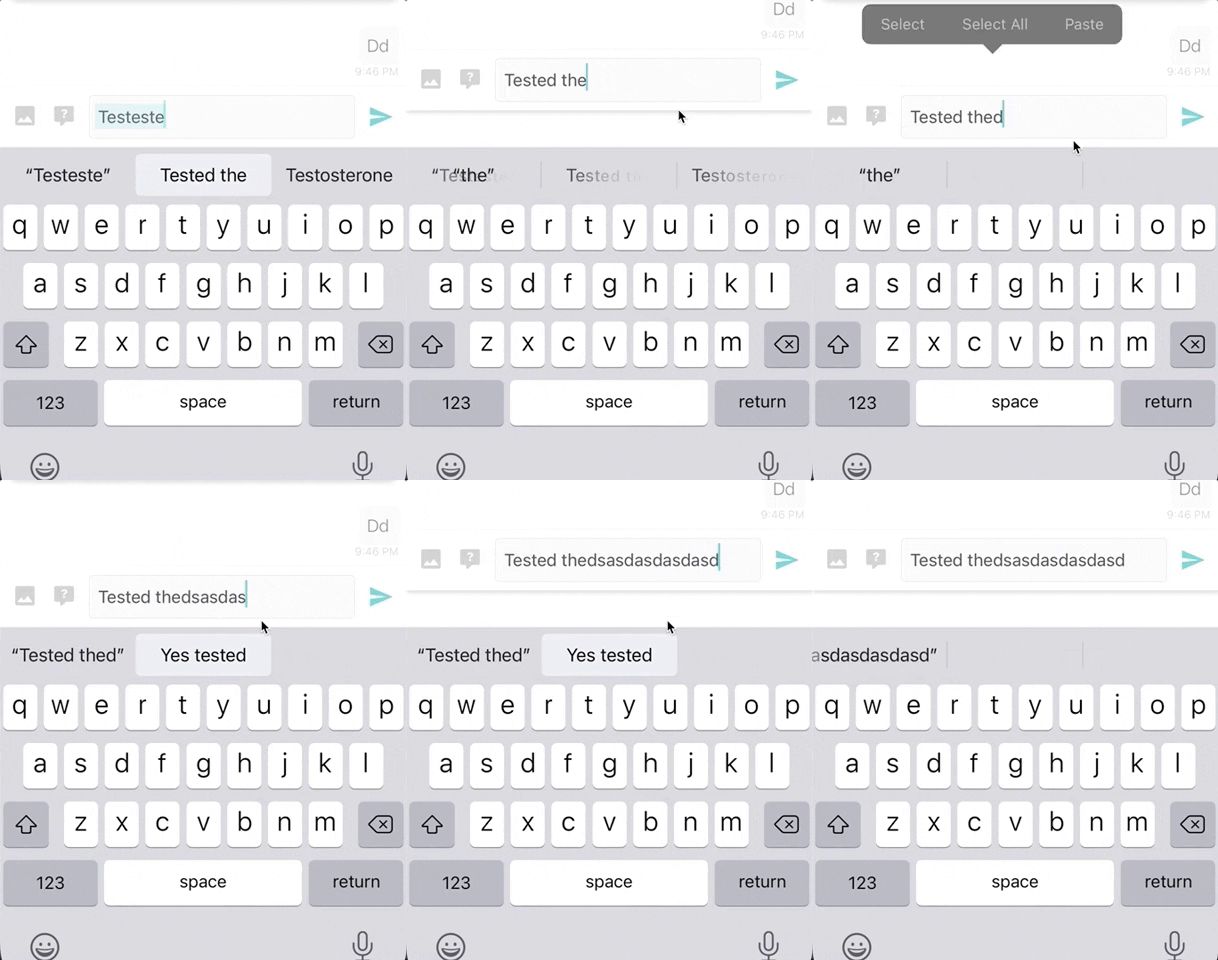
having the same issue since upgrading my simulator to iOS 14 and for me, the extra space appears & disappears on typing:
React version: 16.11.0
React Native version: 0.62.2 (EXPO v38)
react-native-gifted-chat version: 0.16.3
Platform(s) (iOS, Android, or both?): iOS 14 (iPhone 11 Pro simulator)
TypeScript version: 3.9.5
 lsps9150414
on 25 Sep 2020
lsps9150414
on 25 Sep 2020
Any solution to this?
 JLucasCAmorim
on 29 Sep 2020
JLucasCAmorim
on 29 Sep 2020
Never mind, I was able to sort this out.
JLucasCAmorim
on 29 Sep 2020
@JLucasCAmorim Could you please share your solution?
 timvandijck
on 29 Sep 2020
timvandijck
on 29 Sep 2020
may I know how? I have the same problem
 art1373
on 29 Sep 2020
art1373
on 29 Sep 2020
@timvandijck @art1373 you need to set the isKeyboardInternallyHandled as false, and then you can put a KeyBoardAvoidView as the father of GiftedChat. Something like that:
<KeyBoardView>
        <GiftedChat
          messages={messages}
          onSend={handleSend}
          alwaysShowSend
          wrapInSafeArea
          isKeyboardInternallyHandled={false}
         ../>
</KeyBoardView>
@timvandijck @art1373 you need to set the isKeyboardInternallyHandled as false, and then you can put a KeyBoardAvoidView as the father of GiftedChat. Something like that:
<KeyBoardView>
        <GiftedChat
          messages={messages}
          onSend={handleSend}
          alwaysShowSend
          wrapInSafeArea
          isKeyboardInternallyHandled={false}
         ../>
</KeyBoardView>
Can confirm. This is exactly what I ended up doing.
seeocon
on 1 Oct 2020
my Version
        <KeyboardAvoidingView
          behavior={isIos ? "padding" : undefined}
          style={{ flex: 1 }}
        >
          <GiftedChat
            // alignTop
            isKeyboardInternallyHandled={false}
            alwaysShowSend
            infiniteScroll
            messages={messages}
            renderBubble={(props) => <ChatBubble {...props} theme={theme} />}
            renderAvatar={() => null}
            placeholder="Messeage..."
            renderActions={(props) => <ButtonAttach {...props} />}
            renderSend={renderSend}
            renderInputToolbar={renderInputToolbar}
            textInputStyle={[
              styles.chatInput,
              {
                backgroundColor: darkTheme ? Colors.primaryDark : Colors.white,
              },
            ]}
            messagesContainerStyle={{
              backgroundColor: darkTheme ? Colors.primary : Colors.white,
            }}
            onSend={(messages) => onSend(messages)}
            user={{
              _id: 1,
            }}
          />
        </KeyboardAvoidingView>
@lsps9150414 did you ever get that fixed? i'm having the exact same issue. keyboardavoidingview didn't work for me for this case.
Update: seems to be a simulator issue (xcode 12 with ios14). issue doesn't appear with a physical iphone 11 with ios14.
 manilabui
on 9 Oct 2020
manilabui
on 9 Oct 2020
This worked for me: (xcode 12, ios 14.1)
<KeyboardAvoidingView
        behavior={Platform.OS === 'ios' ? 'padding' : undefined}
        style={{ flex: 1, backgroundColor: 'white' }}>
        <GiftedChat
          isTyping
          alwaysShowSend
          lightboxProps={{ useNativeDriver: true }}
          onLoadEarlier={onLoadEarlierMessages}
          isLoadingEarlier={isLoadingEarlier}
          loadEarlier={messages.length >= 15 && messagePage <= messageLastPage}
          infiniteScroll
          messages={messages}
          onSend={currentMessage => onSend(currentMessage)}
          user={{
            _id: userId,
          }}
          isCustomViewBottom
          renderActions={renderActions}
          renderComposer={renderComposer}
          renderInputToolbar={renderInputToolbar}
          renderSend={renderSend}
          isKeyboardInternallyHandled={false}
        />
 </KeyboardAvoidingView>
 hungvu193
on 23 Oct 2020
hungvu193
on 23 Oct 2020
I am getting this issue on a physical phone as well
 Joshandrews43
on 14 Dec 2020
Joshandrews43
on 14 Dec 2020
Just fixed this by adding bottomOffset using react-native-safe-area-context:
const insets = useSafeAreaInsets();

<GiftedChat
// all your code
bottomOffset={insets.bottom}
/>
 mcousillas6
on 11 Jan 2021
mcousillas6
on 11 Jan 2021
Not working
 rajendersha
on 20 Jan 2021
rajendersha
on 20 Jan 2021
Related issues
 radvc
·
3Comments
radvc
·
3Comments
 jasonwcfan
·
3Comments
jasonwcfan
·
3Comments
 luisar
·
3Comments
luisar
·
3Comments
 tafelito
·
3Comments
tafelito
·
3Comments
 SytzeAndr
·
3Comments
SytzeAndr
·
3Comments
Most helpful comment
having the same issue since upgrading my simulator to iOS 14 and for me, the extra space appears & disappears on typing:

React version: 16.11.0
React Native version: 0.62.2 (EXPO v38)
react-native-gifted-chat version: 0.16.3
Platform(s) (iOS, Android, or both?): iOS 14 (iPhone 11 Pro simulator)
TypeScript version: 3.9.5