React-native-gifted-chat: renderSend does not apply the onSend prop
I tried to merge renderSend and onSend but unfortunately this two props does not completely work. So what I did is I added an onPress function on my renderSend. My question is: How do I clear the field after sending a message
Additional Information
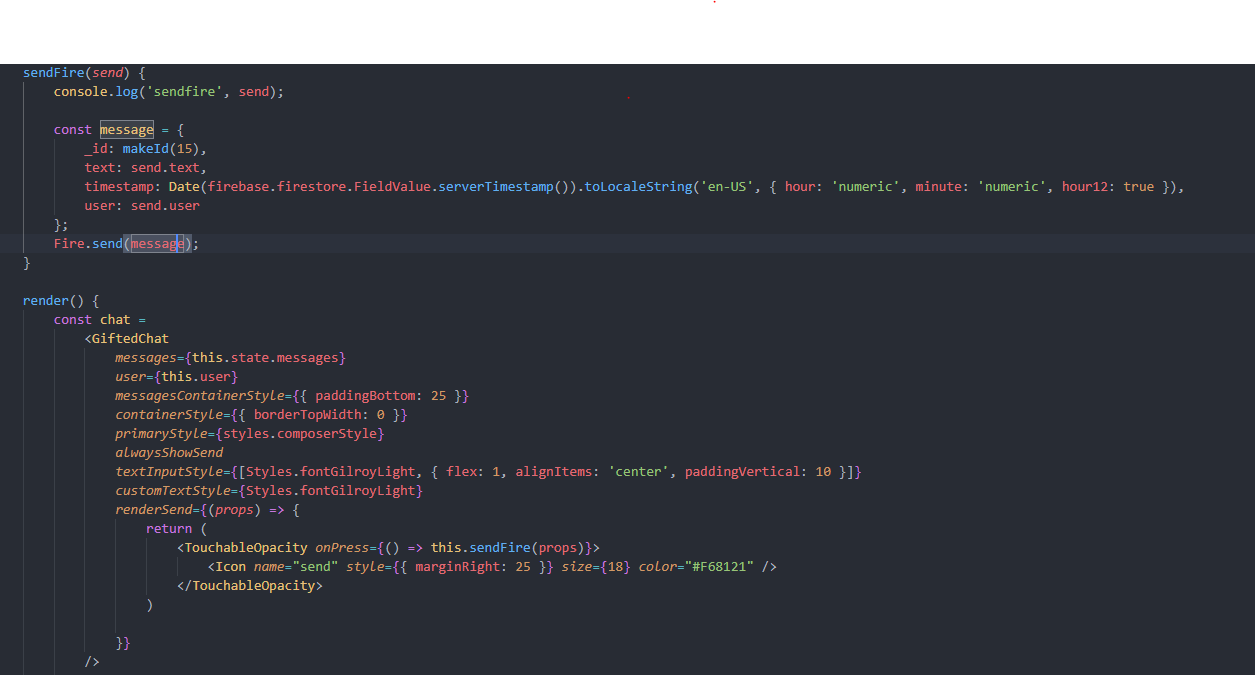
=< Sorry for the bad code.
- Nodejs version: 10.18
- React version: 16.8
- React Native version: 0.60.4
- react-native-gifted-chat version: "^0.13.0"
- Platform(s) (iOS, Android, or both?): Both
 prospkarl
All 6 comments
@prospkarl Kindly try this code. Happy Coding
renderSend={props =>
<Icon
color={Colors.mainAppColor}
size={40}
type="simple-line-icon"
name="bubbles"
onPress={() => { }}
/>
)}
 iqbalfaisal
on 23 Jan 2020
iqbalfaisal
on 23 Jan 2020
@prospkarl Kindly try this code. Happy Coding
renderSend={props =>
<Icon
color={Colors.mainAppColor}
size={40}
type="simple-line-icon"
name="bubbles"
onPress={() => { }}
/>
)}
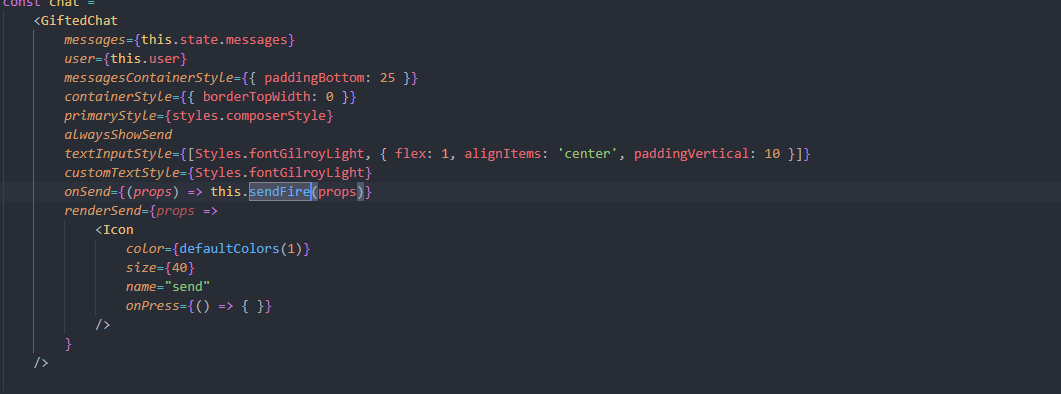
I tried the code. But it does not work.
prospkarl
on 27 Jan 2020
@prospkarl did you test it without renderSend ? if yes then which Icon lib you're using?
iqbalfaisal
on 27 Jan 2020
@prospkarl did you test it without
renderSend? if yes then which Icon lib you're using?
It will work without renderSend, but instead of using the "send" text, I want to use the Send Icon.
Im using 'react-native-vector-icons' for the Icon
prospkarl
on 31 Jan 2020
He @prospkarl
I had the same problem, what does your icon component look like?
With me it was in a Button component that prevented to triggering the Send function.
Ow and don't forget to give your icon as a child to the Send component. Like this.
  renderSend = (props) => {
     //Add the extra styles via containerStyle
    return (
      <Send {...props}>
            <Icon name="send" backgroundPrimary rounded />
      </Send>
    );
  }
 Beaudinn
on 14 Feb 2020
Beaudinn
on 14 Feb 2020
Thank
He @prospkarl
I had the same problem, what does your icon component look like?
With me it was in a Button component that prevented to triggering the Send function.Ow and don't forget to give your icon as a child to the Send component. Like this.
  renderSend = (props) => {
     //Add the extra styles via containerStyle
    return (
      <Send {...props}>
            <Icon name="send" backgroundPrimary rounded />
      </Send>
    );
  }
Thank You!!! It worked with <Send />.

prospkarl
on 18 Feb 2020
Related issues
 cerberusv2px
·
3Comments
cerberusv2px
·
3Comments
 xcxooxl
·
3Comments
xcxooxl
·
3Comments
 iamdurui
·
3Comments
iamdurui
·
3Comments
 luisfuertes
·
3Comments
luisfuertes
·
3Comments
 pentarex
·
3Comments
pentarex
·
3Comments