React-native-gifted-chat: InputToolBar spacing on iPhoneX
Issue Description
There is an issue with iPhoneX where you either have the message that you are typing overlap with the bottom bar and can't see all of your text, or if you add a marginBottom you overlap with the avatar from the most recent message.
Here is some text entered into the text box:

If you add one more character you get this strange artifact:
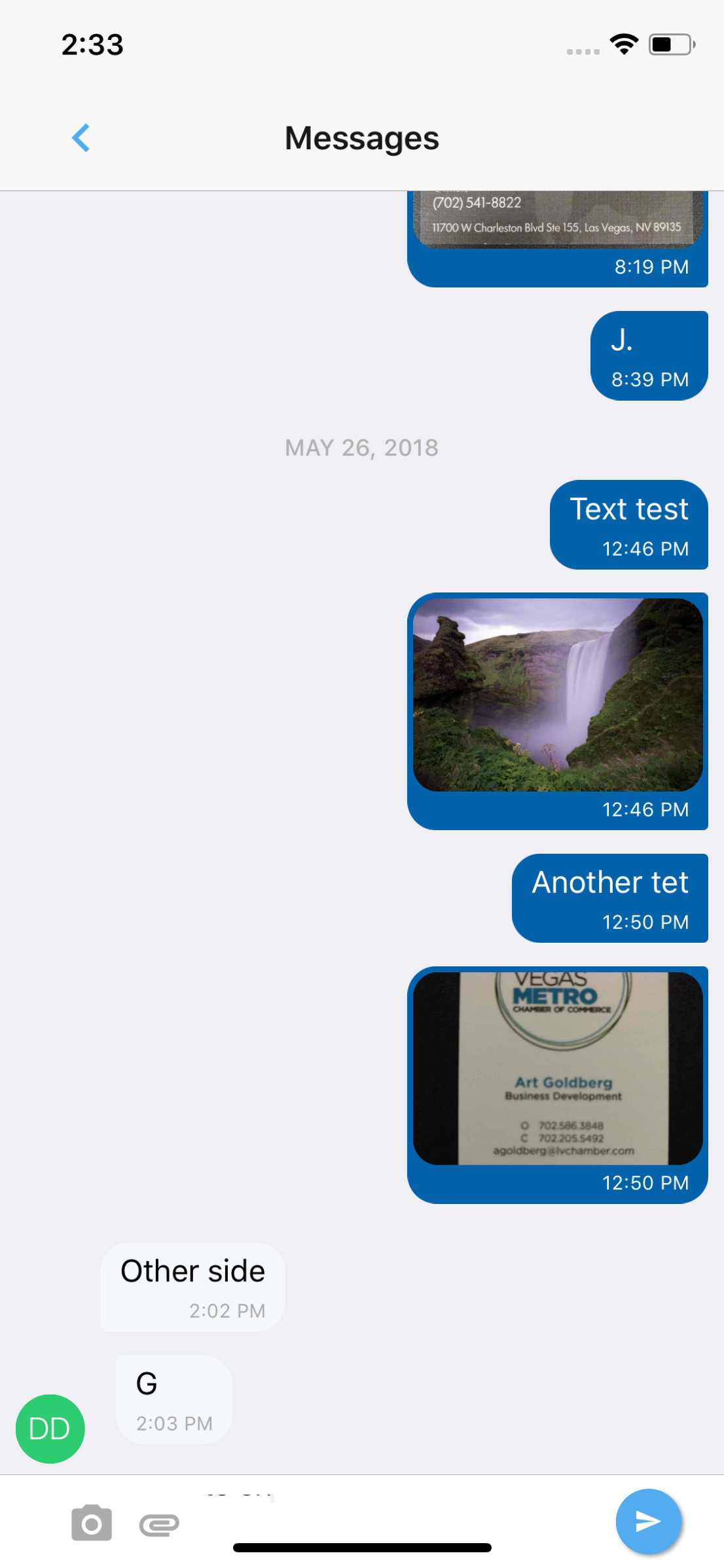
If you style the input toolbar then it overlaps the Initials Avatar of the last message:

Steps to Reproduce / Code Snippets
Default inputToolbar code:
  renderInputToolbar(props) {
    return <InputToolbar {...props} containerStyle={styles.inputToolbarStyle} />;
  }
Here is the styling:
inputToolbarStyle: {
    marginLeft: 15,
    marginRight: 15,
    marginBottom: 10,
    borderWidth: StyleSheet.hairlineWidth,
    borderColor: CommonStyles.colors.middleGrey,
    borderRadius: 25
  },
Expected Results
Should be able to add some padding below the avatar or at least line up the bottom of the avatar with the bottom of the last message
Additional Information
- Nodejs version: 9.3.0
- React version: 16.3.1
- React Native version: Expo version 27
- react-native-gifted-chat version: 0.4.3
- Platform(s) (iOS, Android, or both?): Both
 MeKyleH
All 9 comments
I was able to fix the overlap by adding marginBottom: 5 to Avatar.js styles.left.container on line 73. I don't know if other people are having this problem as well.
MeKyleH
on 26 May 2018
@MeKyleH, just out of curiosity, do you wrap GiftedChat in a SafeAreaView?
 ewal
on 30 May 2018
ewal
on 30 May 2018
@ewal I wasn't wrapping it in a SafeAreaView. However, after adding that it resolved the strange artifact with the text not displaying correctly when typing. Thanks so much!
MeKyleH
on 30 May 2018
Awesomeness 😄
ewal
on 30 May 2018
@ewal and what to do when you have it inside of SafeAreaView? it created some nasty bottom spacing when the keyboard is open :(
OK, i found out you can use bottomOffset and offset the chat by the height of bottom safeArea.. nice :)
 anceque
on 9 Aug 2018
anceque
on 9 Aug 2018
@anceque can you show me what bottomOffset you put? didn't get the "by the height of bottom safeArea" part.
 msqar
on 24 Jan 2019
msqar
on 24 Jan 2019
This library gives you a nice interface to get the right value for bottomOffset on iPhoneX and no offset on other phones https://github.com/ptelad/react-native-iphone-x-helper
 phil-flyclops
on 6 Feb 2019
phil-flyclops
on 6 Feb 2019
@msqar
Solved it by setting bottomOffset and react-native-iphone-x-helper.getBottomSpace
like this:
import {getBottomSpace} from 'react-native-iphone-x-helper';

<View style={paddingBottom: getBottomSpace()}>
...
  <GiftedChat
    messages={this.state.messages}
    bottomOffset={getBottomSpace()}
    onSend={messages => this.onSend(messages)}
    user={{
      _id: 1,
    }}
  />
</View>
 diamont1001
on 9 May 2019
diamont1001
on 9 May 2019
bottomOffset working perfect.
Thanks @diamont1001 you saved my time
 mcanikhilprajapati
on 25 Jan 2021
mcanikhilprajapati
on 25 Jan 2021
Related issues
 maharjanaman
·
3Comments
maharjanaman
·
3Comments
 yazhengwang
·
3Comments
yazhengwang
·
3Comments
 iamdurui
·
3Comments
iamdurui
·
3Comments
 cassioseffrin
·
3Comments
cassioseffrin
·
3Comments
 emilkarl
·
3Comments
emilkarl
·
3Comments
Most helpful comment
@ewal and what to do when you have it inside of
SafeAreaView? it created some nasty bottom spacing when the keyboard is open :(OK, i found out you can use
bottomOffsetand offset the chat by the height of bottom safeArea.. nice :)