React-native-gifted-chat: Text box not visible when keyboard active using expo
Issue Description
Text bot is invisible when keyboard active in android with expo. I'm usingforceGetKeyboardHeight={true} and the message content moves correctly but there is an empty space instead of the textbox.


Steps to Reproduce / Code Snippets
<GiftedChat
        messages={this.state.messages}
        forceGetKeyboardHeight={true}
        onSend={(messages) => this.onSend(messages)}
        user={{
          _id: 1,
        }}
      />
Expected Results
The text box should be visible.
Additional Information
- Nodejs version: 8.9.3
- React version: 16.0.0
- React Native version: expo react native sdk 23.0.0
- react-native-gifted-chat version: 0.3.0
- expo version: 23.0.0
- Platform(s) (iOS, Android, or both?): Tested on android
 hahahatrick
All 20 comments
And if you remove props forceGetKeyboardHeight?
 xcarpentier
on 26 Dec 2017
xcarpentier
on 26 Dec 2017
@xcarpentier Then the screen does not get resized, the view remains the same and keyboard comes over it. I'm was able to fix it by removing the props forceGetKeyboardHeight and using KeyboardSpacer
hahahatrick
on 27 Dec 2017
I had the same issue , but in my case textInputBar was pushing above the keyboard but its view was coming partially.
<KeyboardAvoidingView behavior={'padding'} style={{flex:1}} keyboardVerticalOffset={30}>
<ChatBot/>
</KeyboardAvoidingView>
fixed my problem.
Here
Hope this helps.
 christopher-18
on 29 Dec 2017
christopher-18
on 29 Dec 2017
Same issue here - also only on Android.
"react": "16.0.0-alpha.12",
"react-native": "0.48.3",
"react-native-gifted-chat": "^0.2.7",
 wmonecke
on 20 Jan 2018
wmonecke
on 20 Jan 2018
Same with
"expo": "^24.0.0",
"react-native": "https://github.com/expo/react-native/archive/sdk-24.0.0.tar.gz"
(RN 0.52)
"react-native-gifted-chat": "^0.2.7",
` `
return (
messages={ChatsStore.messages.slice()}
onSend={(messages) => this.onSend(messages)}
user={{
_id: UserStore.user.id,
name: UserStore.user.firstname,
avatar: UserStore.user.avatar
}}
/>
);
 davidbiller
on 23 Jan 2018
davidbiller
on 23 Jan 2018
Hello,
Sorry about that.
There are almost 2 solutions to fix it:
- adding KeyboardAvoidingView after GiftedChat
- adding an opaque background status bar on app.json https://docs.expo.io/versions/latest/guides/configuration.html#androidstatusbar
xcarpentier
on 23 Jan 2018
@xcarpentier What do you mean by after GiftedChat? Like this:
<View>
<GiftedChat
messages={this.state.messages}
onSend={this.onSend}
user={{
_id: 1
}}
forceGetKeyboardHeight
/>
<KeyboardAvoidingView />
</View>
This and wrapping GiftedChat with KeyboardAvoidingView does not fix the issue. I am using:
"expo": "^25.0.0",
"react": "16.2.0",
"react-native": "0.52.0",
"react-native-gifted-chat": "^0.4.3",
Screenshot:

 watadarkstar
on 30 Mar 2018
watadarkstar
on 30 Mar 2018
I got it.. Just do like this..
 <View  style={{flex:1}}>
          <GiftedChat

            messages={this.state.messages}
            onSend={messages => this.onSend(messages)}
            user={{
              _id: 1,
            }}
              ></GiftedChat>

            <KeyboardAvoidingView behavior={'padding'} keyboardVerticalOffset={80}/>
        </View>
need to declare flex to parent view to make it works. 👍
 akulah91
on 31 Mar 2018
akulah91
on 31 Mar 2018
@akulah91
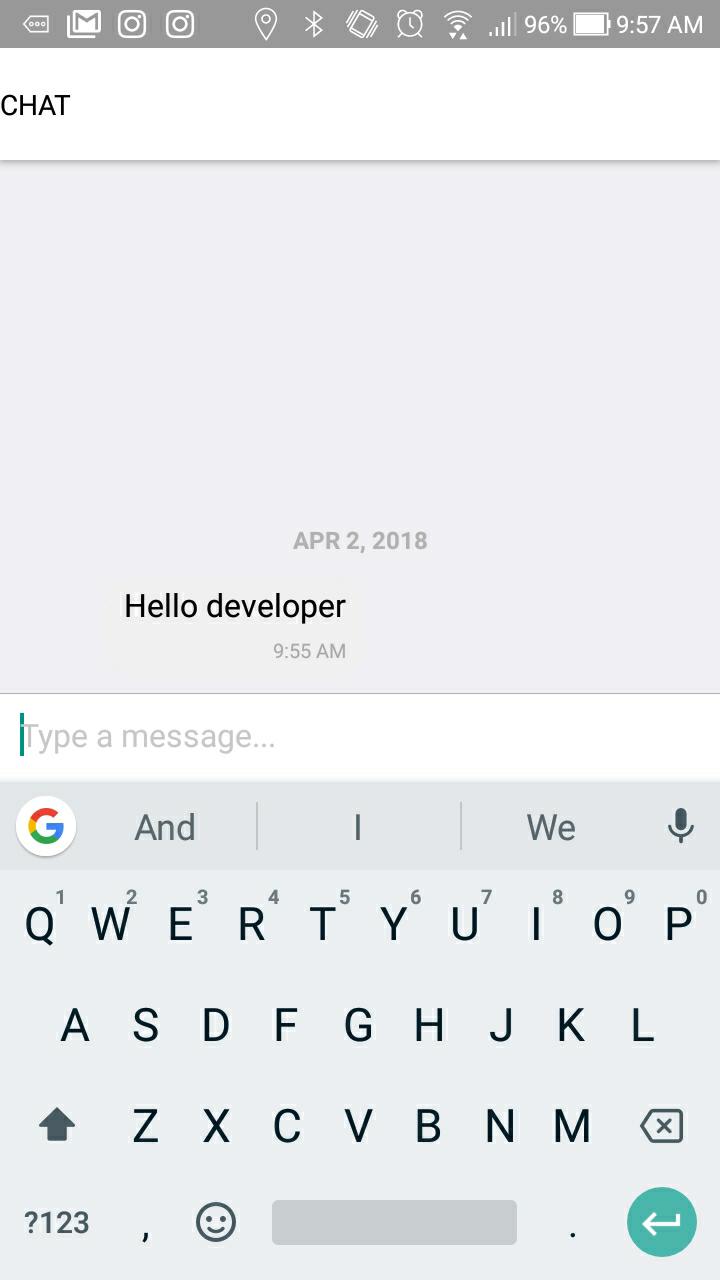
I was wondering if you get this issue where the messages disappear when you type things.
Here is my code:
<View style={{ flex: 1 }}>
<GiftedChat
messages={this.state.messages}
onSend={this.onSend}
user={{
_id: 1
}}
forceGetKeyboardHeight
/>
<KeyboardAvoidingView behavior="padding" keyboardVerticalOffset={80} />
</View>
And this is what I mean:

CC: @xcarpentier
watadarkstar
on 2 Apr 2018
@watadarkstar that because you put forceGetKeyboardHeight on your code..
I also have that line before but its working well when not use that.
akulah91
on 9 Apr 2018
@akulah91 THANK YOU that worked! Life saver!
watadarkstar
on 9 Apr 2018
@watadarkstar most welcome..
akulah91
on 10 Apr 2018
I got it.. Just do like this..
 <View  style={{flex:1}}>
          <GiftedChat

            messages={this.state.messages}
            onSend={messages => this.onSend(messages)}
            user={{
              _id: 1,
            }}
              ></GiftedChat>

            <KeyboardAvoidingView behavior={'padding'} keyboardVerticalOffset={80}/>
        </View>
need to declare flex to parent view to make it works. 👍
The code works fine but it adds a padding on iOS, so we have to check which Plaform the app is running, my fix was 👇🏾
<View style={{ flex: 1 }}>
<GiftedChat
messages={this.state.messages}
onSend={this.onSend}
user={{
_id: 1
}}
/>
<KeyboardAvoidingView behavior={ Platform.OS === 'android' ? 'padding' : null} keyboardVerticalOffset={80} />
</View>
 brunokiafuka
on 19 Sep 2018
brunokiafuka
on 19 Sep 2018
Its not working for me. I tried using KeyboardAvoidingView but still keyboard overlaps the text input
 nandiniparimi1107
on 17 Dec 2018
nandiniparimi1107
on 17 Dec 2018
This issue has been automatically marked as stale because it has not had recent activity. It will be closed if no further activity occurs. Thank you for your contributions.
![stale[bot] picture](https://avatars.githubusercontent.com/in/1724?v=4&s=40) stale[bot]
on 16 Feb 2019
stale[bot]
on 16 Feb 2019
Why use 80 ? I must use 190 so that it is clearly visible, Is there not a value that is noted for any device?
 hadpro24
on 21 May 2019
hadpro24
on 21 May 2019
Why use 80 ? I must use 190 so that it is clearly visible, Is there not a value that is noted for any device?
yes my friend, i use 150
 nppull
on 6 Sep 2019
nppull
on 6 Sep 2019
I use it like this, seems responsive....
<KeyboardAvoidingView style={{flex: 1}} behavior={"padding"}
keyboardVerticalOffset={Header.HEIGHT + StatusBar.currentHeight} enabled={Platform.OS === 'android'} >
<GiftedChat
messages={messages}
onSend={newMessages => onSend(newMessages)}
user=
{{
_id: 1,
}}
inverted={false}
/>
</KeyboardAvoidingView>
 RemusRD
on 12 Sep 2019
RemusRD
on 12 Sep 2019
I got it.. Just do like this..
 <View  style={{flex:1}}>
          <GiftedChat

            messages={this.state.messages}
            onSend={messages => this.onSend(messages)}
            user={{
              _id: 1,
            }}
              ></GiftedChat>

            <KeyboardAvoidingView behavior={'padding'} keyboardVerticalOffset={80}/>
        </View>
need to declare flex to parent view to make it works. 👍
thanks, worked form the first
 alexander0205
on 26 Dec 2019
alexander0205
on 26 Dec 2019
forceGetKeyboardHeight will move messgeArray up
 KrisShin
on 29 Dec 2019
KrisShin
on 29 Dec 2019
Related issues
 Fr33maan
·
3Comments
Fr33maan
·
3Comments
 xcxooxl
·
3Comments
xcxooxl
·
3Comments
 yazhengwang
·
3Comments
yazhengwang
·
3Comments
 maharjanaman
·
3Comments
maharjanaman
·
3Comments
 iamdurui
·
3Comments
iamdurui
·
3Comments
Most helpful comment
I got it.. Just do like this..
need to declare flex to parent view to make it works. 👍