React-native-gifted-chat: Input view doesn't rise when pressed
Issue Description

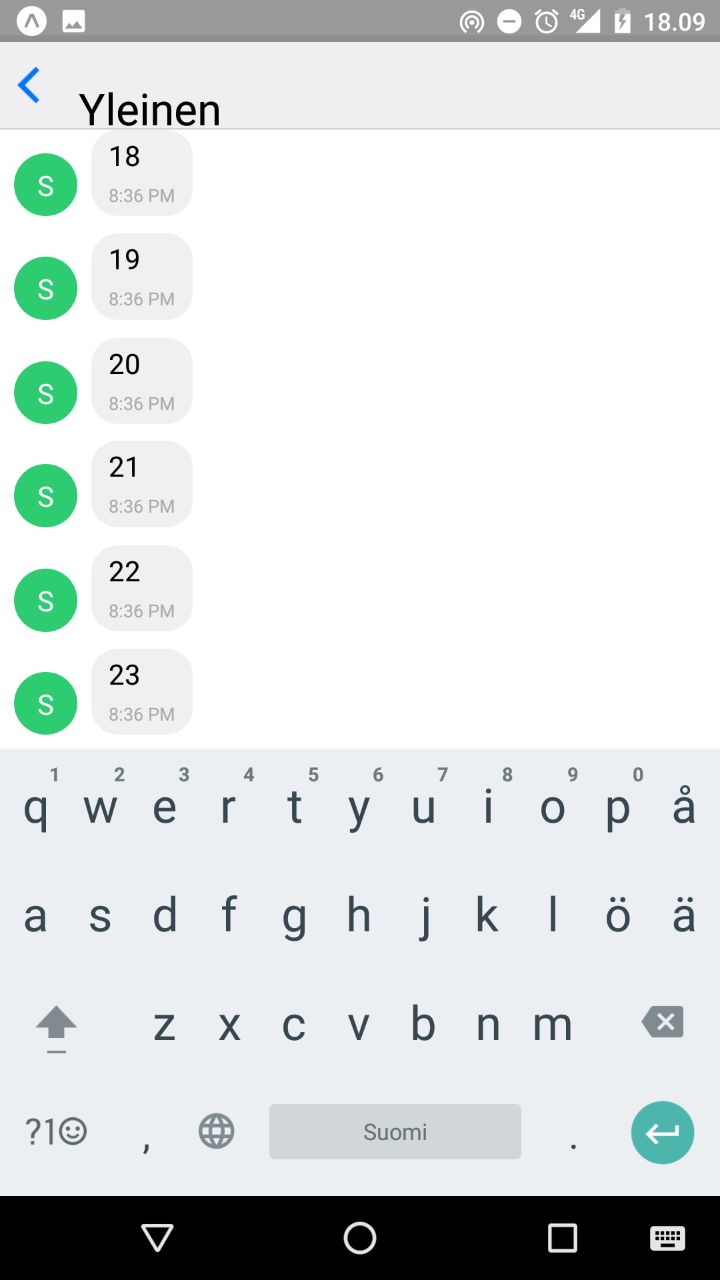
When I press input, it opens, but doesnt rise.
I can type text, but I see it only if I press 'back-symbol'
Code
render() {
const { name, roomName } = this.props.chat;
return (
onSend={(message) => {
this.props.sendMessage(message, name, roomName)
}}
user={{
_id: Math.random(),
name,
}}
/>
);
}
}
const mapStateToProps = state => {
return { chat: state.chat };
};
export default connect(mapStateToProps, { chatFetch, sendMessage, setFetchAmount })(ChatRoom);
Additional Information
- React Native version: "react-native": "https://github.com/expo/react-native/archive/sdk-19.0.0.tar.gz",
- react-native-gifted-chat version: "react-native-gifted-chat": "^0.2.5",
- Platform(s) (iOS, Android, or both?): Android
 juhose
All 10 comments
Hello,
Same issue here with react-native 0.46.* and react-native-gifted-chat 0.2.*
The problem is here : https://github.com/FaridSafi/react-native-gifted-chat/commit/cdbabd139977883eb9604d2a8ad345658d810612#diff-a2356064fe377d125c72f41f52d4dad5R158
If it returns _keyboardHeight, it works.
 Peekmo
on 27 Jul 2017
Peekmo
on 27 Jul 2017
I cannot change the source files, I have expo project. How I can manually set keyboardheight?
juhose
on 27 Jul 2017
In fact, the problem is Expo. Normally, on android you have a setting in the manifest.xml that give the android instruction to auto resize. But with expo, this setting is ignored. So, I guess it's impossible to make it work with Expo.
Peekmo
on 27 Jul 2017
Too bad:/ I wonder if there are other messaging libraries that work with expo
juhose
on 28 Jul 2017
It seems like @dodomasta fixed it in his fork. Is this a working fix? would it be possible to merge this into the original code?
Also, is it impossible to get it working with expo or not? I cannot hardly believe that.
Also #461 should be linked here.
 sveri
on 7 Aug 2017
sveri
on 7 Aug 2017
The reason this doesn't work in Expo has something to do with the translucent status bar in Android. In fact, I believe if you use a translucent status bar even without Expo you'll have issues with the keyboard in gifted chat. If you change the androidStatusBar backgroundColor in the expo section of app.json, the input bar will move up with the keyboard (but you'll lose the translucent status bar). See discussion on Expo forums.
Another way to fix this (and what I did, because losing the translucent status bar caused me more problems than it solved) is to slip a keyboard spacer right under the GiftedChat component, like:
<View>
<GiftedChat ... />
<KeyboardSpacer/>
</View>
The spacer is a view that expands when they keyboard appears and contracts when it disappears. Rumor has it that React Native's built-in KeyboardAvoidingView is finally working correctly, but I've been using react-native-keyboard-spacer and it works fine. In fact, I could see no difference between turning off the translucent status bar and using the keyboard spacer.
 llamaluvr
on 9 Aug 2017
llamaluvr
on 9 Aug 2017
@juhose: Instead of editing the source code of GiftedChat, you can make a reference to it:
<GiftedChat ref={component => this.giftedChat = component} />
and override the the getKeyboardHeight function, i.e. in the componentDidMount method of your component containing the GiftedChat component:
getKeyboardHeight() {
    return this.giftedChat._keyboardHeight;
}

componentDidMount() {
    this.giftedChat.getKeyboardHeight = this.getKeyboardHeight;
}
 RasmusFredensborg
on 1 Sep 2017
RasmusFredensborg
on 1 Sep 2017
@juhose how to set this.giftedChat?
@llamaluvr thanks for your solution
but need to set flex: 1 to the view
<View style={{flex: 1}}>
  <GiftedChat ... />
  <KeyboardSpacer/>
</View>
 buncis
on 7 Sep 2017
buncis
on 7 Sep 2017
Hello,
I have a PR here to fixes https://github.com/FaridSafi/react-native-gifted-chat/pull/587
I confirm it's a Expo configuration from SDK-19.
Please vote ;)
 xcarpentier
on 26 Sep 2017
xcarpentier
on 26 Sep 2017
We had a <KeyboardSpacer /> at the root of our app, which conflicts with the setKeyboardHeight in onKeyboardWillShow. It caused the Composer to be the height of the keyboard, basically obscuring the chat view.
@RasmusFredensborg solution was helpful, with just returning:
getKeyboardHeight() {
    return 0;
}
 phillbaker
on 20 Dec 2017
phillbaker
on 20 Dec 2017
Related issues
 pentarex
·
3Comments
pentarex
·
3Comments
 luisar
·
3Comments
luisar
·
3Comments
 yazhengwang
·
3Comments
yazhengwang
·
3Comments
 iamdurui
·
3Comments
iamdurui
·
3Comments
 Fr33maan
·
3Comments
Fr33maan
·
3Comments
Most helpful comment
@juhose: Instead of editing the source code of GiftedChat, you can make a reference to it:
<GiftedChat ref={component => this.giftedChat = component} />and override the the getKeyboardHeight function, i.e. in the componentDidMount method of your component containing the GiftedChat component: