React-native-gifted-chat: TextInput is pushed up to the screen
Issue Description
I searched through previous issues and found one related to this. It said to add android:windowSoftInputMode="adjustResize" to the AndroidManifest.xml file which I have already done and have also rebuild the project but it cant seem to fix the problem still.
Steps to Reproduce / Code Snippets
This is my component in which Im using the GiftedChat component:
import React, { Component } from 'react';
import {
  View
} from 'react-native';

import { GiftedChat } from 'react-native-gifted-chat';

import FirebaseHelper from '../../api/FirebaseHelper';

export default class ChatScreen extends Component {

  constructor(props) {
    super(props);
    this.state = {
      messages: []
    }
    this.onSend = this.onSend.bind(this);
  }

  onSend(message) {
    FirebaseHelper.sendMessage(message);
  }

  componentDidMount() {
    FirebaseHelper.loadMessages((message) => {
      this.setState((prevState) => {
        return {
          messages: GiftedChat.append(prevState.messages, message)
        }
      })
    });
  }

  render() {
    return (
      <GiftedChat

        messages={this.state.messages}
        onSend={this.onSend}
        user={{
          _id: FirebaseHelper.getUId()
        }}
      />
    );
  }

  componentWillUnmount() {
    FirebaseHelper.closeChat();
  }
}
And this is the FirebaseHelper class:
import * as firebase from 'firebase';
import {FIREBASE_CONFIG, CHAT_TYPES} from '../AppConstants';

class FirebaseHelper {

    uid = '';
    messagesRef = null;

    constructor() {
        firebase.initializeApp(FIREBASE_CONFIG);
        this.uid = Math.round(Math.random()*1000000000000000);
    }

    setUId(uid) {
        this.uid = uid;
    }

    getUId() {
        return this.uid;
    }

    loadMessages(callback) {
        this.messagesRef = firebase.database().ref("messages");
        this.messagesRef.off();
        const onReceive = (data) => {
            const message = data.val();
            callback({
                _id: data.key,
                text: message.text,
                createdAt: new Date(message.createdAt),
                user: {
                    _id: message.user._id,
                    name: message.user.name
                },
            });
        };
        this.messagesRef.on('child_added', onReceive);
    }

    sendMessage(message) {
        for(let i = 0; i < message.length; i++) {
            this.messagesRef.push({
                text: message[i].text,
                user: message[i].user,
                createdAt: firebase.database.ServerValue.TIMESTAMP
            });
        }
    }


    closeChat() {
        if(this.messagesRef) {
            this.messagesRef.off();
        }
    }

    createUser(chat_type, gender, age) {
        let userRef = userRef = firebase.database().ref("users/anonymous/"+this.getUId());
        return userRef.set({
            roomId: 0,
            age: age,
            name: 'X',
            gender: gender
        });
    }
}

export default new FirebaseHelper();
This is the output right now:
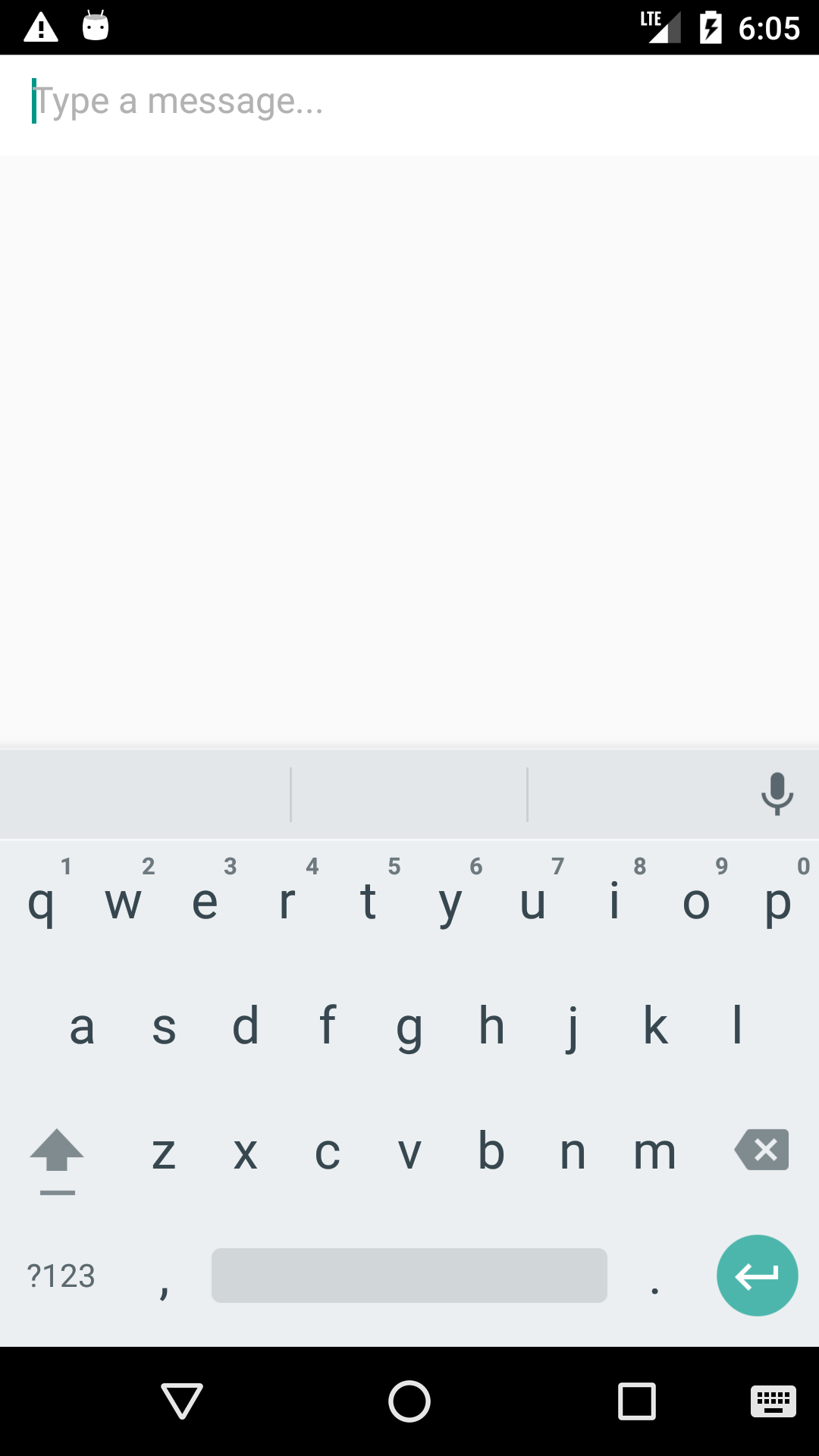
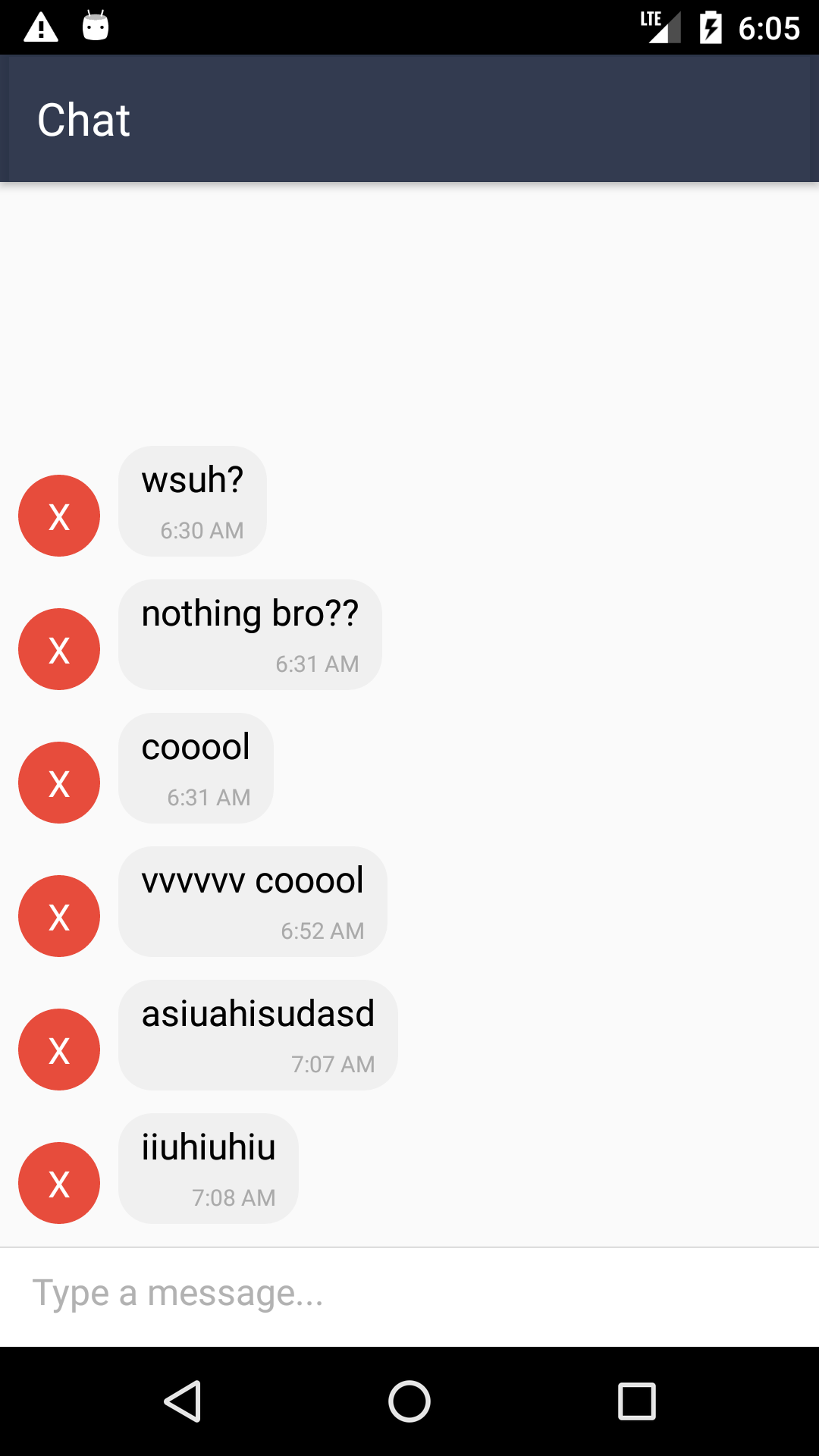
This is my AndroidManifest.xml file:
<manifest xmlns:android="http://schemas.android.com/apk/res/android"
    package="com.chatapp"
    android:versionCode="1"
    android:versionName="1.0">

    <uses-permission android:name="android.permission.INTERNET" />
    <uses-permission android:name="android.permission.SYSTEM_ALERT_WINDOW"/>

    <uses-sdk
        android:minSdkVersion="16"
        android:targetSdkVersion="22" />

    <application
      android:name=".MainApplication"
      android:allowBackup="true"
      android:label="@string/app_name"
      android:icon="@mipmap/ic_launcher"
      android:theme="@style/AppTheme">
      <activity
        android:name=".MainActivity"
        android:label="@string/app_name"
        android:windowSoftInputMode="adjustResize"
        android:configChanges="keyboard|keyboardHidden|orientation|screenSize"
        >
        <intent-filter>
            <action android:name="android.intent.action.MAIN" />
            <category android:name="android.intent.category.LAUNCHER" />
        </intent-filter>
      </activity>
      <activity android:name="com.facebook.react.devsupport.DevSettingsActivity" />
    </application>

</manifest>
Expected Results
I can't seem to fix the problem which is causing that textinput to push up the screen its not even in a modal. How do I fix it so it becomes like the one shown in the readme?
Additional Information
- React Native version: 0.45.0
- react-native-gifted-chat version: ^0.1.4
- Platform(s) (iOS, Android, or both?): Android
 mareebsiddiqui
All 8 comments
well i made a small change in GiftedChat.js ... i removed this :
this.invertibleScrollViewProps = {
      inverted: true,
      keyboardShouldPersistTaps: this.props.keyboardShouldPersistTaps,
      onKeyboardWillShow: this.onKeyboardWillShow,
      onKeyboardWillHide: this.onKeyboardWillHide,
      onKeyboardDidShow: this.onKeyboardDidShow,
      onKeyboardDidHide: this.onKeyboardDidHide,
    };
and added this
this.invertibleScrollViewProps = {
      inverted: true,
      keyboardShouldPersistTaps: this.props.keyboardShouldPersistTaps,
      onKeyboardWillShow: this.onKeyboardWillShow,
      onKeyboardWillHide: this.onKeyboardWillHide,
      onKeyboardDidHide: this.onKeyboardDidHide,
    };
and it is working for me
 controversialUser
on 23 Jun 2017
controversialUser
on 23 Jun 2017
same problem
 WHZWHZ1229
on 29 Jun 2017
WHZWHZ1229
on 29 Jun 2017
+1
 ycb0318
on 5 Jul 2017
ycb0318
on 5 Jul 2017
Similar issue which somehow got solved by removing:
<StatusBar hidden={true} />
Additional Information
- React Native version: 0.45.0
- react-native-gifted-chat version: ^0.1.4
- Platform(s) (iOS, Android, or both?): Android
 d-johan
on 11 Jul 2017
d-johan
on 11 Jul 2017
+1
 yash2code
on 22 Jul 2017
yash2code
on 22 Jul 2017
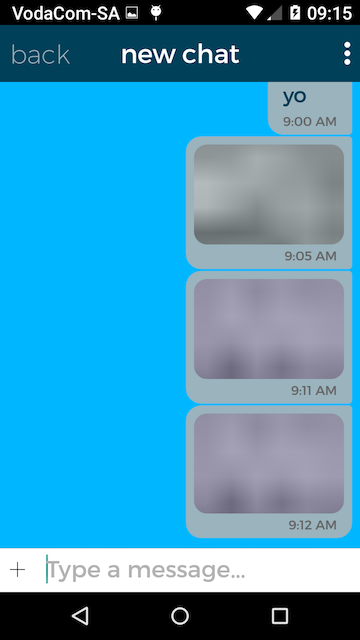
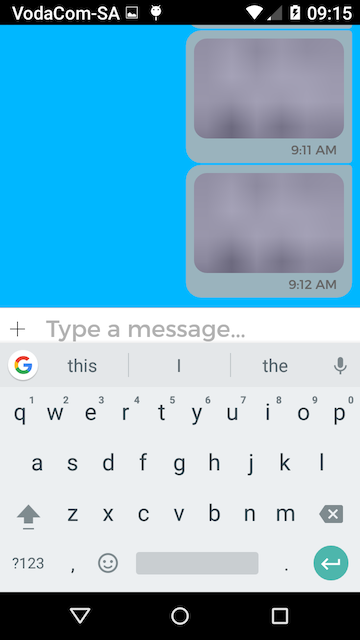
I've updated to 0.2.5 and the issue is somewhat resolved. The text input no longer pushes up to the top of the screen, but instead the screen scrolls too far
1 - correct full screen chat
2 - correct chat with keyboard
3 - incorrect chat with screen scrolled too far up when keyboard shows

If it helps any, my keyboard issue ONLY happens after I select an image to upload. if i close the chat then go back it, the keyboard will render 100% again, until i select another image to upload
 zkrige
on 26 Jul 2017
zkrige
on 26 Jul 2017
I've the same issue!
 jonathanroze
on 19 Sep 2017
jonathanroze
on 19 Sep 2017
This issue has been automatically marked as stale because it has not had recent activity. It will be closed if no further activity occurs. Thank you for your contributions.
![stale[bot] picture](https://avatars.githubusercontent.com/in/1724?v=4&s=40) stale[bot]
on 12 Feb 2019
stale[bot]
on 12 Feb 2019
Related issues
 Hayko1994
·
3Comments
Hayko1994
·
3Comments
 xcxooxl
·
3Comments
xcxooxl
·
3Comments
 tafelito
·
3Comments
tafelito
·
3Comments
 iamdurui
·
3Comments
iamdurui
·
3Comments
 cerberusv2px
·
3Comments
cerberusv2px
·
3Comments