React-native-gesture-handler: REACT-NATIVE automatic linking
I am using react-navigation for my react-native app , as docs said to use these commanads
npm install react-native-gesture-handler
npm install react-navigation
as my react-nnative version is 0.60.3 it said it will link automatically
i was getting error like this after build
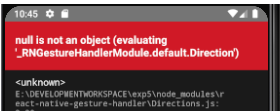
then i used these commands
react-native install --save react-native-gesture-handler
react-native link react-native-gesture-handler.
after build it said error like " react-native 0.60.3 uses autolinking u have linkled react-native-gesture-handler manually ".
then i have unlinked it using below command as it suggested .
react-native unlink react-native-gesture-handler
now ....
after build it is working ... . react-navigation is working after linking and unnlinking ..
?
 ramanasak
All 10 comments
This is horrible, I have the same problem and if this library doesn't work, react-navigation doesn't work either. I can't fix it at all.
 oscar-gallog
on 20 Jul 2019
oscar-gallog
on 20 Jul 2019
A workaround is to link the libraries manually.
In Xcode just go to libraries > add files to "Project Name"

and navigate to Project Name > Node Modules > react-native-gesture-handler > ios > RNGestureHandler.xcodeproj and hit ADD
Then go to Build Phases > Link Binary with Libraries and hit the PLUS and search for libRNGestureHandler.a and add that.
This should do that trick until auto-linking.
 recursiveKirs
on 24 Jul 2019
recursiveKirs
on 24 Jul 2019
for auto linking iOS you need extra step
cd ios
pod install
this installs the pod for Gesture handler.
 smeekmeister
on 27 Jul 2019
smeekmeister
on 27 Jul 2019
@smeekmeister I've tried that and having the same issue
RN Version: 0.60.4
react-native-gesture-handler: 1.3.0
and run pod install again
basically, we already need link manually, right?
 rodrigowpl
on 8 Aug 2019
rodrigowpl
on 8 Aug 2019
you need to remove the Gesture handler Xcode project from your project en do via cocoa pods.
smeekmeister
on 9 Aug 2019
@smeekmeister I've tried that and having the same issue
RN Version: 0.60.4
react-native-gesture-handler: 1.3.0and run pod install again
basically, we already need link manually, right?
add it to your Podfile and run cd ios && pod install
 MANTENN
on 9 Aug 2019
MANTENN
on 9 Aug 2019
Maybe clean your project and start over again. I am using over 20 libraries all via cocoapods. My pod file has the standard react entries as per documentation in rn diff purge so React, React-Core, etc until Follly, then all the firebase ones, the FBSDK ones, GoogleSignIn and lottie-ios. If I run pod install all pods are installed including the ones from package json, eg. react-native-reanimated, rnc’s etc ... and also react-native-gesture-handler
smeekmeister
on 9 Aug 2019
When is autolinking going to be supported? Currently I get either the RN autolink error or does-not-found error.
 tapz
on 1 Sep 2019
tapz
on 1 Sep 2019
When is autolinking going to be supported? Currently I get either the RN autolink error or does-not-found error.
Use a tool "jetifier" Click
 SpawnAtis
on 12 Sep 2019
SpawnAtis
on 12 Sep 2019
@SpawnAtis I already use that. But I got the autolinking working by changing the build.gradle file.
tapz
on 12 Sep 2019
Related issues
 TerrerSandman
·
3Comments
TerrerSandman
·
3Comments
 chhornponleu
·
3Comments
chhornponleu
·
3Comments
 tallen11
·
3Comments
tallen11
·
3Comments
 rgangopadhya
·
4Comments
rgangopadhya
·
4Comments
 nguyenhose
·
4Comments
nguyenhose
·
4Comments