React-native-gesture-handler: TouchableOpacity does not render overflow (shadows etc)
When rendering a button or anything that has an overflow, such as a shadow, the TouchableOpacity does not render (as of Expo SDK 33) any overflow. When setting overflow: 'visible" there is no change. Switching back to RN default TouchableOpacity gives normal, expected behavior (with shadows)
 stevelizcano
All 6 comments
I stumbled upon the same issue. It looks like this only affects iOS though.
@stevelizcano I was able to workaround this by wrapping the touchable in a View to which I applied the shadow.
Snack Repro: https://snack.expo.io/@rszalski/4d0c70
Android (works):

iOS (broken)

I also noticed that the elevation on Android results in deeper/multiplied shadow when applied to RNGH-equivalent touchables, but this could be moved to a separate issue.
 rszalski
on 18 Jul 2019
rszalski
on 18 Jul 2019
Just wondering if there is an idea of a fix or workaround for this? I also am seeing this overflow issue making iOS cut off the shadows, and android making the elevation multiplied. This is using a TouchableWithoutFeedback component where the button shrinks when pressed.
iOS:

left button pressed:

android:
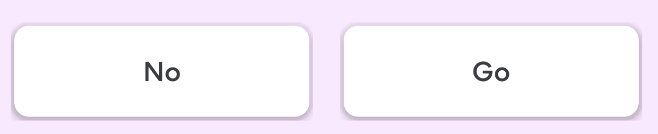
left button pressed

 ITSjwags
on 23 Jul 2019
ITSjwags
on 23 Jul 2019
For anyone stumbling upon this from Google, I fixed this by adding the prop containerStyle={{ overflow: 'visible' }} to TouchableOpacity.
The offending line is here in GestureButtons.js where it explicitly adds overflow: 'hidden' which doesn't seem to be in line with the behavior of RN's default Touchables. But it's probably in there for some other reason, so you can just override it as a workaround.
 masonwolters
on 12 Dec 2019
masonwolters
on 12 Dec 2019
For anyone stumbling upon this from Google, I fixed this by adding the prop
containerStyle={{ overflow: 'visible' }}toTouchableOpacity.The offending line is here in
GestureButtons.jswhere it explicitly addsoverflow: 'hidden'which doesn't seem to be in line with the behavior of RN's default Touchables. But it's probably in there for some other reason, so you can just override it as a workaround.
What, if it does'nt work with expo SDK38? I placed overflow visible on TouchableOpacity but nothing happened... Expo is really full of bugs... So annoying...
 tzs007
on 19 Aug 2020
tzs007
on 19 Aug 2020
For anyone stumbling upon this from Google, I fixed this by adding the prop
containerStyle={{ overflow: 'visible' }}toTouchableOpacity.The offending line is here in
GestureButtons.jswhere it explicitly addsoverflow: 'hidden'which doesn't seem to be in line with the behavior of RN's default Touchables. But it's probably in there for some other reason, so you can just override it as a workaround.
Thanks. I'm with SDK 38 and this works!! Just be aware that it's containerStyle, not the regular style prop that you use for View.
 shuman-shen
on 2 Sep 2020
shuman-shen
on 2 Sep 2020
https://ethercreative.github.io/react-native-shadow-generator/
this link working for me
 cuong1999
on 23 Nov 2020
cuong1999
on 23 Nov 2020
Related issues
 maopixin
·
3Comments
maopixin
·
3Comments
 radex
·
3Comments
radex
·
3Comments
 alexthebake
·
3Comments
alexthebake
·
3Comments
 neiker
·
3Comments
neiker
·
3Comments
 chrisdrackett
·
4Comments
chrisdrackett
·
4Comments
Most helpful comment
For anyone stumbling upon this from Google, I fixed this by adding the prop
containerStyle={{ overflow: 'visible' }}toTouchableOpacity.The offending line is here in
GestureButtons.jswhere it explicitly addsoverflow: 'hidden'which doesn't seem to be in line with the behavior of RN's default Touchables. But it's probably in there for some other reason, so you can just override it as a workaround.