React-native-gesture-handler: PanGestureHandler doesn't work with WebView as child
Hi, I'm working only on iOS right now and when I put a WebView (react-native-webview) in a PanGestureHandler, I get no response from onGestureEvent.
If I put a normal, empty View inside, I get data from onGestureEvent
react-native v0.59.9
react-native-gesture-handler v1.3.0
 allthetime
All 9 comments
  _onPanGestureEvent = () => {
    log('got something')
  }

  _render_web_view = () => {
       return <WebView
         style={{
           marginTop: 20,
           height: height,
           width: width,
         }}
         scrollable={false}
         source={ require('./canvas.html') }
       />
  }

  _render_empty_view = ()=> {
    return<View
      style={ styles.container }
    />
  }

  render() {
    return (
      <PanGestureHandler
        onGestureEvent={this._onPanGestureEvent}>
        {  this._render_web_view() }
       {  /* this._render_empty_view()*/ }
     </PanGestureHandler>
    );
  }
Wrapping the WebView in another View with flex:1 works, but why doesn't it work without a wrapper?
allthetime
on 21 Jun 2019
seeing the same thing - though wrapping the WebView with a View and flex:1 does not help for me
 viviangledhill
on 31 Oct 2019
viviangledhill
on 31 Oct 2019
The flex:1 workaround seems to work for iOS but not for Android. Although we can add a FlingGestureHandler a single-tap does not work as expected on android. The webview will focus links but will not follow them when tapping. Do you have a workaround for this as well?
 DomiR
on 25 Nov 2019
DomiR
on 25 Nov 2019
Seeing same issue with WebView as child for PanGestureHandler, getting no response from onGestureEvent or onHandlerStateChange. Wrapping in View does not work for me.
 pjay79
on 15 Jan 2020
pjay79
on 15 Jan 2020
Could you please provide a small code example showing this problem?
 jakub-gonet
on 3 Sep 2020
jakub-gonet
on 3 Sep 2020
I think that the issue is inside alghoritm that check the child inside ViewGroup that can handle the touch but WebView on android is a ViewGroup without child so is skipped.
my workaroud is the following:
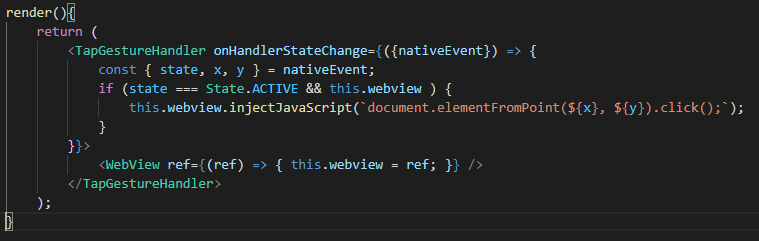
 andmau90
on 27 Oct 2020
andmau90
on 27 Oct 2020
What happens if you wrap WebView with NativeViewGestureHandler?
jakub-gonet
on 24 Nov 2020
Has anyone managed to get this working? I'm trying to add a WebView to the BottomSheet example but haven't had any luck.
 mikos
on 23 Jan 2021
mikos
on 23 Jan 2021
Related issues
 rt2zz
·
4Comments
rt2zz
·
4Comments
 tallen11
·
3Comments
tallen11
·
3Comments
 wcandillon
·
4Comments
wcandillon
·
4Comments
 nguyenhose
·
4Comments
nguyenhose
·
4Comments
 TerrerSandman
·
3Comments
TerrerSandman
·
3Comments
Most helpful comment
Seeing same issue with WebView as child for PanGestureHandler, getting no response from onGestureEvent or onHandlerStateChange. Wrapping in View does not work for me.