React-native-gesture-handler: Incorrect ripple on RectButton when placed alongside with BorderlessButton
Bug description
react-native:0.57.8react-native-gesture-handler:1.0.15- Can reproduce on: Nokia 6 (Android 8.1), Pixel 2 (Android 9), OnePlus 5T (Android 9)
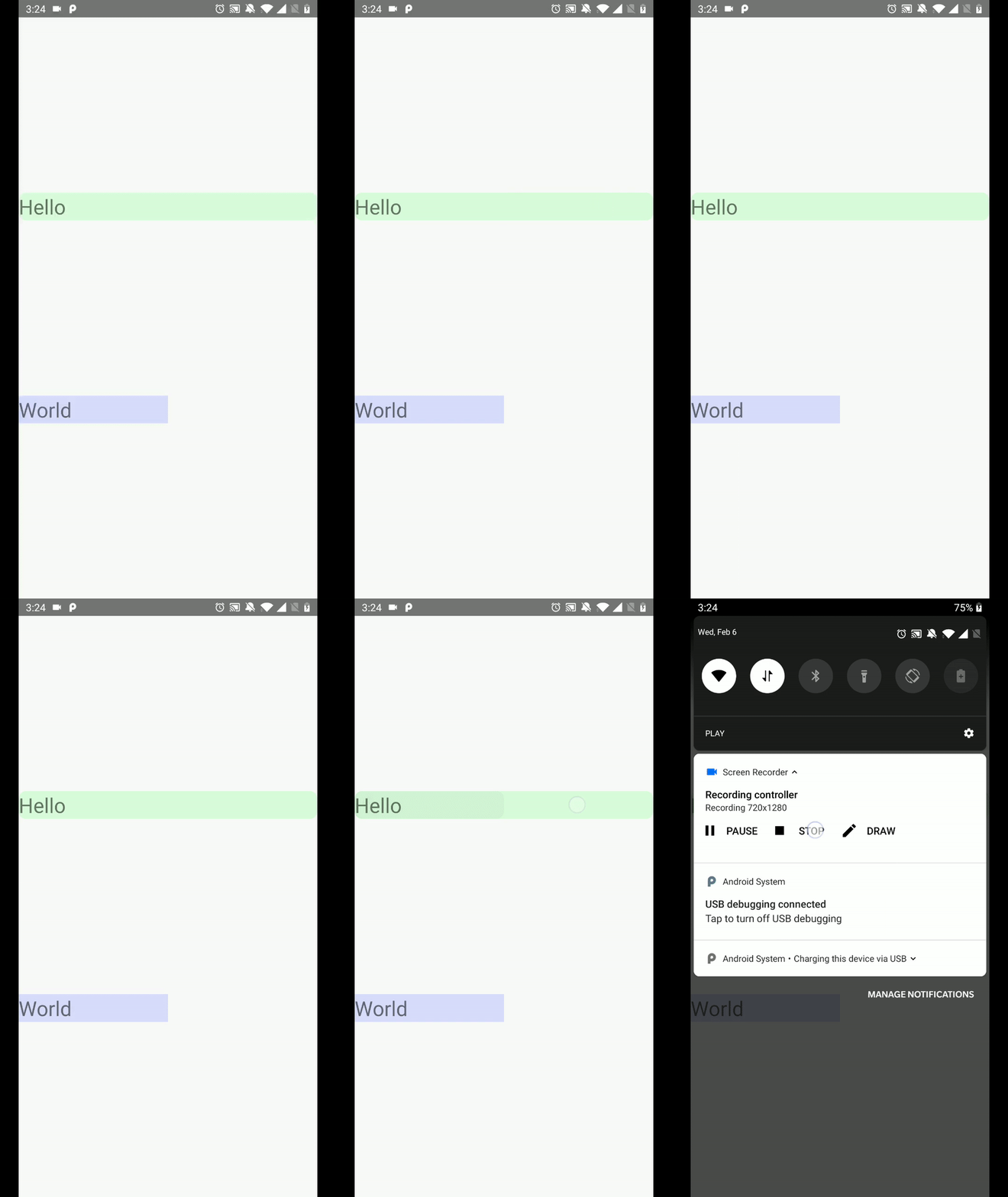
When RectButton and BorderlessButton are placed together, ripple of ReactButton dimensions of BorderlessButton's ripple. The behaviour starts to be even inconsistent/weird if when RectButton and BorderlessButton have borderRadius. Wrong behaviour can be observed when the app is killed and started again, reloading JS bundle usually produce correct results, but starting the app does not.
Repro code
1. No border radius -> incorrect ripple size + unnecessary rounded corners
<View style={{ flex: 1, justifyContent: 'space-evenly', width: '100%' }}>
  <RectButton>
    <Text>Hello</Text>
  </RectButton>
  <View style={{ width: '50%' }}>
    <BorderlessButton borderless={false}>
      <Text>World</Text>
    </BorderlessButton>
  </View>
</View>

2. Border radius on RectButton -> wrong ripple size + ripple on BorderlessButton has rounded corners (it should not have)
<View style={{ flex: 1, justifyContent: 'space-evenly', width: '100%' }}>
  <RectButton style={{ borderRadius: 5 }}>
    <Text>Hello</Text>
  </RectButton>
  <View style={{ width: '50%' }}>
    <BorderlessButton borderless={false}>
      <Text>World</Text>
    </BorderlessButton>
  </View>
</View>
 zamotany
All 8 comments
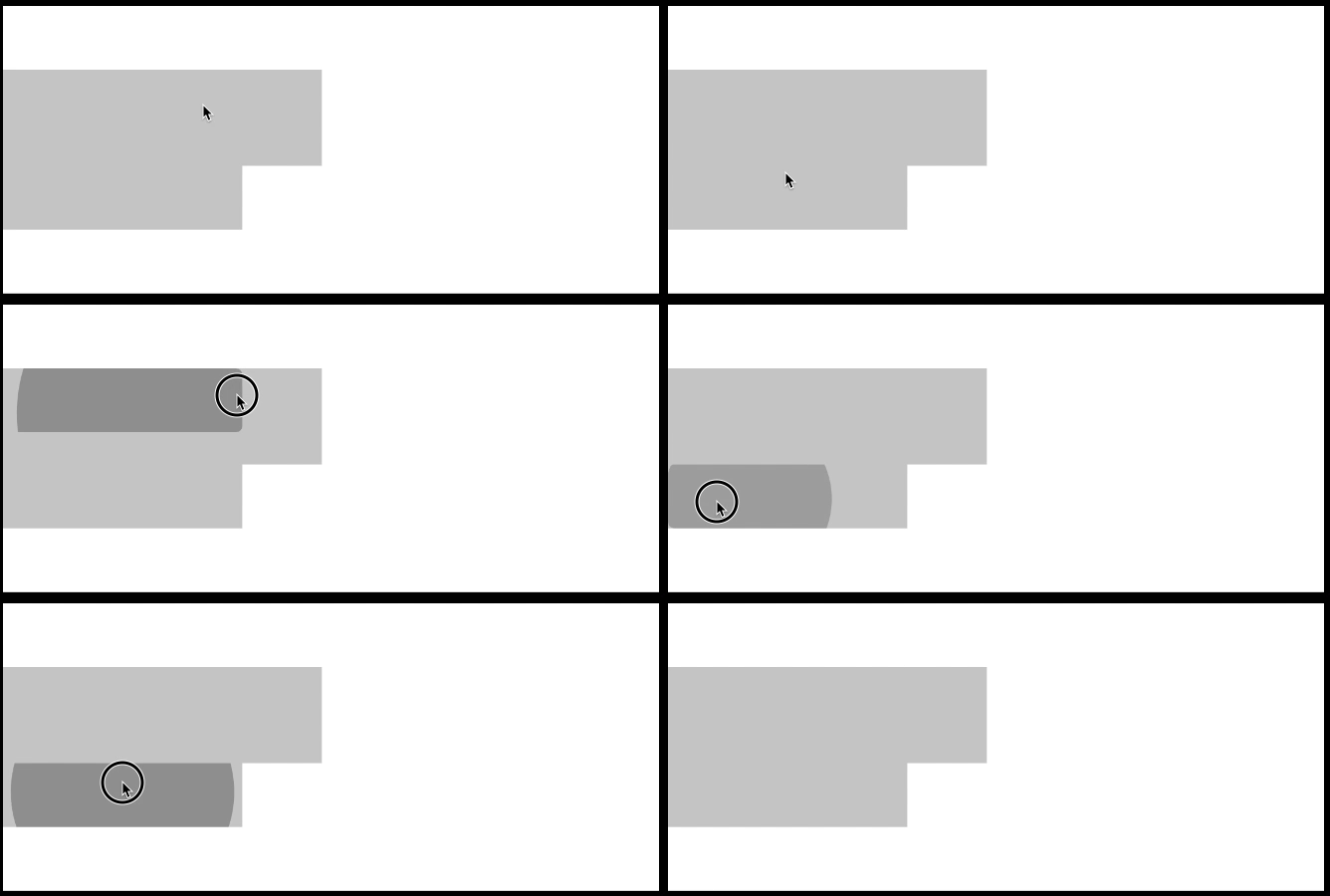
It seems like the ripple just sizes itself to the last rendered Button of any kind.
e.g.
<RectButton
style={{backgroundColor: '#CCC', width: 200, height: 60}}
rippleColor={'#666'}
/>
<RectButton
style={{backgroundColor: '#CCC', width: 150, height: 40}}
rippleColor={'#666'}
/>
reproduces this quite readily:
 olegbl
on 18 Mar 2019
olegbl
on 18 Mar 2019
@zamotany @olegbl Were you guys able to fix this issue? I think I am having similar issues .
 KakarN
on 30 May 2019
KakarN
on 30 May 2019
Nope, just avoided using the button part of this lib.
olegbl
on 30 May 2019
@olegbl Okay. I think I will have to do the same.
KakarN
on 31 May 2019
This bug is still present in:
"react-native": "0.61.0",
"react-native-gesture-handler": "^1.3.0",
 siderakis
on 28 Sep 2019
siderakis
on 28 Sep 2019
Hi,
made work around which seems to work same way as <RectButton> but without glitch.
I've created new component and replaced it anywhere I used <RectButton>
here is a code snippet:
const NativeButton = props => {
  const { children, style, ...others } = props;
  return Platform.OS === 'android' ? (
    <View style={{ backgroundColor: '#ffffff00' }}>{/*setting background color stops borderless ripple*/}
      <BorderlessButton {...others} style={style}>
        {children}
      </BorderlessButton>
    </View>
  ) : (
    <RectButton {...others} style={style}>
      {children}
    </RectButton>
  );
};

export default NativeButton;
 analogApple
on 4 Nov 2019
analogApple
on 4 Nov 2019
Still reproducing
 rcstanciu
on 9 Jul 2020
rcstanciu
on 9 Jul 2020
This is still happening and it's kinda a pain to handle. Having a proper Touchable component to handle all this "problems" is really hard. Is it possible to support default _borderless_ property?
 FRizzonelli
on 22 Jul 2020
FRizzonelli
on 22 Jul 2020
Related issues
 jacobrosenskold
·
3Comments
jacobrosenskold
·
3Comments
 brunolemos
·
3Comments
brunolemos
·
3Comments
 neiker
·
3Comments
brunolemos
·
3Comments
neiker
·
3Comments
brunolemos
·
3Comments
 tallen11
·
3Comments
tallen11
·
3Comments
Most helpful comment
Hi,
made work around which seems to work same way as
<RectButton>but without glitch.I've created new component and replaced it anywhere I used
<RectButton>here is a code snippet: