React-native-gesture-handler: [Android] RectButton borderWidth not working
Hey, guys.
I'm using RectButton and borderWidth works on iOS, but not on Android.
iOS and Android:

This can be achieved with this code:
<RectButton
    onPress={onPress}
    style={{
        width: '100%',
        height: 48,
        flexDirection: 'row',
        alignItems: 'center',
        justifyContent: 'center',
        paddingHorizontal: 15,
        borderRadius: 2,
        borderWidth: 1,
        borderColor: '#e1e5e8',
        marginBottom: 10
    }}
>
    <Image source={{ uri: icon }} style={styles.serviceIcon} />
    <Text style={styles.serviceText}>Continue with <Text style={styles.serviceName}>{name}</Text></Text>
</RectButton>
_Look how we use a single style_
Workaround
The obvious workaround is to add a View inside of RectButton and apply borderWidth, but it adds unnecessary complexity into the code :(
Android with View:
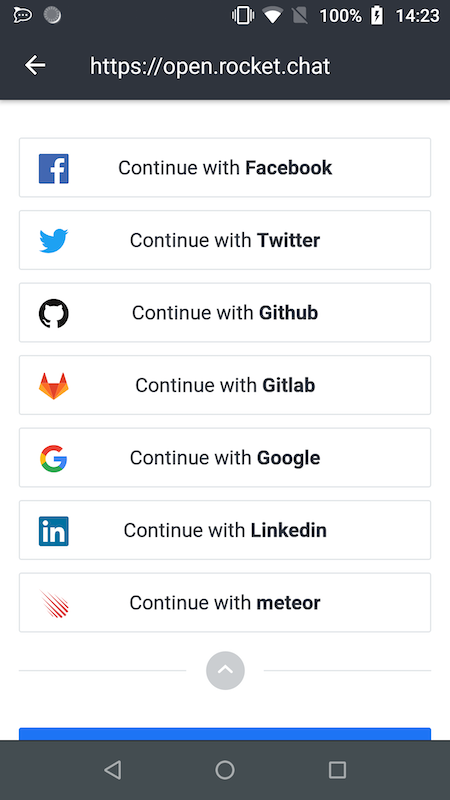
Code for the workaround:
<RectButton onPress={onPress} style={{ borderRadius: 2, marginBottom: 10 }}>
    <View style={{ borderRadius: 2, borderWidth: 1, borderColor: '#e1e5e8', width: '100%', height: 48, flexDirection: 'row', alignItems: 'center', justifyContent: 'center', paddingHorizontal: 15,}}>
        <Image source={{ uri: icon }} style={styles.serviceIcon} />
        <Text style={styles.serviceText}>Continue with <Text style={styles.serviceName}>{name}</Text></Text>
    </View>
</RectButton>
_Look how we need to work with two styles and add an inner View_
_Also, we need to set borderRadius in both because of onPress_
Thanks and let me know if I can help with something! 👊
 diegolmello
All 2 comments
This applies to all buttons, including RawButton.
 ckknight
on 28 Nov 2018
ckknight
on 28 Nov 2018
We agree that this is an issue.
However, we do not intent to clone all layout logic for RN's View in our buttons. We added some basic and most important features (like borderRadius) which are required for proper working of native feedback, but I believe there's no point to handle every case when it's possible simply to wrap View with this button. I advise you not to hesitate with using RNGH's buttons as wrapper for more complex styled components.
 osdnk
on 3 Dec 2018
osdnk
on 3 Dec 2018
Related issues
 maopixin
·
3Comments
maopixin
·
3Comments
 wcandillon
·
4Comments
wcandillon
·
4Comments
 muhaimincs
·
3Comments
muhaimincs
·
3Comments
 enahum
·
4Comments
enahum
·
4Comments
 TerrerSandman
·
3Comments
TerrerSandman
·
3Comments