React-native-gesture-handler: Unsupported top level event type "onGestureHandlerStateChange" dispatched
I am getting crash when I touch the PanGestureHandler.
return (
            <PanGestureHandler
                onGestureEvent={this.onGestureEvent}
                onHandlerStateChange={this.onHandlerStateChange}
            >
                <Animated.View style={[style, panStyle]} {...rest}>
                    {children}
                </Animated.View>
            </PanGestureHandler>
        );
package.json
    "react-native-gesture-handler": "1.0.8",
    "react": "^16.5.0",
    "react-native": "^0.57.2",
android versions:
  compileSdkVersion 27
    buildToolsVersion '27.0.3'

    defaultConfig {
        minSdkVersion 16
        targetSdkVersion 27
  }

    implementation "com.android.support:appcompat-v7:27.1.1"
crash log
Unsupported top level event type "onGestureHandlerStateChange" dispatched
extractEvents
    ReactNativeRenderer-dev.js:2471:6
extractEvents
    ReactNativeRenderer-dev.js:1016:8
runExtractedEventsInBatch
    ReactNativeRenderer-dev.js:1070:4
<unknown>
    ReactNativeRenderer-dev.js:2713:6
batchedUpdates$1
    ReactNativeRenderer-dev.js:15311:14
batchedUpdates
    ReactNativeRenderer-dev.js:2616:31
_receiveRootNodeIDEvent
    ReactNativeRenderer-dev.js:2711:17
receiveEvent
    ReactNativeRenderer-dev.js:2731:26
__callFunction
    MessageQueue.js:349:47
<unknown>
    MessageQueue.js:106:26
__guard
    MessageQueue.js:297:10
callFunctionReturnFlushedQueue
    MessageQueue.js:105:17
related issue: https://github.com/expo/expo/issues/2067
 punksta
All 185 comments
Hi, @punksta
Thanks for the issue. Please, update react to '6.6.0-alpha.8af6728and react-native to 0.57.3 and if it won't help, write here again :)
 osdnk
on 22 Oct 2018
osdnk
on 22 Oct 2018
same here
Unsupported top level event type "onGestureHandlerStateChange" dispatched
extractEvents
    ReactNativeRenderer-dev.js:2530:6
extractEvents
    ReactNativeRenderer-dev.js:1073:8
runExtractedEventsInBatch
    ReactNativeRenderer-dev.js:1127:4
<unknown>
    ReactNativeRenderer-dev.js:2772:6
batchedUpdates$1
    ReactNativeRenderer-dev.js:15568:14
batchedUpdates
    ReactNativeRenderer-dev.js:2675:31
_receiveRootNodeIDEvent
    ReactNativeRenderer-dev.js:2770:17
receiveEvent
    ReactNativeRenderer-dev.js:2790:26
__callFunction
    MessageQueue.js:349:47
<unknown>
    MessageQueue.js:106:26
__guard
    MessageQueue.js:297:10
callFunctionReturnFlushedQueue
    MessageQueue.js:105:17
```
punksta
on 22 Oct 2018
@punksta
Did you try my code with these versions?
osdnk
on 22 Oct 2018
Could you build a showcase repo?
osdnk
on 22 Oct 2018
@osdnk no, it's my opensource project actually.
recent code in dev branch. I use your library here: https://github.com/punksta/Cat-or-dog/blob/dev/src/containers/DraddingFallingV2.js#L187
steps to reproduce:
1) start the app in debug mode on android
2) press "play"
3) press "start game"
4) try to touch any falling image
if you need minimal example I can try to make it later.
punksta
on 22 Oct 2018
@osdnk if you need more info or smaller example, let me know.
punksta
on 23 Oct 2018
Having the same problem on react-native 0.57.5. I am using this library through react-navigation, if that makes a difference.
E: Fixed it by doing the patch of UIManager.RCTView.directEventTypes in my code as well. The patch is here in the codebase if anyone is wondering: https://github.com/kmagiera/react-native-gesture-handler/blob/master/GestureHandler.js#L46
 Jyrno42
on 14 Nov 2018
Jyrno42
on 14 Nov 2018
@osdnk Getting the same issue with a Drawer component using:
- react-native
0.57.7 - react-navigation
3.0.2 - react-native-gesture-handler
1.0.10
@Jyrno42 what versions are you using?
 balthazar
on 30 Nov 2018
balthazar
on 30 Nov 2018
- react-native:
0.57.5 - react-navigation:
3.0.0 - react-native-gesture-handler:
1.0.9
E: So I am a bit behind your versions.
Jyrno42
on 3 Dec 2018
Same issue here I'm using
- react-native-navigation: 1.1.492
- react-native: 0.57.5
- React: 16.6.3
- react-native-gesture-handler: 1.0.10
the packager also crashes with
FATAL ERROR: Ineffective mark-compacts near heap limit Allocation failed - JavaScript heap out of memory
 1: 0x10003a08d node::Abort() [/Users/enahum/.nvm/versions/node/v10.11.0/bin/node]
 2: 0x10003a297 node::OnFatalError(char const*, char const*) [/Users/enahum/.nvm/versions/node/v10.11.0/bin/node]
 3: 0x1001d2455 v8::internal::V8::FatalProcessOutOfMemory(v8::internal::Isolate*, char const*, bool) [/Users/enahum/.nvm/versions/node/v10.11.0/bin/node]
 4: 0x10059d6d2 v8::internal::Heap::FatalProcessOutOfMemory(char const*) [/Users/enahum/.nvm/versions/node/v10.11.0/bin/node]
 5: 0x1005a01a5 v8::internal::Heap::CheckIneffectiveMarkCompact(unsigned long, double) [/Users/enahum/.nvm/versions/node/v10.11.0/bin/node]
 6: 0x10059c04f v8::internal::Heap::PerformGarbageCollection(v8::internal::GarbageCollector, v8::GCCallbackFlags) [/Users/enahum/.nvm/versions/node/v10.11.0/bin/node]
 7: 0x10059a224 v8::internal::Heap::CollectGarbage(v8::internal::AllocationSpace, v8::internal::GarbageCollectionReason, v8::GCCallbackFlags) [/Users/enahum/.nvm/versions/node/v10.11.0/bin/node]
 8: 0x10059a725 v8::internal::Heap::CollectAllAvailableGarbage(v8::internal::GarbageCollectionReason) [/Users/enahum/.nvm/versions/node/v10.11.0/bin/node]
 9: 0x1005a6b81 v8::internal::Heap::AllocateRawWithRetryOrFail(int, v8::internal::AllocationSpace, v8::internal::AllocationAlignment) [/Users/enahum/.nvm/versions/node/v10.11.0/bin/node]
10: 0x1005789c4 v8::internal::Factory::NewRawTwoByteString(int, v8::internal::PretenureFlag) [/Users/enahum/.nvm/versions/node/v10.11.0/bin/node]
11: 0x10089051b v8::internal::IncrementalStringBuilder::Extend() [/Users/enahum/.nvm/versions/node/v10.11.0/bin/node]
12: 0x100678d0b v8::internal::JsonStringifier::SerializeString(v8::internal::Handle<v8::internal::String>) [/Users/enahum/.nvm/versions/node/v10.11.0/bin/node]
13: 0x10067c258 v8::internal::JsonStringifier::Result v8::internal::JsonStringifier::Serialize_<true>(v8::internal::Handle<v8::internal::Object>, bool, v8::internal::Handle<v8::internal::Object>) [/Users/enahum/.nvm/versions/node/v10.11.0/bin/node]
14: 0x10067b684 v8::internal::JsonStringifier::Result v8::internal::JsonStringifier::Serialize_<false>(v8::internal::Handle<v8::internal::Object>, bool, v8::internal::Handle<v8::internal::Object>) [/Users/enahum/.nvm/versions/node/v10.11.0/bin/node]
15: 0x10067ab3d v8::internal::JsonStringifier::Result v8::internal::JsonStringifier::Serialize_<false>(v8::internal::Handle<v8::internal::Object>, bool, v8::internal::Handle<v8::internal::Object>) [/Users/enahum/.nvm/versions/node/v10.11.0/bin/node]
16: 0x10067ce2c v8::internal::JsonStringifier::Result v8::internal::JsonStringifier::Serialize_<true>(v8::internal::Handle<v8::internal::Object>, bool, v8::internal::Handle<v8::internal::Object>) [/Users/enahum/.nvm/versions/node/v10.11.0/bin/node]
17: 0x10067b684 v8::internal::JsonStringifier::Result v8::internal::JsonStringifier::Serialize_<false>(v8::internal::Handle<v8::internal::Object>, bool, v8::internal::Handle<v8::internal::Object>) [/Users/enahum/.nvm/versions/node/v10.11.0/bin/node]
18: 0x100676f8f v8::internal::JsonStringifier::Stringify(v8::internal::Handle<v8::internal::Object>, v8::internal::Handle<v8::internal::Object>, v8::internal::Handle<v8::internal::Object>) [/Users/enahum/.nvm/versions/node/v10.11.0/bin/node]
19: 0x100290df6 v8::internal::Builtin_Impl_JsonStringify(v8::internal::BuiltinArguments, v8::internal::Isolate*) [/Users/enahum/.nvm/versions/node/v10.11.0/bin/node]
20: 0x2777add5c17d
21: 0x2777add0a5a3
22: 0x2777adde8d5f
23: 0x2777add118b5
24: 0x2777add0a5a3
Abort trap: 6
events.js:167
      throw er; // Unhandled 'error' event
      ^

Error: write EPIPE
    at WriteWrap.afterWrite [as oncomplete] (net.js:788:14)
Emitted 'error' event at:
    at onwriteError (_stream_writable.js:431:12)
    at onwrite (_stream_writable.js:456:5)
    at _destroy (internal/streams/destroy.js:40:7)
    at Socket._destroy (net.js:613:3)
    at Socket.destroy (internal/streams/destroy.js:32:8)
    at WriteWrap.afterWrite [as oncomplete] (net.js:790:10)
 enahum
on 3 Dec 2018
enahum
on 3 Dec 2018
can we re-opened this issue please?
enahum
on 3 Dec 2018
Because my navigators were created asynchronously, the handler was registered too late and thus throwing this error. I fixed the issue by simply doing:
import 'react-native-gesture-handler'
at the top of my index.js 🙂
balthazar
on 3 Dec 2018
Awesome @balthazar that seems to have done it
enahum
on 3 Dec 2018
perhaps I should open another issue, but after this was no longer throwing the error no the PanGestureHandler works but after the gesture finishes it won't start again unless I re-mount the component
enahum
on 3 Dec 2018
Upgrading to 0.58.0-rc.1 gives me this issue when trying to open my drawer
 jamsch
on 12 Dec 2018
jamsch
on 12 Dec 2018
@jamsch
Could you clarify a bit? Which drawer do you use? How do you import it?
osdnk
on 13 Dec 2018
@osdnk Using the React Navigation v3 DrawerNavigator which is apparently using this library. I have a production build running on 0.57.6 and it works fine though.
jamsch
on 13 Dec 2018
Because my navigators were created asynchronously, the handler was registered too late and thus throwing this error. I fixed the issue by simply doing:
import 'react-native-gesture-handler'at the top of my
index.js🙂
Resovled it, but how this happens. Module code is always running when code have been loaded, doesn't it?
Can you tell me why? Thank you.
============================
I make a terrible mistake, I export module by using get xxx(){}, so it makes module code lazy running while it is required by other modules.
 yqz0203
on 15 Dec 2018
yqz0203
on 15 Dec 2018
I have same issue with:
"react-navigation": "^3.1.0",
"react-native-gesture-handler": "^1.0.15",
I did put import 'react-native-gesture-handler' on top of index.js but it's doesn't work :(
 sinhpn92
on 31 Jan 2019
sinhpn92
on 31 Jan 2019
I'm also still seeing this error. I put import 'react-native-gesture-handler'; in my file that has createAppContainer but still seeing the error.
I'm using:
"react-navigation": "3.0.9", "react-native-gesture-handler": "^1.0.12",
Any ideas @yqz0203 ?
 brendandestefano
on 1 Feb 2019
brendandestefano
on 1 Feb 2019
@brendandestefano
Try put this import in the first index.js of your application.
Like this:
import "react-native-gesture-handler";

import { AppRegistry } from "react-native";

import App from "./src/App";

import { name as appName } from "./app.json";
 fsmaiorano
on 6 Feb 2019
fsmaiorano
on 6 Feb 2019
@fsmaiorano Downgrade to "react-native-gesture-handler": "^1.0.9" will working fine.
sinhpn92
on 7 Feb 2019
On react-native 0.58.3 this occurs for me only in a production build with Android. Tried to work around it by doing the following in my codebase but it did not help. My current theory is that it is somehow related to minification of javascript which breaks the patching logic.
E: Nope, disabled minification, issue still occurs.
E2: Saw the message of this commit and updated my patch accordingly. All good now :)
index.js:
import './thepatch';
import './App/index'; // AppRegistry.registerComponent in here
thepatch.js:
import { NativeModules } from 'react-native';

const { UIManager } = NativeModules;

if (UIManager) {
// Add gesture specific events to genericDirectEventTypes object exported from UIManager
// native module.
// Once new event types are registered with react it is possible to dispatch these
// events to all kind of native views.
    UIManager.genericDirectEventTypes = {
        ...UIManager.genericDirectEventTypes,
        onGestureHandlerEvent: { registrationName: 'onGestureHandlerEvent' },
        onGestureHandlerStateChange: {
            registrationName: 'onGestureHandlerStateChange',
        },
    };
}
Thanks for attaching context! I’ll try to figure out what’s going on soon
osdnk
on 13 Feb 2019
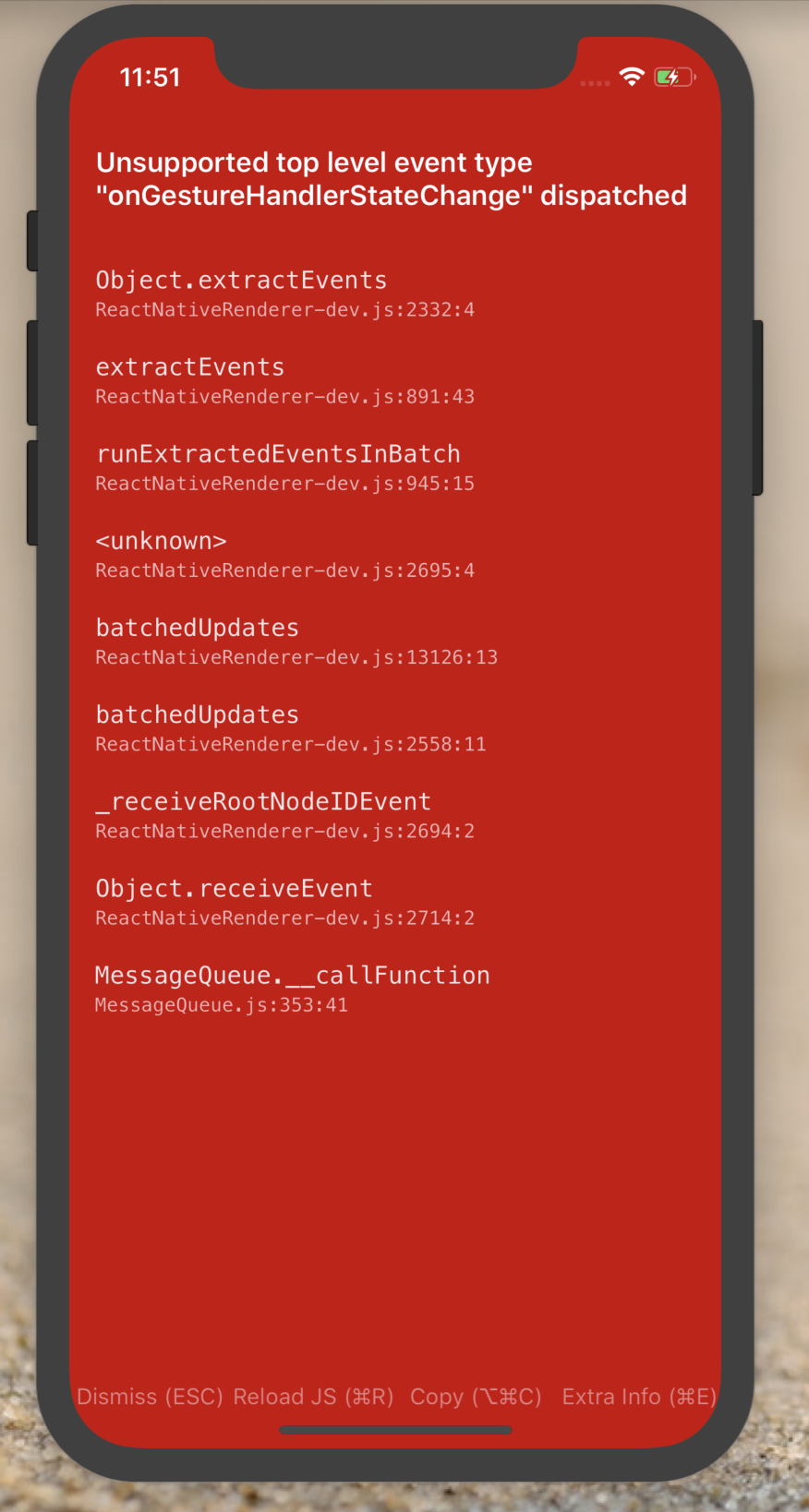
The same problem.
I using react native version 0.54.4
react-native-gesture-handler version 1.0.9
react-navigation version 1.5.9
Can you help me, how to solve this problem.
Just error in IOS, but android not error.
 arisupriatna14
on 19 Feb 2019
arisupriatna14
on 19 Feb 2019
Do anyone still have the same issue? It is still an issue for v1.0.16. Have any contributor take time to resolve the issue for us? Thanks
 Anhmike
on 24 Feb 2019
Anhmike
on 24 Feb 2019
import 'react-native-gesture-handler'this code resolved it
thanks
 hosseinmd
on 25 Feb 2019
hosseinmd
on 25 Feb 2019
It's a duplicate of #439. I would be extremely grateful for some example how to reproduce it.
osdnk
on 25 Feb 2019
I still have the issue:
"react-native": "0.55.3"
"react-navigation": "^3.1.0",
"react-native-gesture-handler": "^1.1.0",
Importing in index.js as mentoned above didn't help
 denissb
on 4 Mar 2019
denissb
on 4 Mar 2019
did you link react-native-gesture-handler to android mainActivity.java ?
hosseinmd
on 4 Mar 2019
@hosseinmd - yes, in fact for me it happens on both iOS and Android
denissb
on 4 Mar 2019
@denissb
GH 1.1.0 is not working with RN < 0.57.2, as stated in release notes:
This version requires react-native in version at least 0.57.2
Also, I've come across this issue using GH 1.0.15 with RN 0.55.4.
Rolling back to 1.0.14 fixed it for me.
 Krizzu
on 5 Mar 2019
Krizzu
on 5 Mar 2019
Rollback to 1.0.12 instead as 1.0.14 is not working on Android
 anniewey
on 8 Mar 2019
anniewey
on 8 Mar 2019
@anniewey
Yeah, there's a bug in Android on version 1.0.14, which is fixed on 1.0.15, but has the same issue on iOS as on later versions.
Soo, to come around this, I've used patch package to apply fixes on Android on version 1.0.15.
And it's working fine now.
Krizzu
on 8 Mar 2019
Thanks it's working on 0.55.4
"react-native-gesture-handler": "^1.0.14",
"react-navigation": "^3.3.2"
 sefatunckanat
on 13 Mar 2019
sefatunckanat
on 13 Mar 2019
I downgraded the React Native version and it worked smoothly.
"react-native": "^0.58.0",
"react-native-gesture-handler": "^1.1.0",
"react-navigation": "^3.0.9"
 yildiz
on 14 Mar 2019
yildiz
on 14 Mar 2019
@brendandestefano
Try put this import in the first index.js of your application.
Like this:
import "react-native-gesture-handler";

import { AppRegistry } from "react-native";

import App from "./src/App";

import { name as appName } from "./app.json";
it's worked for me.thanks.
 Dealchan
on 23 Mar 2019
Dealchan
on 23 Mar 2019
This issue appears to be only for helping purpose. However, it's a quite popular problem so leaving it open.
Also, remove duplicated https://github.com/kmagiera/react-native-gesture-handler/issues/439
osdnk
on 26 Mar 2019
Upgrading react-native-gesture-handler from 1.0.12 to 1.1.0 solved the problem for me.
My versions:
"react-native": "0.59.0",
"react-navigation": "^3.5.1",
"react-native-gesture-handler": "^1.1.0"
Changed version number in package.json and ran rm -rf node_modules && npm install.
 Mjuk-Biltvatt
on 27 Mar 2019
Mjuk-Biltvatt
on 27 Mar 2019
"react": "16.8.3",
"react-native": "0.59.2",
"react-native-gesture-handler": "^1.1.0",
"react-navigation": "^3.5.1"
None of the example are working for me, although I don't get any crash. react-navigation which depends on react-native-gesture-handler works fine though.
 ajaymore
on 28 Mar 2019
ajaymore
on 28 Mar 2019
Saw this first time in iOS with the following versions. Happens when I tap the back arrow in react-navitation. Got this also with Samsung Galaxy Tab (Android 8.1.0) in my own code using TapGestureHandler. Never seen this before.
iOS 12.1.4 (iPhone X)
Xcode 10.2
"react": "16.8.6",
"react-native": "0.59.2",
"react-native-gesture-handler": "1.1.0",
"react-navigation": "3.5.1",

 tapz
on 29 Mar 2019
tapz
on 29 Mar 2019
I'm having this issue too:
Even when importing the library at the main index file
import 'react-native-gesture-handler'
Versions:
"react-navigation": "^3.6.1",
"react-native": "0.55.4",
"react-native-gesture-handler": "1.0.17",

 carloscuesta
on 9 Apr 2019
carloscuesta
on 9 Apr 2019
I have the same problem and this occurs for me only in a production build with iOS.
react-native: '0.59.1'
react-navigation: '3.5.1'
react-native-gesture-handler: '1.1.0'
react: '16.8.3'
I have a try to figure out the root cause.
Print the log console.log(UIManager.genericDirectEventTypes, '=========genericDirectEventTypes=sync==') in getNativeComponentAttributes.js
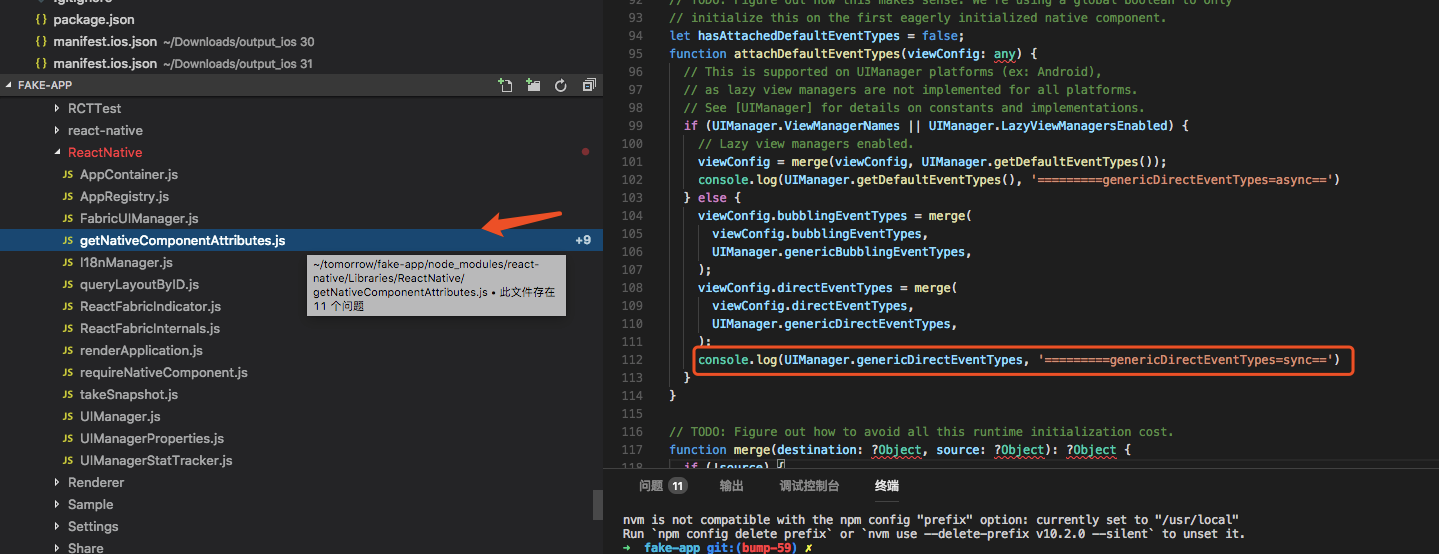
When in DEV, I can find the log.
UIManager.genericDirectEventTypes is { onGestureHandlerEvent: { registrationName: 'onGestureHandlerEvent' }.
onGestureHandlerStateChange: { registrationName: 'onGestureHandlerStateChange' } }.
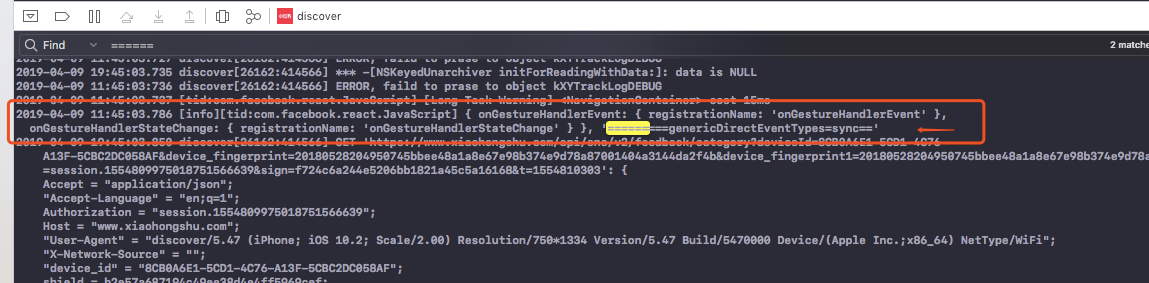
But when in "PRODUCTION", I can find UIManager.genericDirectEventTypes is undefined.

I don't know whether or not it's related to this.
 xutm
on 9 Apr 2019
xutm
on 9 Apr 2019
https://github.com/kmagiera/react-native-gesture-handler/issues/320#issuecomment-470845589
@Krizzu has the only solution that worked for me, thank you!
 arthurpankiewicz
on 9 Apr 2019
arthurpankiewicz
on 9 Apr 2019
I only see this error with RN 0.59. With 0.58 works fine at least with debug builds.
tapz
on 9 Apr 2019
On react-native
0.58.3this occurs for me only in a production build with Android. Tried to work around it by doing the following in my codebase but it did not help. My current theory is that it is somehow related to minification of javascript which breaks the patching logic.E: Nope, disabled minification, issue still occurs.
E2: Saw the message of this commit and updated my patch accordingly. All good now :)index.js:
import './thepatch';
import './App/index'; // AppRegistry.registerComponent in here
thepatch.js:
import { NativeModules } from 'react-native';

const { UIManager } = NativeModules;

if (UIManager) {
// Add gesture specific events to genericDirectEventTypes object exported from UIManager
// native module.
// Once new event types are registered with react it is possible to dispatch these
// events to all kind of native views.
    UIManager.genericDirectEventTypes = {
        ...UIManager.genericDirectEventTypes,
        onGestureHandlerEvent: { registrationName: 'onGestureHandlerEvent' },
        onGestureHandlerStateChange: {
            registrationName: 'onGestureHandlerStateChange',
        },
    };
}
I fixed the issue. Thanks
xutm
on 10 Apr 2019
@xutm Why is this fix needed if it's from a commit ialready merget tot the master?
tapz
on 10 Apr 2019
In react-navigation export module by using get xxx(){} and react-native-gesture-handler is used in react-navigation, so it will be lazy load while it is required.
I think the issue can be done through import 'react-native-gesture-handler'.
xutm
on 10 Apr 2019
@xutm So, is the lazy loading the reason for the issue? I'm using inline requires with RN 0.59. Maybe that's why I'm seeing the issue only in 0.59.
tapz
on 10 Apr 2019
Downgrading to react-native-gesture-handler 1.0.9 worked for me
 andreus3
on 16 Apr 2019
andreus3
on 16 Apr 2019
Turning off inline requires with RN 0.59 mades the issue go away for us on iOS.
"react-native-gesture-handler": "1.1.0",
"react-navigation": "3.6.1"
"react-native": "0.59.5"
We were also able to work around the issue by explicitly importing react-native-gestures before react-navigation gets imported.
import 'react-native-gesture-handler';
 smacgregor
on 4 May 2019
smacgregor
on 4 May 2019
This is still an issue with 1.2.1 version and latest RN (0.58.8), but workaround suggested by @smacgregor works for me. Are you planning to implement fix for library or maybe explicit import is recommend way to fix that problem?
 Simek
on 16 May 2019
Simek
on 16 May 2019
@andreus3 also version 1.0.9 worked for me. I am using RN 0.55.4
 luispeerez
on 21 May 2019
luispeerez
on 21 May 2019
In RN0.52-RN0.55, framework will not merge UIManager.genericDirectEventTypes into every native module viewConfig, see here.
So we should inject it using following code
import UIManager from "UIManager";
for (let k in UIManager) {
  if (UIManager.hasOwnProperty(k) && UIManager[k] && UIManager[k].directEventTypes) {
    UIManager[k].directEventTypes.onGestureHandlerEvent = {
      registrationName: "onGestureHandlerEvent"
    };
    UIManager[k].directEventTypes.onGestureHandlerStateChange = {
      registrationName: "onGestureHandlerStateChange"
    };
  }
}
At the top of my index.js or app.js
 jetzhliu
on 29 May 2019
jetzhliu
on 29 May 2019
importing in index.js not workng for me, happening on RNGH version 1.0.9 as well as in 1.2.1. it happens on release build but not on dev build
 romit07
on 30 May 2019
romit07
on 30 May 2019
@smacgregor solution works well! Ty
 DWboutin
on 18 Jun 2019
DWboutin
on 18 Jun 2019
the same issue but it just happened when i release apk, debug not get any errors.
 viralS-tuanlv
on 25 Jun 2019
viralS-tuanlv
on 25 Jun 2019
@viralS-tuanlv make sure your index.android.bundle file is updated while creating release apk, I had the same issue, after updating the RNGH version I was direct doing assemble release,
use this command first after deleting previous index.android.bundle if any
react-native bundle --platform android --dev false --entry-file index.js --bundle-output android/app/src/main/assets/index.android.bundle --assets-dest android/app/src/main/res
romit07
on 27 Jun 2019
I experienced the same issue (Unsupported top level event type "onGestureHandlerStateChange" dispatched) only in release build after updating RN from 0.57.7 to 0.59.9
Resolved it by updating react-native-gesture-handler from 1.0.10 to the 1.3.0
 vtolochk
on 3 Jul 2019
vtolochk
on 3 Jul 2019
I just upgraded my app from 0.57.x to 0.59.10 and got this issue again when touching react-navigation UI.
Clearing native and js cache didn't help. However adding import 'react-native-gesture-handler'; to the top of root index.js fixed it.
rn 0.59 is using inline requires so it might be the reason. I am using 1.3.0
punksta
on 10 Jul 2019
@jetzhliu my react-native version is 0.55.4,import 'react-native-gesture-handler' is not work for me,but your method is work for me.thank you very much!
 peachestao
on 13 Jul 2019
peachestao
on 13 Jul 2019
In my case, following step worked
upgraded "react-native-gesture-handler" to 1.3.0 from "1.0.9"
and my "react-native" version is "0.59.0"
 imsantoshyadav
on 17 Jul 2019
imsantoshyadav
on 17 Jul 2019
Same issue here with Expo SDK 33 when closing Drawer Navigator by touching outside of drawer navigator area.
Expo SDK 33 using...
"react-native": "https://github.com/expo/react-native/archive/sdk-33.0.0.tar.gz",
"react-navigation": "^3.11.0",
Fixed by adding react-native-gesture-handler directly:
"react-native-gesture-handler": "^1.2.2"
and importing in app.js:
import 'react-native-gesture-handler';
 badbod99
on 19 Jul 2019
badbod99
on 19 Jul 2019
Just to mention that this problem still exists when using react-native v0.59.5 and react-navigation 3.11.0. However, the suggested solution does work:
import 'react-native-gesture-handler';
Somehow it didn't work when written into the same file as the initial react-navigation import, so I extracted the code that needed to import react-navigation into a whole new file to ensure that the react-native-gesture-handler was imported in module closer to the app's entrypoint than the module that imported react-navigation.
 shirakaba
on 24 Jul 2019
shirakaba
on 24 Jul 2019
Worked by importing it at the upper level. Odd bug
 MarioAslau
on 6 Aug 2019
MarioAslau
on 6 Aug 2019
Does anyone know if this issue is being resolved in a future release?
 josephbonifacio1982
on 12 Aug 2019
josephbonifacio1982
on 12 Aug 2019
This issue appeared now using:
"react-native-gesture-handler": "^1.4.1", "react-native": "0.61.0-rc.0" and "react": "16.9.0"
 OtacilioN
on 4 Sep 2019
OtacilioN
on 4 Sep 2019
For react-native: 0.60 and react-native-gesture-handler: 1.4.1 I've fixed the problem by:
- linking manually
react-native-gesture-handlerandreact-native-reanimated. - Adding an
<Animated.View>as first child of a gesture handler component:
import React from 'react';
import {SafeAreaView} from 'react-native';
import {PanGestureHandler} from 'react-native-gesture-handler';
import Animated from 'react-native-reanimated';

const {event, Value} = Animated;

export default (App = () => {
  const translationX = new Value(0);
  const onGestureEvent = event([{nativeEvent: {translationX}}]);
  return (
    <SafeAreaView>
      <PanGestureHandler
        onHandlerStateChange={onGestureEvent}
        onGestureEvent={onGestureEvent}>
        <Animated.View style={{flex: 1, width: '100%', padding: 10}}>
          <Animated.View
            style={{
              width: 100,
              height: 50,
              backgroundColor: 'purple',
              borderRadius: 5,
              transform: [{translateX: translationX}],
            }}
          />
        </Animated.View>
      </PanGestureHandler>
    </SafeAreaView>
  );
});
 PierreCapo
on 8 Sep 2019
PierreCapo
on 8 Sep 2019
Adding import 'react-native-gesture-handler'; on the top of my root file did the trick. Thanks!
 felippepuhle
on 16 Sep 2019
felippepuhle
on 16 Sep 2019
Started getting this once upgraded to react navigation 4.0
 bobber205
on 26 Sep 2019
bobber205
on 26 Sep 2019
Same problem only in release mode.
Enviroment:
- react-native: 0.61.1
- react-native-gesture-handler: 1.4.1
 ahce
on 27 Sep 2019
ahce
on 27 Sep 2019
Strangely this had never bitten me before even though it seems long-standing? But for react-native 0.61.1 and react-native-gesture-handler 1.4.1 I needed the import before react-navigation 4.0.9 was referenced, whereas with the same versions except react-native 0.60.6 I did not need it :man_shrugging: - the workaround does seem to work though.
 mikehardy
on 27 Sep 2019
mikehardy
on 27 Sep 2019
Same, we ran into the problem after upgrading the two RNs. Adding the import to the top of our index.js solved the issue.
React Native 0.61.1
React Navigation 4.0.9
Gesture Handler 1.4.1
 johnhaup
on 27 Sep 2019
johnhaup
on 27 Sep 2019
okay - well glad I'm not crazy. @kmagiera you've probably investigated this thoroughly, but in case it helps I'll offer that if you have some theory and you want to validate it I'm pretty handy with adding git dependencies (so I could install a fork or PR or whatever) and I'm always building and testing my app anyway - so I could check on any potential solutions. Cheers
mikehardy
on 27 Sep 2019
@johnhaup thx! the import in the index.js file did the trick
 Under-Warz
on 27 Sep 2019
Under-Warz
on 27 Sep 2019
This was driving me crazy today! Adding the import to the index.js really did fix it. Surprised it's been an issue since last year and I never came across it before.
Thanks @balthazar
 Esirei
on 1 Oct 2019
Esirei
on 1 Oct 2019
Same issue and it didn't happen before. Happened after updating react navigation
 cristianoccazinsp
on 1 Oct 2019
cristianoccazinsp
on 1 Oct 2019
This is fixed in the latest react native version - 0.61.1
https://github.com/facebook/react-native/releases/tag/v0.61.1
Edit: @mikehardy You're right. Works on Android but still crashes on iOS. Tried with 0.61.2 as well.
 dblazeski
on 2 Oct 2019
dblazeski
on 2 Oct 2019
I was on react-native 0.61.1 when this was happening to me - see comments above
mikehardy
on 2 Oct 2019
Same issue here.
- "react-native": "0.61.2",
- "react-navigation": "^4.0.10",
- "react-navigation-stack": "1.9.3",
- "react-native-gesture-handler": "^1.4.1",
~import "react-native-gesture-handler" does not fix it~
UPDATE: it does fix it, but MUST be on App.js file on line 1.
I was adding it on line 6
 LuisRodriguezLD
on 3 Oct 2019
LuisRodriguezLD
on 3 Oct 2019
Same issue here.
- "react-native": "0.61.2",
- "react-navigation": "^4.0.10",
- "react-navigation-stack": "1.9.3",
- "react-native-gesture-handler": "^1.4.1",
import "react-native-gesture-handler"does not fix it
Crash on Android when build release
 chengsokdara
on 3 Oct 2019
chengsokdara
on 3 Oct 2019
    "react": "16.10.1",
    "react-native": "0.61.2",
    "react-native-gesture-handler": "^1.4.1",
    "react-navigation": "^4.0.10",
    "react-navigation-drawer": "^2.2.2",
and
+  import 'react-native-gesture-handler'
   import {AppRegistry} from 'react-native';
   import App from './App';
   import {name as appName} from './app.json';
Worked perfectly. Thank you @balthazar
 jayan2019
on 3 Oct 2019
jayan2019
on 3 Oct 2019
I saw this error now for the first time on iOS after updating to use React Native version 0.61.2, so like @dblazeski, @mikehardy and @LuisRodriguezLD are saying, seems to happen on the newest RN version on iOS.
Here are the versions that I am using:
iOS 13.0
    "react": "16.9.0",
    "react-native": "0.61.2",
    "react-native-gesture-handler": "^1.4.1",
    "react-navigation": "^3.11.1",
 kristerkari
on 3 Oct 2019
kristerkari
on 3 Oct 2019
I saw this error only on bundleRelease.
import 'react-native-gesture-handler' in my index.js fix my problem.
Thank you everyone.
 Agungkes
on 3 Oct 2019
Agungkes
on 3 Oct 2019
It looks like adding import 'react-native-gesture-handler' to the project's index.js file solves the issue for me.
I could easily reproduce the error without the import, but not after adding it.
kristerkari
on 3 Oct 2019
I was able to fix this by adding import 'react-native-gesture-handler' to both root index.js and my separate Routes.js file where I set up react-navigation. (It failed if I just imported it in either file only)
Thanks!
 jeffmon
on 4 Oct 2019
jeffmon
on 4 Oct 2019
This is not really a fix though, is it?
 RWOverdijk
on 6 Oct 2019
RWOverdijk
on 6 Oct 2019
@RWOverdijk definitely not, but I'm not aware of any pull requests proposing fixes yet, and I haven't made one myself, so we're all just working around for the moment. But you're subscribed now so you'll get notifications
mikehardy
on 6 Oct 2019
after adding
import 'react-native-gesture-handler'
to index.js my release build was not even starting sadly.
eventually found a solution via gradlew clean after adding the new line to the project. For some reason simply re-running react-native run-android --variant=release was not working
Hope this helps other Android newbies such as myself ;)
 markl-vesper
on 7 Oct 2019
markl-vesper
on 7 Oct 2019
@mikehardy Just checking if this is just "accepted" or not. I understand the low priority to find the cause given the relatively simple workaround.
If there are pointers I might take a look.
RWOverdijk
on 7 Oct 2019
same issue on android when release
    "reactxp":'2.0.0-rc.1'
    "react-native": "^0.61.1",
    "react-native-gesture-handler": "^1.4.1",
 linjson
on 8 Oct 2019
linjson
on 8 Oct 2019
The import in index.js did not work for me. What worked for me was the workaround mentioned here.
"react-native": "0.61.1",
"react-native-gesture-handler": "^1.3.0",
"react-navigation": "^3.11.1",
 marcelo-schroeder
on 8 Oct 2019
marcelo-schroeder
on 8 Oct 2019
Adding on to people who stumble here from Google, I stupidly followed only half of @LuisRodriguezLD's advice.
I had an AppContainer.tsx file where react-navigation's AppContainer was declared - it was then used in my main App.js file.
Only adding it to AppContainer.tsx still produced the error - you need to add it wherever you use the AppContainer as well!
 Hissvard
on 8 Oct 2019
Hissvard
on 8 Oct 2019
+1
 xhirazi
on 9 Oct 2019
xhirazi
on 9 Oct 2019
I had the same error, in release mode (with minified and optimized JS) only, no crash in development.
Adding the import "react-native-gesture-handler";instruction before the AppRegistry.registerComponent statement in index.js did the trick.
Even though, this should not be a requirement, this has to be fixed by the team.
 ScreamZ
on 9 Oct 2019
ScreamZ
on 9 Oct 2019
Have same error, in release mode only, no crash in dev.
Adding the
import "react-native-gesture-handler";Before
AppRegistry.registerComponentdid the trick
Thanks for this clear information, it fixed our problem!
 Arjan-Zuidema
on 10 Oct 2019
Arjan-Zuidema
on 10 Oct 2019
had the same issue after upgrading to 0.61.2 with Hermes solved by adding the import
 lironsher
on 10 Oct 2019
lironsher
on 10 Oct 2019
Make sure import 'react-native-gesture-handler'; is the very first line of the index.js file. I had put it just above AppRegistry.registerComponent but below some other import statements at the top. It only worked when I had the import statement as the first line in the file.
 vhesener-mobiquity
on 11 Oct 2019
vhesener-mobiquity
on 11 Oct 2019
Adding the import to index.js works for me as well but does anyone know _why_ this fix works? I'm just hesitant to add it when I don't know what problem it's solving in case it introduces any other issues.
 tomtargosz
on 11 Oct 2019
tomtargosz
on 11 Oct 2019
Make sure
import 'react-native-gesture-handler';is the very first line of theindex.jsfile. I had put it just aboveAppRegistry.registerComponentbut below some other import statements at the top. It only worked when I had the import statement as the first line in the file.
It solved but don't know the resion why :-|
 om-mahato
on 15 Oct 2019
om-mahato
on 15 Oct 2019
This started happening on latest RN 0.61.2, when I swipe back with react-navigation@4. As well any other place, where I use react-native-gesture-handler.
On prod build, It says:
Invariant Violation: Unsupported top level event type "onGestureHandlerStateChange" dispatched
and in DEV mode it doesn't crash app, but just shows warning:
[RCTRootView cancelTouches] is deprecated and will be deleted soon.
There is close PR related to RCTRootView cancelTouches -> https://github.com/kmagiera/react-native-gesture-handler/pull/657
UPDATE
So yeah, I tried to apply PR above, and it fixed my issue with react-navigation. Although it's bit hacky way, since it breaks other behaviour 🤓
EASIER FIX
Add this to first line of index.js file in root folder of project:
import 'react-native-gesture-handler';
 usrbowe
on 17 Oct 2019
usrbowe
on 17 Oct 2019
@brendandestefano
Try put this import in the first index.js of your application.
Like this:
import "react-native-gesture-handler";

import { AppRegistry } from "react-native";

import App from "./src/App";

import { name as appName } from "./app.json";
Super important to keep this order
Place the import at the top before you've imported from App otherwise the Handler can't see it in production apk (Android)
 theycallmeloki
on 18 Oct 2019
theycallmeloki
on 18 Oct 2019
I have the same problem with RN 0.61.2
 mountainWanderer
on 18 Oct 2019
mountainWanderer
on 18 Oct 2019
I'm hitting this too on 0.61.2, only in the release build on iOS (haven't tried Android). None of the above remedies have worked for me (details below).
Not sure when it's happening for others, but for me it happens only in certain instances, like tapping the back button in a stack navigator, or presenting a modal. Tab navigator seems to render and navigate just fine (I imagine because it doesn't really use react-native-gesture-handler?)
My upgrade path was 0.60.5 -> 0.61.1 -> 0.61.2, using the Upgrade Tool each time.
I've cleared all caches (Xcode derived data, node_modules, etc)
Relevant dependencies:
"react-native": "0.61.2",
"react-native-gesture-handler": "^1.3.0",
"react-navigation": "^3.11.1",
Importing react-native-gesture-handler as the first line of index.js does not fix the problem, nor does wrapping my app component in gestureHandlerRootHOC, though I may be doing it wrong. This is what my index.js looks like:
import 'react-native-gesture-handler';
import {gestureHandlerRootHOC} from 'react-native-gesture-handler';
import {AppRegistry} from 'react-native';
import App from './App';
import {name as appName} from './app.json';

AppRegistry.registerComponent(appName, () => gestureHandlerRootHOC(App));
Hopefully this is helpful in some way, I'll keep investigating.
 pwightman
on 18 Oct 2019
pwightman
on 18 Oct 2019
Update: I upgraded to the latest versions of things:
    "react-native": "0.61.2",
    "react-navigation": "^4.0.10",
    "react-native-gesture-handler": "^1.4.1",
And that appears to have fixed the issue (I still have the import statement and gestureHandlerHOC in place) 👍 but there may be issues with projects using the versions I posted previously
pwightman
on 18 Oct 2019
Appears you may need react-native-gesture-handler 1.4.0+, upgrading from 1.3.0 to 1.4.1 solved it on my side.
 punchlist-andy
on 18 Oct 2019
punchlist-andy
on 18 Oct 2019
We are experiencing the same issue. The app crashes with the same error since upgrading to react-native 0.61.1. I tried the import 'react-native-gesture-handler fix, but it is still crashing
Edit: It works.
 maxKimoby
on 18 Oct 2019
maxKimoby
on 18 Oct 2019
We are experiencing the same issue. The app crashes with the same error since upgrading to react-native 0.61.1. I tried the
import 'react-native-gesture-handlerfix, but it is still crashing
Besides add import 'react-native-gesture-handler', also need update react-native-gesture-handler to "^1.4.1".
 mapleray
on 19 Oct 2019
mapleray
on 19 Oct 2019
Hi, i tried import 'react-native-gesture-handler' in my index.js, also update react-native-gesture-handler to latest version but still crash when i tried to call this.props.navigation.navigate. Debug mode work fine.
"react-native": "0.61.2",
"react-navigation": "4.0.10",
"react-native-gesture-handler": "^1.4.1",
My code
import 'react-native-gesture-handler';
import {gestureHandlerRootHOC} from 'react-native-gesture-handler';
import './App/Config/ReactotronConfig';
import {AppRegistry, YellowBox} from 'react-native';
import App from './App/Containers/App';

YellowBox.ignoreWarnings([
  '`-[RCTRootView cancelTouches]` is deprecated and will be deleted soon.', // https://github.com/kmagiera/react-native-gesture-handler/issues/746
]);

AppRegistry.registerComponent('Safety', () => gestureHandlerRootHOC(App));
onNavigate = item => () => {
    this.props.navigation.navigate('Category', {
      data: item,
    });
};
renderItem = ({item, index}) => {
    return (
      <TouchableOpacity
        onPress={this. onNavigate(item)}
        key={index.toString()}>
        <Text>{item.title}</Text>
      </TouchableOpacity>
    );
};
UPDATE
Error fixed. Seems i facing another issue, i was use console.tron without ___DEV___.
 Stjng
on 20 Oct 2019
Stjng
on 20 Oct 2019
Following my and @kmagiera knowledge, this issue is no longer valid for RN > 0.61.2.
Our monkey-patching for view configs is no longer needed because we need to have our events registered BEFORE compilation, not during runtime. Otherwise, the native code related to these events won't be generated. Thus Facebook team decided to add these events for us in the core (it's costless).
https://github.com/facebook/react-native/commit/942de5718236ddbd1a112a2ce7adf20591949672#diff-1eaa4391573b4aa3e399dafeb401f47fR105
Codegen is part of the new React Native architecture and previously view configs have been used only for validating events from the native side. Now it's done for us in RN core.
So if you still face the problem, update React Native.
osdnk
on 21 Oct 2019
@osdnk that is fantastic! The commit mentions that it is present in 0.61-stable branch for all 0.61 releases, but your comment says for 'RN > 0.61.2' (which does not exist yet there is no 0.61.3 or 0.62-stable release). But people have definitely seen this in 0.61.2
Is the commit tag reference list (which includes releases people have seen the problem) wrong, meaning we'll re-test with a 0.61.3 or a 0.62-stable release, or am I misunderstanding something else?
Sorry to bother
mikehardy
on 21 Oct 2019
ditto everything @mikehardy is saying, I'm not sure if there is a commit in particular that would be cherry picked for 0.61.3 (as the only reference is to the commit present in 0.61 since the start) that will fix it, but for 0.61.2 is still present.
 kelset
on 22 Oct 2019
kelset
on 22 Oct 2019
The only way to resolve this for me in RN 0.61.2 with RNGH 1.4.1 was to wrap the App root component in gestureHandlerRootHOC as suggested by kmagiera here: https://github.com/react-native-community/releases/issues/140#issuecomment-532819601
e.g.:
export default gestureHandlerRootHOC(App);
 mllrmat
on 23 Oct 2019
mllrmat
on 23 Oct 2019
Can we have this issue reopened or get an "official" solution? I'm not sure why it was closed, the majority of people facing this issue are already on the latest version of RN. As for the import in index.js:
Adding the import to index.js works for me as well but does anyone know why this fix works? I'm just hesitant to add it when I don't know what problem it's solving in case it introduces any other issues.
tomtargosz
on 24 Oct 2019
It maybe should be re-opened, it is not fixed. I will assume the best of intentions though, I imagine the developers really thought it was fixed. As a maintainer of a big react-native package I can say we're not doing this because internet points are worth anything, we're all trying our best.
However, there is active development also, examine:
- for the crash issue https://github.com/kmagiera/react-native-gesture-handler/pull/792
- for the cancelTouches issue mentioned here https://github.com/kmagiera/react-native-gesture-handler/pull/796
So I think the right actions would be to help get those to a merge-worthy state, testing, reviewing, etc
mikehardy
on 24 Oct 2019
This started happening on latest RN
0.61.2, when I swipe back withreact-navigation@4. As well any other place, where I usereact-native-gesture-handler.On prod build, It says:
Invariant Violation: Unsupported top level event type "onGestureHandlerStateChange" dispatched
and in DEV mode it doesn't crash app, but just shows warning:
[RCTRootView cancelTouches] is deprecated and will be deleted soon.There is close PR related to
RCTRootView cancelTouches-> #657UPDATE
So yeah, I tried to apply PR above, and it fixed my issue with react-navigation. Although it's bit hacky way, since it breaks other behaviour 🤓
EASIER FIX
Add this to first line ofindex.jsfile in root folder of project:import 'react-native-gesture-handler';
Have the same problem on RN 0.61.1 and this fixed the problem for me, thanks a lot!
I hope this could be a built-in thing to the library rather than people having to figure this out in this thread every time. Maybe at least have this solution documented somewhere obvious?
 RageBill
on 25 Oct 2019
RageBill
on 25 Oct 2019
@mikehardy completely agree! Apologies if I came off as impatient, did not mean that at all. Repos like this are the reason our projects are able to be as great as they are, especially thanks to maintainers like yourself. Wasn't aware of #792, I'll definitely help with that. 😄
tomtargosz
on 25 Oct 2019
I actually mis-linked the second one anyway ;-), for cancelTouches deprecation #796 (and edited above)
mikehardy
on 25 Oct 2019
Following my and @kmagiera knowledge, this issue is no longer valid for RN > 0.61.2.
RN 0.61.3 is released. Apparently, it does not include the fix, since the issue is still reproducible there.
 yamov
on 29 Oct 2019
yamov
on 29 Oct 2019
Hello everyone! I hear that this issue has not been resolved by react-native upgrade or the library upgrade and that the workaround is necessary. I'll be happy to investigate this issue however I've not experience this problem personally despite a number of different projects I use gesture-handler with.
I've scanned throughout the comments and couldn't find a concrete pointers on how the issue can be reproduce. If you've provided some please comment again below.
Given all of that before I can dive more into this issue can someone who'd experienced the problem can provide a minimal repro example app that I can try?
 kmagiera
on 31 Oct 2019
kmagiera
on 31 Oct 2019
Still getting this on 0.61.3 and 1.5.0
The import workaround makes no difference and nor has any other suggestion that I've seen.
I don't think I could quickly provide a minimal repro but I'll share anything I do find
 NicholasIoanJones
on 31 Oct 2019
NicholasIoanJones
on 31 Oct 2019
Thank you @NicholasIoanJones looking forward to it
kmagiera
on 31 Oct 2019
I added barebone reproducible repo on #820 @kmagiera
along with error code, running instructions and screen cap
 jimji1005
on 1 Nov 2019
jimji1005
on 1 Nov 2019
As others have suggested i can confirm adding import "react-native-gesture-handler" to the top of index.js works as a short term fix.
I'm running react-native '0.61.3' and react-native-gesture-handler '1.4.1'

 johnny-minty
on 4 Nov 2019
johnny-minty
on 4 Nov 2019
OK, so we had an old version of Navigation. Now on Navigation 4 with RN .61.2 and gesture handler 1.5 and the top level index fix does work! yay
Really odd bug this
NicholasIoanJones
on 4 Nov 2019
@NicholasIoanJones i was facing the same issue with react-native '0.61.3' and react-native-gesture-handler '1.5.0' for both, iOS and Android.
Importing 'react-native-gesture-handler' at index.js made it for iOS but not for Android, until i found this happy solution (courtesy of Snehal Agrawal): https://aboutreact.com/swipe-gestures-not-working-in-android/
Simply go to you MainActivity.java file ( /android/app/src/main/java/com/yourproject/MainActivity.java ), add the following lines to your imports:
import com.facebook.react.ReactActivityDelegate;
import com.facebook.react.ReactRootView;
import com.swmansion.gesturehandler.react.RNGestureHandlerEnabledRootView;
and finally add this method inside the MainActivity class:
@Override
protected ReactActivityDelegate createReactActivityDelegate() {
    return new ReactActivityDelegate(this, getMainComponentName()) {
        @Override
          protected ReactRootView createRootView() {
               return new RNGestureHandlerEnabledRootView(MainActivity.this);
          }
    };
}
This is my whole MainActivity file, just in case:
package com.project;

import com.facebook.react.ReactActivity;
import com.facebook.react.ReactActivityDelegate;
import com.facebook.react.ReactRootView;
import com.swmansion.gesturehandler.react.RNGestureHandlerEnabledRootView;

public class MainActivity extends ReactActivity {

  /**
   * Returns the name of the main component registered from JavaScript. This is used to schedule
   * rendering of the component.
   */
  @Override
  protected String getMainComponentName() {
    return "Project";
  }

  @Override
  protected ReactActivityDelegate createReactActivityDelegate() {
    return new ReactActivityDelegate(this, getMainComponentName()) {
      @Override
      protected ReactRootView createRootView() {
        return new RNGestureHandlerEnabledRootView(MainActivity.this);
      }
    };
  }
}
Hope it helped
 LautaroRk
on 7 Nov 2019
LautaroRk
on 7 Nov 2019
@kmagiera adding the import works on android and iOS as a workaround.
solution provided by @LautaroRk doesn't work, Its already in react-navigation docs. But i got the same error in release mode
 victorkvarghese
on 10 Nov 2019
victorkvarghese
on 10 Nov 2019
It is still crashing in iOS versions release mode. Though the crash is not there in the debug.
RN = 0.61.4
Package = 1.5.0
Tried to tweak with imports and it works fine but that is not the permanent solution. It's very easy to replicate with react-navigation. Just try to swipe to go back from a screen to previous screen on the stack.
Any idea?
 ShivamKJJW
on 11 Nov 2019
ShivamKJJW
on 11 Nov 2019
I have the problem I cannot apply the import on the top of my file, because it breaks the touch recognition with other libraries, to be more specific, it breaks mapbox.
Is there any other workaround? or maybe can I disable the gesture handler for a specific component, does anybody have an idea of how to achieve this?
 ospfranco
on 12 Nov 2019
ospfranco
on 12 Nov 2019
I'd had same crashing, so I had to write import 'react-native-gesture-handler'; but after upgrading 1.5.0, there've been no more crashing so I deleted the line.
@ react-native : 0.61.4 (I think, this is not related)
 rarira
on 12 Nov 2019
rarira
on 12 Nov 2019
I'd had same crashing, so I had to write
import 'react-native-gesture-handler';but after upgrading 1.5.0, there've been no more crashing so I deleted the line.
@ react-native : 0.61.4 (I think, this is not related)
Did you try the build in the release mode? It doesn't crash in the debug.
ShivamKJJW
on 12 Nov 2019
Based on @Jyrno42 answer I started digging into the code from the event registering and came with my own patch:
import { NativeModules } from 'react-native';

const { UIManager } = NativeModules;

if (UIManager) {
  const {
    // setJSResponder: oldSetJSResponder = () => {},
    // clearJSResponder: oldClearJSResponder = () => {},
    getConstants: oldGetConstants = () => ({}),
  } = UIManager;

  const customGHEventsConfig = {
    onGestureHandlerEvent: { registrationName: 'onGestureHandlerEvent' },
    onGestureHandlerStateChange: {
      registrationName: 'onGestureHandlerStateChange',
    },
  };

  UIManager.getConstants = () => {
    const constants = oldGetConstants();

    return {
      ...constants,
      genericDirectEventTypes: {
        ...constants.genericDirectEventTypes,
        ...customGHEventsConfig,
      },
    };
  };

  UIManager.genericDirectEventTypes = {
    ...UIManager.genericDirectEventTypes,
    ...customGHEventsConfig,
  };
}
and it is the first import on the main index.js file
This fixes the crash for me, while still being able to use other libraries dependent on the gestures such as mapbox, hopefully it help someone who is also having issues.
ospfranco
on 12 Nov 2019
I'd had same crashing, so I had to write
import 'react-native-gesture-handler';but after upgrading 1.5.0, there've been no more crashing so I deleted the line.
@ react-native : 0.61.4 (I think, this is not related)Did you try the build in the release mode? It doesn't crash in the debug.
yes.. in my case release build works without a problem.
rarira
on 12 Nov 2019
Am stuck on this too, raised in react-navigation repo here : https://github.com/react-navigation/react-navigation/issues/6447
"react-native-gesture-handler": "^1.5.0",
"react-navigation": "^4.0.10",
"react-navigation-drawer": "^2.3.3",
"react-navigation-slide-from-right-transition": "^1.0.4",
"react-navigation-stack": "^1.10.3",
"react-navigation-tabs": "^2.5.6",
"react-native-reanimated": "^1.4.0",
"react-native-screens": "^1.0.0-alpha.23",
No suggested solutions work.
 JeremyBradshaw7
on 12 Nov 2019
JeremyBradshaw7
on 12 Nov 2019
Finally Jyrno42's suggestion worked for me, but the import on its own didn't. Now I've applied both the crash is avoided.
JeremyBradshaw7
on 13 Nov 2019
I'd had same crashing, so I had to write
import 'react-native-gesture-handler';but after upgrading 1.5.0, there've been no more crashing so I deleted the line.
@ react-native : 0.61.4 (I think, this is not related)Did you try the build in the release mode? It doesn't crash in the debug.
Yes, only release mode
 FelipeLimaDeSouza
on 13 Nov 2019
FelipeLimaDeSouza
on 13 Nov 2019
I'd had same crashing, so I had to write
import 'react-native-gesture-handler';but after upgrading 1.5.0, there've been no more crashing so I deleted the line.
@ react-native : 0.61.4 (I think, this is not related)Did you try the build in the release mode? It doesn't crash in the debug.
I was able to reproduce the crash only in release mode as well, adding the import seems to fix it
 drac94
on 13 Nov 2019
drac94
on 13 Nov 2019
It is still crashing in iOS versions release mode. Though the crash is not there in the debug.
RN = 0.61.4
Package = 1.5.0Tried to tweak with imports and it works fine but that is not the permanent solution. It's very easy to replicate with react-navigation. Just try to swipe to go back from a screen to previous screen on the stack.
Any idea?
I have rn 0.61.4 and [email protected]
I fixed it like this: install [email protected]
 sozdayka
on 14 Nov 2019
sozdayka
on 14 Nov 2019
Putting import "react-native-gesture-handler" at the first line of index.js removed the error for me.
Now I am not getting any error in release as well.
RN 0.61.2
react-native-gesture-handler 1.4.1
 ElavanResu
on 14 Nov 2019
ElavanResu
on 14 Nov 2019
After implementing suggestions, Still crash on:
RN 0.61.4
react-native-gesture-handler 1.4.1/1.5.0
 HessiPard
on 14 Nov 2019
HessiPard
on 14 Nov 2019
After implementing suggestions, Still crash on:
RN 0.61.4
react-native-gesture-handler 1.4.1/1.5.0
Fixed.
Just in case anyone had this issue,
I moved the import 'react-native-gesture-handler'; one level deeper at my AppContainer which has my </Provider> and </PersistGate>.
Note: i'm using "react-native-router-flux": "4.2.0-beta.2",
HessiPard
on 14 Nov 2019
Fixed using import 'react-native-gesture-handler';
"react-native": "0.61.0",
"react-native-gesture-handler": "1.4.1",
 ashish-kale
on 14 Nov 2019
ashish-kale
on 14 Nov 2019
I know it's not much help but I also solved it by putting the import as the first line in my index.js file.
 nikolamilev-cwl
on 15 Nov 2019
nikolamilev-cwl
on 15 Nov 2019
Still having the crash even after adding the import.
RN 0.61.4
react-native-gesture-handler 1.5.0
 layinka
on 15 Nov 2019
layinka
on 15 Nov 2019
What worked for me in the end was to put this import as the FIRST line in the root index file AND in any file that calls react-navigation's createAppContainer method :
import 'react-native-gesture-handler';
And then this immediately after all the imports in your root index file:
// fix for https://github.com/kmagiera/react-native-gesture-handler/issues/320
if (Platform.OS === 'android') {
  const { UIManager } = NativeModules;
  if (UIManager) {
    // Add gesture specific events to genericDirectEventTypes object exported from UIManager native module.
    // Once new event types are registered with react it is possible to dispatch these events to all kind of native views.
    UIManager.genericDirectEventTypes = {
      ...UIManager.genericDirectEventTypes,
      onGestureHandlerEvent: { registrationName: 'onGestureHandlerEvent' },
      onGestureHandlerStateChange: {
        registrationName: 'onGestureHandlerStateChange',
      },
    };
  }
}
which (thanks josecarlosrz) requires this import as well:
import {AppRegistry, Platform, NativeModules} from 'react-native'
It would still be better to have it properly fixed in the repo so that these workarounds aren't necessary.
JeremyBradshaw7
on 16 Nov 2019
What worked for me in the end was to put this import as the first line in the root index file AND in any file that calls react-navigation's
createAppContainermethod :
import 'react-native-gesture-handler';And then this immediately after all the imports in your root index file:
// fix for https://github.com/kmagiera/react-native-gesture-handler/issues/320
if (Platform.OS === 'android') {
  const { UIManager } = NativeModules;
  if (UIManager) {
    // Add gesture specific events to genericDirectEventTypes object exported from UIManager native module.
    // Once new event types are registered with react it is possible to dispatch these events to all kind of native views.
    UIManager.genericDirectEventTypes = {
      ...UIManager.genericDirectEventTypes,
      onGestureHandlerEvent: { registrationName: 'onGestureHandlerEvent' },
      onGestureHandlerStateChange: {
        registrationName: 'onGestureHandlerStateChange',
      },
    };
  }
}
It would still be better to have it properly fixed in the repo so that these workarounds aren't necessary.
works like a charm, thank you a lot bro, cheers!
Edit:
Also, don't forget to add Platform and NativeModules, this way:
import {AppRegistry, Platform, NativeModules} from 'react-native'
 josecarlosrz
on 18 Nov 2019
josecarlosrz
on 18 Nov 2019
What is the root casue of this problem, is it possible to fix it?
 gaodeng
on 18 Nov 2019
gaodeng
on 18 Nov 2019
I'm seeing this crash a lot on iOS production builds, but wasn't able to reproduce it.
I use this library only through react-navigation.
{
  "react-native": "0.61.4",
  "react-native-gesture-handler": "1.5.0",
  "react-native-screens": "2.0.0-alpha.7",
  "react-navigation": "4.0.10"
}
It started after I updated the libs. All was fine when I was using this versions:
{
  "react-native": "0.60.4",
  "react-native-gesture-handler": "1.3.0",
  "react-native-screens": "2.0.0-alpha.3",
  "react-navigation": "4.0.1"
}
 fontesrp
on 18 Nov 2019
fontesrp
on 18 Nov 2019
I was also having this issue after updating my project from rn 0.59.x to the following versions:
{
  "react-native": "0.61.4",
  "react-native-gesture-handler": "1.5.0",
  "react-native-screens": "2.0.0-alpha.7",
  "react-navigation": "4.0.10"
}
The import fix did not work for me. I created a project from scratch using react-native init and installed all of my dependencies and added my source code. Everything worked fine, even without the import fix.
It seems that the issue was with some of the boilerplate native code. UpdatingAppDelegate.m/h to the new versions created by react-native init fixed the issue. Here is my AppDelegate.m:
/**
 * Copyright (c) Facebook, Inc. and its affiliates.
 *
 * This source code is licensed under the MIT license found in the
 * LICENSE file in the root directory of this source tree.
 */

#import "AppDelegate.h"

#import <React/RCTBridge.h>
#import <React/RCTBundleURLProvider.h>
#import <React/RCTRootView.h>

@implementation AppDelegate

- (BOOL)application:(UIApplication *)application didFinishLaunchingWithOptions:(NSDictionary *)launchOptions
{
  RCTBridge *bridge = [[RCTBridge alloc] initWithDelegate:self launchOptions:launchOptions];
  RCTRootView *rootView = [[RCTRootView alloc] initWithBridge:bridge
                                                   moduleName:@"MyCoolAppBlahBlahBlah"
                                            initialProperties:nil];

  rootView.backgroundColor = [[UIColor alloc] initWithRed:1.0f green:1.0f blue:1.0f alpha:1];

  self.window = [[UIWindow alloc] initWithFrame:[UIScreen mainScreen].bounds];
  UIViewController *rootViewController = [UIViewController new];
  rootViewController.view = rootView;
  self.window.rootViewController = rootViewController;
  [self.window makeKeyAndVisible];
  return YES;
}

- (NSURL *)sourceURLForBridge:(RCTBridge *)bridge
{
#if DEBUG
  return [[RCTBundleURLProvider sharedSettings] jsBundleURLForBundleRoot:@"index" fallbackResource:nil];
#else
  return [[NSBundle mainBundle] URLForResource:@"main" withExtension:@"jsbundle"];
#endif
}

@end
Specifically, the first two lines of application didFinishLaunchingWithOptions changed and sourceURLForBridge was added.
 rawbeans
on 19 Nov 2019
rawbeans
on 19 Nov 2019
i tried every solution. Downgrading react native gesture handler @sinhpn92 and importing package in to index file @JeremyBradshaw7 , still not working.
I have 2 projects with same react native version and gesture package version , but only one app is crashing .
how do i solve this, any thing that i'm missing in linking part?
 avbeladiya
on 20 Nov 2019
avbeladiya
on 20 Nov 2019
We are having same issue here almost tried every suggested solution with no luck.
 mhdtouban
on 20 Nov 2019
mhdtouban
on 20 Nov 2019
Hello :)
My app was crashing in production too.
Added import "react-native-gesture-handler"; in top of my root "index.js" solves my problems
My dependencies :
{
  "react-native": "0.61.4",
  "react-native-gesture-handler": "1.5.0",
  "react-native-screens": "^1.0.0-alpha.23",
  "react-navigation": "4.0.10",
  "react-navigation-backhandler": "^1.3.2",
  "react-navigation-stack": "^1.10.3",
  "react-navigation-tabs": "^2.6.0",
}
I followed this recommendations : https://reactnavigation.org/docs/en/getting-started.html#installing-dependencies-into-a-bare-react-native-project
yarn add react-native-reanimated react-native-gesture-handler react-native-screens@^1.0.0-alpha.23
Then add the following at the top of your entry file, such as index.js or App.js:
import 'react-native-gesture-handler'
 rphlmr
on 21 Nov 2019
rphlmr
on 21 Nov 2019
Solved this issue!
As @HessiPard suggested ,with moving my
import "react-native-gesture-handler"
line to one level deeper, where my AppNavigator was in render method.
Dependencies :
"react-native": "0.61.4",
"react-native-gesture-handler": "1.5.0",
"react-native-screens": "^1.0.0-alpha.23"
avbeladiya
on 21 Nov 2019
So is adding the import at the top still the "right" fix or not?
cristianoccazinsp
on 21 Nov 2019
yes, the import should still be there as gesture handler runs some important initialization logic that has to run before RN's Views are registered. Unfortunately there is no better workaround I am aware of for registering event types for existing Views as RN does not expose any "official" API for doing that.
kmagiera
on 21 Nov 2019
Not sure what's the fuzz about it, it's not so bad, just ensure it is documented properly and it's good to go! The reason I asked is because of the new commit, made me feel like it was "fixed" or something.
IMO, not a big deal.
cristianoccazinsp
on 21 Nov 2019
@cristianoccazinsp It's documented at the end of this doc : https://reactnavigation.org/docs/en/getting-started.html#install-into-an-existing-project ;)
At first I didn't see it :D
rphlmr
on 21 Nov 2019
the patch 1.5.1 didn't fix the crash, we are still able to reproduce the issue.
mhdtouban
on 21 Nov 2019
Saw this update come through but a pod install didn't result in anything new being installed.
@mhdtouban maybe that's why? I think something still needs to be published.
bobber205
on 21 Nov 2019
no the RNGestureHandler (1.5.1) was installed for us
mhdtouban
on 21 Nov 2019
You can solve this issue by adding 'react-native-gesture-handler' in index.js file
1) Open index.js file
2) Add this in line # 1: import 'react-native-gesture-handler'
Now build a new aab or apk file using: gradlew buildRelease (for aab file) gradlew assembleRelease (for apk file)
Install it to your Android Phone. Hope so it will work.
 umairahmad27
on 23 Nov 2019
umairahmad27
on 23 Nov 2019
```
"react": "16.9.0",
"react-native": "0.61.3",
"react-native-gesture-handler": "^1.5.1",
"react-native-paper": "^3.2.1",
"react-native-reanimated": "^1.4.0",
"react-native-screens": "^1.0.0-alpha.23",
"react-navigation": "^4.0.10",
"react-navigation-drawer": "^2.3.3",
"react-navigation-header-buttons": "^3.0.4",
"react-navigation-material-bottom-tabs": "^2.1.5",
"react-navigation-stack": "^1.10.3",
"react-navigation-tabs": "^2.5.6",
The documented index.js fix works only with ``` "react-native-screens": "^1.0.0-alpha.23", ``` in my case. However, it did not work with version 2.0.0 react-native-screens. Running
yarn add react-native-reanimated react-native-gesture-handler react-native-screens@^1.0.0-alpha.23
```
From the documentation and having the index.js fix solved the issue for me.
 tulpn
on 24 Nov 2019
tulpn
on 24 Nov 2019
🎉 react-native-gesture-handler: 1.5.1 Fixed the production iOS crashes for me. 🎉
Big thanks @kmagiera, @osdnk && all involved 🥇
Our package.json included:
"react-native": "^0.61.4",
"react-native-navigation": "3.6.0",
"react-native-reanimated": "^1.4.0",
"react-native-gesture-handler": "^1.5.1",
I didn't need to include the immediate import of react-native-gesture-handler in the index file, but it might be because I'm using the gestureHandlerRootHOC as explained here
 quizzy
on 25 Nov 2019
quizzy
on 25 Nov 2019
🎉
react-native-gesture-handler: 1.5.1Fixed the production iOS crashes for me. 🎉
Big thanks @kmagiera, @osdnk && all involved 🥇Our package.json included:
"react-native": "^0.61.4",
"react-native-navigation": "3.6.0",
"react-native-reanimated": "^1.4.0",
"react-native-gesture-handler": "^1.5.1",
I didn't need to include the immediate import of
react-native-gesture-handlerin the index file, but it might be because I'm using thegestureHandlerRootHOCas explained here
As mentioned above, in my case v1.5.0 has no crash issue with IOS production build.
But I recently knew that android production build still crashes without 'import ~' in index.js at v1.5.1.
Have you ever checked android build also?
rarira
on 27 Nov 2019
🎉
react-native-gesture-handler: 1.5.1Fixed the production iOS crashes for me. 🎉
Big thanks @kmagiera, @osdnk && all involved 🥇
Our package.json included:"react-native": "^0.61.4", "react-native-navigation": "3.6.0", "react-native-reanimated": "^1.4.0", "react-native-gesture-handler": "^1.5.1",I didn't need to include the immediate import of
react-native-gesture-handlerin the index file, but it might be because I'm using thegestureHandlerRootHOCas explained hereAs mentioned above, in my case v1.5.0 has no crash issue with IOS production build.
But I recently knew that android production build still crashes without 'import ~' in index.js at v1.5.1.@quizzy Have you ever checked android build also?
rarira
on 27 Nov 2019
Please try to react-native-gesture-handler: 1.5.2.
It seems the above issue has been fixed on ios as well as Android build.
FYI, in v1.5.0, not fixed this issue.
 bugsniper
on 5 Dec 2019
bugsniper
on 5 Dec 2019
Hello!
Added import "react-native-gesture-handler"; and solved my problem. I was having this issue only on release, and who still has the issue after add the import, try to clean the cache of the apk. I had this problem and stook on it after the add because of the cache, when I generate a clean apk, the problem was solved =)
 nildes
on 19 Dec 2019
nildes
on 19 Dec 2019
Just paste this on top of the file ---> import 'react-native-gesture-handler'
don't forget to update package.json "react-native-gesture-handler": "^1.5.3", mine
where your TouchableHighlight or TouchableOpacity bug
or the same js file of that causes bug
works mine
 delacernamarimar
on 8 Jan 2020
delacernamarimar
on 8 Jan 2020
Because my navigators were created asynchronously, the handler was registered too late and thus throwing this error. I fixed the issue by simply doing:
import 'react-native-gesture-handler'at the top of my
index.js🙂
Thanks bro :), This solves my issue everything is working now
 KiranNinave
on 13 Jan 2020
KiranNinave
on 13 Jan 2020
Because my navigators were created asynchronously, the handler was registered too late and thus throwing this error. I fixed the issue by simply doing:
import 'react-native-gesture-handler'at the top of my
index.js🙂
Thank's Bro issue resolved
 Harib0475
on 31 Jan 2020
Harib0475
on 31 Jan 2020
Because my navigators were created asynchronously, the handler was registered too late and thus throwing this error. I fixed the issue by simply doing:
import 'react-native-gesture-handler'at the top of my
index.js🙂
Boy Boy Thanks
Harib0475
on 31 Jan 2020
@brendandestefano
Try put this import in the first index.js of your application.
Like this:
import "react-native-gesture-handler";

import { AppRegistry } from "react-native";

import App from "./src/App";

import { name as appName } from "./app.json";
Works for me, thank you
 SamilMehdiyev
on 21 Feb 2020
SamilMehdiyev
on 21 Feb 2020
Thank you so much @Jyrno42 ❤️ you saved me
After the "import in index" solution didn't work for me I thought I wouldn't be able to fix this
 Sofianio
on 17 Mar 2020
Sofianio
on 17 Mar 2020
I've recently encountered the same issue. None of these fixes have worked for me. Here's my current configuration. As you can see, I am using expo.
"expo": "^36.0.2",
"react": "^16.12.0",
"react-native": "^0.61.5",
"react-native-gesture-handler": "^1.6.1",
"react-navigation": "^3.11.0",
I am using DrawerLayout from RNGH and I can open the Drawer using an <Icon onPress={...}/> with no problem, but if I attempt to swipe it closed, it crashes. Also, when I try to call .closeDrawer() by any means, it crashes.
I have Sentry installed, so I can see this is the caught error:
Invariant Violation
Unsupported top level event type "onGestureHandlerStateChange" dispatched
Is anyone else still having this problem?
 hufftheweevil
on 25 Mar 2020
hufftheweevil
on 25 Mar 2020
It looks like adding
import 'react-native-gesture-handler'to the project'sindex.jsfile solves the issue for me.I could easily reproduce the error without the import, but not after adding it.
Thanks. It's works for me.
 hadpro24
on 22 May 2020
hadpro24
on 22 May 2020
Hi,
I still have this issue, and I've tried all of the solutions mentioned above and a couple more.
I have an ejected Expo app, and the problem only occurs in the 'Release' build for iOS.
It only seems to occur when using TouchableOpacity component and then when it calls the onPress function.
Any help is appreciated as i'm blocked from progressing at the moment. Please see my lib versions below:
"@react-native-community/blur": "^3.4.1",
"@react-native-community/datetimepicker": "2.4.0",
"@react-native-community/netinfo": "5.9.2",
"expo": "^37.0.0",
"expo-ads-admob": "~8.1.0",
"expo-av": "~8.1.0",
"expo-constants": "~9.0.0",
"expo-in-app-purchases": "~8.1.0",
"expo-permissions": "~8.1.0",
"expo-screen-orientation": "~1.0.0",
"expo-speech": "~8.1.0",
"expo-splash-screen": "^0.2.3",
"expo-updates": "^0.2.7",
"react": "~16.13.1",
"react-dom": "~16.13.1",
"react-native": "~0.62.2",
"react-native-gesture-handler": "~1.6.1",
"react-native-reanimated": "~1.9.0",
"react-native-screens": "~2.2.0",
"react-native-ui-lib": "^5.5.0",
"react-native-unimodules": "^0.9.0",
"react-native-web": "^0.12.3"
Thanks in Advance.
 NickCain
on 10 Jun 2020
NickCain
on 10 Jun 2020
Hello @NickCain,
I have the same problem as you currently: /
Did you manage to solve it?
If yes can you share your solution please.
Thank you
 Marinaarimany
on 9 Jul 2020
Marinaarimany
on 9 Jul 2020
Hello @NickCain,
I have the same problem as you currently: /
Did you manage to solve it?
If yes can you share your solution please.Thank you
Hi @Marinaarimany ,
No, i still have the problem and I've search everywhere for a solution, If you ever discover the solution please can you share with me?
It's getting to a point where I might have to consider a re-write
Thanks,
NickCain
on 9 Jul 2020
Bonjour @NickCain ,
j'ai le même problème que vous actuellement: /
Avez-vous réussi à le résoudre?
Si oui, pouvez-vous partager votre solution s'il vous plaît.
Je vous remercieSalut @Marinaarimany ,
Non, j'ai toujours le problème et j'ai cherché partout une solution, Si jamais vous découvrez la solution, pouvez-vous la partager avec moi?
Il arrive à un point où je pourrais avoir à envisager une réécriture
Merci,
@NickCain Yes no worries currently I am looking for a solution :/
Thank you
Marinaarimany
on 9 Jul 2020
Bonjour @NickCain ,
j'ai le même problème que vous actuellement: /
Avez-vous réussi à résoudre?
Si oui, pouvez-vous partager votre solution s'il vous plaît.
Je vous remercieSalut @Marinaarimany ,
Non, j'ai toujours le problème et j'ai cherché partout une solution, Si jamais vous découvrez la solution, pouvez-vous partager avec moi?
Il arrive à un point où je pourrais avoir à envisager une réécriture
Merci,@NickCain Oui pas de soucis actuellement je cherche une solution: /
Merci
@NickCain I found the solution to my problem, it was because of a method in my page that made everything bug. Review each line of your code, I hope you find the solution.
Have a good day :)
Marinaarimany
on 9 Jul 2020
Thanks @Marinaarimany for getting back to me... looks like a big debugging session is coming up haha.
NickCain
on 9 Jul 2020
If you follow the bisect strategy the error is on average 4 tests away from discovery and a maximum of 6 I think? Stay organized in your bughunt and you'll find it :)
mikehardy
on 9 Jul 2020
I had this problem as well. The app crashed in release mode when opening the drawer menu. Everything else worked fine.
Fixed with the following suggestions stated above;
import 'react-native-gesture-handler' at the top of app.js and index.js
Updating react-native-gesture-handler to 1.5.2
 Tinmania2018
on 8 Aug 2020
Tinmania2018
on 8 Aug 2020
I updated react-native-gesture-handler from 1.5.0 to 1.5.2, also not experiencing those crashes anymore.
RN version 0.61.4
Note: I only experienced this crash on iOS, after updating Xcode to v12
 Beamanator
on 12 Oct 2020
Beamanator
on 12 Oct 2020
Because my navigators were created asynchronously, the handler was registered too late and thus throwing this error. I fixed the issue by simply doing:
import 'react-native-gesture-handler'at the top of my
index.js🙂
This didnt work for me!
 iamabdulhaseeb
on 10 Jan 2021
iamabdulhaseeb
on 10 Jan 2021
Related issues
 brunolemos
·
3Comments
brunolemos
·
3Comments
 neiker
·
3Comments
neiker
·
3Comments
 rgangopadhya
·
4Comments
rgangopadhya
·
4Comments
 maopixin
·
3Comments
maopixin
·
3Comments
 brentvatne
·
5Comments
brentvatne
·
5Comments
Most helpful comment
Because my navigators were created asynchronously, the handler was registered too late and thus throwing this error. I fixed the issue by simply doing:
at the top of my
index.js🙂