React-native-gesture-handler: 'React/RCTEventDispatcher.h' file not found
Here what I found

I use expo and eject it.
react-native link works fine

pod install works fine

Already did config the scheme React

Already config Header Search Path


Here is my package.json
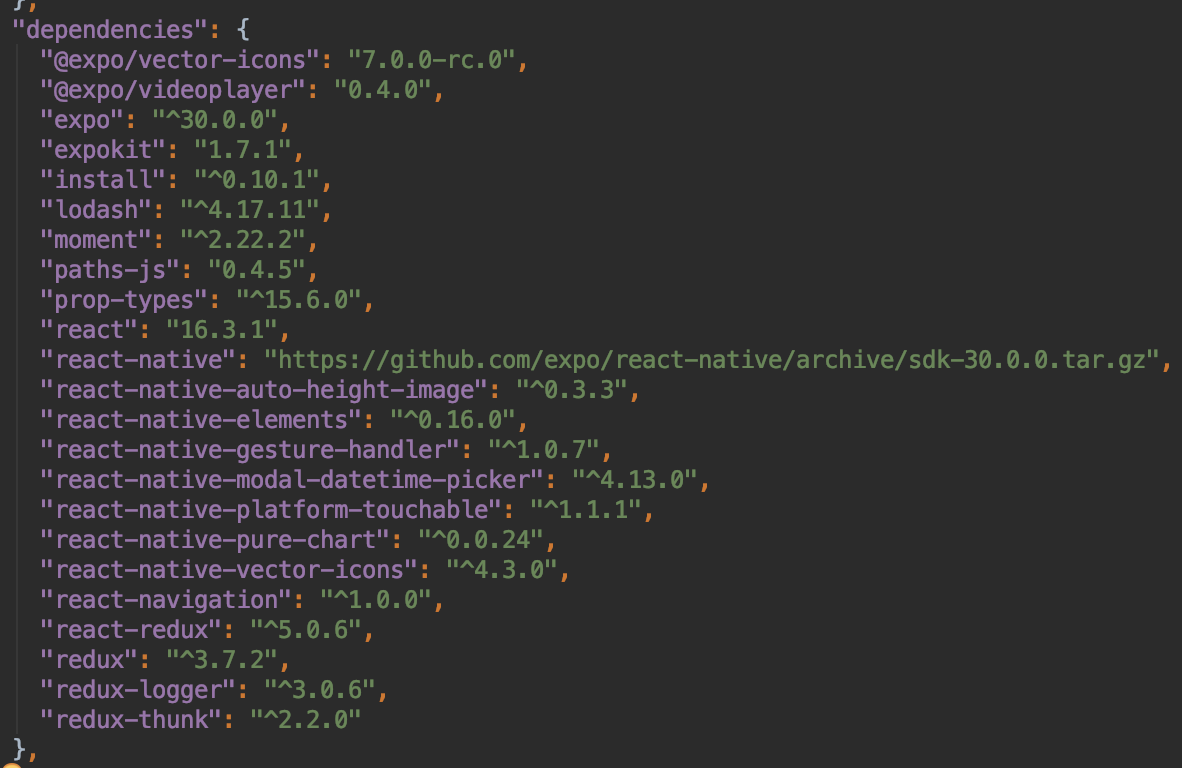
Now I don't know what to do next. I googled and followed all what I can. Nothing worked.
You guys are my last hope, before I delete React Native project and re-write it all over again with the Pure Native one.
 chillyprig
All 24 comments
@chillyprig
This issue appears to be quite common. Could you please use Product -> clean and then react-native start --reset-cache
 osdnk
on 1 Oct 2018
osdnk
on 1 Oct 2018
Thanks @osdnk I did what you've suggest.
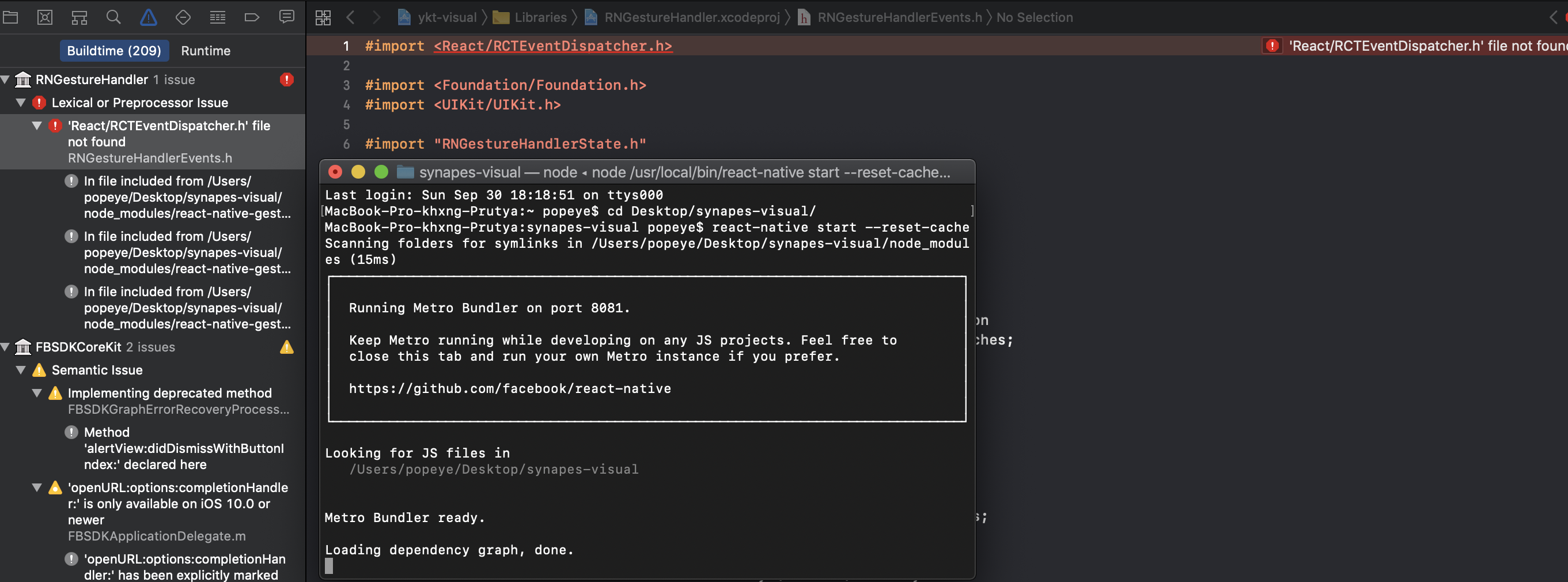
The problem still persist in my case. I really appreciated your help.
chillyprig
on 1 Oct 2018
Have you tried with legacy build system?
osdnk
on 22 Oct 2018
This issue appears to be inactive. If you still face the problem, please let us know
osdnk
on 22 Oct 2018
This issue appears to be inactive. If you still face the problem, please let us know
Hi @osdnk
my issue like @chillyprig
"react-native": "^0.57.4",
and i'm use cocoapod
 KaneNguyen
on 17 Nov 2018
KaneNguyen
on 17 Nov 2018
I have the same product because I have pod file and so I have conflict with react from ./node_modules and ./Pods.
So I deleted React from Pods and my previous problem was resolved, but now, I don't know what I have to do to resolve this issue
 gigeos
on 30 Dec 2018
gigeos
on 30 Dec 2018
@osdnk Same problem here, clearing every cache I could never resolved my issue.
Though replacing all #import <React/XXX> by #import "XXX" resolves building issues, it is in any way a solution as these files are always suppressed and redownloaded.
There seems to be an issue with how RNGestureHandler access React libraries that others don't have.
Would it be related to the old version of React (0.11.0) added and referenced in Podfile.lock by RNGestureHandler ?
In Podfile.lock
  - React (0.11.0):
    - React/Core (= 0.11.0)
  - React/Core (0.11.0)
  - RNGestureHandler (1.0.12):
    - React
I know little about Swift/Objective-C and Xcode. I've also cleaned Xcode project and rebuild multiple times and this doesn't do anything.
I also tried linking RNGestureHandler manually instead of using react-native link react-native-gesture-handler as suggested in another issue
https://github.com/kmagiera/react-native-gesture-handler/issues/179 on the same problem but this did not work for me.
 TomBerriot
on 10 Jan 2019
TomBerriot
on 10 Jan 2019
same issue here, and I couldn't resolve it. I hope, someone can help me with this:)
 haluong89
on 13 Jan 2019
haluong89
on 13 Jan 2019
I have found similar issue here:
https://github.com/bugsnag/bugsnag-react-native/issues/193#issuecomment-355166756
Could you try following it? @TomBerriot @haluong89
osdnk
on 13 Jan 2019
@haluong89
How about https://github.com/kmagiera/react-native-gesture-handler/issues/179#issuecomment-453034194?
osdnk
on 14 Jan 2019
Same issue here:
Nothing helps:
- Clearing caches
- Reinstall node, npm, node_modules etc.
- Clearing XCode build artifacts (on disk and from menu)
- Removal of Podfile
- Manual linking and thought react-native link
- Global reset (remove project, remove node and npm from dev box, checkout again, link libraries by instructions).
Eventually I modified Podfile manually (with all dependencies) and it finally start compiling. I do not publish it because it will definitely will not work for everyone.
After that it failed with "jsbundle not found" (and it is actually missing).
Nice :) After week of nightmare I have no clue why it stop working in first place and what to do next.
 ifyapishore
on 15 Jan 2019
ifyapishore
on 15 Jan 2019
This is likely caused by the project not being linked with React Native properly. I believe this is a bug in this project, not with your code. I could be wrong, but...
Solution:
Go in and add React Native as a dependency manually, clean, and rebuild the RNGestureHandler target manually.
Here's a guide to doing it:
https://github.com/facebook/react-native/issues/11721#issuecomment-270672904
 scarlac
on 20 Jan 2019
scarlac
on 20 Jan 2019
I was able to fix this by adding the following to my ios/Podfile:
pod 'React', :path => '../node_modules/react-native', :subspecs => [
  'Core',
  'CxxBridge',
  'DevSupport',
  'RCTText',
  'RCTNetwork',
  'RCTWebSocket',
  'RCTAnimation',
  # Add any other subspecs you want to use in your project
]
pod 'yoga', :path => '../node_modules/react-native/ReactCommon/yoga'

# Third party deps podspec link
pod 'DoubleConversion', :podspec => '../node_modules/react-native/third-party-podspecs/DoubleConversion.podspec'
pod 'glog', :podspec => '../node_modules/react-native/third-party-podspecs/glog.podspec'
pod 'Folly', :podspec => '../node_modules/react-native/third-party-podspecs/Folly.podspec'
When I ran pod update, I noticed this: Installing React 0.58.0-rc.2 (was 0.11.0)
This means that @TomBerriot was correct about the old react version, and if you don't manually specify the React pod in your Podfile, it will try to use the older version of React, which doesn't allow for the <React/RCTEventDispatcher.h> syntax.
 SteffeyDev
on 21 Feb 2019
SteffeyDev
on 21 Feb 2019
I can confirm that @SteffeyDev 's solution worked for me as well. None of the other solutions work. It seems that this is indeed to do with an outdated version of the React Pod being installed.
 naoey
on 5 Mar 2019
naoey
on 5 Mar 2019
Follows works good.
- remove Pods, Podfile.lock
- remove
pod RNGestureHandlerinPodfile pod install
and then Build!
 brave-merida
on 28 May 2019
brave-merida
on 28 May 2019
I have this problem but when I modify the Podfile per @SteffeyDev's comment I get:
[!] No podspec found forReactin./node_modules/react-native`
What's supposed to put the podspec into the node_modules folder? Do I need to add something to npm's package.json ?
 karenerobinson
on 10 Jun 2019
karenerobinson
on 10 Jun 2019
@karenerobinson are you sure you've added the path to the podspec correctly? Your log says ./node_modules/react-native, when in a standard RN project structure the path to node_modules would be a level above the Podfile which would make it ../node_modules/react-native
naoey
on 10 Jun 2019
Follows works good.
- remove Pods, Podfile.lock
- remove
pod RNGestureHandlerinPodfilepod install
and then Build!
I can't believe it, but just your solution solved my problem thanks man!
 blueturtle13g
on 9 Jul 2019
blueturtle13g
on 9 Jul 2019
The app is likely to crash at some point if you remove RNGestureHandler.
 hugoh59
on 6 Aug 2019
hugoh59
on 6 Aug 2019
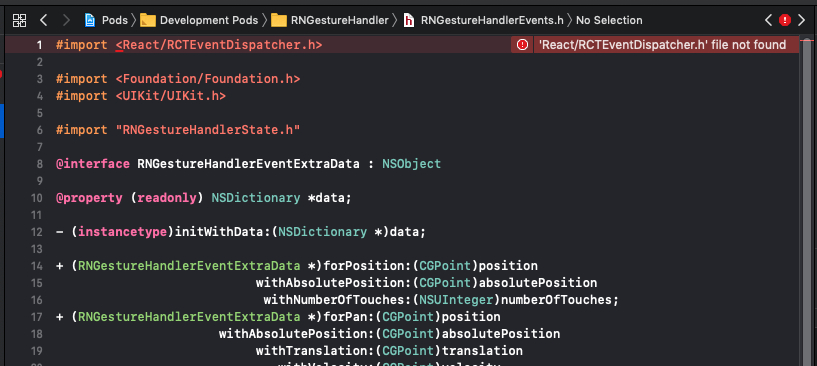
I tried every solution out there, but still, no luck fixing this.
Using version: "react-native-gesture-handler": "1.4.1"
 justinsymph
on 16 Sep 2019
justinsymph
on 16 Sep 2019
I was facing this same issue yesterday when updating from react-native-gesture-handler 1.0.16 to 1.5.0. In the past I linked react-native-gesture-handler with react-native link (even that I have pods too). What I did is run react-native unlink react-native-gesture-handler and then I add it into pods:
pod 'RNGestureHandler', :path => '../node_modules/react-native-gesture-handler'
That might be useful for anyone landing here :)
 ferrannp
on 9 Nov 2019
ferrannp
on 9 Nov 2019
upgrading with rn +60 to the latest "react-native-gesture-handler": "^1.5.2" version solution.
Do not put into your podfile! If you add that already just remove.
Follow these steps;
Go Libraries folder from remove RnGesutreHandler.xscodeproj
Go header search under build settings remove GestureHanler paths which is related GestureHandler
Go general section remove libRNGestureHandler from Frameworks and libraries
 ue
on 6 Dec 2019
ue
on 6 Dec 2019
@ferrannp fix worked for me. Thanks, I was pulling out my hair.
 dean-scott
on 19 Mar 2020
dean-scott
on 19 Mar 2020
Should be resolved in newer versions.
 jakub-gonet
on 28 Sep 2020
jakub-gonet
on 28 Sep 2020
Related issues
 chhornponleu
·
3Comments
chhornponleu
·
3Comments
 jacobrosenskold
·
3Comments
jacobrosenskold
·
3Comments
 rt2zz
·
4Comments
rt2zz
·
4Comments
 enahum
·
4Comments
enahum
·
4Comments
 TerrerSandman
·
3Comments
TerrerSandman
·
3Comments
Most helpful comment
Follows works good.
pod RNGestureHandlerinPodfilepod installand then Build!