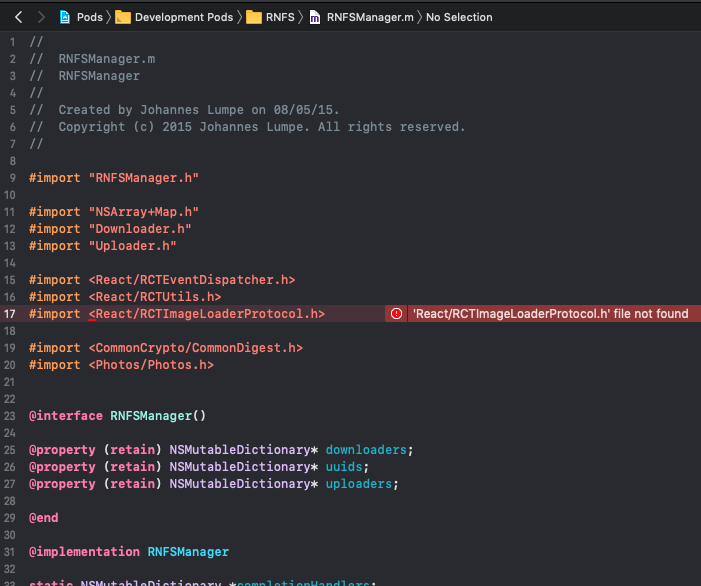
React-native-fs: Build error: 'React/RCTImageLoaderProtocol.h' file not found for react native version 0.56
The recent changes to the repo to fix the issue with RCTImageLoader for react native version >= 0.60, are failing builds in version 0.56.
RNFS Version: 2.16.1.
Should we just fix with previous version of the library?
 adkaushik
All 22 comments
I got that error when I try with react-native version 0.60.6.
RNFS Version: 2.14.1
 perfectAlways1028
on 22 Oct 2019
perfectAlways1028
on 22 Oct 2019
Same issue
RN: 0.59.9
RNFS: 2.16.1
 NobodyFlex
on 22 Oct 2019
NobodyFlex
on 22 Oct 2019
As written in README: for RN < 0.61, install 2.15
and for RN >= 0.61, install 2.16
 itinance
on 22 Oct 2019
itinance
on 22 Oct 2019
@itinance
RN: 0.60.5
RNFS: 2.15.0
You mentioned above that i should use 2.15, but i am still getting this error :-(((
Please help
 AnthonyAkentiev
on 22 Oct 2019
AnthonyAkentiev
on 22 Oct 2019
The README says for RN >= 0.57 install RNFS >= 2.13.2, and for RN >= 0.61 install RNFS >= 2.16.0.
It doesn't say that RNFS 2.16.x is not compatible with RN < 0.61.
If that is the case, then the README needs updating to be clearer.
 grit96
on 22 Oct 2019
grit96
on 22 Oct 2019
@itinance @grit96
2.15.2 worked well
2.15 didn't
AnthonyAkentiev
on 22 Oct 2019
@AnthonyAkentiev are you sure that react-native-fs 2.15.x is installed?
Please double check the include-statement in line 17 at node_modules/react-native-fs/RNFSManager.m
itinance
on 22 Oct 2019
@itinance Please see my prev.comment above.
2.15.2 worked well, thank you!
AnthonyAkentiev
on 22 Oct 2019
Changing
#import <React/RCTImageLoaderProtocol.h>
to
#import <React/RCTImageLoader.h>
fixed the build issue for me
Don't forget to clean your DerivedData folder
 AlanKeiss
on 22 Oct 2019
AlanKeiss
on 22 Oct 2019
For RN 0.60.5 use 2.15.2
For RN 0.61 use 2.16
 mattslight
on 24 Oct 2019
mattslight
on 24 Oct 2019
If you are breaking API then you must up MAJOR version! whats wrong with you?
 viventus
on 28 Oct 2019
viventus
on 28 Oct 2019
Instead of changing #import statement again again and again, why don't you use a suitable version like @mattslight said !!
 luatnd
on 29 Oct 2019
luatnd
on 29 Oct 2019
Updating to 2.16.1 broke my build .Rolling back to 21.15.2 fixed it. @mattslight thanks!
"react": "^16.9.0",
"react-native": "0.60.6",
"react-native-fs": "^2.16.1",
/myapp/source/node_modules/react-native-fs/RNFSManager.m:17:9: fatal error:
'React/RCTImageLoaderProtocol.h' file not found
import
^~~~~~~~~~~~~~~~~~~~~~~~~~~~~~~~
1 error generated.
````
yarn add [email protected]
 esutton
on 1 Nov 2019
esutton
on 1 Nov 2019
This is not working. I'm running:
"react": "16.8.3",
"react-native": "0.61.3",
"react-native-fs": "2.16.1"
It looks like the latest version of RN isn't compatible with RNFS? Not sure if I'm missing something.
Also tried downgrading to 2.15.2, the same issue.
 abury
on 4 Nov 2019
abury
on 4 Nov 2019
I'm running React Native 0.59.9. Downgrading to 2.14.1 worked for me. Agree that making the readme more clear would be good.
 Miyou
on 5 Nov 2019
Miyou
on 5 Nov 2019
Just to clarify,
this doesn't work: "react-native-fs": "^2.15.2"
and
this works: "react-native-fs": "2.15.2"
removing caret symbol solved it for me & cleaning derivedData
rm -rf ~/Library/Developer/Xcode/DerivedData
 vforvasile
on 7 Nov 2019
vforvasile
on 7 Nov 2019
Just to clarify,
this doesn't work:
"react-native-fs": "^2.15.2"
and
this works:"react-native-fs": "2.15.2"removing caret symbol solved it for me & cleaning derivedData
rm -rf ~/Library/Developer/Xcode/DerivedData
Work well ! Thanks !
 mgfjx
on 13 Nov 2019
mgfjx
on 13 Nov 2019
If you are breaking API then you must up MAJOR version! whats wrong with you?
This is a react-native related project. It's literally part of the react-native style guide to make major breaking changes in minor maintenance releases and then poorly documented those changes.
 simplepanda
on 13 Dec 2019
simplepanda
on 13 Dec 2019
"react": "16.8.3",
"react-native": "0.59.9",
"react-native-fs": "^2.13.2"
still getting error
 theromie
on 17 Dec 2019
theromie
on 17 Dec 2019
i have same issue in rn :59/8 and installed all version of rnfs it works correctly in android but in ios get error 'React/RCTImageLoader.h' file not found
 sootood
on 7 Jan 2020
sootood
on 7 Jan 2020
I believe this is now fixed in bbafdc122af013b9f8a3998078ed488de81f186d as of v2.16.4
grit96
on 17 Feb 2020
replacing
#import <React/RCTImageLoader.h>
with
#import <React/RCTImage.h>
works to me.
 chaloxc
on 7 Jul 2020
chaloxc
on 7 Jul 2020
Related issues
 1556173267
·
3Comments
1556173267
·
3Comments
 wmonecke
·
3Comments
wmonecke
·
3Comments
 opoze
·
3Comments
opoze
·
3Comments
 PimDeWitte
·
4Comments
PimDeWitte
·
4Comments
 let-aurn
·
3Comments
let-aurn
·
3Comments
Most helpful comment
Changing
#import <React/RCTImageLoaderProtocol.h>to
#import <React/RCTImageLoader.h>fixed the build issue for me
Don't forget to clean your DerivedData folder