React-native-fs: Installing from Podfile fails
Might be related to #258. Adding RNFS using cocoapods leads to build failure.
I'll try to be as thorough as possible–
From my package.json, you can see that I'm using:
"react": "16.0.0-alpha.12",
"react-native": "0.45.1",
"react-native-fs": "^2.3.3",
The following is my Podfile:
target 'myapp' do
    pod 'RNFS', :path => '../node_modules/react-native-fs'
end
While building, I get the following errors from the react-native CLI:
/Applications/MAMP/htdocs/myapp/node_modules/react-native-fs/RNFSManager.m:17:9: fatal error: 'React/RCTImageLoader.h' file not found
#import <React/RCTImageLoader.h>
        ^
1 error generated.

** BUILD FAILED **


The following build commands failed:

CompileC /Applications/MAMP/htdocs/myapp/ios/build/Build/Intermediates/Pods.build/Debug-iphonesimulator/RNFS.build/Objects-normal/x86_64/RNFSManager.o /Applications/MAMP/htdocs/myapp/node_modules/react-native-fs/RNFSManager.m normal x86_64 objective-c com.apple.compilers.llvm.clang.1_0.compiler
(1 failure)
This results in the following error represented in the simulator:

This results in the following error represented in Xcode:
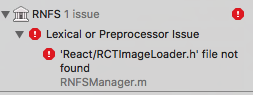
Things I've tried:
- I've cleaned the build
- killed/restarted package manager
- cleaned out and reinstalled NPM
- removed all other pods to ensure that this is isolated to RNFS
I'm wondering if this has to do with the Cocoapod's dependency on an outdated version of React?
I noticed the following while running pod install:
Analyzing dependencies
Fetching podspec for `RNFS` from `../node_modules/react-native-fs`
Downloading dependencies
Installing RNFS (2.3.3)
Installing React (0.11.0)
Generating Pods project
Integrating client project
Sending stats
Pod installation complete! There is 1 dependency from the Podfile and 2 total pods installed.
Any help is appreciated.
 colewinans
All 24 comments
Same issue here
 spaquis
on 30 Jun 2017
spaquis
on 30 Jun 2017
For me it seems like a wrong and outdated version of React-Lib will be installed thru Pods. Can someone confirm?
 itinance
on 30 Jun 2017
itinance
on 30 Jun 2017
same issue
 tnmendes
on 4 Jul 2017
tnmendes
on 4 Jul 2017
Same, any idea how to fix this guys?
 reense
on 14 Jul 2017
reense
on 14 Jul 2017
I've updated the Podspecs-File similar to other common RN-Libraries, but i still can't publish the Podspec on Cocoapods due to an error, that cocoapods will still require React 0.11.0, which is wrong and oudated.
Any Ideas someone?
$ pod trunk push RNFS.podspec
Updating spec repo `master`
CocoaPods 1.3.0.beta.2 is available.
To update use: `sudo gem install cocoapods --pre`
[!] This is a test version we'd love you to try.
For more information, see https://blog.cocoapods.org and the CHANGELOG for this version at https://github.com/CocoaPods/CocoaPods/releases/tag/1.3.0.beta.2
Validating podspec
-> RNFS
-> RNFS (2.5.1)
- WARN | github_sources: Github repositories should end in `.git`.
- ERROR | [iOS] xcodebuild: Returned an unsuccessful exit code. You can use `--verbose` for more information.
- WARN | xcodebuild: React/React/Base/RCTBatchedBridge.m:170:7: warning: unused variable 'cookie' [-Wunused-variable]
- WARN | xcodebuild: React/React/Executors/RCTContextExecutor.m:560:7: warning: comparison of function 'JSGlobalContextSetName' not equal to a null pointer is always true [-Wtautological-pointer-compare]
- NOTE | xcodebuild: React/React/Executors/RCTContextExecutor.m:560:7: note: prefix with the address-of operator to silence this warning
- WARN | xcodebuild: React/React/Base/RCTRootView.m:230:17: warning: method override for the designated initializer of the superclass '-initWithFrame:' not found [-Wobjc-designated-initializers]
- NOTE | xcodebuild: /Applications/Xcode.app/Contents/Developer/Platforms/iPhoneSimulator.platform/Developer/SDKs/iPhoneSimulator10.3.sdk/System/Library/Frameworks/UIKit.framework/Headers/UIView.h:150:1: note: method marked as designated initializer of the class here
- WARN | xcodebuild: RNFS/Downloader.m:80:54: warning: format specifies type 'size_t' (aka 'unsigned long') but the argument has type 'unsigned int' [-Wformat]
- WARN | [iOS] xcodebuild: RNFS/Downloader.m:64:47: warning: implicit conversion loses integer precision: 'long long' to 'long' [-Wshorten-64-to-32]
- WARN | [iOS] xcodebuild: RNFS/Downloader.m:120:47: warning: incompatible pointer to integer conversion sending 'NSString *' to parameter of type 'NSInteger' (aka 'int') [-Wint-conversion]
- NOTE | xcodebuild: /Applications/Xcode.app/Contents/Developer/Platforms/iPhoneSimulator.platform/Developer/SDKs/iPhoneSimulator10.3.sdk/System/Library/Frameworks/Foundation.framework/Headers/NSError.h:72:71: note: passing argument to parameter 'code' here
- NOTE | [iOS] xcodebuild: RNFS/RNFSManager.h:9:9: fatal error: 'React/RCTBridgeModule.h' file not found
- WARN | [iOS] xcodebuild: RNFS/Downloader.m:120:47: warning: incompatible pointer to integer conversion sending 'NSString *' to parameter of type 'NSInteger' (aka 'long') [-Wint-conversion]
- ERROR | [OSX] unknown: Encountered an unknown error (The platform of the target `App` (OS X 10.10) is not compatible with `React (0.11.0)`, which does not support `osx`.) during validation.
[!] The spec did not pass validation, due to 2 errors and 8 warnings.
[!] The validator for Swift projects uses Swift 3.0 by default, if you are using a different version of swift you can use a `.swift-version` file to set the version for your Pod. For example to use Swift 2.3, run:
`echo "2.3" > .swift-version`.
[!] React has been deprecated
@itinance
can you publish podspec you tried to push?
have you tried removing support of osx from here https://github.com/itinance/react-native-fs/blob/master/RNFS.podspec#L14? it seems to be related to
- ERROR | [OSX] unknown: Encountered an unknown error (The platform of the target `App` (OS X 10.10) is not compatible with `React (0.11.0)`, which does not support `osx`.) during validation.
 maxkomarychev
on 3 Aug 2017
maxkomarychev
on 3 Aug 2017
You can get rid of
[!] The validator for Swift projects uses Swift 3.0 by default, if you are using a different version of swift you can use a
.swift-versionfile to set the version for your Pod. For example to use Swift 2.3, run:
echo "2.3" > .swift-version.
by updating cocoapods to latest available version - 1.3.0 via gem update cocoapods
Not sure yet what causes xcodebuild error
maxkomarychev
on 3 Aug 2017
Thank you for your advice, @maxkomarychev. I've updated cocoapods to 1.3.0 and got rid of the swift-error.
But i am still unable to push the current version to Cocoapods due to the same issue:
it will for some reason constantly install React 0.11, which is deprecated and outdated. Hence any compilation fails.
Can somebody explain, why pods will still install React 0.11 as dependency?
Comparing resolved specification to the sandbox manifest
A RNFS
A React
Downloading dependencies
-> Installing RNFS (2.5.2)
> Copying RNFS from `/Users/hagen/Library/Caches/CocoaPods/Pods/External/RNFS/cae72b0a2bf63b140e3d409d417bb9dd-70077` to `../../../../private/var/folders/cj/c_zjt5x12ps_6q93t023qc4w0000gn/T/CocoaPods-Lint-20170803-32572-1hjk84c-RNFS/Pods/RNFS`
-> Installing React (0.11.0)
> Copying React from `/Users/hagen/Library/Caches/CocoaPods/Pods/Release/React/0.11.0-ab1a2` to `../../../../private/var/folders/cj/c_zjt5x12ps_6q93t023qc4w0000gn/T/CocoaPods-Lint-20170803-32572-1hjk84c-RNFS/Pods/React`
- Running pre install hooks
Even if i clear the cache it will always pull out React 11 instead of React 16.
itinance
on 3 Aug 2017
Okay, React on cocoapods is outdated: https://github.com/CocoaPods/Specs/tree/master/Specs/5/0/c/React
Latest stable version is 0.11. Thats why it constantly will install React 11.
itinance
on 3 Aug 2017
Yeah, that's because react-native guys don't publich react podspec into public repo, they ask you to use local dependency from within node_modules. This is only works for requiring it from Podfile, can't be done for podspec
maxkomarychev
on 3 Aug 2017
The original problem of the topic seems to be caused by the fact that subspec RCTImage of react-native is not installed.
@colewinans can you share your Podfile and Podfile.lock?
You can also try fixing this by having this in your Podfile:
    pod 'React', :path => '../node_modules/react-native', :subspecs => [
        // other subspecs you may already have here
        'RCTImage',
    ]
+1
same issue
 iamblue
on 10 Dec 2017
iamblue
on 10 Dec 2017
Do you mind moving the podspec file to somewhere else if cocoapods are not supported anymore. React-native link gets confused.
 berkcoker
on 20 Dec 2017
berkcoker
on 20 Dec 2017
@berkcoker i am thinking about the same. Since nobody could help here lets try out. Give me a minute
itinance
on 20 Dec 2017
I've finally fixed it apparently. Please checkout v2.9.6 and test it.
If still react v11 will be installed it happens due to another library of your package.json or Podfile.
But not anymore with this library :)
If so, then you should comment the others out for testing.
You can complete get rid of any cocoapods-installation and start from scratch within an existing application with the command "pod deintegrate". This will remove everything that has been installed accidentely. After this one can start from scratch with "pod install"
I will close this ticket now. Feel free to reopen if you experience new issues.
itinance
on 21 Dec 2017
I have react-native-fs 2.9.6 and it still installs React 0.11 pod for me. I've removed all other pods to isolate this issue to react-native-fs.
 jasdeepsingh
on 10 Jan 2018
jasdeepsingh
on 10 Jan 2018
2.9.11 same issue.
 AndreyMalykhin
on 26 Feb 2018
AndreyMalykhin
on 26 Feb 2018
I've managed to get everything working by doing a combination of stuff mentioned in the thread.
first i did the pod deintegrate
second i manually updated my Podfile to include this
  pod 'yoga', :path => '../node_modules/react-native/ReactCommon/yoga'
  pod 'React', :path => '../node_modules/react-native', :subspecs => [
    'RCTImage',
  ]
and lastly i did pod install.
everything was fine after that.
But notice i had to add the 'yoga' lib in pods as well since React/Core depends on it.
Hope this helps anyone in the future.
 boogie666
on 15 Mar 2018
boogie666
on 15 Mar 2018
I had this same issue, and after experimenting a bit, adding this to my Podfile is what made it all work for me:
pod 'React', :path => '../node_modules/react-native', :subspecs => [
  'Core',
  'CxxBridge',
  'DevSupport',
  'RCTActionSheet',
  'RCTAnimation',
  'RCTBlob',
  'RCTCameraRoll',
  'RCTImage',
  'RCTNetwork',
  'RCTPushNotification',
  'RCTSettings',
  'RCTText',
  'RCTVibration',
  'RCTWebSocket',
  'RCTLinkingIOS'
]

# Explicitly include Yoga if you are using RN >= 0.42.0
pod 'yoga', :path => '../node_modules/react-native/ReactCommon/yoga'
Note that I did not run pod deintegrate.
 alax
on 12 Jun 2018
alax
on 12 Jun 2018
2.11.15
same issue!!
 asapping99
on 4 Sep 2018
asapping99
on 4 Sep 2018
My problem is solved by adding this line
pod 'React', :path => '../node_modules/react-native', :subspecs => [
'RCTImage',
]
then pod install
react-native link.
Now some other issue is there that says 'linker command failed' but that seem to be a total different issue
Thanks
 mitalisrivastava
on 6 Dec 2018
mitalisrivastava
on 6 Dec 2018
@mitalisrivastava thanks, it works for me
 c1ngular
on 11 Mar 2019
c1ngular
on 11 Mar 2019
@itinance How about adding this workaround to README.md?
 vieiralucas
on 5 Jul 2019
vieiralucas
on 5 Jul 2019
2.16.2 same issue. I'm on RN 0.59.9. Linking works, pod install works fine, but building fails.
 naderghanbari
on 14 Jan 2020
naderghanbari
on 14 Jan 2020
Related issues
 wangfpp
·
3Comments
wangfpp
·
3Comments
 nishanBende
·
3Comments
nishanBende
·
3Comments
 let-aurn
·
3Comments
let-aurn
·
3Comments
 barnir
·
3Comments
barnir
·
3Comments
 wmonecke
·
3Comments
wmonecke
·
3Comments
Most helpful comment
The original problem of the topic seems to be caused by the fact that subspec
RCTImageofreact-nativeis not installed.@colewinans can you share your
PodfileandPodfile.lock?You can also try fixing this by having this in your
Podfile: