React-native-firebase: [🐛] Unable to register a new iOS app with Firebase Crashlytics
Issue
I unable to register a new iOS app with Firebase Crashlytics.
Firebase dashboard keeps loading.
I could do it on Android but iOS seems to load forever (at least half-day without changes)
Note: Firebase Analytics and Performance still work very well and I can track it on Firebase dashboard

Project Files
Javascript
import crashlytics from '@react-native-firebase/crashlytics'

<Button label="Force a Crash" onPress={() => crashlytics().crash()} />
package.json:
"dependencies": {
    "@react-native-firebase/analytics": "^10.0.0",
    "@react-native-firebase/app": "^10.0.0",
    "@react-native-firebase/crashlytics": "^10.0.0",
    "react": "16.13.1",
    "react-native": "0.63.3",
  },
firebase.json for react-native-firebase v6:
{
  "react-native": {
    "crashlytics_auto_collection_enabled": true,
    "crashlytics_debug_enabled": true,
    "crashlytics_disable_auto_disabler": true
  }
}
iOS
ios/Podfile:
- [ ] I'm not using Pods
- [x] I'm using Pods and my Podfile looks like:
require_relative '../node_modules/react-native/scripts/react_native_pods'
require_relative '../node_modules/@react-native-community/cli-platform-ios/native_modules'

platform :ios, '11.4'

target 'example' do
  inhibit_all_warnings! # hide all warnings

  config = use_native_modules!
  use_react_native!(:path => config["reactNativePath"])

  target 'exampleTests' do
    inherit! :complete
    # Pods for testing
  end

  # Enables Flipper.
  #
  # Note that if you have use_frameworks! enabled, Flipper will not work and
  # you should disable these next few lines.
  use_flipper!
  post_install do |installer|
    flipper_post_install(installer)
    installer.pods_project.targets.each do |target|
      target.build_configurations.each do |config|
        config.build_settings['IPHONEOS_DEPLOYMENT_TARGET'] = '11.4' #Force all dependencies to use deployment target 11.4 since React Native Navigation required 11.0 and up
      end
    end
  end
end

target 'example-tvOS' do
  # Pods for example-tvOS

  target 'example-tvOSTests' do
    inherit! :complete
    # Pods for testing
  end
end
AppDelegate.m:
// N/A
Environment
Click To Expand
**`react-native info` output:**
System:
    OS: macOS 11.0.1
    CPU: (8) x64 Intel(R) Core(TM) i7-4770HQ CPU @ 2.20GHz
    Memory: 428.36 MB / 16.00 GB
    Shell: 5.8 - /bin/zsh
  Binaries:
    Node: 14.10.1 - ~/.nvm/versions/node/v14.10.1/bin/node
    Yarn: 1.22.5 - ~/.nvm/versions/node/v14.10.1/bin/yarn
    npm: 6.14.8 - ~/.nvm/versions/node/v14.10.1/bin/npm
    Watchman: 4.9.0 - /usr/local/bin/watchman
  Managers:
    CocoaPods: 1.10.0 - /usr/local/bin/pod
  SDKs:
    iOS SDK:
      Platforms: iOS 14.2, DriverKit 20.0, macOS 11.0, tvOS 14.2, watchOS 7.1
    Android SDK:
      Android NDK: 22.0.6917172-beta1
  IDEs:
    Android Studio: 4.1 AI-201.8743.12.41.6953283
    Xcode: 12.2/12B45b - /usr/bin/xcodebuild
  Languages:
    Java: 13.0.2 - /usr/bin/javac
    Python: 2.7.16 - /usr/bin/python
  npmPackages:
    @react-native-community/cli: Not Found
    react: 16.13.1 => 16.13.1
    react-native: 0.63.3 => 0.63.3
    react-native-macos: Not Found
  npmGlobalPackages:
    *react-native*: Not Found
 anhtuank7c
All 14 comments
I am getting same issue from last three weeks
 ahtisham09
on 18 Nov 2020
ahtisham09
on 18 Nov 2020
Have you triggered a test crash then restarted the app (so the crash sends)? You didn't specify
I know that Crashlytics was somewhat hooked to analytics for detection if you had connected or not to get past that page, but with a test crash uploaded it should work
 mikehardy
on 18 Nov 2020
mikehardy
on 18 Nov 2020
@mikehardy I did trigger some test cash, restart the app, simulator in both js and native side.
For Js: crashlytics().crash()
For native Swift: fatalError()
Besides that, the Firebase Analytics work just fine and I could see the analytics summary in the Firebase Dashboard.
anhtuank7c
on 19 Nov 2020
That is really frustrating! I'm not sure what it could be then. You're sure dsyms are uploaded?
mikehardy
on 19 Nov 2020
@mikehardy Yes of course. I uploaded it manually.
anhtuank7c
on 19 Nov 2020
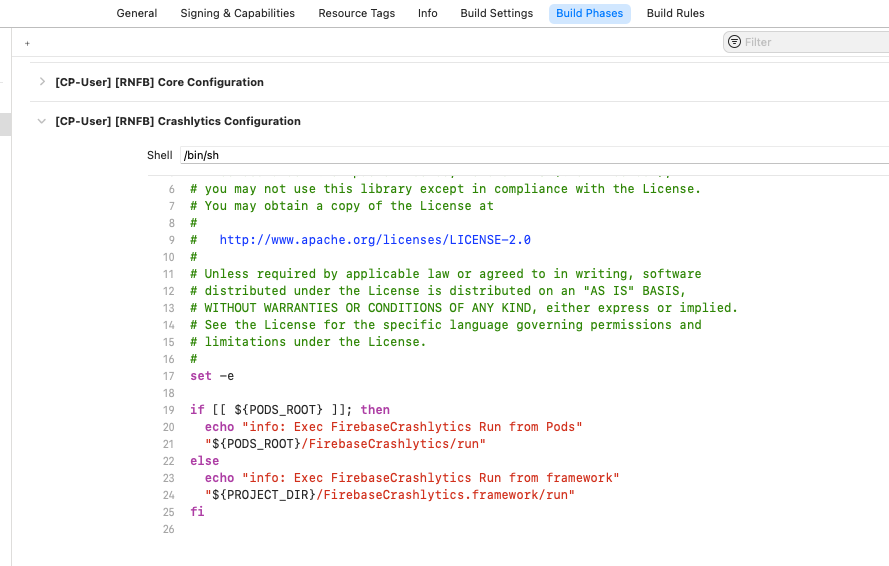
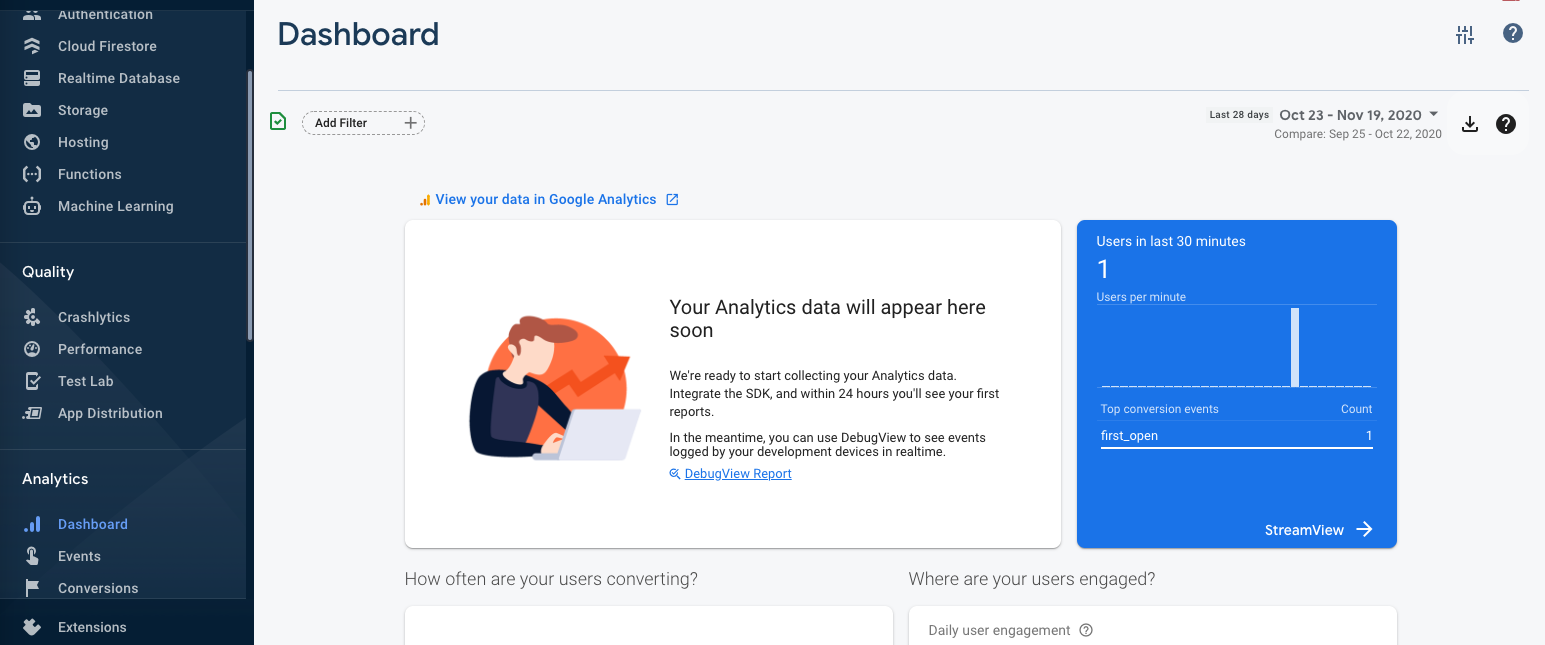
I added some more information to this issue:
Crashlytics log in xCode

Upload dSYM file result

Analytics Dashboard
anhtuank7c
on 20 Nov 2020
what is weird is that it does not show any unsent reports. It thinks it is sending them - when there are unsent reports you can see them in the logs normally (and I think we recently added an API to get the count?). I sincerely apologize, but I'm stumped on this one
mikehardy
on 20 Nov 2020
Alright, I push code to this repo. Please help to check it out.
https://github.com/anhtuank7c/rnfbdemo
anhtuank7c
on 20 Nov 2020
@anhtuank7c I had a similar experience to you. I had to go ahead and add $FirebaseSDKVersion = '7.0.0' to this line here in the Podfile and it seems to work now. Hope it helps.
Based off docs
 jnrepo
on 6 Dec 2020
jnrepo
on 6 Dec 2020
As a note, if you do that, you are now responsible for tracking the underlying SDK releases yourself, you won't automatically get updates pulled in by our default setting in @react-native-firebase/app. We are already on 7.1.0 in app, and 7.2.0 is out and tested and working and I'll release it as v10.2.0 here shortly but your override will keep you on 7.2.0 unless you track https://firebase.google.com/support/release-notes/ios yourself and do the updates. As with all things this is not good or bad, just tradeoffs.
Cheers!
mikehardy
on 7 Dec 2020
I am as well facing the same issue.. Android works fine.
 sagarguhe
on 8 Dec 2020
sagarguhe
on 8 Dec 2020
Got the same issue. When testing and looking at xCode console, I got the following when calling await crashlytics().crash();:

Maybe it can help
 Copdate-Copdate
on 15 Dec 2020
Copdate-Copdate
on 15 Dec 2020
Images never really help me when debugging sorry. Full stack traces pasted in triple-backticks (for github markdown formatting) help
mikehardy
on 15 Dec 2020
@Copdate-Copdate it is documented that if you try to do a test crash while a debugger is attached it will capture the crash. So it's working as expected.
mikehardy
on 15 Dec 2020
Related issues
 Damnum
·
3Comments
Damnum
·
3Comments
 escobar5
·
3Comments
escobar5
·
3Comments
 joecaraccio
·
3Comments
joecaraccio
·
3Comments
 alizahid
·
3Comments
alizahid
·
3Comments
 rtman
·
3Comments
rtman
·
3Comments
Most helpful comment
I am getting same issue from last three weeks