React-native-firebase: Android - Error: AndroidNotification: Missing required `channelId` property - Local Notifications
Issue
Currently local notifications on android api > 26 are not working because we are not populating the channelId.
Example of code on JS land:
  onNotification = (notification: Notification) => {
    firebase.notifications().displayNotification(notification);
  };
This happens because the Notification created has no way to infer the channel id from the RemoteMessage.Notification sent from Firebase, see api here:
And how we are building it here: https://github.com/invertase/react-native-firebase/blob/d101813b5fc67c9f2da5d664f711b5113781163b/android/src/main/java/io/invertase/firebase/notifications/RNFirebaseNotifications.java#L273-L288
See image:
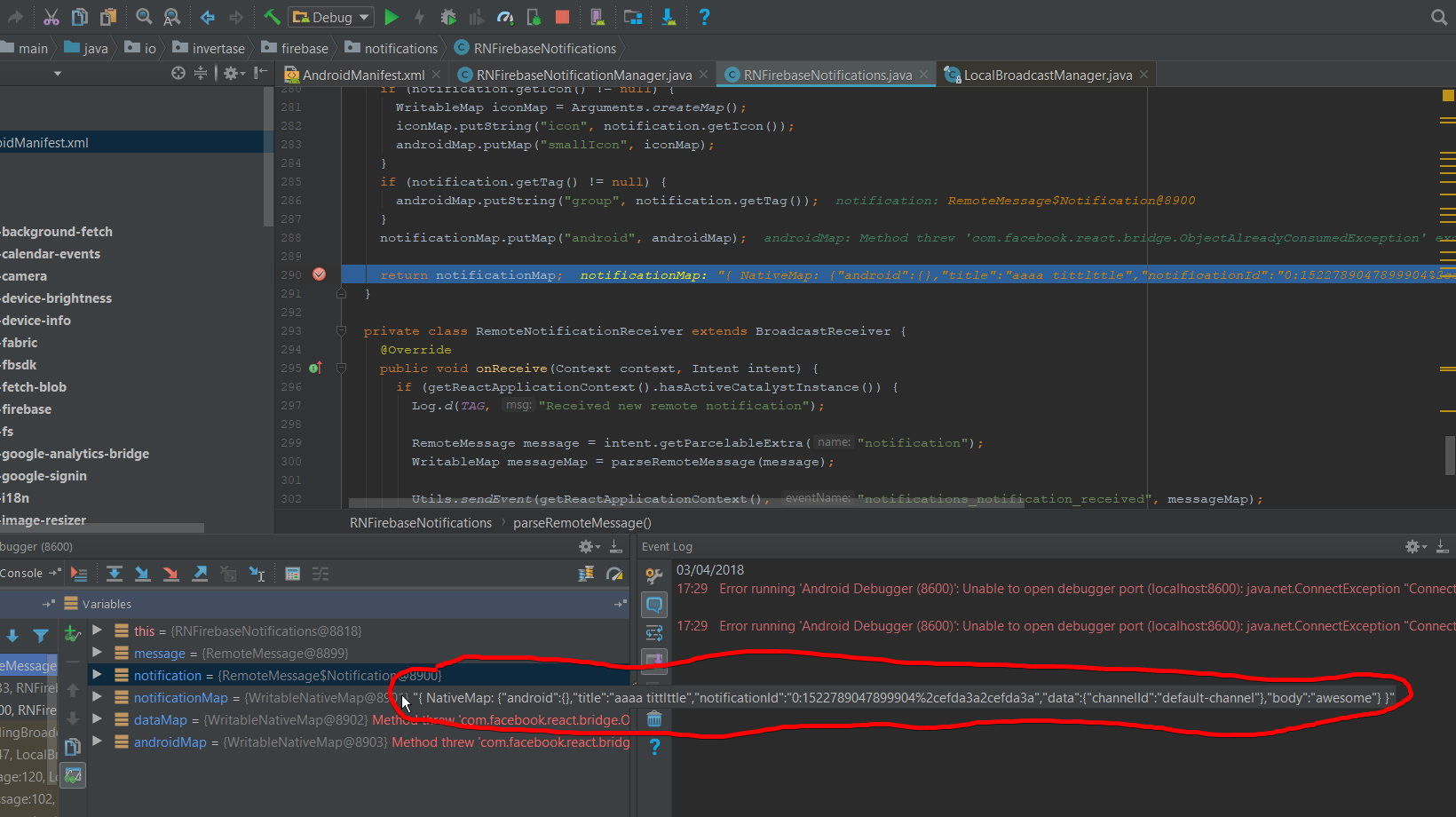
There is a question on SO for this exact problem: https://stackoverflow.com/q/46910621/710693
The way I got around this was to rebuild the notification object and pass the channelId as an additional property:
  onNotification = (notification: Notification) => {
    // eslint-disable-next-line
    console.log('onNotification: ', notification);

    const localNotification = new firebase.notifications.Notification()
      .setNotificationId(notification.notificationId)
      .setTitle(notification.title)
      .setSubtitle(notification.subtitle)
      .setBody(notification.body);

    if (Platform.OS === 'android') {
      localNotification._android._channelId = notification.data.channelId;
    }

    firebase.notifications().displayNotification(localNotification);
  };
Environment
Android
- Application Target Platform:
N/A
- Development Operating System:
N/A
- Build Tools:
N/A
- React Native version:
v53
- RNFirebase Version:
v4
- Firebase Module:
Notifications
 JCMais
All 9 comments
@JCMais I'm not sure there's anything we can really do here given, as you say, the channel ID isn't available from the FCM API. We could start having custom properties within the data part of the message that automatically get picked up by RNFirebase, but this starts enforcing structure and hidden behaviour which isn't in control of you, the developer.
The approach you have adopted makes sense, however, you shouldn't have to completely rebuild the notification. Instead, you should just be able to do the following:
  onNotification = (notification: Notification) => {
    notification.android.setChannelId(notification.data.channelId);
    firebase.notifications().displayNotification(notification);
  };
I'll add a note to the documentation explaining that the remote notification on android will be missing the notification ID.
 chrisbianca
on 4 Apr 2018
chrisbianca
on 4 Apr 2018
I'll add a note to the documentation explaining that the remote notification on android will be missing the notification ID.
Please do, the purpose of the issue was just to let know of that issue with the FCM api
JCMais
on 4 Apr 2018
Thanks, I have done here: https://github.com/invertase/react-native-firebase-docs/commit/bb2b894c4e70ef39dd9b47a59a70f4eebabec06c
chrisbianca
on 4 Apr 2018
@JCMais I have same issue, how did you solve it?
 adirzoari
on 16 May 2018
adirzoari
on 16 May 2018
We have this problem as well. I'm a little confused about the fix suggested here. If the app is in the foreground the notification was never displayed, so it seems that the API should make it easy to displayNotification that incoming message or opt into automatically displaying it for you. Right now the API feels broken by default since notifications are suppressed when in the foreground, but the API makes it non-obvious how to display them again.
 esprehn
on 7 Jun 2018
esprehn
on 7 Jun 2018
any updates? have the same problem...
 guitar9
on 19 Jul 2018
guitar9
on 19 Jul 2018
@esprehn it is easy to call displayNotification on an incoming message like you suggested;
Here's an example of how to do so:
import React, { Component } from 'react';
import firebase from 'react-native-firebase';
import { Text, View } from 'react-native';

// optional flow type
import type { Notification } from 'react-native-firebase';

class Root extends Component {
  onNotification = (notification: Notification) => {
    // modify your notification if required e.g. for this issue:
    notification.android.setChannelId(notification.data.channelId);
    // then display it by calling displayNotification
    firebase.notifications().displayNotification(notification);
  };

  componentDidMount() {
    this.unsubscribe = firebase.notifications().onNotification(this.onNotification);
  }

  componentWillUnmount() {
    this.unsubscribe();
  }

  render() {
    return (
      <View>
        <Text>Hello World</Text>
      </View>
    );
  }
}
Hope that helps! There's also a more detailed example here: https://github.com/invertase/react-native-firebase/issues/988#issuecomment-383175789 by @mitchellbutler
Loving react-native-firebase and the support we provide? Please consider supporting us with any of the below:
- 👉 Back financially via Open Collective
- 👉 Follow
React Native FirebaseandInvertaseon Twitter - 👉 Star this repo on GitHub ⭐️
 Salakar
on 21 Jul 2018
Salakar
on 21 Jul 2018
Hi, I could not set channel Id for android
onNotification = (notification: Notification) => {
    // modify your notification if required e.g. for this issue:
    notification.android.setChannelId(notification.data.channelId);
    // then display it by calling displayNotification
    firebase.notifications().displayNotification(notification);
  };
In the above code for me 'notification.data' does not contain 'channelId'.
If I want to create Chanel, where I want to create it.
Help me.
 EdisonDevadoss
on 21 Nov 2019
EdisonDevadoss
on 21 Nov 2019
@EdisonDevadoss
docs to create a channel
Then, you need to include your channelId in the data section of you notification. How you do it depends on how you send a notification in the first place.
a post request body would look something like:
{
    "to": "RECIPIENT_TOKEN",
    "notification": {
        "body": "notification body",
        "title": "notification title",
        "android_channel_id": "YOUR_CHANNEL_ID"
    },
    "data": {
        "channelId": "YOUR_CHANNEL_ID"
    }
}
 vehsuga
on 27 Nov 2019
vehsuga
on 27 Nov 2019
Related issues
 mahyarr
·
3Comments
mahyarr
·
3Comments
 jonaseck2
·
3Comments
jonaseck2
·
3Comments
 ODelibalta
·
3Comments
ODelibalta
·
3Comments
 joecaraccio
·
3Comments
joecaraccio
·
3Comments
 escobar5
·
3Comments
escobar5
·
3Comments
Most helpful comment
@JCMais I'm not sure there's anything we can really do here given, as you say, the channel ID isn't available from the FCM API. We could start having custom properties within the data part of the message that automatically get picked up by RNFirebase, but this starts enforcing structure and hidden behaviour which isn't in control of you, the developer.
The approach you have adopted makes sense, however, you shouldn't have to completely rebuild the notification. Instead, you should just be able to do the following:
I'll add a note to the documentation explaining that the remote notification on android will be missing the notification ID.