React-native-firebase: Crash when signInWithPhoneNumber
I'm trying to use signinWithPhoneNumber, but it is always crashing with the following message:
Please register custom URL scheme 'com.googleusercontent.apps.711281515158-jccuuigsa4851bub2f1dfo5qcfihd469' in the app's Info.plist file.' was thrown while invoking signInWithPhoneNumber on target RNFirebaseAuth with params (
"__FIRAPP_DEFAULT",
2392159312,
2538,
2539
)
I followed all steps to configure RNFirebase on the project, from npm package to XCode stuff. What I'm doing wrong?
Environment
Application Target Platform:
iOSDevelopment Operating System:
Mac OS High SierraBuild Tools:
XCode 9React Native version:
0.49.3RNFirebase Version:
3.0.5Firebase Module:
auth
 ararog
All 12 comments
@ararog you need to follow steps 1 & 2 from the official firebase ios docs to add the url schema. Note that this also will not work on an emulator, phone auth requires a physical device.
 Salakar
on 30 Oct 2017
Salakar
on 30 Oct 2017
If it helps, when enabling Auth, is required to download the GoogleService-info again.
 gusgard
on 28 Nov 2017
gusgard
on 28 Nov 2017
Thank you @gusgard, that's not an obvious thing to do and it was just what I needed.
 jmhuret
on 12 Jan 2018
jmhuret
on 12 Jan 2018
Hey guys, sorry reopening this thread, but I've made the steps 1 and 2 to enable silent notifications, but my react native app is crashing asking for configure the URL link is need for recaptcha mode. when I configure this url, everything runs fine, but in the middle of the process, firebase still opening the Verifying If you're not a robot.
I definitely need help with that...
 lucasfernandes
on 26 Jan 2018
lucasfernandes
on 26 Jan 2018
Kind of stuck on this, just tried to setup the phone auth and getting 'Please register custom url scheme'. What should i do?
 joshbedo
on 16 Mar 2018
joshbedo
on 16 Mar 2018
I fixed it by following the steps in #2 to enable recaptcha verification, specifically:
Add custom URL schemes to your Xcode project:
Open your project configuration: double-click the project name in the left tree view. Select your app from the TARGETS section, then select the Info tab, and expand the URL Types section.
Click the + button, and add a URL scheme for your reversed client ID. To find this value, open the GoogleService-Info.plist configuration file, and look for the REVERSED_CLIENT_ID key. Copy the value of that key, and paste it into the URL Schemes box on the configuration page. Leave the other fields blank.
 mypark
on 12 Apr 2018
mypark
on 12 Apr 2018
@lucasfernandes I was also surprise there is no guide for that! I just spent the whole afternoon on this silent notifications not working and reCaptcha always showing when authenticating with phone number... I think that should be part of a guide on Medium.com lol
There is more stuff that needs to be done actually and you get it from reading that blog: https://firebase.googleblog.com/2017/01/debugging-firebase-cloud-messaging-on.html
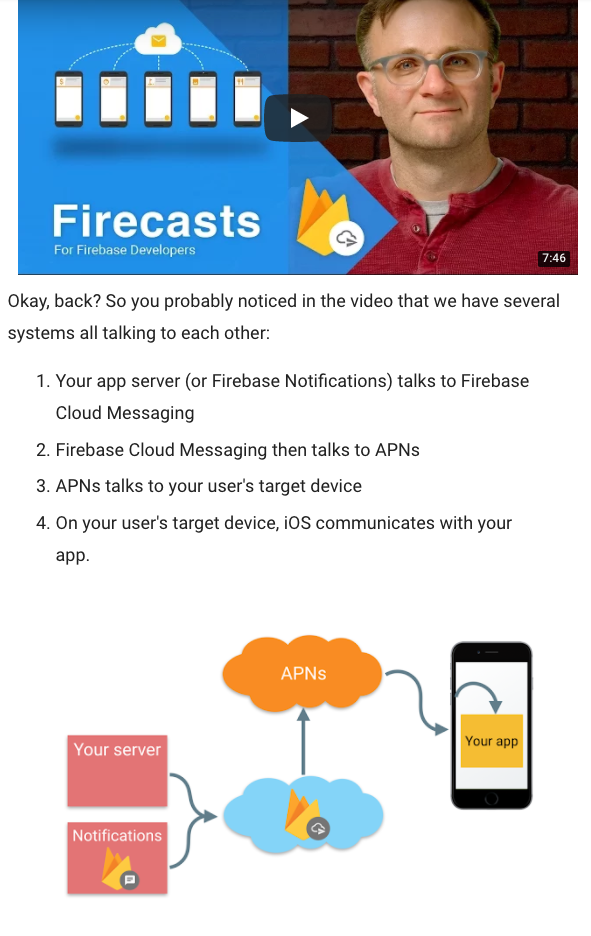
The additional part that I have missed that helped me to solved this:
1) Install Cloud Messaging Module from RNFirebase
https://rnfirebase.io/docs/v4.0.x/messaging/ios
2) Install Notifications Module in RNFirebase
https://rnfirebase.io/docs/v4.0.x/notifications/ios
Hope it will help someone else
 JimTeva
on 13 Apr 2018
JimTeva
on 13 Apr 2018
@tevatahiti just tried your suggestion and tried 2. install notifications module and I get the error on #import "RNFirebaseNotifications.h", file not found. I was able to get FCM working, but didn't see an additional pod install for notifications specifically. Am I missing something? Also a bit confused on the overlap between notifications and messaging - I had assumed that messaging also installs remote notifications - is that incorrect?
mypark
on 13 Apr 2018
@mypark do you have a version of your app already working with ReCaptcha?
If yes then once you installed Cloud Messaging module and Notifications module:
- xcode : clean derivated data
- xcode : clean project
- in pod folder : pod update
- sometimes it also helps to clean everything and reboot your mac
Hope it can help
JimTeva
on 15 Apr 2018
@tevatahiti rebooting seems to have helped - though I'm not importing notifications, just FCM.
mypark
on 16 Apr 2018
Besides, no need to have a real iOS device for testing phone authentication. You just need to set test phone numbers and code in firebase settings.
 berpcor
on 4 Aug 2018
berpcor
on 4 Aug 2018
@mypark save my day
 roy-law
on 26 Apr 2019
roy-law
on 26 Apr 2019
Related issues
 csumrell
·
3Comments
csumrell
·
3Comments
 escobar5
·
3Comments
escobar5
·
3Comments
 ODelibalta
·
3Comments
ODelibalta
·
3Comments
 rtman
·
3Comments
rtman
·
3Comments
 mahyarr
·
3Comments
mahyarr
·
3Comments
Most helpful comment
I fixed it by following the steps in #2 to enable recaptcha verification, specifically:
Add custom URL schemes to your Xcode project: