React-native-fetch-blob: Not displaying image (even with file://) on Android
I'm trying to retrieve the image downloaded via RNFetchBlob on my Android app.
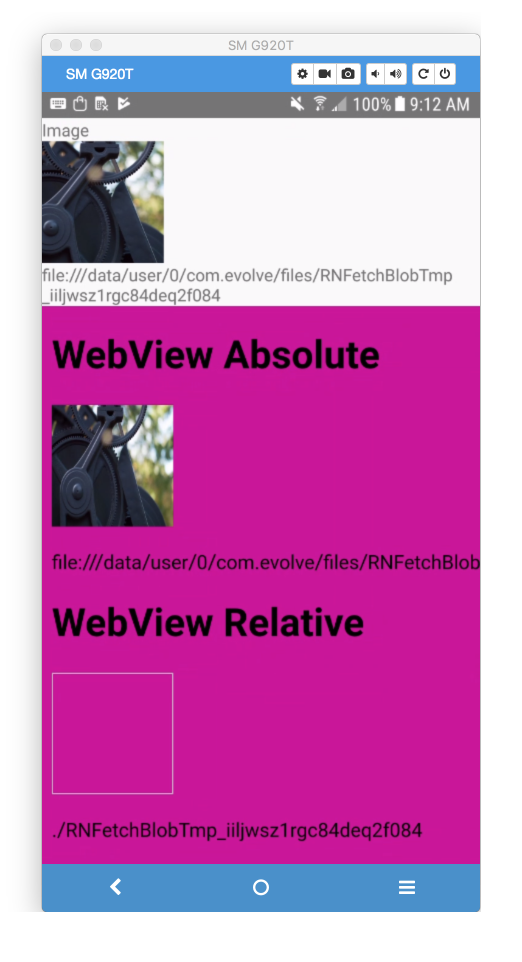
After trying to pull the image within WebView and being unsuccessful (by setting baseUri as suggested here), I thought to test to see if I can within the normal React Native render but cannot render anything.
I'm using the file:// prefix suggested here.
Thanks.
Relevant Packages:
"react": "16.0.0-alpha.12",
"react-native": "0.46.3",
"react-native-fetch-blob": "^0.10.8",
"react-native-permissions": "^1.0.1",
Sample Code:
import React from 'react';
import RNFetchBlob from 'react-native-fetch-blob';
import Permissions from 'react-native-permissions';
import { View, Image, Text, Alert, WebView } from 'react-native';

export default class RegisterScreen extends React.Component {

    state = {
        file: 'waiting...',
    };

    componentWillMount() {
        Permissions.request('storage')
            .then(res => {
                if (res !== 'authorized') {
                    throw Error('not authorized');
                }
            })
            .then(() => {
                return RNFetchBlob.config({
                    fileCache: true,
                }).fetch('GET', 'http://wolfiezero.com/uploads/2016/06/gears-692013.jpg');
            })
            .then(res => {
                this.setState({
                    // only one `/` as `res.path()` will
                    // have one prefixed.
                    file: 'file:/' + res.path(),
                });
                return RNFetchBlob.fs.exists(res.path());
            })
            .then((exists) => {
                if (! exists) {
                    this.setState({
                        file: 'errored',
                    });
                    throw Error('No file downloaded');
                }
            })
            .catch(error => {
                Alert.alert(error.message);
            });
    }

    html(imageFile) {
        const sourceAbsolute = imageFile;
        const sourceRelative = imageFile.replace('file:/' + RNFetchBlob.fs.dirs.DocumentDir, '.');
        return `
            <!DOCTYPE html>
            <html lang="en">
            <head>
                <meta charset="UTF-8">
                <title>Test</title>
                <style>
                    body{
                        background: #c09;
                    }
                </style>
            </head>
            <body>
                <h1>WebView Absolute</h1>
                <img src="${sourceAbsolute}" width="100" height="100" />
                <p>${sourceAbsolute}</p>
                <h1>WebView Relative</h1>
                <img src="${sourceRelative}" width="100" height="100" />
                <p>${sourceRelative}</p>
            </body>
            </html>
        `;
    }

    render() {
        const html = this.html(this.state.file);
        return (
            <View style={{ flex: 1 }}>
                <View style={{
                    flex: 0,
                }}>
                    <Text>Image</Text>
                    <Image source={{ uri: this.state.file, width: 100, height: 100 }} />
                    <Text>{this.state.file}</Text>
                </View>
                <WebView source={{
                    baseUrl: RNFetchBlob.fs.dirs.DocumentDir,
                    html,
                }} style={{
                    flex: 1,
                }} />
            </View>
        );
    }
}
Edit: Added WebView test case.
 WolfieZero
All 5 comments
Hi @WolfieZero
Please try to put on more / in your file://:
this.setState({
                    // only one `/` as `res.path()` will
                    // have one prefixed.
                    file: 'file://' + res.path(),
                });

....

const sourceRelative = imageFile.replace('file://' + RNFetchBlob.fs.dirs.DocumentDir, '.');
 lucasferreira
on 24 Oct 2017
lucasferreira
on 24 Oct 2017
So the protocol uses three slashes?
E.g. file:///data/...
WolfieZero
on 25 Oct 2017
Okay, that's really confusing why that works? Surely the standard is a colon and two slashes?
Thanks for that though! 😀

WolfieZero
on 25 Oct 2017
No dude,
It's equal HTTP protocol, like that
http:// _yourdomain_
and
file:// _yourfilepath_
so if you are on "Windows" you go like this:
file://_C:/myData/blablabla.txt_
so if you are on unix systens you go like this:
file://_/var/myData/blablabla.txt_
Got it?
lucasferreira
on 25 Oct 2017
I get you. I was thinking too much like a web address and ignoring the fact different systems use different resource routing. 😃
WolfieZero
on 25 Oct 2017
Related issues
 IamMasterWayne
·
4Comments
IamMasterWayne
·
4Comments
 yaronlevi
·
4Comments
yaronlevi
·
4Comments
 nicholasstephan
·
3Comments
nicholasstephan
·
3Comments
 gonglong
·
3Comments
gonglong
·
3Comments
 NarendraSingh88
·
3Comments
NarendraSingh88
·
3Comments
Most helpful comment
No dude,
It's equal HTTP protocol, like that
http:// _yourdomain_
and
file:// _yourfilepath_
so if you are on "Windows" you go like this:
file://_C:/myData/blablabla.txt_
so if you are on unix systens you go like this:
file://_/var/myData/blablabla.txt_
Got it?