React-native-fcm: not open particular screen when user tap on notification banner
Hello sir
  I need Open particular screen when user tap on notification banner.

 Following is my js code  it 's perfectly work on ios not not in android

 so plz help me


and also not getting payload in android but getting in ios
componentDidMount() {
this.notificationSetup()
}
async notificationSetup(){
await FCM.requestPermissions({badge: false, sound: true, alert: true}).then(()=>console.log('granted')).catch(()=>console.log('notification permission rejected'));
FCM.getFCMToken().then((token) => {
  console.log("TOKEN (getFCMToken)", token);
  AsyncStorage.setItem(APPCONSTANTS.ASYNCKEY.LOGIN.DEVICETOKEN,token+"")

  if(_this.state.deviceTokenId != token){
    if(_this.state.userId != null && _this.state.userId != undefined){
      isOnline().then(online => {
        if(online){
          this.updateToken(token)
        }
      });
    }else{
      console.log("User Id Null")
    }
  }else{
    console.log("Token id Matched")
  }

  //this.setState({deviceToken:token})
});

FCM.getInitialNotification().then(notif => {
  console.log("INITIAL NOTIFICATION", notif)
});

this.notificationListner = FCM.on(FCMEvent.Notification, notif => {
  console.log("Notification", JSON.stringify(notif));
  if(notif.local_notification){
    return;
  }
  if(notif.opened_from_tray){

      // if (notif.cutom_action == '0' || notif.cutom_action == '1') {
      //   // setTimeout(() => {Actions.searchResult({notification : true ,jobId :1002})},500)
      //   // setTimeout(() => { Actions.sidemenu({ notification: true, allJobScreen: true }) }, 500)
      //   Actions.sidemenu({ notification: true, allJobScreen: true })
      // } else if (notif.cutom_action == '2' || notif.cutom_action == '3') {
      //   // console.log("Activity screen")
      //   // setTimeout(() => { Actions.sidemenu({ notification: true, activityScreen: true }) }, 500)
      //   Actions.sidemenu({ notification: true, activityScreen: true })
      // } else {
      //   // console.log("custom")
      //   // setTimeout(() => { Actions.sidemenu({ notification: true }) }, 500)
      //   Actions.sidemenu({ notification: true })
      // }

      if (notif.custom_notification.cutom_action == '0' || notif.custom_notification.cutom_action == '1') {
        // setTimeout(() => {Actions.searchResult({notification : true ,jobId :1002})},500)
        // setTimeout(() => { Actions.sidemenu({ notification: true, allJobScreen: true }) }, 500)
        Actions.sidemenu({ notification: true, allJobScreen: true })
      } else if (notif.custom_notification.cutom_action == '2' || notif.custom_notification.cutom_action == '3') {
        // console.log("Activity screen")
        // setTimeout(() => { Actions.sidemenu({ notification: true, activityScreen: true }) }, 500)
        Actions.sidemenu({ notification: true, activityScreen: true })
      } else {
        // console.log("custom")
        // setTimeout(() => { Actions.sidemenu({ notification: true }) }, 500)
        Actions.sidemenu({ notification: true })
      }

  }

  if (Platform.OS == 'ios') {

    //optional
    //iOS requires developers to call completionHandler to end notification process. If you do not call it your background remote notifications could be throttled, to read more about it see the above documentation link.
    //This library handles it for you automatically with default behavior (for remote notification, finish with NoData; for WillPresent, finish depend on "show_in_foreground"). However if you want to return different result, follow the following code to override
    //notif._notificationType is available for iOS platfrom
    switch (notif._notificationType) {
      case NotificationType.Remote:
        notif.finish(RemoteNotificationResult.NewData) //other types available: RemoteNotificationResult.NewData, RemoteNotificationResult.ResultFailed
        break;
      case NotificationType.NotificationResponse:
        notif.finish();
        break;
      case NotificationType.WillPresent:
        notif.finish(WillPresentNotificationResult.All) //other types available: WillPresentNotificationResult.None
        break;
    }
  }
  this.showLocalNotification(notif);
});

this.refreshTokenListener = FCM.on(FCMEvent.RefreshToken, token => {
  AsyncStorage.setItem(APPCONSTANTS.ASYNCKEY.LOGIN.DEVICETOKEN,token+"")
  console.log("TOKEN (refreshUnsubscribe)", token);
  if(_this.state.deviceTokenId != token){
    if(_this.state.userId != null && _this.state.userId != undefined){
      isOnline().then(online => {
        if(online){
          this.updateToken(token)
        }
      });
    }else{
      console.log("User Id Null")
    }
  }else{
    console.log("Token id Matched")
  }
});
}
showLocalNotification(notif) {
console.log("Push Notification Data-->"+JSON.stringify(notif))

// var customeData = JSON.parse(notif.body);

// console.log("Custom Data-->"+JSON.stringify(customeData));
  FCM.presentLocalNotification({
    vibrate: notif.vibrate,
    title: notif.title,
    body: notif.body,
    priority: "high",
    sound: notif.sound,
    show_in_foreground: true,
  });
}
componentWillUnmount() {
this.notificationListner.remove();
this.refreshTokenListener.remove();
}
 rjravijoshi
All 26 comments
Try this, it is possible notification is received in getInitialNotification event in this scenario.
  FCM.getInitialNotification().then(notif => {
    alert(JSON.stringify(notif));
});
If you receive notification here in android let me know, we can dig it further.
 sfm2222
on 26 Feb 2018
sfm2222
on 26 Feb 2018
@sfm2222
I have try to set
FCM.getInitialNotification().then(notif => {
alert(JSON.stringify(notif));
});
but not alert display
rjravijoshi
on 26 Feb 2018
Plz help me what should i changes in this code?
rjravijoshi
on 26 Feb 2018
in ios
FCM.getInitialNotification().then(notif => {
alert(JSON.stringify(notif));
});
this working fine
but not working in android
rjravijoshi
on 26 Feb 2018
I'm not sure whether anything is wrong with your code. It's a bit unreadable, but I'm experiencing similar problems. I experience this with the latest version of react-native-fcm:
- When the app is killed/inactive for quite some time, the
getInitialNotificationcatches the notification when I click it in the tray - When I'm in the app, the
oncatches the notification - When I just 'clicked the app away', and a new notification comes in, nothing happens when I tap it.
Please let me know if this is what you experience too.
 christianversloot
on 26 Feb 2018
christianversloot
on 26 Feb 2018
may be in android
FCM.getInitialNotification().then(notif => {
alert(JSON.stringify(notif));
});
this is not work in my code
rjravijoshi
on 26 Feb 2018
notification received but when i tap on notification
i want to open particular screen
.
.
in ios is opened but in android no any action
rjravijoshi
on 26 Feb 2018
I understand that it's the getInitialNotification part that is not working. But it may be wise to give a bit more context here by answering these questions:
- Does it show the alert when the app starts when it is killed?
- Does it show the alert when the app is inactive?
- Does it show the alert when it was recently deactivated?
christianversloot
on 26 Feb 2018
1)no
2)no
3)no
rjravijoshi
on 26 Feb 2018
i have also try to print console.log(notify) but not print in console
rjravijoshi
on 26 Feb 2018
Do any errors get visible in adb logcat when you tap the notification?
christianversloot
on 26 Feb 2018
No
rjravijoshi
on 26 Feb 2018
Then I'm a bit clueless unfortunately :(
christianversloot
on 26 Feb 2018
"notification": {
"title": "hello",
"body": "yo",
"vibrate" : 500,
"sound" : "default",
"action":"android.intent.action.MAIN"
},
"data": {
"cutom_action" : 0
}
this my notification payload it is currect?
rjravijoshi
on 26 Feb 2018
@rjravijoshi use custom_notification for Android and not use notification. the data piece will be eaten by FCM if you receive notification when app is alive
 evollu
on 26 Feb 2018
evollu
on 26 Feb 2018
can you give me example
rjravijoshi
on 27 Feb 2018
```
data: {
custom_notification: {
"title": "hello",
"body": "yo",
"vibrate" : 500,
"sound" : "default",
"action":"android.intent.action.MAIN",
"cutom_action" : 0
}
}
evollu
on 27 Feb 2018
and in application which code write?
rjravijoshi
on 27 Feb 2018
I've included an example about navigation
https://github.com/evollu/react-native-fcm/blob/master/Examples/simple-fcm-client/app/App.js#L114
evollu
on 27 Feb 2018
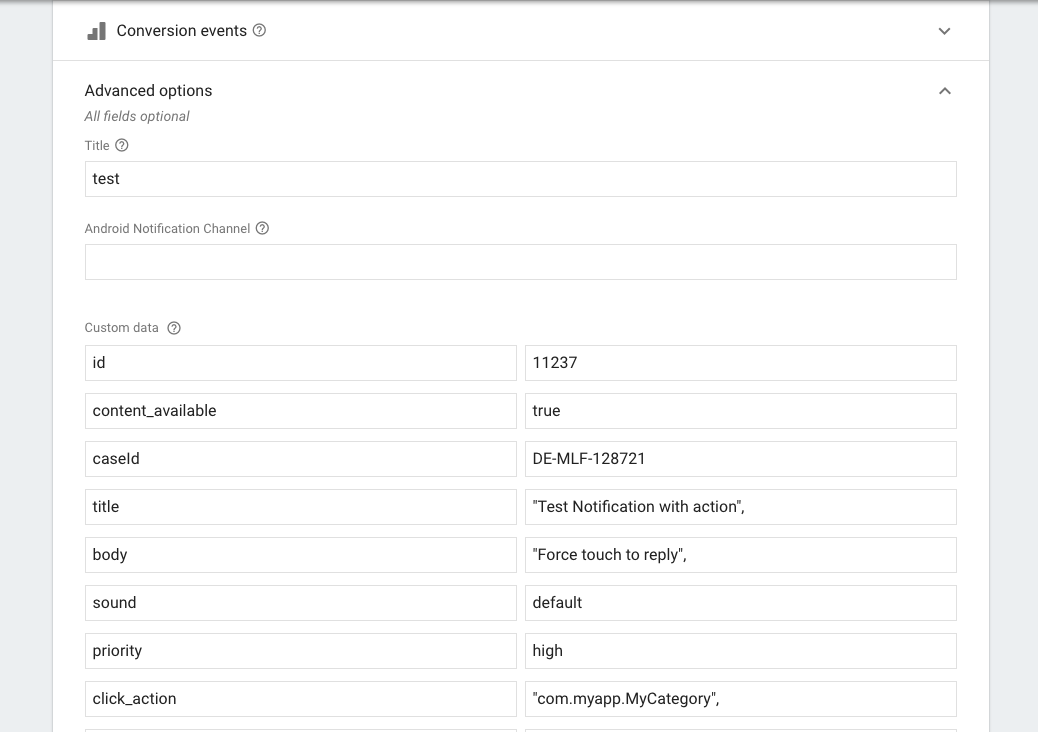
@evollu I have the same problem. I send messages directly on https://console.firebase.google.com to test but it not working on Android It works fine on IOS.
 mymai91
on 10 Mar 2018
mymai91
on 10 Mar 2018
@rjravijoshi : I updated file config it fixed your issue but I'm still facing one issue my app can't receive notification in the background on Android.
I checked config AndroidManifest.xml
I remove code in block android:name=".SplashActivity"
<activity
            android:name=".SplashActivity"
            android:label="@string/app_name"
            android:theme="@style/SplashTheme">
            <intent-filter>
                <action android:name="android.intent.action.MAIN" />
                <category android:name="android.intent.category.LAUNCHER" />
                <action android:name="android.intent.action.DOWNLOAD_COMPLETE"/>
            </intent-filter>
        </activity>
and update android:name=".MainActivity"
        <activity android:name=".MainActivity"
            android:label="@string/app_name"
            android:windowSoftInputMode="adjustResize"
            android:launchMode="singleTop"
            android:configChanges="keyboard|keyboardHidden|orientation|screenSize"
            android:exported="true"
        >
            <intent-filter>
                <action android:name="android.intent.action.MAIN" />
                <category android:name="android.intent.category.LAUNCHER" />
            </intent-filter>

            <intent-filter>
                <action android:name="fcm.ACTION.HELLO" />
                <category android:name="android.intent.category.DEFAULT" />
            </intent-filter>
        </activity>
        <activity android:name="com.facebook.react.devsupport.DevSettingsActivity" />
From https://console.firebase.google.com of my project i added
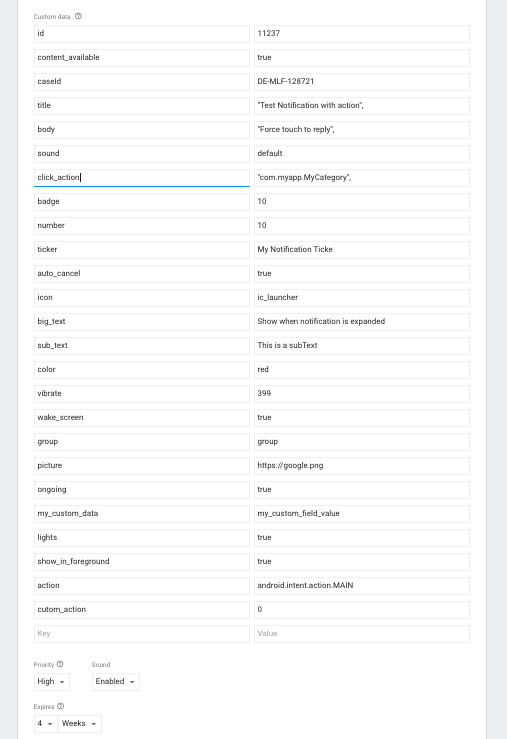
you can try
mymai91
on 10 Mar 2018
@mymai91 your issue seems irrelevant to the original issue in the thread which is about navigation.
custom data is not the custom_notification here. you should pass only one field in custom data:
custom_notification: (JSON object of your content)
evollu
on 10 Mar 2018
@evollu It didn't open particular screen till I change the config for AndroidManifest.xml
Then It works. I compared your AndroidManifest.xml in Example folder and mine. I changed like what you config ^_^
The issue I'm facing is Android device get notification foreground but in background its not. IOS is working fine.
mymai91
on 11 Mar 2018
in background its not
does it appear in notification tray?
evollu
on 12 Mar 2018
@evollu: No, it doesn't appear in the notification tray. Can you suggest solution?
mymai91
on 22 Mar 2018
sounds like message is not delivered at all.
can you debug android and check if following line is triggered?
https://github.com/evollu/react-native-fcm/blob/master/android/src/main/java/com/evollu/react/fcm/MessagingService.java#L26
evollu
on 22 Mar 2018
Related issues
 polovi
·
4Comments
polovi
·
4Comments
 Keksike
·
5Comments
Keksike
·
5Comments
 xavieramoros
·
4Comments
xavieramoros
·
4Comments
 Przemocny
·
3Comments
Przemocny
·
3Comments
 mts88
·
5Comments
mts88
·
5Comments