React-native-fcm: AppState changes to active when app receives notification in killed state
I am able to receive notification in all 3 states (_killed/foreground/background_).
The data gets printed in console when the notification arrives, however I was not receiving any data from the notification when clicked on it from the notification tray.
- When I just send data, I can see the data getting printed in console the moment I send the notification but no icon in the notification array,
const payload = {
  data: {
    title: 'Hi',
    body: 'body',
    message: 'Message',
  }
}
- When I just send data with notification, I can see icon in the notification array, but when I click on it, there is no data passed to the application in background and killed state
const payload = {
  data: {
    title: 'Hi',
    body: 'body',
    message: 'Message',
  },
  notification: {
    title: 'Hi',
    body: 'body',
    message: 'Message',
  }
}
- Updated: When I just send data with custom_notification, I can see icon in the notification array with data getting printed in the console as soon as the notification arrives in the notification tray, but when I click on it, there is no data passed to the application in background and killed state.
const payload = {
  data: {
    custom_notification: {
      title: 'Hi',
      body: 'body',
      message: 'Message',
    }
  },
}
So, finally I decided to save data in asyncStorage whenever I receive the notification and if the user clicks on it I retrieve the notification data from storage. For this I heavily rely on appState.
The main problem here is that, when app is in killed state, I manage to store the data, but my function is unable to run as the AppState gets set as active when the notification arrives in killed state. Now when I click on the notification the AppState still remains active and my handler does not run at all.
RN: 0.45.1, FCM: 13.3.1
 sahil290791
All 21 comments
what OS?
your 3rd payload seems to be wrong
behavior 1 is expected. data is just data, it won't trigger anything unless you are using custom_notification for android
 evollu
on 23 Feb 2018
evollu
on 23 Feb 2018
Its Android, testing on 8.0
On 23-Feb-2018 8:55 PM, "Libin Lu" notifications@github.com wrote:
what OS?
—
You are receiving this because you authored the thread.
Reply to this email directly, view it on GitHub
https://github.com/evollu/react-native-fcm/issues/808#issuecomment-368039877,
or mute the thread
https://github.com/notifications/unsubscribe-auth/AG8x8L2b2YJOba9oWqaj9fkg-TKJ31HRks5tXthSgaJpZM4SQZm-
.
sahil290791
on 23 Feb 2018
const payload = {
  data: {
    custom_notificaiton: {
      title: 'Hi',
      body: 'body',
      message: 'Message',
      key: 'val',
      key2: 'val2'
    }
  }
}
@evollu it was typo above, I am using custom_notification. So the app is working fine. But there is one issue alone now. Let's say that the app is in killed state, and then I receive a notification, I tap on it and I get to the desired screen. Now if I receive any notification background/foreground and click on the notification, the tap on the notification does not take me to any screen.
2nd scenario: App is in killed state, now I open the app from the app icon from the phone's launcher. I receive a notification whether the app is in foreground/background, tapping the notification takes me to the desired screen. I kill the app receive a notification, tap it, and it works but this breaks the future notifications that receive in foreground/background.
sahil290791
on 24 Feb 2018
are you handling the navigation logic in both getInitialNotification and notification callback?
evollu
on 24 Feb 2018
Yes, basically when I get the notification, and if the app is running in
background/foreground/killed state, the notification data gets printed from
on Notification handler, so here I store the data in asyncStorage. Now
when I click on the notification (this click event is captured by on
Notification listener), I just get keys inside the notification payload,
opened_from_tray, fcm: {action: null},, so when opened_from_tray is
present I fetch the data from storage and then handle the navigation.
Similarly when the app is in killed state, notification arrives data is
stored in storage. Later when user clicks on the notification, app becomes
active, and the click is registered in getInitialNotification listener
which contains opened_from_tray key, and then again I fetch data from
storage and route accordingly.
On Sat 24 Feb, 2018, 10:22 PM Libin Lu, notifications@github.com wrote:
are you handling the navigation logic in both getInitialNotification and
notification callback?—
You are receiving this because you authored the thread.
Reply to this email directly, view it on GitHub
https://github.com/evollu/react-native-fcm/issues/808#issuecomment-368241826,
or mute the thread
https://github.com/notifications/unsubscribe-auth/AG8x8NOts18R7ZqD5HI87HOsu7jTOFBBks5tYD5IgaJpZM4SQZm-
.
sahil290791
on 24 Feb 2018
custom notification should contain your data when you tap on the notification. have you tried with example app?
evollu
on 24 Feb 2018
I have taken the listener code from your example app only. The only difference is you send remote notifications from within the app, I am testing it from a php script and Firebase console:
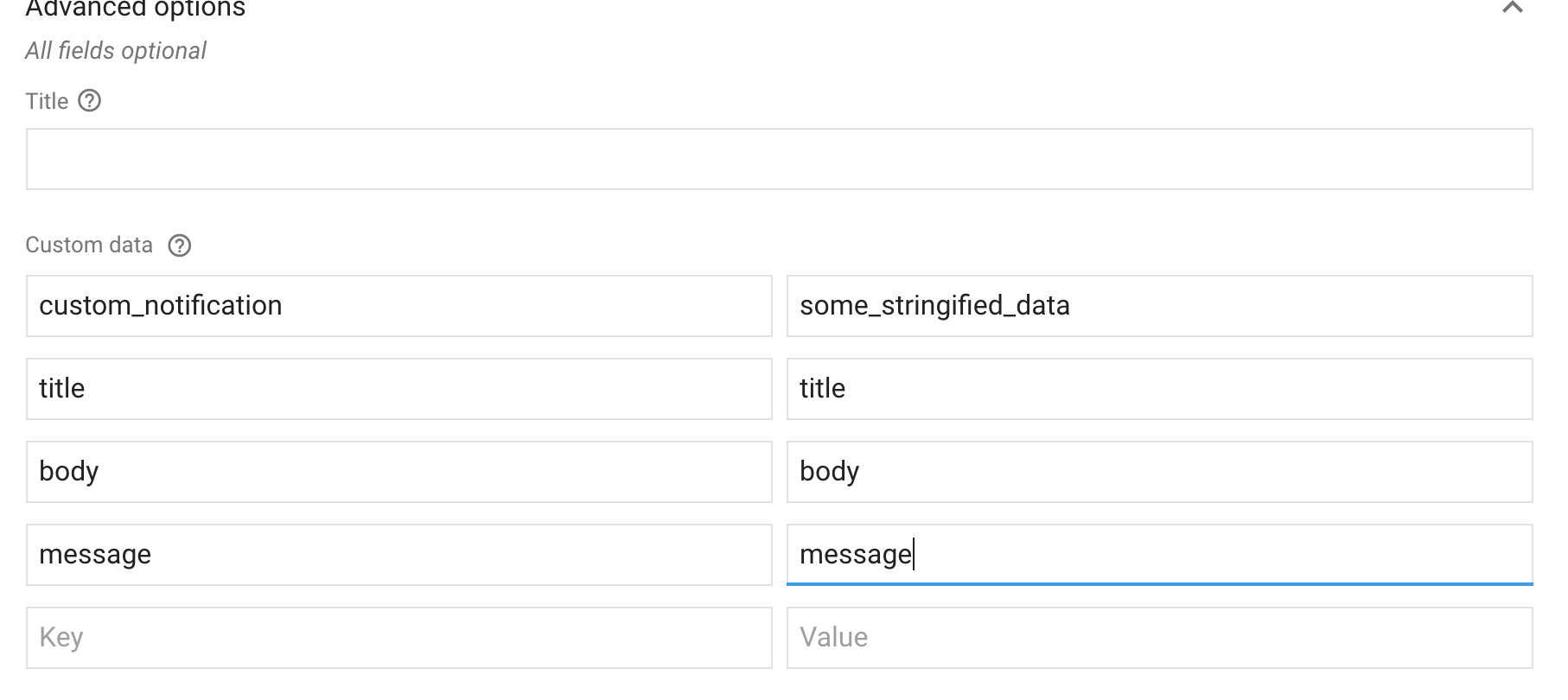
PHP script: custom_notification's value is received as a stringified JSON string in the console on its arrival. But I click on it, the app only gets 3 keys inside notif:
fcm: {
 action: null,
body: null,
},
opened_from_tray: true,
$url = 'https://android.googleapis.com/gcm/send';
$fields = array(
        'registration_ids'  => $registrationIDs,
        "data" => array(
          "priority"=> "high",
          "show_in_foreground" => true,
          'deeplink'=>'deeplink',
          'page_url'=>'some_url',
          'image'=>'image.png',
          'type' => 'DEEPLINK',
          'source' => 'notification',
          'title'=> 'Blog',
          "custom_notification" => array(
            'body' => 'Blog content',
            "sound" => "default",
            "vibrate" => 300,
            "lights" => true,
            "show_in_foreground"=> true,
          )
        ),
);
I am not sure exactly how I can create the payload as data: { custom_notification: value} from firebase console.
sahil290791
on 25 Feb 2018
Check if you have received notification data in getInitialNotification event in this scenario.
FCM.getInitialNotification().then(notif => {
alert(JSON.stringify(notif));
});
Let us know then we can check it further.
 sfm2222
on 26 Feb 2018
sfm2222
on 26 Feb 2018
@sfm2222 it works as written in iOS with this payload ({notification: {}, data: {} }), I get opened_from_tray: true with the data on clicking the notification in iOS alone. But in Android I do not get any data when I click on notification, I get it when the notification arrives, so I store it in storage.
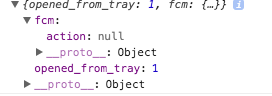
FCM.getInitialNotification always returns this in android alone:
sahil290791
on 27 Feb 2018
@evollu still i'm getting below msg only in android if i opened app .How to fix this
{
  "content_available": false,
   "notification": {
       "title": "hello",
       "body": "yo"
   },
   "data": {
       "extra":"juice"
   },
  "to":"cbGVdEcQcl5pXvT8wBqo1e8I_nALw7czQaymhDRa1ol0IZD4KV2GVqmDANy6_oJcphyIizEkF9LLtyf18FnYXvd6buARv60y8MLlGds-jpQUvqOPs7Xiat0DV-HiPwmNSPRmZAbn"
}
{ opened_from_tray: 1, fcm: { action: 'android.intent.action.MAIN' } }
 balapkm
on 29 May 2018
balapkm
on 29 May 2018
{ opened_from_tray: 1, fcm: { action: 'android.intent.action.MAIN' } } is expected for Android. When you launch your app though icon, system pass this as initial notification.
you can find a way to ignore this
evollu
on 29 May 2018
@evollu I Understood.but if i sent below payload while app in closed/killed state.After opening app i'm not getting that notification data in notification event.How to get that data or How to get hidden notification data while app in closed/Killed State ?
Data
{ opened_from_tray: 1, fcm: { action: 'android.intent.action.MAIN' } }
Payload
{
  "content_available": true,
   "data": {
       "extra":"juice"
   },
"to":"cbGVdEcQcl5pXvT8wBqo1e8I_nALw7czQaymhDRa1ol0IZD4KV2GVqmDANy6_oJcphyIizEkF9LLtyf18FnYXvd6buARv60y8MLlGds-jpQUvqOPs7Xiat0DV-HiPwmNSPRmZAbn"
}
JS Code
/**
 * javascript comment
 * @Author: Balakumaran G
 * @Date: 2018-05-23 16:02:01
 * @Desc: Sign In Page
 */
import React,{ Component } from 'react';
import CommonService       from '../../services/CommonService'
import Layout              from "./Layout";
import {AsyncStorage}      from "react-native";
import * as ConfigFn       from "../../configs/ConfigFn";
import FCM,{FCMEvent}      from "react-native-fcm";

export default class AuthLoading extends Component {

  static navigationOptions = {
    header : null
  }

  /**
   *
   * @param {component property} props
   */
  constructor(props){
    super(props);
    this.state = {
      visible : true,
      rootKey : Math.random()
    }
    this.checkLoginStatus();
  }

  componentDidMount(){
    FCM.requestPermissions();
    FCM.getFCMToken().then(token => {
          console.log("TOKEN (getFCMToken)", token);
    });

    FCM.getInitialNotification().then(notif => {
      console.log("INITIAL NOTIFICATION", notif)
    });

    FCM.on(FCMEvent.Notification, async(notif) => {
      console.log(notif,"notification");
    });
  }

  /**
   * checking async storage data
   */
  async checkLoginStatus(){
    const retrievedItem = await AsyncStorage.getItem('@login:session:data');
    if(retrievedItem !== null){
      data = JSON.parse(retrievedItem);
      ConfigFn.setloginStatus(data.login_status);
      ConfigFn.setTextConfig(data.text_config);
      ConfigFn.setThemeConfig(data.theme_config);
      this.props.navigation.navigate('App')
    }else{
      this.props.navigation.navigate('SignIn')
    }
    this.setState({visible:false})
  }

  /**
   * render view part
   */
  render() {
    return (
      <Layout component={this}/>
    );
  }
}
so console.log("INITIAL NOTIFICATION", notif) gives you { opened_from_tray: 1, fcm: { action: 'android.intent.action.MAIN' } }?
is your react activity your main activity? some people have the issue when they use a splash screen as main
evollu
on 30 May 2018
@evollu yes i am getting this log from console.log(). i am not using any splash screen.Please help me to fix this issue.i spent long time for this issue..
Main activity
package com.agencyauto;

import android.content.Intent;

import com.facebook.react.ReactActivity;

public class MainActivity extends ReactActivity {

    @Override
    public void onNewIntent(Intent intent) {
        super.onNewIntent(intent);
        setIntent(intent);
    }
    /**
     * Returns the name of the main component registered from JavaScript.
     * This is used to schedule rendering of the component.
     */
    @Override
    protected String getMainComponentName() {
        return "AgencyAuto";
    }
}
Manifest xml
<manifest xmlns:android="http://schemas.android.com/apk/res/android"
    package="com.agencyauto">

    <uses-permission android:name="android.permission.INTERNET" />
    <uses-permission android:name="android.permission.SYSTEM_ALERT_WINDOW"/>
    <uses-permission android:name="android.permission.RECEIVE_BOOT_COMPLETED" />
    <uses-permission android:name="android.permission.VIBRATE" />

    <application
      android:name=".MainApplication"
      android:label="@string/app_name"
      android:icon="@mipmap/ic_launcher"
      android:allowBackup="false"
      android:theme="@style/AppTheme">
      <meta-data android:name="com.google.firebase.messaging.default_notification_icon" android:resource="@mipmap/ic_launcher"/>

      <service android:name="com.evollu.react.fcm.MessagingService" android:enabled="true" android:exported="true">
        <intent-filter>
          <action android:name="com.google.firebase.MESSAGING_EVENT"/>
        </intent-filter>
      </service>

      <service android:name="com.evollu.react.fcm.InstanceIdService" android:exported="false">
        <intent-filter>
          <action android:name="com.google.firebase.INSTANCE_ID_EVENT"/>
        </intent-filter>
      </service>
      <activity
        android:name=".MainActivity"
        android:label="@string/app_name"
        android:launchMode="singleTop"
        android:configChanges="keyboard|keyboardHidden|orientation|screenSize"
        android:windowSoftInputMode="adjustResize">
        <intent-filter>
            <action android:name="android.intent.action.MAIN" />
            <category android:name="android.intent.category.LAUNCHER" />
        </intent-filter>
      </activity>
      <activity android:name="com.facebook.react.devsupport.DevSettingsActivity" />

      <receiver android:name="com.evollu.react.fcm.FIRLocalMessagingPublisher"/>
      <receiver android:enabled="true" android:exported="true"  android:name="com.evollu.react.fcm.FIRSystemBootEventReceiver">
          <intent-filter>
              <action android:name="android.intent.action.BOOT_COMPLETED"/>
              <action android:name="android.intent.action.QUICKBOOT_POWERON"/>
              <action android:name="com.htc.intent.action.QUICKBOOT_POWERON"/>
              <category android:name="android.intent.category.DEFAULT" />
          </intent-filter>
      </receiver>
    </application>

</manifest>
App Gradle
apply plugin: "com.android.application"


import com.android.build.OutputFile

/**
 * The react.gradle file registers a task for each build variant (e.g. bundleDebugJsAndAssets
 * and bundleReleaseJsAndAssets).
 * These basically call `react-native bundle` with the correct arguments during the Android build
 * cycle. By default, bundleDebugJsAndAssets is skipped, as in debug/dev mode we prefer to load the
 * bundle directly from the development server. Below you can see all the possible configurations
 * and their defaults. If you decide to add a configuration block, make sure to add it before the
 * `apply from: "../../node_modules/react-native/react.gradle"` line.
 *
 * project.ext.react = [
 *   // the name of the generated asset file containing your JS bundle
 *   bundleAssetName: "index.android.bundle",
 *
 *   // the entry file for bundle generation
 *   entryFile: "index.android.js",
 *
 *   // whether to bundle JS and assets in debug mode
 *   bundleInDebug: false,
 *
 *   // whether to bundle JS and assets in release mode
 *   bundleInRelease: true,
 *
 *   // whether to bundle JS and assets in another build variant (if configured).
 *   // See http://tools.android.com/tech-docs/new-build-system/user-guide#TOC-Build-Variants
 *   // The configuration property can be in the following formats
 *   //         'bundleIn${productFlavor}${buildType}'
 *   //         'bundleIn${buildType}'
 *   // bundleInFreeDebug: true,
 *   // bundleInPaidRelease: true,
 *   // bundleInBeta: true,
 *
 *   // whether to disable dev mode in custom build variants (by default only disabled in release)
 *   // for example: to disable dev mode in the staging build type (if configured)
 *   devDisabledInStaging: true,
 *   // The configuration property can be in the following formats
 *   //         'devDisabledIn${productFlavor}${buildType}'
 *   //         'devDisabledIn${buildType}'
 *
 *   // the root of your project, i.e. where "package.json" lives
 *   root: "../../",
 *
 *   // where to put the JS bundle asset in debug mode
 *   jsBundleDirDebug: "$buildDir/intermediates/assets/debug",
 *
 *   // where to put the JS bundle asset in release mode
 *   jsBundleDirRelease: "$buildDir/intermediates/assets/release",
 *
 *   // where to put drawable resources / React Native assets, e.g. the ones you use via
 *   // require('./image.png')), in debug mode
 *   resourcesDirDebug: "$buildDir/intermediates/res/merged/debug",
 *
 *   // where to put drawable resources / React Native assets, e.g. the ones you use via
 *   // require('./image.png')), in release mode
 *   resourcesDirRelease: "$buildDir/intermediates/res/merged/release",
 *
 *   // by default the gradle tasks are skipped if none of the JS files or assets change; this means
 *   // that we don't look at files in android/ or ios/ to determine whether the tasks are up to
 *   // date; if you have any other folders that you want to ignore for performance reasons (gradle
 *   // indexes the entire tree), add them here. Alternatively, if you have JS files in android/
 *   // for example, you might want to remove it from here.
 *   inputExcludes: ["android/**", "ios/**"],
 *
 *   // override which node gets called and with what additional arguments
 *   nodeExecutableAndArgs: ["node"],
 *
 *   // supply additional arguments to the packager
 *   extraPackagerArgs: []
 * ]
 */

project.ext.react = [
    entryFile: "index.js"
]

apply from: "../../node_modules/react-native/react.gradle"

/**
 * Set this to true to create two separate APKs instead of one:
 *   - An APK that only works on ARM devices
 *   - An APK that only works on x86 devices
 * The advantage is the size of the APK is reduced by about 4MB.
 * Upload all the APKs to the Play Store and people will download
 * the correct one based on the CPU architecture of their device.
 */
def enableSeparateBuildPerCPUArchitecture = false

/**
 * Run Proguard to shrink the Java bytecode in release builds.
 */
def enableProguardInReleaseBuilds = false

android {
    compileSdkVersion 23
    buildToolsVersion '27.0.3'

    defaultConfig {
        applicationId "com.agencyauto"
        minSdkVersion 16
        targetSdkVersion 22
        versionCode 1
        versionName "1.0"
        ndk {
            abiFilters "armeabi-v7a", "x86"
        }
    }
    splits {
        abi {
            reset()
            enable enableSeparateBuildPerCPUArchitecture
            universalApk false  // If true, also generate a universal APK
            include "armeabi-v7a", "x86"
        }
    }
    buildTypes {
        release {
            minifyEnabled enableProguardInReleaseBuilds
            proguardFiles getDefaultProguardFile("proguard-android.txt"), "proguard-rules.pro"
        }
    }
    // applicationVariants are e.g. debug, release
    applicationVariants.all { variant ->
        variant.outputs.each { output ->
            // For each separate APK per architecture, set a unique version code as described here:
            // http://tools.android.com/tech-docs/new-build-system/user-guide/apk-splits
            def versionCodes = ["armeabi-v7a":1, "x86":2]
            def abi = output.getFilter(OutputFile.ABI)
            if (abi != null) {  // null for the universal-debug, universal-release variants
                output.versionCodeOverride =
                        versionCodes.get(abi) * 1048576 + defaultConfig.versionCode
            }
        }
    }
}

dependencies {
    compile project(':react-native-fcm')
    compile project(':react-native-vector-icons')
    compile fileTree(dir: "libs", include: ["*.jar"])
    compile "com.android.support:appcompat-v7:23.0.1"
    compile "com.facebook.react:react-native:+"  // From node_modules
}

// Run this once to be able to run the application with BUCK
// puts all compile dependencies into folder libs for BUCK to use
task copyDownloadableDepsToLibs(type: Copy) {
    from configurations.compile
    into 'libs'
}

apply plugin: 'com.google.gms.google-services'
@balapkm you need to store the notification payload when it arrives in sleep/killed state using AsyncStorage and then when the user actually clicks on it, read it from AsyncStorage.
If you add a listener for killed state you will notice that the app receives the payload in killed state but when the user clicks on the notification the payload gets lost.
sahil290791
on 30 May 2018
@sahil290791 Now it's working fine.Thank you very much.
@evollu Thank you very much for your response
balapkm
on 31 May 2018
@sahil290791 Can you help me how to listen to notification and store it using AsyncStorage when app is killed? And what shall be the payload structure for that, whether custom_notification or only data or only notification we have to send?
I tried the example but the problem is that the app is not storing data in killed state.
Actually I want to accumulate all the notification and show all the notification as one notification... But it has taken too much time of mine...
Please help me...
 Louies89
on 1 Jun 2018
Louies89
on 1 Jun 2018
@Louies89 this is how I am handling it in iOS/Android, the below logic has worked for me so far.
I compile my android app using SDK 26, for that I had to use react-native-fcm/sdk-26 branch and I have tested it on devices running Android 5+ onwards till Android 9 beta.
Let me know if you have any queries, this might not be the best way of handling notifications.
class Home extends Component {
  constructor() {
    this._onTokenRegister = this._onTokenRegister.bind(this);
    this._onPushNotification = this._onPushNotification.bind(this);
    this._handleAppStateChange = this._handleAppStateChange.bind(this);
    this.handleNotificationFromKilledState = this.handleNotificationFromKilledState.bind(this);
  }

  async componentDidMount() {
    registerAppListener(this._onPushNotification, this._handleOpenURL);
    AppState.addEventListener('change', this._handleAppStateChange);
    this.handleNotificationFromKilledState();

    try {
      await FCM.requestPermissions({ badge: false, sound: true, alert: true });
    } catch (e) {
      Sentry.captureException(e);
    }
    this._registerDevice();
  }

  handleNotificationFromKilledState() {
    FCM.getInitialNotification().then((notif) => {
      if (notif && notif.opened_from_tray) {
        if (!isUndefined(notif.title)) {
          this._onPushNotification(notif);
        } else {
          AsyncStorage.getItem('lastNotification').then((data) => {
            const notification = isEmpty(data) ? {} : JSON.parse(data);
            if (!isUndefined(notification.title)) {
              this._onPushNotification(notification);
            }
          });
        }
      }
    });
  }

  _handleAppStateChange() {
    if (AppState.currentState === 'active') {
      if (Platform.OS === 'android') {
        this.handleNotificationFromKilledState();
      }
  }

  _registerDevice() {
    NetInfo.getConnectionInfo().then((isConnected) => {
      if (isConnected) {
        FCM.getFCMToken().then((token) => {
          this._onRegistered(token);
        });
      }
    });
  }

  _onTokenRegister(token) {
    if (typeof (token) === 'object' && token.token) {
      this._onRegistered(token.token);
    }
  }

  _onPushNotification(notification) {
    AsyncStorage.removeItem('lastNotification');
    // if the app is in foreground and receives a notification
    // I show it as an alert
    if (notification.source === 'SAMPLE') {
      if (notification.foreground) {
        Alert.alert(
          notification.title,
          notification.message,
          [{ text: 'Show', onPress: () => this._gotoNotification(notification) }]
        );
      } else {
        this._gotoNotification(notification);
      }
    }
  }

  _onRegistered(deviceToken) {
    NetInfo.getConnectionInfo().then((isConnected) => {
      if (isConnected) {
        const requestData = {
          deviceId: DeviceInfo.getUniqueID(),
         deviceToken,
          tokenType: 'fcm',
        };
        const successCB = json => this._registerDeviceResponse(requestData, json);
        const errorCB = e => this._registerDeviceError(e);
        const postURL = `example.com`;
        makePostRequest(postURL, requestData, successCB, errorCB);
      }
    });
  }

  _registerDeviceError(e) {
    Sentry.captureException(e);
  }

  _registerDeviceResponse(requestData, response) {
    if (response.success) {
     // handle success part
    }
  }

  _handleOpenURL = (event) => {
   // custom logic for handling routing
    const url = parseOpenLink(event.url);
    if (url && url.path) {
      if (url.isInternal) {
        const data = Object.assign({}, url.data);
       // navigation
      }
    }
  };

  render() {
    // component
  }
}
import firebase from 'react-native-firebase';
import FCM, {
  FCMEvent, RemoteNotificationResult, WillPresentNotificationResult, NotificationType, NotificationActionType,
  NotificationActionOption, NotificationCategoryOption } from 'react-native-fcm';

let notifOpened = false;

AsyncStorage.getItem('lastNotification').then((data) => {
  if (data) {
    if (AppState.currentState !== 'uninitialized') {
      notifOpened = false;
      AsyncStorage.removeItem('lastNotification');
    }
  }
});

export function registerKilledListener() {
  // this listener will be triggered even when app is killed
  FCM.on(FCMEvent.Notification, (notif) => {
    if (!notif.opened_from_tray) {
      notifOpened = false;
      // this stores notification payload in storage
      // which can be read later when the user clicks on the notification
      AsyncStorage.setItem('lastNotification', JSON.stringify(notif));
    }
  });
}

export function registerAppListener(openPushNotification, handleOpenURL) {

  // channel creation can be skipped if you are not compiling app using SDK 26
  const channel = new firebase.notifications.Android.Channel('default',
  'Notification', firebase.notifications.Android.Importance.Max)
    .setDescription('Receive notifications');

  // Create a channel
  firebase.notifications().android.createChannel(channel);

  // this callback will be triggered only when app is in background
  FCM.on(FCMEvent.Notification, (notif) => {
    if (Platform.OS === 'ios'
      && notif._notificationType === NotificationType.WillPresent && !notif.local_notification) {
      notif.finish(WillPresentNotificationResult.All);
      return;
    }
    if (notif.opened_from_tray) {
      // opened_from_tray is only true when a user clicks on the notificaiton
      // so that's how we know if someone clicked on the notification

      // fetch the last stored notification from storage
      AsyncStorage.getItem('lastNotification').then((data) => {
        const notification = isEmpty(data) ? {} : JSON.parse(data);

        // just a check to make sure that both killedState and foreground listener
        // are not opening the same notification
        if (!isUndefined(notification.title) && !notifOpened) {
          notifOpened = true;
          openPushNotification(notification);
        }
      });
    }

    if (Platform.OS === 'ios') {
      switch (notif._notificationType) {
        case NotificationType.Remote:
          notif.finish(RemoteNotificationResult.NewData);
          break;
        case NotificationType.NotificationResponse:
          notif.finish();
          break;
        case NotificationType.WillPresent:
          notif.finish(WillPresentNotificationResult.All);
          break;
      }
    }
  });

  FCM.on('FCMNotificationReceived', (notif) => {
     // listener for notifications when app is active
    if (AppState.currentState === 'active' && !isUndefined(notif.title) && Platform.OS === 'android' && !notifOpened) {
      const notification = Object.assign({}, notif, { foreground: true });
      notifOpened = true;
      openPushNotification(notification);
    }
  });
}
@sahil290791 perhaps I should merge sdk-26 into main as it is getting stable
evollu
on 13 Jun 2018
@sahil290791
Thank you a lot for the code. :+1: :)
I am working in some other things, Once I will start FCM part, I will go through your code, and let you know if anything has to be updated or I will get some other way also. :)
Louies89
on 15 Jun 2018
Related issues
 polovi
·
4Comments
polovi
·
4Comments
 ahmed1490
·
5Comments
ahmed1490
·
5Comments
 gplopes
·
6Comments
gplopes
·
6Comments
 Udbhav12
·
4Comments
Udbhav12
·
4Comments
 Przemocny
·
3Comments
Przemocny
·
3Comments