React-native-fcm: RNFIRMessaging.h:4:9: fatal error: 'Firebase.h' file not found
After last update which 13.1.0 it gives that error.
react-native: 0.51.0
react-native-fcm: 13.1.0
Real device: IPhone 5s.
 AkilLis
All 19 comments
AkilLis
on 9 Feb 2018
I have the same problem.
Solved for the moment revertingo to:
@import FirebaseCore;
@import FirebaseMessaging;
@import FirebaseInstanceID;
 fnicastri
on 9 Feb 2018
fnicastri
on 9 Feb 2018
I knew it is going to break things.
@AkilLis @fnicastri do you use manual integration? There should be a Firebase.h file
 evollu
on 9 Feb 2018
evollu
on 9 Feb 2018
I was a little confused at first, so hopefully this will help the next person.
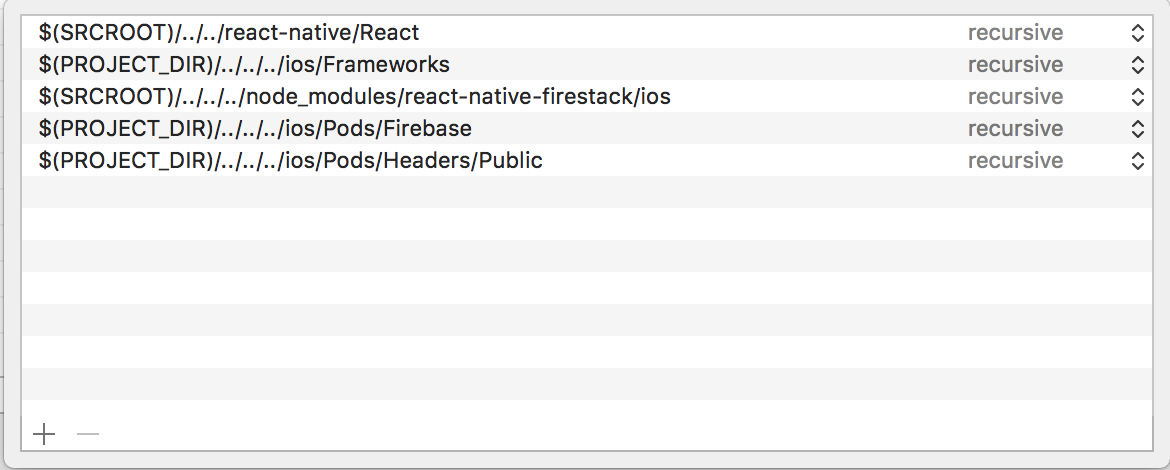
When you install Firebase manually following the Readme, put all the .framework files AND Firebase.h inside /ios/Frameworks folder. Not just inside Xcode explorer in the Frameworks folder. Actually in a real folder called Frameworks inside the ios folder of your project. i.e. you can open up Finder and see this Frameworks folder.
react-native-fcm is specifically looking for Firebase.h in ios/Frameworks. As you can see in the image below, react-native-fcm has the following for Header Search Paths: (notice the 2nd path)
 airman00
on 10 Feb 2018
airman00
on 10 Feb 2018
I think this is broken when following the instructions in the README using Cocoapods installation. I believe this is because the import is looking for Firebase.h, but the file in ios/Pods/Headers/Public is called FirebaseCore.h.
 matt-oakes
on 13 Feb 2018
matt-oakes
on 13 Feb 2018
Following the instructions to manually link Firebase works fine.
matt-oakes
on 13 Feb 2018
@matt-oakes Firebase.h is under /Pods/Firebase/Core/Sources if you install through cocoapods
evollu
on 13 Feb 2018
@evollu I can't check now because I went down the non-Cocoapods route, but following the instructions in the README from a fresh project caused the same error as this issue reports.
matt-oakes
on 13 Feb 2018
also having this issue, using cocoapods. @fnicastri' 's solution worked for me, although something less invasive would be nice. @evollu when you say
Firebase.h is under /Pods/Firebase/Core/Sources if you install through cocoapods
what exactly do I need to do to get it working? Not a cocoapods expert. Thanks.
 vonovak
on 14 Feb 2018
vonovak
on 14 Feb 2018
@vonovak when you do pod install it should put header file there automatically. You don't need to do anything.
evollu
on 14 Feb 2018
@evollu unfortunately, then I'm getting 'FirebaseAnalytics/FirebaseAnalytics.h' file not found. Note that I'm not using the podspect file that comes with the repo, because otherwise pods install React 0.11 in my dependencies.. Any idea? Thanks. edit: this is related to use_frameworks!, which I had enabled. commenting it made it work
vonovak
on 15 Feb 2018
@vonovak yes, removing use_frameworks! should make it work. oh I remember some people were using swift and has to use module. I don't know if it has changed
evollu
on 16 Feb 2018
I had it in my project which uses swift for a long time, but now I removed
and building still works, so I kept it removed :)
On Feb 16, 2018 17:34, "Libin Lu" notifications@github.com wrote:
@vonovak https://github.com/vonovak yes, removing use_frameworks!
should make it work. oh I remember some people were using swift and has to
use module. I don't know if it has changed—
You are receiving this because you were mentioned.
Reply to this email directly, view it on GitHub
https://github.com/evollu/react-native-fcm/issues/784#issuecomment-366286803,
or mute the thread
https://github.com/notifications/unsubscribe-auth/ABfmwwfne39ZHH7dphr7uqVnWXSND4xMks5tVa4KgaJpZM4R_Y4I
.
vonovak
on 16 Feb 2018
had the same issue. i also removed the frameworks requirement and avoided the invasive manual process (as it will be harder to remember to do this if im building from scratch). thanks @evollu and @vonovak
 temitope
on 20 Feb 2018
temitope
on 20 Feb 2018
@import FirebaseCore;
@import FirebaseMessaging;
@import FirebaseInstanceID;
Where exactly do I put this? AppDelegate.m? I also stumbled on this error.
I did it the cocoa pods way and I got this error. Also tried doing it manually and also had the issue. And nothing here has really helped me. Do I need to specify the Header Search Paths as well?
@temitope @vonovak You guys solved it by adding the import statements above?
 wmonecke
on 20 Feb 2018
wmonecke
on 20 Feb 2018
@wmonecke the example project is using cocoa pods integration, try compare your difference
evollu
on 21 Feb 2018
@wmonecke no, i got it to work by removing the use_frameworks! line in the Podfile for iOS
temitope
on 21 Feb 2018
@wmonecke you can add this in the RNFIRMessaging.h File replacing Line 3
 jaschaio
on 2 Mar 2018
jaschaio
on 2 Mar 2018
If you don't want to manually link, you can try installing RNFirebase as a pod install directly:
pod 'RNFirebase', :path => 'path/to/node_modules/react-native-firebase/ios'
Changing or hardcoding HEADER_SEARCH_PATHS did not help me. When the error recurs, it's not necessary to rm -rf node_modules nor delete the pod file etc, I found it useful to clear the cache.
 ehacinom
on 29 Oct 2018
ehacinom
on 29 Oct 2018
Related issues
 gplopes
·
6Comments
gplopes
·
6Comments
 andryuwka
·
6Comments
andryuwka
·
6Comments
 polovi
·
4Comments
polovi
·
4Comments
 pewh
·
5Comments
pewh
·
5Comments
 dg92
·
4Comments
dg92
·
4Comments
Most helpful comment
I was a little confused at first, so hopefully this will help the next person.
When you install Firebase manually following the Readme, put all the .framework files AND Firebase.h inside /ios/Frameworks folder. Not just inside Xcode explorer in the Frameworks folder. Actually in a real folder called Frameworks inside the ios folder of your project. i.e. you can open up Finder and see this Frameworks folder.
react-native-fcm is specifically looking for Firebase.h in ios/Frameworks. As you can see in the image below, react-native-fcm has the following for Header Search Paths: (notice the 2nd path)
