React-native-fcm: Build error on iOS (Non Cocoapod)
I using Non Cocoapod & put frameworks under ios/Frameworks folder.
Any Idea?
Undefined symbols for architecture x86_64:
  "_OBJC_CLASS_$_SKPaymentQueue", referenced from:
      objc-class-ref in FirebaseAnalytics(FIRAInAppPurchaseTransactionReporter_51b6624ff1330bf43a3ed7d9ba76e1ba.o)
  "_OBJC_CLASS_$_SKProductsRequest", referenced from:
      objc-class-ref in FirebaseAnalytics(FIRAProductsRequest_b9979194c8f29313114f911734ebc0e8.o)
ld: symbol(s) not found for architecture x86_64
clang: error: linker command failed with exit code 1 (use -v to see invocation)
 vinpro24
All 13 comments
link issue? have you put the frameworks into your project?
 evollu
on 25 Dec 2017
evollu
on 25 Dec 2017
yes. I checked in xcode and its has been linked
vinpro24
on 25 Dec 2017
try rm -rf ~/Library/Developer/Xcode/DerivedData?
or you can post a public repo with the issue
evollu
on 26 Dec 2017
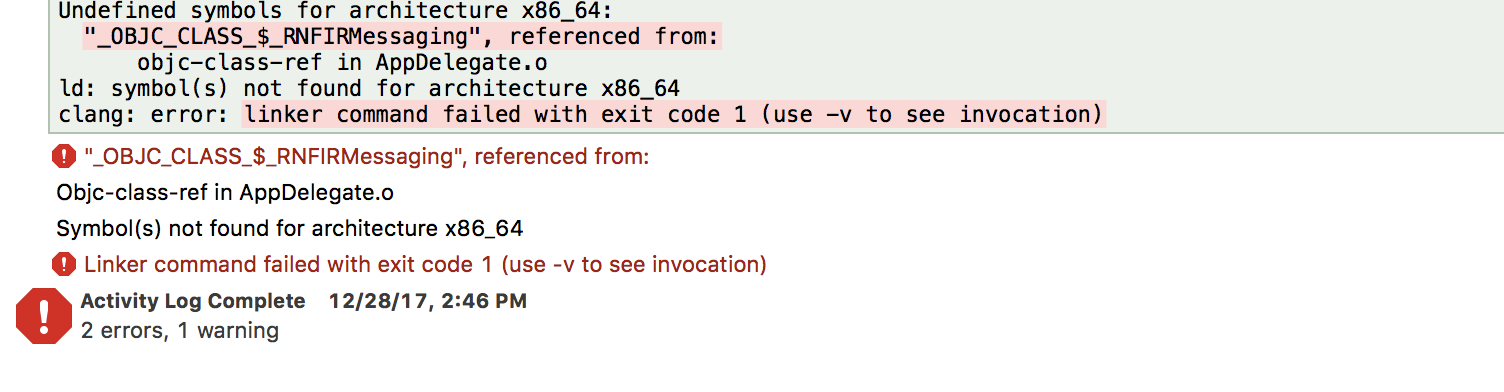
I'm getting the same error, but for the FirebaseAnalytics part, if you add #import "Firebase.h" to the top of AppDelegate.m you'll end up with one error regarding _OBJC_CLASS_$_RNFIRMessaging like what I'm having now.
Any idea? @evollu
 iMagdy
on 28 Dec 2017
iMagdy
on 28 Dec 2017
I ran react-native unlink .... and react-native link ... again and it cleared the above issue!
Now I have this:

iMagdy
on 28 Dec 2017
evollu
on 28 Dec 2017
Doing manual linking fixed the issue for me, it seem something wrong with react-native auto linking.
iMagdy
on 28 Dec 2017
it has been not working for months
evollu
on 28 Dec 2017
rm -rf ~/Library/Developer/Xcode/DerivedData
this didnot worked for me
vinpro24
on 6 Jan 2018
same here
 niocncn
on 25 Jan 2018
niocncn
on 25 Jan 2018
@vinXpro @niocncn
Took me like 4 hours to fix this.
Build phases > Link binary with libraries > Add StoreKit.framework

 EstebanBP
on 6 Feb 2018
EstebanBP
on 6 Feb 2018
Why is it necessary to add Storekit though?
I don't have In-app purchases in my app.
 rohitgoyal
on 26 Feb 2018
rohitgoyal
on 26 Feb 2018
I don't think StoreKit is the issue. the example project doesn't have that.
The original issue seems to be solved?
evollu
on 26 Feb 2018
Related issues
 sf577
·
3Comments
sf577
·
3Comments
 Keksike
·
5Comments
Keksike
·
5Comments
 pewh
·
5Comments
pewh
·
5Comments
 gplopes
·
6Comments
gplopes
·
6Comments
 jitenderchand1
·
4Comments
jitenderchand1
·
4Comments
Most helpful comment
@vinXpro @niocncn

Took me like 4 hours to fix this.
Build phases > Link binary with libraries > Add StoreKit.framework