React-native-fcm: build error "_OBJC_CLASS_$_RNFIRMessaging"
Hi,
I'm using react-native 0.48.2 and the last know sdk version.
I'm not using cocoapods for the project (kinda lost with it), I did every steps explained in the FCM README
- drag and drop each .framework
- add to target
- make sure that a specific checkbox is checked
Then I modified every needed file (AppDelegate.m | h)
And now whenever I try to build I got this this
Undefined symbols for architecture x86_64:
  "_OBJC_CLASS_$_RNFIRMessaging", referenced from:
      objc-class-ref in AppDelegate.o
  "_OBJC_CLASS_$_SKPaymentQueue", referenced from:
      objc-class-ref in FirebaseAnalytics(FIRAInAppPurchaseTransactionReporter_51b6624ff1330bf43a3ed7d9ba76e1ba.o)
  "_OBJC_CLASS_$_SKProductsRequest", referenced from:
      objc-class-ref in FirebaseAnalytics(FIRAProductsRequest_b9979194c8f29313114f911734ebc0e8.o)
ld: symbol(s) not found for architecture x86_64
clang: error: linker command failed with exit code 1 (use -v to see invocation)
I really am inexperienced with XCODE and IOS development so I'm sorry if I didn't fill this issue right, I will try my best to correct it with your advice
 maieonbrix
All 20 comments
where do you put your framework files?
it needs to be under ios/Pods
 evollu
on 7 Dec 2017
evollu
on 7 Dec 2017
I'm facing the same problem, but I'm using pods. I tried a lot of things, I'm a kind lost now...
My files are under ios/Pods:

And my Podfile:
target 'Project' do
  # Uncomment the next line if you re using Swift or would like to use dynamic frameworks
  # use_frameworks!

  # Pods for Project
  pod 'Firebase/Messaging'
  pod 'ReactNativeFabric', :path => '../node_modules/react-native-fabric'
  pod 'RSKImageCropper'
  pod 'QBImagePickerController'
This is mine Link Binary with Libraries:
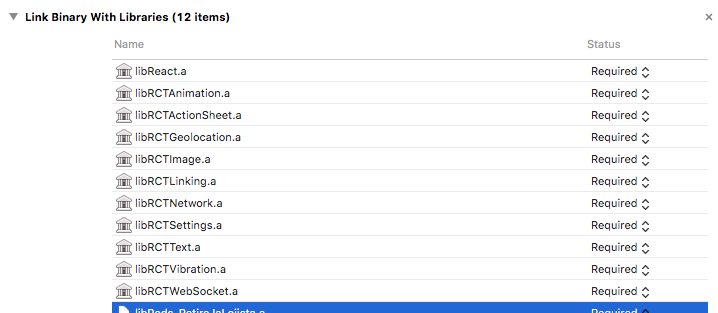
The last one is libPods-ProjectName.a. I can't reveal the name, so I cut it.
I appreciate any help.
 vendramini
on 8 Dec 2017
vendramini
on 8 Dec 2017
where is libRNFCM.a?
evollu
on 8 Dec 2017
OMG, @evollu Thank you so much for your work and your reactivity !!!
I just fixed my problem by simply drag and dropping the RNFireMessaing.xcodeproject into the libraries of mine and linking it, I didn't do react-native link in the first place so that's on me 🤦♂️
maieonbrix
on 8 Dec 2017
Now I have the infamous : FirebaseCore/FIRApp.h' not found ...
maieonbrix
on 8 Dec 2017
check if libRNFCM.a is in the Link Binary with Libraries
do you import FirebaseCore/FIRApp.h anywhere in your code?
evollu
on 8 Dec 2017
I've just created the podfile and pod install. Supposedly, this should be added automatically, didn't it?
If I try to add manually, libRNFCM.a doesn't appear on the list to choose.
I'm completely new on iOS world, I'm a JS/PHP/Java developer.
vendramini
on 8 Dec 2017
Ok, I solved it. For some reason, the RNFIRMessaging.xcodeprojdidn't exists in react-native-fcm/ios. I deleted all node_modules and npm install.
Now my podfile is like:
pod 'Firebase/Messaging'
  pod 'ReactNativeFabric', :path => '../node_modules/react-native-fabric'
  pod 'RSKImageCropper'
  pod 'QBImagePickerController'
  pod 'React', :path => "../node_modules/react-native"
  pod 'yoga', :path => "../node_modules/react-native/ReactCommon/yoga"
  pod 'react-native-fcm', :path => '../node_modules/react-native-fcm'
I can compile the project, but node tells me that there are several modules serving react-native: the react-native original folder inside node_modules and the ios/Podfile/React folder.
Trying to solve this now.
Thanks for the attention!
EDIT
Solved: just erased ios/Podfiles/React.
vendramini
on 8 Dec 2017
react-native link should link FCM library into Library folder so you don't need to put them into pods.
But seems like you are including through React rather than how facebook's example does it so I don't know how to fix your issue.
evollu
on 10 Dec 2017
Hi,
I have the same exact problem:
Showing Recent Issues
  "_OBJC_CLASS_$_SKPaymentQueue", referenced from:
      objc-class-ref in FirebaseAnalytics(FIRAInAppPurchaseTransactionReporter_51b6624ff1330bf43a3ed7d9ba76e1ba.o)
  "_OBJC_CLASS_$_SKProductsRequest", referenced from:
      objc-class-ref in FirebaseAnalytics(FIRAProductsRequest_b9979194c8f29313114f911734ebc0e8.o)
ld: symbol(s) not found for architecture x86_64
clang: error: linker command failed with exit code 1 (use -v to see invocation)
I drag and dropped frameworks to install them.
More precisely I followed this tutorial : https://school.shoutem.com/lectures/react-native-chat-app-serverless-firebase-push-notifications/
Can you please help me ? I tried everything but I event don't understand what ProductsRequest has to do with FCM ?
 comur
on 14 Dec 2017
comur
on 14 Dec 2017
For your information, I solved this (after 3-4 hours...) by adding
#import "Firebase.h"
just before
#import "RNFIRMessaging.h"
Sorry I didn't follow up, I panicked so I just quickly implemented node-apn on the server-side and sticked to rn-push-notif on the react-native side, I'm going to retry by the end of the week and try @comur 's solution which I believe is the solution.
I can not remember where the buggy import was though but I will update soon
maieonbrix
on 15 Dec 2017
I'm using this library in two projects and this issue also happened on this other app. I realize that the library is named libRNFIRMessaging.a on this project. On the original issue asked by me, the library is react-native-fcm.a and you (@evollu) said libRNFCM.a.
Also in this new project, when I typed pod update it downgraded from FirebaseCore 4.7.0 to 3.5. It was insane (after upgrading my react-native-fcm from 10.x to new 11.x).
I'm confused when to add some library on pod or not.
vendramini
on 20 Dec 2017
@vendramini libRNFIRMessaging.a is the right name.
I don't know why pod downgraded but it shouldn't be caused by with this repo.
I wonder if you install this repo through pod. Usually it is linked though Library (or react-native link)
evollu
on 20 Dec 2017
hi,
i have same problem here,
i use pod n link with react-native-link
help please
 andaGS
on 27 Dec 2017
andaGS
on 27 Dec 2017
@andaGS what same problem?
evollu
on 27 Dec 2017
@evollu libRNFIRMessaging.a is not linking through react-native link.
How to link it manually?
 geekvijay
on 28 Dec 2017
geekvijay
on 28 Dec 2017
@geekvijay in Build Phases-> Link Binary with Libraries
evollu
on 28 Dec 2017
@evollu I did the steps shown on https://facebook.github.io/react-native/docs/linking-libraries-ios.html#manual-linking, and my problem got solved :)
geekvijay
on 29 Dec 2017
@evollu please help me .i am using pod . i successfully linked libFirebase.xcodeproject and libFiremessage.xcode then running same error occured.
 nzrsrk
on 15 May 2019
nzrsrk
on 15 May 2019
Related issues
 sf577
·
3Comments
sf577
·
3Comments
 gplopes
·
6Comments
gplopes
·
6Comments
 404sand808s
·
5Comments
404sand808s
·
5Comments
 holyxiaoxin
·
4Comments
holyxiaoxin
·
4Comments
 havinhthai
·
4Comments
havinhthai
·
4Comments
Most helpful comment
OMG, @evollu Thank you so much for your work and your reactivity !!!
I just fixed my problem by simply drag and dropping the RNFireMessaing.xcodeproject into the libraries of mine and linking it, I didn't do react-native link in the first place so that's on me 🤦♂️