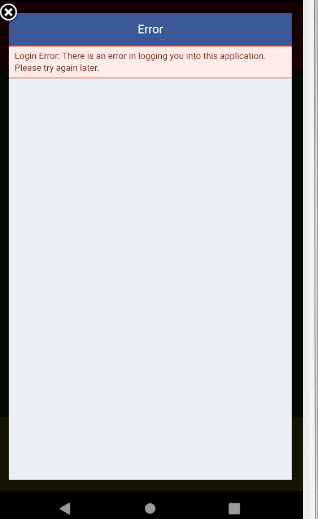
React-native-fbsdk: Login Error : there is an error in logging you into this application. please try again later.
Hi,
I have followed the instructions properly and i got this error while i signed in into the app and did the facebook login.
This issue am getting is in android.
Please help
 thisisbalaG
All 71 comments
me too
 maslhiro
on 29 Aug 2019
maslhiro
on 29 Aug 2019
Ran into this, I believe it occurred when the Facebook app was on the Android device and signed in.
 jordangrant
on 29 Aug 2019
jordangrant
on 29 Aug 2019
Facing same issue right now. This is occurring only on Android if the facebook application is installed on device.
 abhi-nahi
on 29 Aug 2019
abhi-nahi
on 29 Aug 2019
Not sure if this is the same issue as well, but been stuck on this screen (for android) after login and can't find a fix

React Native Environment Info:
System:
OS: Linux 4.4 Ubuntu 18.04.1 LTS (Bionic Beaver)
CPU: (4) x64 Intel(R) Core(TM) i5-7300U CPU @ 2.60GHz
Memory: 724.09 MB / 7.89 GB
Shell: 4.4.19 - /bin/bash
Binaries:
Node: 10.15.3 - /usr/bin/node
npm: 6.4.1 - /usr/bin/npm
npmPackages:
react: 16.8.3 => 16.8.3
react-native: ^0.59.9 => 0.59.9
npmGlobalPackages:
react-native-cli: 2.0.1
 naimoon6450
on 30 Aug 2019
naimoon6450
on 30 Aug 2019
Hey guys, haven’t tried this yet but since it seems the issue is the native Facebook app. You could try setting the Login mode to web only so that it ignores the native app, as a workaround.
jordangrant
on 30 Aug 2019
Hey guys, haven’t tried this yet but since it seems the issue is the native Facebook app. You could try setting the Login mode to web only so that it ignores the native app, as a workaround.
I'm pretty sure that this approach should not be considered as proper solution of the problem but I would definitely like to try this. Let me know if you have any tutorial/guide reference for this approach.
abhi-nahi
on 30 Aug 2019
@abhi-nahi Correct, not a proper solution and hopefully this issue get fixed. Here's some more info on setting LoginBehavior https://stackoverflow.com/questions/39835006/how-do-i-set-loginbehaviour-when-using-react-native-fbsdk-loginmanager/47267836
You can pass this as a prop to LoginButton also to see which login types are working
jordangrant
on 30 Aug 2019
@jordangrant Thanks, This thing works but still the question remains same. Why would anyone enter their credentials again if they already have Facebook installed ??
abhi-nahi
on 5 Sep 2019
I had the same problem and solved like this, setting loginBehavior only for web, like the code below:
if (Platform.OS === "android") {
            LoginManager.setLoginBehavior("web_only")
        }

await LoginManager.logInWithPermissions(["public_profile", "email"])
I dont know why, but when you have facebook app installed react-native-fbsdk try to login with then, and nothing happen.
 yanguyt
on 5 Sep 2019
yanguyt
on 5 Sep 2019
@abhi-nahi They wouldn't. Hence the bug report. My current workaround defaults to Web and allows user to manually change to native. If I leave it as native some people can't access my app.
{Platform.OS === 'android' &&
 <Text onPress={() => this.toggleLoginMode()}>
      {(this.state.loginMode == 'web_only' ? 'Login via Web (Tap to change)' : 'Login Automatically (FB App)')}
</Text>}

<LoginButton
  loginBehaviorAndroid={this.state.loginMode}
...
Hi guys, any solution yet, I am experiencing the same with 1.0.3 and 1.0.4
 yasir-netlinks
on 19 Sep 2019
yasir-netlinks
on 19 Sep 2019
I found a solution for this guys. Use this stable version "react-native-fbsdk": "^1.0.2". and add correct Hash keys for both development and release mode. It will work. Hope this helps.
thisisbalaG
on 19 Sep 2019
@thisisbalaG that doesn't support IOS 13
yasir-netlinks
on 19 Sep 2019
@yasir-netlinks I have a temporary solution for this. Since you cannot use separate versions of this library for android and iOS, Inside your node modules inside ./ios folder replace the RCTFBSDK and RCTFBSDK.xcodeproj from a lower version file in the library version "react-native-fbsdk": "^0.10.1". This will work
thisisbalaG
on 19 Sep 2019
+1 i had the same problem :(
 ducpt2
on 9 Oct 2019
ducpt2
on 9 Oct 2019
same issue
 Saad-Bashar
on 17 Oct 2019
Saad-Bashar
on 17 Oct 2019
@janicduplessis any chance this will get a fix soon. Makes this library pretty unusable on android.
 MrLoh
on 18 Oct 2019
MrLoh
on 18 Oct 2019
In Build apk login with facebook worked but when I prepare release apk, in release apk login with facebook throw error as thisisbalaG said I also put build & release a hash key.
 DevAelius
on 18 Oct 2019
DevAelius
on 18 Oct 2019
I had the same problem and solved like this, setting loginBehavior only for web, like the code below:
if (Platform.OS === "android") {
            LoginManager.setLoginBehavior("web_only")
        }

await LoginManager.logInWithPermissions(["public_profile", "email"])
I dont know why, but when you have facebook app installed react-native-fbsdk try to login with then, and nothing happen.
Working in current version of RN and SDK
 alexnaldo
on 19 Oct 2019
alexnaldo
on 19 Oct 2019
Yes but thats a current workaround but not a solution. People should be able to log in with the Facebook app without reentering their password.
MrLoh
on 20 Oct 2019
I had the same problem and solved like this, setting loginBehavior only for web, like the code below:
if (Platform.OS === "android") {
            LoginManager.setLoginBehavior("web_only")
        }

await LoginManager.logInWithPermissions(["public_profile", "email"])
I dont know why, but when you have facebook app installed react-native-fbsdk try to login with then, and nothing happen.
This is a temporary workaround, I hope a solution will be found.
 ahmadsdk
on 22 Oct 2019
ahmadsdk
on 22 Oct 2019
same issue, not cool that people reenter their password :/
 jessk77
on 24 Oct 2019
jessk77
on 24 Oct 2019
if (Platform.OS === "android") {
LoginManager.setLoginBehavior("web_only")
}
Const result = Await LoginManager.logInWithReadPermissions(['public_profile', 'email']);
if (result.isCancelled) {

  ToastAndroid.show("User cancelled request ", ToastAndroid.SHORT)
  console.log('User cancelled request');

}
else{
Const data = Await AccessToken.getCurrentAccessToken();
if (!data) {

 console.log('Something went wrong obtaining the users access token');

}
//here logincredential code
}### Its working for me
 csnindreamer
on 25 Oct 2019
csnindreamer
on 25 Oct 2019
The issue is not that it's not working when using web-only but that it doesn't work without it. And users should not be forced to enter a password again.
MrLoh
on 25 Oct 2019
even when set to web_only behavior, in safari it opens up the browser and there is an option to login from the app by facebook so when the user tries that I does not work again :/
Saad-Bashar
on 26 Oct 2019
That error occurred because of using invalid hash key in Facebook Developer.
You need to export hash key by using the below command, then update generated hash key (28 characters) into https://developers.facebook.com/ under Settings-> Basic -> Android HashKeys
keytool -exportcert -alias ADD_RELEASE_KEY_ALIASE_HERE -keystore ADD_UR_KEYSTORE_PATH_HERE | openssl sha1 -binary | openssl base64
 ngtan
on 27 Oct 2019
ngtan
on 27 Oct 2019
@ngtan , thanks man. So I need to create a new hash key with my release key store? What should I do with the old one that is already there in facebook developer?
I understand your command for generating key hash, can you give a full example. Just wanted to see how does it look after adding key alias and key store path. Thanks a lot.
Saad-Bashar
on 27 Oct 2019
@Saad-Bashar it's mine from FB developer.

ngtan
on 28 Oct 2019
@ngtan , I meant the cli command
Saad-Bashar
on 29 Oct 2019
Any update on this?
 pacozaa
on 1 Nov 2019
pacozaa
on 1 Nov 2019
Any update on this??
 suryaj92
on 1 Nov 2019
suryaj92
on 1 Nov 2019

me tooo
 nguyenphufps
on 3 Nov 2019
nguyenphufps
on 3 Nov 2019
Any update on this??
 1290846731
on 7 Nov 2019
1290846731
on 7 Nov 2019
Hello @Saad-Bashar,
FYI, here are my commands for generating hash key
keytool -exportcert -alias androiddebugkey -keystore YOUR_PROJECT/android/app/debug.keystone | openssl sha1 -binary | openssl base64
keytool -exportcert -alias androidreleasekey -keystore YOUR_PROJECT/android/app/YOUR_RELEASE_FILE.keystone | openssl sha1 -binary | openssl base64
After got hash key from cli, just put them in FB developer as the image below

I put 2 hash keys for both debug and release in FB developer.
ngtan
on 9 Nov 2019
Hello @Saad-Bashar,
FYI, here are my commands for generating hash key
keytool -exportcert -alias androiddebugkey -keystore YOUR_PROJECT/android/app/debug.keystone | openssl sha1 -binary | openssl base64
keytool -exportcert -alias androidreleasekey -keystore YOUR_PROJECT/android/app/YOUR_RELEASE_FILE.keystone | openssl sha1 -binary | openssl base64After got hash key from cli, just put them in FB developer as the image below
I put 2 hash keys for both debug and release in FB developer.
Just did this with both of your commands and the error persists :(
 feliperugai
on 12 Nov 2019
feliperugai
on 12 Nov 2019
Can’t you discuss these completely unrelated things in a different issue or on stack overflow. This is exactly the reason why library maintainers drown in issues that it’s impossible to u der Stand what they are about.
MrLoh
on 12 Nov 2019
Hello @Saad-Bashar,
FYI, here are my commands for generating hash key
keytool -exportcert -alias androiddebugkey -keystore YOUR_PROJECT/android/app/debug.keystone | openssl sha1 -binary | openssl base64
keytool -exportcert -alias androidreleasekey -keystore YOUR_PROJECT/android/app/YOUR_RELEASE_FILE.keystone | openssl sha1 -binary | openssl base64
After got hash key from cli, just put them in FB developer as the image below
I put 2 hash keys for both debug and release in FB developer.Just did this with both of your commands and the error persists :(
Note that, androiddebugkey and androidreleasekey are your key alias for both dev and prod environment.
ngtan
on 12 Nov 2019
Following theses steps solved my problem:
https://github.com/facebook/react-native-fbsdk/issues/424#issuecomment-469047955
feliperugai
on 12 Nov 2019
If you already uploaded your app to the playstore and enabled "app signing by Google Play" there is a solution (at least this worked for me):
- login into you play console
- click on the app
- now on the left side click "release management"
- click "App signing"
- under "App signing certificate" copy the SHA-1 certificate fingerprint
- go to http://tomeko.net/online_tools/hex_to_base64.php
- paste the SHA-1 in the first field
- copy the text in input field under "Output (base64)"
- now open developer.facebook.com/apps
- click your app
- on the left side navigate to "Settings" -> "Basic"
- past the Base64 text here under key hashes

That should fix the issue.
 tafelnl
on 15 Nov 2019
tafelnl
on 15 Nov 2019
Great but all of this is completely unrelated to the topic of this issue.
MrLoh
on 15 Nov 2019
@MrLoh
That is not true. It _is_ related to the topic.
I got the exact same error message and this is what I did to fix it. How is that unrelated?
tafelnl
on 18 Nov 2019
@tafelnl So you can now login without web_only login behavior on Android?
MrLoh
on 18 Nov 2019
@MrLoh
Yes, when the Facebook app is installed, it will make use of it.
tafelnl
on 19 Nov 2019
@tafelnl thank you for the clear answer that this actually is related to the original issue and not a separate one as the original comment by Saad-Bashar suggested:
even when set to web_only behavior, in safari it opens up the browser and there is an option to login from the app by facebook so when the user tries that I does not work again :/
The issue is indeed solved by updating the key hashes. This probably happened to a lot of people, since the latest react native version changed the setup of the debug keystore.
MrLoh
on 19 Nov 2019
@MrLoh You're welcome. Happy coding :)
tafelnl
on 20 Nov 2019
Thanks guys for the response. @tafelnl I am having one issue. After converting the sha-1 from my play console the base64 output that I get is incorrect in facebook developer key hashes. Am I doing something wrong? When I convert I do not get the = sign at the end of the string.
Update: Now I did it correctly. But still getting the same error in debug build. Do I need to delete the previous one?
Saad-Bashar
on 21 Nov 2019
@Saad-Bashar for debug you also need a debug key and not a release key as far as I am aware. I don't think app signing by google play store supports this. So you have to fall back to the keytool way. Here is a good explanation even for rookies: https://stackoverflow.com/a/46241386/8634342
tafelnl
on 21 Nov 2019
I don't know why, but for me, the hash that FBSDK got for the release build scheme app is not the same that you get with keytool/openssl. What helped me is looking at the "adb logcat" output (just after attempting to log in) where I found:
BlueServiceQueue: X.2NP: [code] 404 [message]: Key hash %YOUR KEY HASH HERE% does not match any stored key hashes. (404) [extra]: null
and i used that hash for the fb console
 thedukeatreides
on 6 Dec 2019
thedukeatreides
on 6 Dec 2019
Solution provided by @tafelnl works, though I used simpler way to get the hashes:
keytool -exportcert -alias YOUR_RELEASE_KEY_ALIAS -keystore YOUR_RELEASE_KEY_PATH | openssl sha1 -binary | openssl base64
This code is provided by Facebook in their Quickstart guide. Just make sure you're using correct value for your keystore password! This code generates different hashes if you provide different passwords and does not fail if you provide incorrect password.
 hbarylskyi
on 8 Jan 2020
hbarylskyi
on 8 Jan 2020
@urvashikharecha
You should not use that method, as it provides really bad User Experience and seems not to be needed anymore.
Please refer to my solution (https://github.com/facebook/react-native-fbsdk/issues/633#issuecomment-554335094) or the one @hbarylskyi mentioned at https://github.com/facebook/react-native-fbsdk/issues/633#issuecomment-571956106
tafelnl
on 10 Jan 2020
@ngtan
I think my issue began when i upgraded Android Studio. I'm having issues signing in with Google Authentication and Facebook on Android with my Ionic app...and i think it's my key has from everything I've read. But I have no idea what I'm doing wrong...I'm generating the hash exactly as you've said but nothing will work for Android...Google or Facebook authentication. I don't know where to begin at this point...I've tried everything. I even tried creating a new project and the same thing happened. Is it possible the wrong key hash is being compiled in the apk file during build?
 DuaneQ
on 23 Feb 2020
DuaneQ
on 23 Feb 2020
@tafelnl thanks for sharing. It work for me
 phithu
on 29 Feb 2020
phithu
on 29 Feb 2020
For me its not working. And I have the same issue on iOS, too.
I added the hash to Facebook then the issue with adding keys is gone and the other one appears.
Dont know how to solve it.

And after I added the key like @tafelnl mentioned.

 patrickbussmann
on 6 Apr 2020
patrickbussmann
on 6 Apr 2020
If you already uploaded your app to the playstore and enabled "app signing by Google Play" there is a solution (at least this worked for me):
- login into you play console
- click on the app
- now on the left side click "release management"
- click "App signing"
- under "App signing certificate" copy the SHA-1 certificate fingerprint
- go to http://tomeko.net/online_tools/hex_to_base64.php
- paste the SHA-1 in the first field
- copy the text in input field under "Output (base64)"
- now open developer.facebook.com/apps
- click your app
- on the left side navigate to "Settings" -> "Basic"
- past the Base64 text here under key hashes
That should fix the issue.
If you already uploaded your app to the playstore and enabled "app signing by Google Play" there is a solution (at least this worked for me):
- login into you play console
- click on the app
- now on the left side click "release management"
- click "App signing"
- under "App signing certificate" copy the SHA-1 certificate fingerprint
- go to http://tomeko.net/online_tools/hex_to_base64.php
- paste the SHA-1 in the first field
- copy the text in input field under "Output (base64)"
- now open developer.facebook.com/apps
- click your app
- on the left side navigate to "Settings" -> "Basic"
- past the Base64 text here under key hashes
That should fix the issue.
I can not see the SHA-1 certificate fingerprint. I can see this screen. Did I miss something? I have released the app into beta mode.Please help

 kindacoder
on 30 Apr 2020
kindacoder
on 30 Apr 2020
If you already uploaded your app to the playstore and enabled "app signing by Google Play" there is a solution (at least this worked for me):
- login into you play console
- click on the app
- now on the left side click "release management"
- click "App signing"
- under "App signing certificate" copy the SHA-1 certificate fingerprint
- go to http://tomeko.net/online_tools/hex_to_base64.php
- paste the SHA-1 in the first field
- copy the text in input field under "Output (base64)"
- now open developer.facebook.com/apps
- click your app
- on the left side navigate to "Settings" -> "Basic"
- past the Base64 text here under key hashes
That should fix the issue.
This works, but ony when i'm in development mode. When I release the sdk and install it in my smartphone, the problem shows again? Do you know why?
 JoaoMartins1930
on 30 Apr 2020
JoaoMartins1930
on 30 Apr 2020
This works, but ony when i'm in development mode. When I release the sdk and install it in my smartphone, the problem shows again? Do you know why?
I think because maybe you are using debug SHA-1, please use Release SHA-1 if that is the case.
kindacoder
on 30 Apr 2020
This works, but ony when i'm in development mode. When I release the sdk and install it in my smartphone, the problem shows again? Do you know why?
I think because maybe you are using debug SHA-1, please use Release SHA-1 if that is the case.
The SHA-1 that I was using was the only one in the firebase console, there's no debug and release. But now I tried the SHA-1 loading certificate which I found in Google Play Console and now it works. I don't now if it is the best or right way to do it, but in fact it works.
JoaoMartins1930
on 30 Apr 2020
This works, but ony when i'm in development mode. When I release the sdk and install it in my smartphone, the problem shows again? Do you know why?
I think because maybe you are using debug SHA-1, please use Release SHA-1 if that is the case.
The SHA-1 that I was using was the only one in the firebase console, there's no debug and release. But now I tried the SHA-1 loading certificate which I found in Google Play Console and now it works. I don't now if it is the best or right way to do it, but in fact it works.
SHA-1 you used is release level SHA-1 (you uploaded release build on play store) that is why it worked :)
kindacoder
on 30 Apr 2020
The error occurs because of invalid hash key.
We can create Hash key using the below command and update the same here under Settings-> Basic -> Android HashKeys
keytool -exportcert -alias ADD_RELEASE_KEY_ALIASE_HERE -keystore ADD_UR_KEYSTORE_PATH_HERE | openssl sha1 -binary | openssl base64
You can find the Relase Key Alias of your keystore using the below command if needed:
keytool -list -keystore ADD_UR_KEYSTORE_PATH_HERE
I have also experience an issue like by using the above HashKey the login works fine if I install the release APK directly to the device, But when I upload the APK to Play Store and install app from store then it shows the same Login failed error. The fix for this is as follows:
Go to Release Management here
Select Release Management
 -> App Signing
You can see SHA1 key in hex format App signing certificate.

Copy the SHA1 in hex format and convert it in to base64 format, you can use this link do that without the SHA1: part of the hex.

Go to Facebook developer console and add the key(after convert to base 64) in the settings —> basic –> key hashes.
 aungmyooo2k17
on 1 May 2020
aungmyooo2k17
on 1 May 2020
If you already uploaded your app to the playstore and enabled "app signing by Google Play" there is a solution (at least this worked for me):
- login into you play console
- click on the app
- now on the left side click "release management"
- click "App signing"
- under "App signing certificate" copy the SHA-1 certificate fingerprint
- go to http://tomeko.net/online_tools/hex_to_base64.php
- paste the SHA-1 in the first field
- copy the text in input field under "Output (base64)"
- now open developer.facebook.com/apps
- click your app
- on the left side navigate to "Settings" -> "Basic"
- past the Base64 text here under key hashes
That should fix the issue.
For those who don't want to paste their hashes into an online tool, here's a oneliner Node.js command to do the same:
node -e 'console.log(Buffer.from(process.argv[1].split(":").map(hex => parseInt(hex, 16))).toString("base64"))' '5E:8F:16:06:2E:A3:CD:2C:4A:0D:54:78:76:BA:A6:F3:8C:AB:F6:25'
outputs:
Xo8WBi6jzSxKDVR4drqm84yr9iU=
 mifi
on 14 May 2020
mifi
on 14 May 2020
The error occurs because of invalid hash key.
We can create Hash key using the below command and update the same here under Settings-> Basic -> Android HashKeys
keytool -exportcert -alias ADD_RELEASE_KEY_ALIASE_HERE -keystore ADD_UR_KEYSTORE_PATH_HERE | openssl sha1 -binary | openssl base64
You can find the Relase Key Alias of your keystore using the below command if needed:
keytool -list -keystore ADD_UR_KEYSTORE_PATH_HERE
I have also experience an issue like by using the above HashKey the login works fine if I install the release APK directly to the device, But when I upload the APK to Play Store and install app from store then it shows the same Login failed error. The fix for this is as follows:
Go to Release Management here
Select Release Management
 -> App Signing
You can see SHA1 key in hex format App signing certificate.

Copy the SHA1 in hex format and convert it in to base64 format, you can use this link do that without the SHA1: part of the hex.

Go to Facebook developer console and add the key(after convert to base 64) in the settings —> basic –> key hashes.
I had the same problem. Thanks!!
JoaoMartins1930
on 14 May 2020
Set LoginBehavior if you have installed facebook app in your phone loginButton.setLoginBehavior(LoginBehavior.WEB_ONLY);
 deepakdreamworks
on 21 May 2020
deepakdreamworks
on 21 May 2020
Hi,
I have followed the instructions properly and i got this error while i signed in into the app and did the facebook login.
This issue am getting is in android.
Please help
Set LoginBehavior if you have installed facebook app in your phone loginButton.setLoginBehavior(LoginBehavior.WEB_ONLY);
deepakdreamworks
on 21 May 2020
This is the proper solution if your app is live on the store and you're using app signing. The method to generate your release key hash (in FB hopelessly outdated documentation) does not apply to you.
DO NOT USE THIS TO GENERATE HASH IF YOU'RE USING APP SIGNING :
keytool -exportcert -alias YOUR_RELEASE_KEY_ALIAS -keystore YOUR_RELEASE_KEY_PATH | openssl sha1 -binary | openssl base64
Instead, do this:
- Go to Release Management in your Google Play Console
- Select App Signing in Release Management
- You can see SHA1 key in hex format App signing certificate.
- Copy the SHA1 in hex format and convert it in to base64 format, you can use link. Do that without the SHA1: part of the hex.
- Go to Facebook developer console and add the key(after convert to base 64) in the settings —> basic –> key hashes.
Answer credit to Nadhir Falta from Android Facebook SDK: generate release key hash
Credit also goes to tafelnl for giving a similar solution . But I thought what was missing was the clarity to remove the SHA1 part of the hex.
 robertqin86
on 1 Jun 2020
robertqin86
on 1 Jun 2020
This is the proper solution if your app is live on the store and you're using app signing. The method to generate your release key hash (in FB hopelessly outdated documentation) does not apply to you.
DO NOT USE THIS TO GENERATE HASH IF YOU'RE USING APP SIGNING :
keytool -exportcert -alias YOUR_RELEASE_KEY_ALIAS -keystore YOUR_RELEASE_KEY_PATH | openssl sha1 -binary | openssl base64Instead, do this:
- Go to Release Management in your Google Play Console
- Select App Signing in Release Management
- You can see SHA1 key in hex format App signing certificate.
- Copy the SHA1 in hex format and convert it in to base64 format, you can use link. Do that without the SHA1: part of the hex.
- Go to Facebook developer console and add the key(after convert to base 64) in the settings —> basic –> key hashes.
Answer credit to Nadhir Falta from Android Facebook SDK: generate release key hash
Credit also goes to tafelnl for giving a similar solution . But I thought what was missing was the clarity to remove the SHA1 part of the hex.
Hi @robertqin86 , I am not able to see any SHA1 key in my release management console. instead it's asking me upload. what to do in this case ? see this screenshot for reference https://github.com/facebook/react-native-fbsdk/issues/633#issuecomment-621620260
kindacoder
on 1 Jun 2020
This worked for me.
Copy the APK to your PC in Program Files\java\jdkX.X.X_XXX\bin folder
In my case it's C:\Program Files\Java\jdk1.8.0_191\bin
Open CMD in this directory and type the following
keytool -list -printcert -jarfile YOUR_APK_NAME.apk
Copy the SHA1 value to your clipboard It will be something like this: 79:D0:E6:80:4E:28:1E:D1:88:28:CB:D7:E6:BE:2E:0C:FB:24:98:52
Then go to http://tomeko.net/online_tools/hex_to_base64.php to convert your SHA1 value to base64.
This is what Facebook requires get the generated hash " ******= " and copy the key hash to your Facebook developers app settings.
Generate your key like this & try again.
Ovi Thank you.
 Mayank-U
on 17 Jun 2020
Mayank-U
on 17 Jun 2020
I had the same problem and solved like this, setting loginBehavior only for web, like the code below:
if (Platform.OS === "android") {
            LoginManager.setLoginBehavior("web_only")
        }

await LoginManager.logInWithPermissions(["public_profile", "email"])
I dont know why, but when you have facebook app installed react-native-fbsdk try to login with then, and nothing happen.
This is a temporary workaround, I hope a solution will be found.
@ahmadsdk I've used your solution and it is working fine, i would like to know if there are any long term problems associated with this method ?
@Mayank-U I tried your solution but the resultant hash key was already on the facebook developers app settings, it was working fine with the codes but it just started throwing this error and i cannot pinpoint the exact reason , some feedback on this issue would be welcome.
 wadejohnson650
on 28 Jul 2020
wadejohnson650
on 28 Jul 2020
I confirm @robertqin86 solution works magically !!!
 nguyenhoanglam
on 28 Jul 2020
nguyenhoanglam
on 28 Jul 2020
I got this problem in dev mode, the problem cause by wrong key hash.
If you got this problem while developing. Please make sure you are generating the key hash from the right debug.keystore file. There is one inside <your_project>/android/app/debug.keystore
keytool -exportcert -alias androiddebugkey -keystore <your_project>/android/app/debug.keystore | openssl sha1 -binary | openssl base64
In facebook documentation, they generate from ~/.android/debug.keystore. so that is the difference
 r0b0t3d
on 18 Aug 2020
r0b0t3d
on 18 Aug 2020
Hi guys, I also faced this problem and i'he not resolved yet... I've correctly configured the hash key, obtained from SHA-1 fingerpring inside the App signing certificate section on Google Play and http://tomeko.net/online_tools/hex_to_base64.php, inside Facebook developer console, but the problem still persist. Someone has some ideas?
 cmerlientando
on 18 Sep 2020
cmerlientando
on 18 Sep 2020
Hello, I'm also facing this issue. I have made sure to generate the hash keys in the right directory, aswell as pasting and saving the generated hash keys in the FB developers platform.
My app is still in devmode, it belongs to the business and pages category. Under app purposes: 'Yourself or your own business'. On iOS the native FB login works correctly without fail, but on android it only works when login behavior is set to 'web_only'. When I try it the native FB login way... it gives the login error mentioned in the title of this question. Oddly everytime I generate a new hash key on my computer the same one comes out which is: Xo8WBi6jzSxKDVR4drqm84yr9iU= just like the one @mifi mentions.. I thought it would generate a different one for everybody everytime but I guess it doesn't..
Anyway I hope a fix comes out for this soon.. Im using react native 0.61.5 and react-native-fbsdk 3.0.0. lib. Any info at all is apreciated thanks.
 MannySAD
on 27 Jan 2021
MannySAD
on 27 Jan 2021
Related issues
 coryb08
·
4Comments
coryb08
·
4Comments
 ankitnb
·
4Comments
ankitnb
·
4Comments
 sibelius
·
4Comments
sibelius
·
4Comments
 nlindeke
·
5Comments
yanguyt
·
4Comments
nlindeke
·
5Comments
yanguyt
·
4Comments
Most helpful comment
If you already uploaded your app to the playstore and enabled "app signing by Google Play" there is a solution (at least this worked for me):
That should fix the issue.