React-native-fbsdk: Use of undeclared identifier 'FBSDKLoginBehaviorNative'; did you mean 'FBSDKLoginBehaviorBrowser'?
🐛 Bug Report
Fresh install of the package... iOS build fails with:
Use of undeclared identifier 'FBSDKLoginBehaviorNative'; did you mean 'FBSDKLoginBehaviorBrowser'?
RCTFBSDKLoginButtonManager.m line 49
To Reproduce
Follow iOS install instructions
Expected Behavior
Successful build
Environment
React Native Environment Info:
System:
OS: macOS 10.14.5
CPU: x64 Intel(R) Core(TM) i7-8850H CPU @ 2.60GHz
Memory: 236.19 MB / 16.00 GB
Shell: 3.2.57 - /bin/bash
Binaries:
Node: 12.1.0 - /usr/local/bin/node
Yarn: 1.16.0 - /usr/local/bin/yarn
npm: 6.9.0 - /usr/local/bin/npm
Watchman: 4.9.0 - /usr/local/bin/watchman
SDKs:
iOS SDK:
Platforms: iOS 12.2, macOS 10.14, tvOS 12.2, watchOS 5.2
IDEs:
Android Studio: 3.4 AI-183.6156.11.34.5522156
Xcode: 10.2.1/10E1001 - /usr/bin/xcodebuild
npmPackages:
react: 16.4.1 => 16.4.1
react-native: 0.56.0 => 0.56.0
npmGlobalPackages:
react-native-cli: 2.0.1
 javi10823
All 42 comments
same issue
 IacoCesar
on 25 May 2019
IacoCesar
on 25 May 2019
same here
 fabricio-dedalord
on 25 May 2019
fabricio-dedalord
on 25 May 2019
any resolution?
IacoCesar
on 26 May 2019
Yes see https://github.com/facebook/react-native-fbsdk/issues/523#issuecomment-495962326
javi10823
on 26 May 2019
Yes see #523 (comment)
@javi10823 what is the version of your fbsdk?
IacoCesar
on 26 May 2019
After set the SDK version to 4.42 given "Lexical or processor issue" and various issues of "Include of non-modular header"
IacoCesar
on 26 May 2019
Yes see #523 (comment)
@javi10823 what is the version of your fbsdk?
@IacoCesar "react-native-fbsdk": "^0.8.0",
javi10823
on 26 May 2019
Yes see #523 (comment)
@javi10823 what is the version of your fbsdk?
@IacoCesar "react-native-fbsdk": "^0.8.0",
@javi10823 and your Documents/FacebookSDK version?
IacoCesar
on 26 May 2019
Yes see #523 (comment)
:'( it didnt work
 fsantecchia
on 26 May 2019
fsantecchia
on 26 May 2019
Yes see #523 (comment)
@javi10823 what is the version of your fbsdk?
@IacoCesar "react-native-fbsdk": "^0.8.0",
@javi10823 and your Documents/FacebookSDK version?
I don't know, How can get the version? I just download a few days ago
javi10823
on 26 May 2019
Yes see #523 (comment)
@javi10823 what is the version of your fbsdk?
@IacoCesar "react-native-fbsdk": "^0.8.0",
@javi10823 and your Documents/FacebookSDK version?
I don't know, How can get the version? I just download a few days ago
@javi10823 follow https://developers.facebook.com/docs/ios/downloads
IacoCesar
on 26 May 2019
any resolution?
IacoCesar
on 26 May 2019
same issue
 phamdungtsx
on 28 May 2019
phamdungtsx
on 28 May 2019
same issue
 uragecz
on 28 May 2019
uragecz
on 28 May 2019
Downgrading to earlier version of fbsdk using pods worked for me.
add these in podfile and do pod install
pod 'FBSDKCoreKit', '~> 4.40.0'
pod 'FBSDKLoginKit', '~> 4.40.0'
pod 'FBSDKShareKit', '~> 4.40.0'
 gamingumar
on 28 May 2019
gamingumar
on 28 May 2019
Downgrading to earlier version of fbsdk using pods worked for me.
add these in podfile and dopod installpod 'FBSDKCoreKit', '~> 4.40.0' pod 'FBSDKLoginKit', '~> 4.40.0' pod 'FBSDKShareKit', '~> 4.40.0'
are you using react-native-fbsdk 0.8.0 or 0.7.0 now? @gamingumar
fsantecchia
on 28 May 2019
@fsantecchia 0.8.0
gamingumar
on 28 May 2019
now it throws new errors :'(
fsantecchia
on 28 May 2019
Same issue
 IMG-Enrique
on 29 May 2019
IMG-Enrique
on 29 May 2019
[SOLVED],
1 - Remove fbsdk imports from pods and creating a ios/Frameworks folder.
2 - Add FBSDK frameworks to ios/Frameworks
3 - react 0.59 have a several issues, open the project with .xcworkspace not .xcodeproject and the most errors disappear
4 - Drag ios/framewoks to your Frameworks in workspace
5 - add FBSDK .xcodeproj to Libraries
6 - go to libraries FBSDK find "framework search paths" in "build settings" and set manualy frameworks with example:
$(PROJECT_DIR)/../../../ios/Frameworks
remove others paths if exists
7 - Clean Project, Clean Build, and Run!
IacoCesar
on 29 May 2019
Same issue here
 digitaldavenyc
on 31 May 2019
digitaldavenyc
on 31 May 2019
Same issue si ce upgrading from react 0.56.1 to react 0.59.8
 ponchautf
on 31 May 2019
ponchautf
on 31 May 2019
same issue
 Hannah-Alto
on 3 Jun 2019
Hannah-Alto
on 3 Jun 2019
it still happens :(
fsantecchia
on 4 Jun 2019
pod 'react-native-fbsdk', :path => '../node_modules/react-native-fbsdk'
pod 'FBSDKCoreKit', '~> 4.42.0'
pod 'FBSDKLoginKit', '~> 4.42.0'
pod 'FBSDKShareKit', '~> 4.42.0'
This solution worked for me. But anyway, this issue should be fixed soon please
 danhnguyeen
on 6 Jun 2019
danhnguyeen
on 6 Jun 2019
do we know if they are trying to fix this?
fsantecchia
on 10 Jun 2019
i believe i know how to fix this. i will submit a pr later this week if i was successful in fixing it on my branch
 redcancode
on 10 Jun 2019
redcancode
on 10 Jun 2019
pod 'react-native-fbsdk', :path => '../node_modules/react-native-fbsdk'
pod 'FBSDKCoreKit', '~> 4.42.0'
pod 'FBSDKLoginKit', '~> 4.42.0'
pod 'FBSDKShareKit', '~> 4.42.0'
This solution worked for me. But anyway, this issue should be fixed soon please
It does not work. :(
CocoaPods could not find compatible versions for pod "FBSDKCoreKit":
  In snapshot (Podfile.lock):
    FBSDKCoreKit (= 5.0.0)

  In Podfile:
    FBSDKCoreKit (~> 4.40.0)
 tandat2209
on 11 Jun 2019
tandat2209
on 11 Jun 2019
pod 'react-native-fbsdk', :path => '../node_modules/react-native-fbsdk'
pod 'FBSDKCoreKit', '~> 4.42.0'
pod 'FBSDKLoginKit', '~> 4.42.0'
pod 'FBSDKShareKit', '~> 4.42.0'
This solution worked for me. But anyway, this issue should be fixed soon please
It does not work. :(
CocoaPods could not find compatible versions for pod "FBSDKCoreKit":
  In snapshot (Podfile.lock):
    FBSDKCoreKit (= 5.0.0)

  In Podfile:
    FBSDKCoreKit (~> 4.40.0)
Remove your podfile.lock and try again
This should work
ponchautf
on 11 Jun 2019
@redcancode hi! I know you dived deep into this topic, can you explain how to install react-native-fbsdk on react-native 0.59.9? I tried every pill described here, but still can't start it to work. Should I use pods or download frameworks directly? I even try to install rnfbsdk from your fork but it didn't help too.
In the v1.0.0-rc.0 they say that minimum React Native version is now 0.60.0, but It still not released and I don't want to upgrade right now.
 elatonsev
on 15 Jun 2019
elatonsev
on 15 Jun 2019
@elatonsev thats a good point. i too also don't want to upgrade my app to rn 0.60 yet. i'm creating a branch on my fork that will support rn v0.59 and fbsdk v5 without androidx. i think it would be a great idea to release this as a fix version, something like v0.9.1, because i think for a couple months there will be many people who don't want to jump yet. @janicduplessis will be the one who decides the release, but worst case you should be able to install it from my fork 🙂
redcancode
on 15 Jun 2019
@redcancode Sure, if you can send me a branch that works on rn 0.59 I can publish it as 0.10.0.
 janicduplessis
on 15 Jun 2019
janicduplessis
on 15 Jun 2019
@janicduplessis i've created a branch on my fork that supports rn0.59 and fbsdk5. i intend to keep it up to date with upstream master up to the point when 1.0.0 goes live. currently i have the version set to 0.9.2 in package.json. i didn't wanted to update it to 0.10.0 before everything is ready. i'm not sure if i should create a PR or not. we don't really want to merge this into master. i've tested it and it works with my app which is rn0.59.4. the example app doesn't work, i left that out because i think it's not necessary :) https://github.com/redcancode/react-native-fbsdk/tree/rn59-fbsdk5
redcancode
on 17 Jun 2019
In case it helps anyone trying to use rn0.59 and fbsdk5, here's how I got @redcancode 's branch working on my project. The only three steps necessary are:
yarn add redcancode/react-native-fbsdk#rn59-fbsdk5
react-native link react-native-fbsdk
cd ios;pod update
_No need to include the pods from the fb upgrade guide_, those are already included in the react-native-fbsdk pod.
 anthonyjoeseph
on 18 Jun 2019
anthonyjoeseph
on 18 Jun 2019
@redcancode @anthonyjoeseph I just created the 0.10.0-stable branch which is the same as https://github.com/redcancode/react-native-fbsdk/tree/rn59-fbsdk5 and published 0.10.0 to npm.
janicduplessis
on 18 Jun 2019
@janicduplessis I have run npm install [email protected]
got clang: error: no such file or directory: '.../node_modules/react-native-fbsdk/ios/RCTFBSDK/core/RCTFBSDKInitializer.m
did this:
open your app xcodeproj > RCTFBSDK.xcodeproj >RCTFBSDK > core, then remove RCTFBSKInitializer.m file.
now I'm getting this error:
Property 'dataAccessExpirationDate' not found on object of type 'FBSDKAccessToken *'
solution of anthonyjoeseph cannot be applied as I don't have pods and pod update not works.
What shall I do?
 yevhenpashutin
on 19 Jun 2019
yevhenpashutin
on 19 Jun 2019
@yevhenpashutin Update to 0.10.1 to fix the first error and make sure you update the version of the fbsdk to 5+ to fix the 2nd
janicduplessis
on 20 Jun 2019
Hi, since the last update, I've a strange behavior on Android only.
when I call LoginManager.logInWithPermissions, the FB login panel is displayed, but after a successful login, the function in the .then() statement is never executed.
The FaceBook login page disappears and nothing else. No error, no Warning.
I don't have this error on iOS and this code was working with the previous version using LoginManager.logInWithReadPermissions
I tried to put breakpoint anywhere in the debugger, but there are never hit.
any idea how to solve this?
`
LoginWithFBSDKLoginManager() {
LoginManager.logOut();

const self = this;

return new Promise((resolve, reject) => {
  LoginManager.logInWithPermissions(['public_profile', 'email']).then((result) => {
    if (result.isCancelled) {
      return;
    }
    AccessToken.getCurrentAccessToken().then((data) => {
      const accessToken = data.accessToken.toString();
      const userID = data.userID.toString();
      self
        .getUserInfos(accessToken)
        .then((response) => {
          resolve({ ...response, accessToken, userID });
        })
        .catch((error) => reject(error));
    });
  });
});
}
`
ponchautf
on 20 Jun 2019
@yevhenpashutin Update to 0.10.1 to fix the first error and make sure you update the version of the fbsdk to 5+ to fix the 2nd
I updated to 0.10.1 and now I get error in file FBSDKAccessToken.a
- (FBSDKAccessToken *)FBSDKAccessToken:(id)json
{
NSDictionary *data = [RCTConvert NSDictionary:json];
if (data.count > 0) {
return [[FBSDKAccessToken alloc]
initWithTokenString:[RCTConvert NSString:data[@"accessToken"]] (!) No visible @interface for 'FBSDKAccessToken' declares the selector 'initWithTokenString:permissions:declinedPermissions:expiredPermissions:appID:userID:expirationDate:refreshDate:dataAccessExpirationDate:'
--and make sure you update the version of the fbsdk to 5+
how? I see only how to do that with Podfile pod install, but as you write in your tutorial, we should not use pod install. And in manual download https://github.com/facebook/facebook-objc-sdk?fbclid=IwAR1mn5OMUhpbPZ1wbKsmpMwPSNWHHbHfa9npfMpSo2QD5-75P0BG1cnRHtI
there are no .frameworks, I don't know how to install that without pod install. And installing with pod install is also not working, giving me like 23 errors after that.
@janicduplessis please guide me what to do.
yevhenpashutin
on 4 Jul 2019
@yevhenpashutin there are frameworks in the zip files. i assume FacebookSDK_Static.zip
will be the one you need. https://github.com/facebook/facebook-objc-sdk/releases
redcancode
on 5 Jul 2019
@yevhenpashutin 0.10.1 works for me with pods.
My Podfile:
platform :ios, '9.0'
target 'MyApp' do
pod 'FBSDKCoreKit'
pod 'FBSDKLoginKit'
pod 'FBSDKShareKit'
end
It will install 5.0.0 version of SDK.
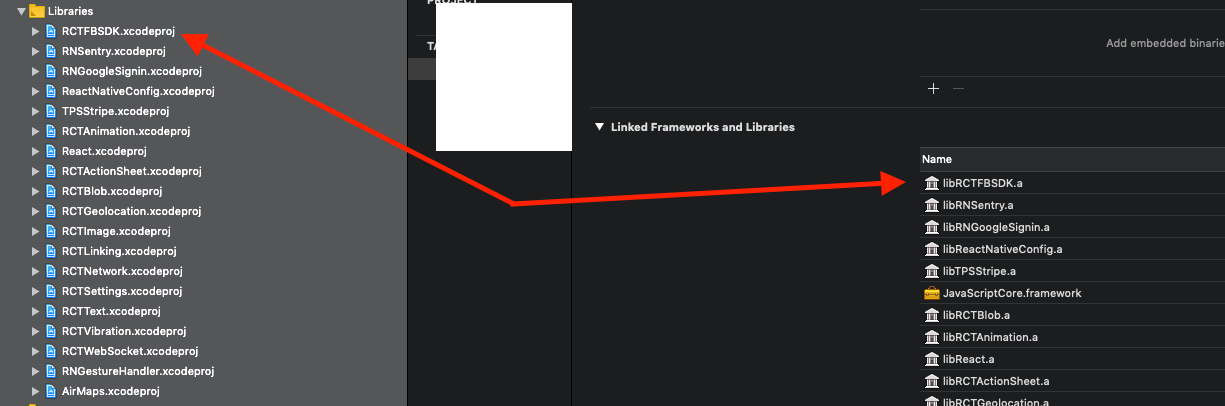
Make sure you add RCTFBSDK.xcodeproj to you Libraries and linked it.
elatonsev
on 7 Jul 2019
@elatonsev I've created pod file, added lines that you mentioned, run pod install, libRCTFBSDK appeared in Linked Frameworks and libraries itself, and now with building XCode project I'm getting 17 issues in RCTFBSDK:
@interface FBSDKApplicationDelegate : NSObject - Duplicate interface definition for class 'FBSDKApplicationDelegate'
@interface FBSDKButton : UIButton - Duplicate interface definition for class 'FBSDKButton'
@interface FBSDKGraphRequest : NSObject - Duplicate interface definition for class 'FBSDKGraphRequest'
@property (nonatomic, copy) NSDictionary
and other similar issues.
Before I had react-native-fbsdk 0.8.0 working with RN 0.57.3. Now I've upgraded RN to 0.60.0, during that upgrade I has issues with react-native-fbsdk so I deleted manually all I found about it. Now I run npm install react-native-fbsdk and react-native link react-native-fbsdk and got 0.10.1 version in my package.json (then did podfile steps above).
What does those errors mean? How can I solve them?
yevhenpashutin
on 31 Jul 2019
Related issues
 coryb08
·
4Comments
coryb08
·
4Comments
 akash-rajput
·
4Comments
akash-rajput
·
4Comments
 pyeonjaesik
·
5Comments
pyeonjaesik
·
5Comments
 nlindeke
·
5Comments
nlindeke
·
5Comments
 pranny
·
6Comments
pranny
·
6Comments
Most helpful comment
@janicduplessis i've created a branch on my fork that supports rn0.59 and fbsdk5. i intend to keep it up to date with upstream master up to the point when 1.0.0 goes live. currently i have the version set to 0.9.2 in package.json. i didn't wanted to update it to 0.10.0 before everything is ready. i'm not sure if i should create a PR or not. we don't really want to merge this into master. i've tested it and it works with my app which is rn0.59.4. the example app doesn't work, i left that out because i think it's not necessary :) https://github.com/redcancode/react-native-fbsdk/tree/rn59-fbsdk5