React-native-fbsdk: null is not an object (evaluating LoginManager.logInWithReadPermissions)
I found this exception recently.
null is not an object (evaluating LoginManager.logInWithReadPermissions)
import {AccessToken, GraphRequest, GraphRequestManager, LoginManager} from 'react-native-fbsdk';

class Auth extends React.Component {


  facebook() {
    LoginManager.logInWithReadPermissions(['public_profile', 'email'])
      .then(result => {
        if (result.isCancelled) {
          console.log('Login cancelled');
        } else {
          console.log(
            'Login success with permissions: ' +
            result.grantedPermissions.toString()
          );

          AccessToken.getCurrentAccessToken().then(data => {
            const token = data.accessToken.toString();
            console.log('facebook initialLogin');
            console.log(token);

            const req = new GraphRequest(
              '/me',
              {
                httpMethod: 'GET',
                version: 'v2.5',
                parameters: {
                  fields: {
                    string: 'email,name',
                  },
                },
              },
              (err, res) => {
                if (err) {
                  console.error(err);
                } else {
                  console.log(res);
                }
              }
            );
            new GraphRequestManager().addRequest(req).start();
          });
        }
      })
      .catch(error => {
        console.log('Login fail with error: ' + error);
      });
  }
}
PodFile
platform :ios, '9.0'
use_frameworks!

def shared_pods
  pod 'Bolts'
  pod 'FBSDKShareKit'
  pod 'FBSDKCoreKit'
  pod 'FBSDKLoginKit'
  pod 'FacebookSDK'

  pod 'Firebase/Core','4.13.0'
  pod 'Firebase/Messaging','4.13.0'
end

target 'MyProj' do
  shared_pods

end
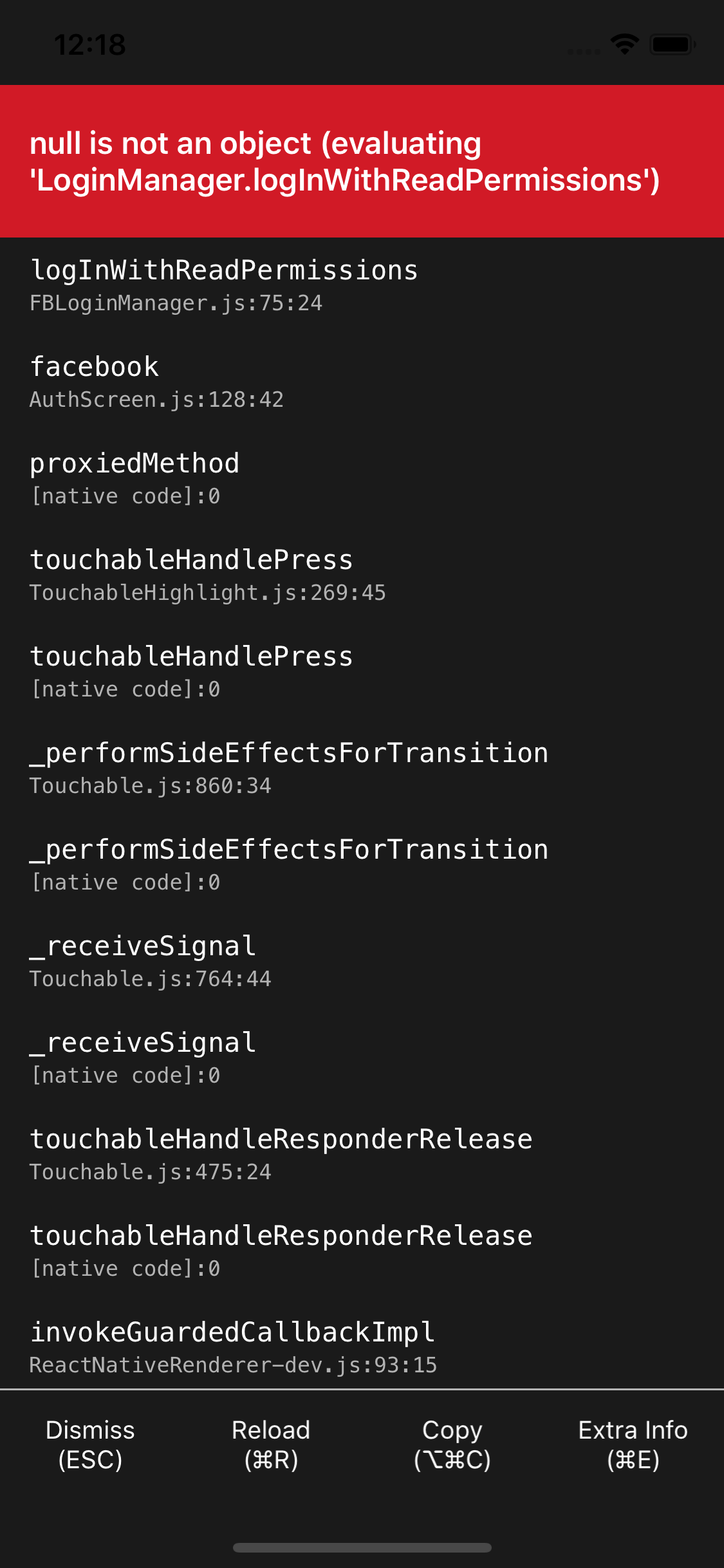
_Originally posted by @dotkebi in https://github.com/facebook/react-native-fbsdk/issues/510#issuecomment-482998076_
 dotkebi
All 20 comments
I'm getting the same error. I think something's wrong with the linking of pods or something... I followed the guide perfectly.
 N1ghtly
on 14 Apr 2019
N1ghtly
on 14 Apr 2019
I can say - me too. Does anyone have a solution for that?
 Shaquu
on 14 Apr 2019
Shaquu
on 14 Apr 2019
Same error!
 Alekseyideas
on 15 Apr 2019
Alekseyideas
on 15 Apr 2019
Same error for me, does not work with current guide
 skaan
on 15 Apr 2019
skaan
on 15 Apr 2019
This happens when something went wrong in the installation. I recommend to go with the manual installation.
 hossamnasser938
on 16 Apr 2019
hossamnasser938
on 16 Apr 2019
@hossamnasser938 you are right! I had these error on android device in AndroidManifest.xml ! I added <meta-data android:name="com.facebook.sdk.ApplicationId" android:value="@string/facebook_app_id"/>
in application and the error disappeared
Alekseyideas
on 16 Apr 2019
I solved it by importing RCTFBSDK.xcodeproject (from node_modules) in Libraries, and adding the .framework files in Libraries / RCTFBSDK.xcodeproject / Frameworks
 efiorello
on 16 Apr 2019
efiorello
on 16 Apr 2019
Using pods instead of manually installing fixed the issue for me. You have to use a specific version.
  pod 'FBSDKCoreKit', '~> 4.39.1'
  pod 'FBSDKLoginKit', '~> 4.39.1'
  pod 'FBSDKShareKit', '~> 4.39.1'
 AndrewMorsillo
on 8 May 2019
AndrewMorsillo
on 8 May 2019
Finally, I solved it.
CheckPodfile
  pod 'FBSDKCoreKit', '~> 4.40.0'
  pod 'FBSDKLoginKit', '~> 4.40.0'
  pod 'FBSDKShareKit', '~> 4.40.0'
  pod 'FacebookSDK', '~> 4.38.0'
Check package.json
"react-native-fbsdk": "^0.8.0",
This is driving me CRAZY! I have this workin on Android, but I cannot for the life of me get this working in IOS. I can get it to build, but whenever I bring up the application, I get the error
(null is not an object (evaluating 'LoginManager.loginWithReadPermissions'
I have scoured the web and tried every proposed solution. I have used the pods setting listed above from dotkebi. I have ensure I have linked the library's in the xcode project and add the libRCTRBSDK.a to the link Binary with Libraries.
No matter what, I continue to get this error.
Does anyone have complete steps on how to actually get this working with the current versions of SDK and react-native-fbsdk??
 ElixirMike
on 14 Jun 2019
ElixirMike
on 14 Jun 2019
@ElixirMike I am also facing this problem, working on Android, but not in ios, so I guess it should be a link problem, but every time when I link the react-native-fbsdk, the xcode will report error when I run it, the funny thing is it doesn't tell what the problem is, it just says build failed, even no error message. I have been stuck for already two days :( .
 Jackyaung
on 11 Jul 2019
Jackyaung
on 11 Jul 2019
Also getting the same error
 alexstoyanov
on 19 Jul 2019
alexstoyanov
on 19 Jul 2019
@efiorello I tried your solution it still doesn't work for me. There is no error in the Build of the project thus couldn't figure it out yet. Many are saying that this might be caused if the installation is wrong. :'(
 JDElectromagnet
on 21 Jul 2019
JDElectromagnet
on 21 Jul 2019
FINALLY!!!!!. Solved it with Facebook SDK, from the facebook Developers site. I had to downgraded my react-native to 0.59.5 and [email protected]. I Think the issues lies on the recent updates of react-native-fbsdk and as well as react-native 0.60.0. @Jackyaung @alexstoyanov
JDElectromagnet
on 23 Jul 2019
I have a similar problem, but the weird part is if while debugging I print to the console the LoginManager object shows the "logInWithPermissions" method, also if I do
console.log(LoginManager.logInWithPermissions);
Shows that the method is a function, but when I call it the app crash with the error
null is not an object (evaluating LoginManager.logInWithPermissions)
I tried a lot of thing but nothing worked actually using react-native 0.60.0 and react-native-fbsdk 1.0.0-rc.4 but nothing, can someone give some help.
 sephirothtbm
on 14 Aug 2019
sephirothtbm
on 14 Aug 2019
Downgrade to react Native 0.59.0 and react-native-fbsdk 0.8.0 .. that's supposed to work.
JDElectromagnet
on 14 Aug 2019
Hi, I am also facing the same issues.
1) Firstly, I used the react-native version - 0.59.10
2) Used react-native-fbsdk : 0.10.3 ,pod - 1.8 and frameworks ' FBSDKCoreKit,FBSDKLoginKit,FBSDKShareKit : 5.1.1 ' It shown errors like
LoginManager.loginWithPermissions is not a function and build failed in xcode and in android build is scceeded.
3) Again i tired with downgrading the pod frameworks version with 4.40.0 and 4.20.0 . here i got like expired permissions error and dataaccesspermission error from Accesstoken in xcode.
3) Again i tried with react-native-fbsdk:0.8.0 and pod 1.8 and FBSDKCoreKit,FBSDKShareKit,FBSDKLoginKit with 4.40.0 build got succeeded in both android and ios.
But getting same error.
I need solution for this.
 Eswar-T
on 6 Dec 2019
Eswar-T
on 6 Dec 2019
I just had the same issue an solved like this (React Native 0.61):
npm i --save react-native-fbsdk(version 1.1.1)- edit pod file in /ios/Podfile adding the following:
  pod 'FBSDKCoreKit'
  pod 'FBSDKLoginKit'
  pod 'FBSDKShareKit'
  pod 'FacebookSDK'
- Pod install
pod update FBSDKCoreKitpod update FBSDKLoginKit
Hope this help!
 frabanca
on 13 Jan 2020
frabanca
on 13 Jan 2020
System:
OS: macOS 10.15.3
CPU: (16) x64 Intel(R) Core(TM) i9-9880H CPU @ 2.30GHz
Memory: 1.01 GB / 32.00 GB
Shell: 5.7.1 - /bin/zsh
Binaries:
Node: 13.5.0 - ~/.nvm/versions/node/v13.5.0/bin/node
npm: 6.13.7 - ~/.nvm/versions/node/v13.5.0/bin/npm
Watchman: 4.9.0 - /usr/local/bin/watchman
SDKs:
iOS SDK:
Platforms: iOS 13.2, DriverKit 19.0, macOS 10.15, tvOS 13.2, watchOS 6.1
IDEs:
Android Studio: 3.5 AI-191.8026.42.35.6010548
Xcode: 11.3/11C29 - /usr/bin/xcodebuild
npmPackages:
react: 16.9.0 => 16.9.0
react-native: 0.61.5 => 0.61.5
npmGlobalPackages:
react-native: 0.61.5
pod 'Bolts'
pod 'FBSDKShareKit'
pod 'FBSDKCoreKit'
pod 'FBSDKLoginKit'
pod 'FacebookSDK'
facebook = async () => {
let results = await new LoginManager.logInWithPermissions(['email']);
console.log(results);
};
Possible Unhandled Promise Rejection (id: 2):
TypeError: null is not an object (evaluating 'LoginManager.logInWithPermissions')
logInWithPermissions@http://localhost:8081/index.bundle?platform=ios&dev=true&minify=false:156866:26
_callee$@http://localhost:8081/AppNavigation/components/Login.bundle?platform=ios&dev=true&minify=false&modulesOnly=true&runModule=false&shallow=true:57:88
tryCatch@http://localhost:8081/index.bundle?platform=ios&dev=true&minify=false:29290:23
invoke@http://localhost:8081/index.bundle?platform=ios&dev=true&minify=false:29465:32
tryCatch@http://localhost:8081/index.bundle?platform=ios&dev=true&minify=false:29290:23
invoke@http://localhost:8081/index.bundle?platform=ios&dev=true&minify=false:29366:30
http://localhost:8081/index.bundle?platform=ios&dev=true&minify=false:29396:19
tryCallTwo@http://localhost:8081/index.bundle?platform=ios&dev=true&minify=false:3253:9
doResolve@http://localhost:8081/index.bundle?platform=ios&dev=true&minify=false:3417:25
Promise@http://localhost:8081/index.bundle?platform=ios&dev=true&minify=false:3276:14
callInvokeWithMethodAndArg@http://localhost:8081/index.bundle?platform=ios&dev=true&minify=false:29395:29
enqueue@http://localhost:8081/index.bundle?platform=ios&dev=true&minify=false:29400:157
http://localhost:8081/index.bundle?platform=ios&dev=true&minify=false:29416:69
_callee@http://localhost:8081/AppNavigation/components/Login.bundle?platform=ios&dev=true&minify=false&modulesOnly=true&runModule=false&shallow=true:52:42
touchableHandlePress@http://localhost:8081/index.bundle?platform=ios&dev=true&minify=false:52921:47
touchableHandlePress@[native code]
_performSideEffectsForTransition@http://localhost:8081/index.bundle?platform=ios&dev=true&minify=false:52358:36
_performSideEffectsForTransition@[native code]
_receiveSignal@http://localhost:8081/index.bundle?platform=ios&dev=true&minify=false:52284:46
_receiveSignal@[native code]
touchableHandleResponderRelease@http://localhost:8081/index.bundle?platform=ios&dev=true&minify=false:52163:26
touchableHandleResponderRelease@[native code]
invokeGuardedCallbackImpl@http://localhost:8081/index.bundle?platform=ios&dev=true&minify=false:12660:21
invokeGuardedCallback@http://localhost:8081/index.bundle?platform=ios&dev=true&minify=false:12756:42
invokeGuardedCallbackAndCatchFirstError@http://localhost:8081/index.bundle?platform=ios&dev=true&minify=false:12760:36
executeDispatch@http://localhost:8081/index.bundle?platform=ios&dev=true&minify=false:12867:48
executeDispatchesInOrder@http://localhost:8081/index.bundle?platform=ios&dev=true&minify=false:12887:26
executeDispatchesAndRelease@http://localhost:8081/index.bundle?platform=ios&dev=true&minify=false:12992:35
forEach@[native code]
forEachAccumulated@http://localhost:8081/index.bundle?platform=ios&dev=true&minify=false:12982:22
runEventsInBatch@http://localhost:8081/index.bundle?platform=ios&dev=true&minify=false:13016:27
runExtractedPluginEventsInBatch@http://localhost:8081/index.bundle?platform=ios&dev=true&minify=false:13104:25
http://localhost:8081/index.bundle?platform=ios&dev=true&minify=false:14130:42
batchedUpdates$1@http://localhost:8081/index.bundle?platform=ios&dev=true&minify=false:25584:20
batchedUpdates@http://localhost:8081/index.bundle?platform=ios&dev=true&minify=false:14078:36
_receiveRootNodeIDEvent@http://localhost:8081/index.bundle?platform=ios&dev=true&minify=false:14129:23
receiveTouches@http://localhost:8081/index.bundle?platform=ios&dev=true&minify=false:14159:34
__callFunction@http://localhost:8081/index.bundle?platform=ios&dev=true&minify=false:2683:49
http://localhost:8081/index.bundle?platform=ios&dev=true&minify=false:2396:31
__guard@http://localhost:8081/index.bundle?platform=ios&dev=true&minify=false:2637:15
callFunctionReturnFlushedQueue@http://localhost:8081/index.bundle?platform=ios&dev=true&minify=false:2395:21
callFunctionReturnFlushedQueue@[native code]
 gitforanand
on 19 Feb 2020
gitforanand
on 19 Feb 2020
Just used manually linking and it's fixed. RN>0.60
-added pod 'react-native-fbsdk', :path => '../node_modules/react-native-fbsdk' to Podfile
-reinstall pods
 SlavikMelnyk
on 7 Jul 2020
SlavikMelnyk
on 7 Jul 2020
Related issues
 stevesaygoodbuycom
·
5Comments
stevesaygoodbuycom
·
5Comments
 notlose
·
5Comments
notlose
·
5Comments
 santilorenzo
·
3Comments
santilorenzo
·
3Comments
 aurelienshz
·
4Comments
aurelienshz
·
4Comments
 chirag04
·
4Comments
chirag04
·
4Comments
Most helpful comment
I have a similar problem, but the weird part is if while debugging I print to the console the LoginManager object shows the "logInWithPermissions" method, also if I do
console.log(LoginManager.logInWithPermissions);Shows that the method is a function, but when I call it the app crash with the error
null is not an object (evaluating LoginManager.logInWithPermissions)
I tried a lot of thing but nothing worked actually using react-native 0.60.0 and react-native-fbsdk 1.0.0-rc.4 but nothing, can someone give some help.