React-native-fbsdk: failed for URL: "fbauth2:/"
I'm getting the error in the ios canOpenURL: failed for URL: "fbauth2:/" - error: "The operation couldn’t be completed. (OSStatus error -10814.)"
 Prashant-Mutnale
All 9 comments
me too :(
 VietChaien
on 9 Dec 2018
VietChaien
on 9 Dec 2018
Im guessing this has to do with newest FBSDK framework?
 stokesbga
on 10 Dec 2018
stokesbga
on 10 Dec 2018
^ It does. Downgrade to SDK 38 fixes it.
https://developers.facebook.com/docs/ios/downloads/
stokesbga
on 10 Dec 2018
^ It does. Downgrade to SDK 38 fixes it.
https://developers.facebook.com/docs/ios/downloads/
Hi @stokesbga , how to downgrade sdk with Podfile, i used
pod 'react-native-fbsdk', :path => '../node_modules/react-native-fbsdk'
 pod 'FacebookSDK', '~> 3.8'
but it not work
VietChaien
on 10 Dec 2018
I fixed this by downgrading to 4.38. Try to add these lines in your Podfile @VietChaien
pod 'FBSDKCoreKit', '4.38'
pod 'FBSDKLoginKit', '4.38'
pod 'FBSDKShareKit', '4.38'
Hope it helps :) Cheers
 nmchr7
on 10 Dec 2018
nmchr7
on 10 Dec 2018
@nmchr7 and @stokesbga Thanks for the kind support
@nmchr7 I was able to login '4.38' but in the console i was getting the response as login error so i downgraded to '4.32' now its working fine. @nmchr7 Thank you for you'r help
@VietChaien Try to downgrade to other versions i think it might help you as suggested by @nmchr7
Prashant-Mutnale
on 10 Dec 2018
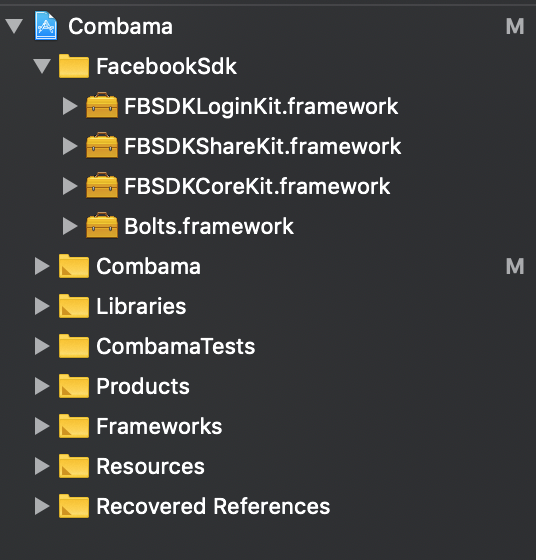
I dont using Cocoapods.
I download FacebookSDK and drap & drop it to iOS project.
And remember change one thing in Build Settings:
Select project -> Build Settings Tab -> Framework Search Paths -> $(PROJECT_DIR)/FacebookSdk
This is work for me.
 huynguyen1509
on 13 Dec 2018
huynguyen1509
on 13 Dec 2018
this work for me:
https://github.com/facebook/react-native-fbsdk/issues/644#issuecomment-536465702
 edicarloslds
on 26 Jan 2020
edicarloslds
on 26 Jan 2020
I'm using the npm package cordova-plugin-facebook4, so downgrading from 4.2.1 to 4.0.0 worked for me
 VaishaliReppa
on 16 Sep 2020
VaishaliReppa
on 16 Sep 2020
Related issues
 sibelius
·
4Comments
sibelius
·
4Comments
 nlindeke
·
5Comments
nlindeke
·
5Comments
 notlose
·
5Comments
notlose
·
5Comments
 santilorenzo
·
3Comments
santilorenzo
·
3Comments
 akash-rajput
·
4Comments
akash-rajput
·
4Comments
Most helpful comment
I fixed this by downgrading to 4.38. Try to add these lines in your Podfile @VietChaien
pod 'FBSDKCoreKit', '4.38'
pod 'FBSDKLoginKit', '4.38'
pod 'FBSDKShareKit', '4.38'
Hope it helps :) Cheers