React-native-fbsdk: FBSDKShareKit/FBSDKShareKit.h file not found
I have tried all ways:
- Download fresh version of Facebook SDK and save a Documents folder
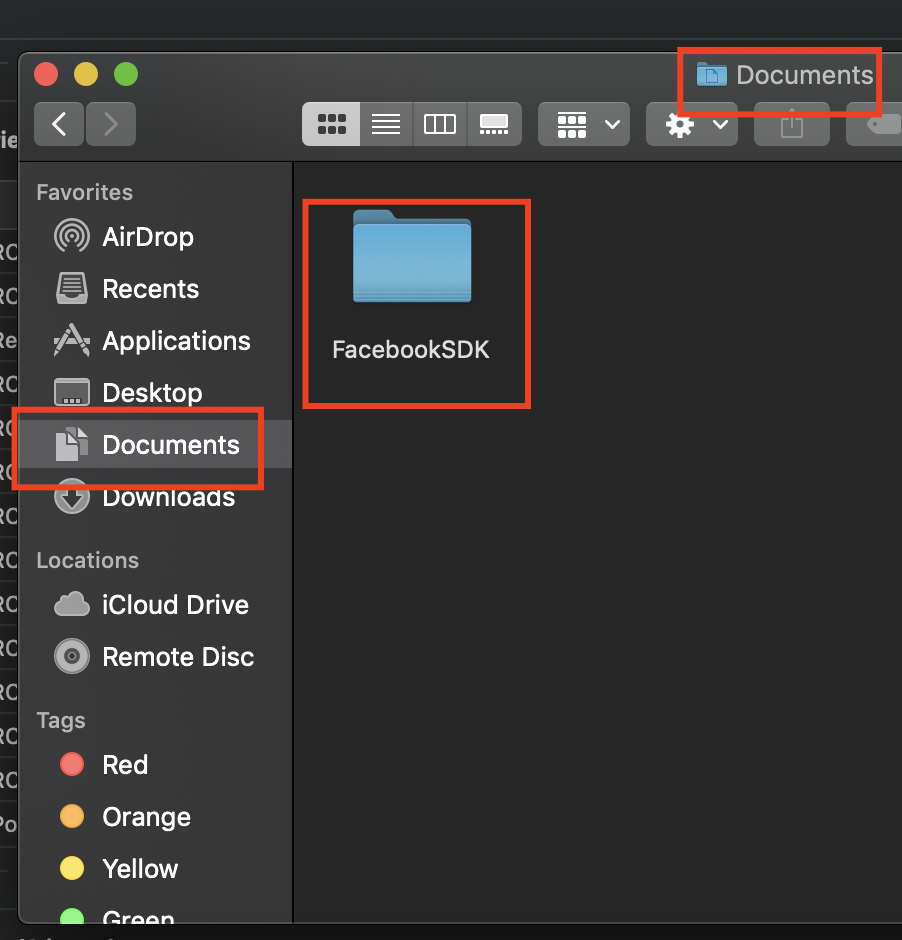

- Add FBSDK[Core, Login, Share]Kit.framework from Documents/Facebook
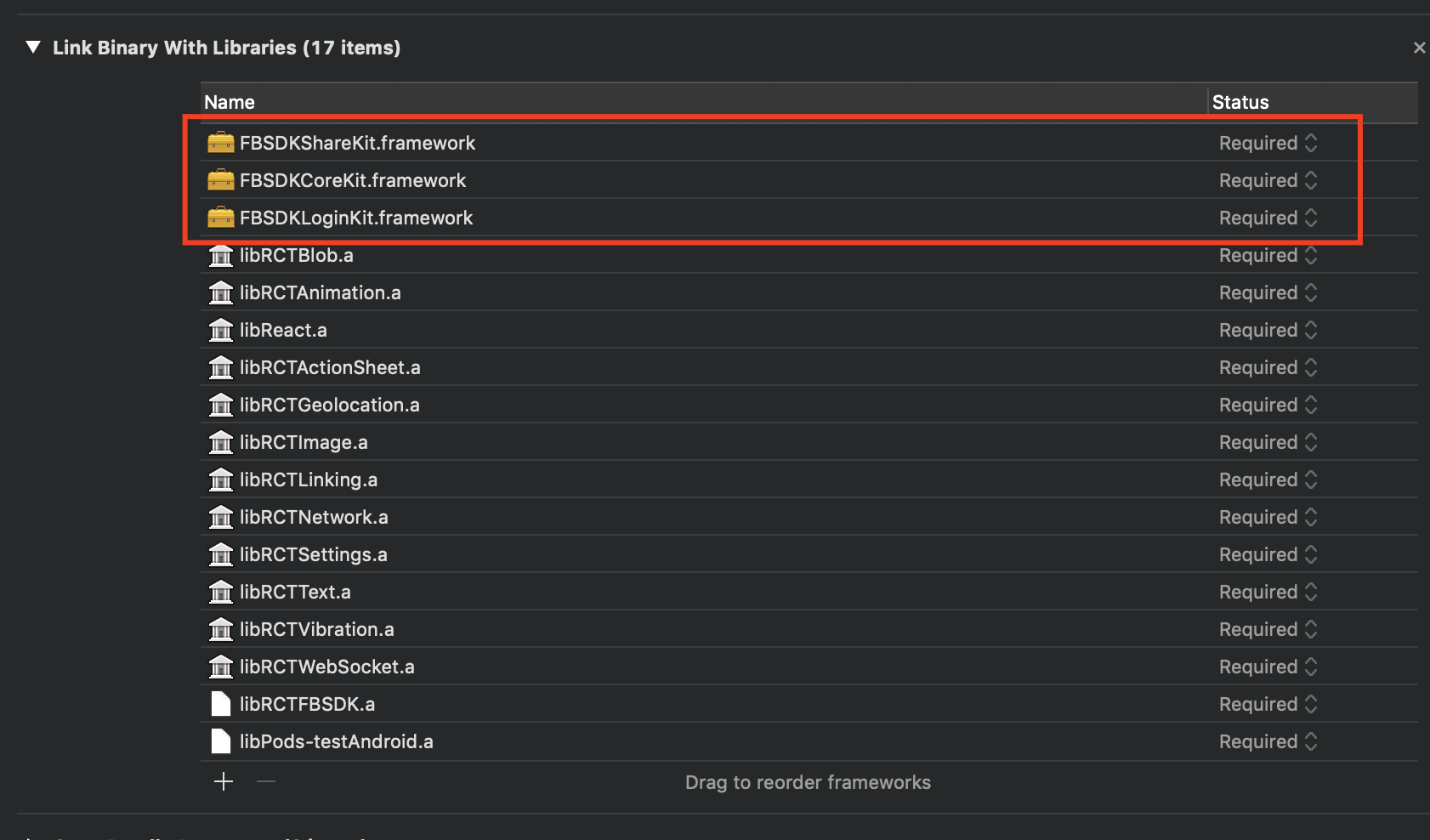
SDK folder - Add path to Framework Search Path

- Also I have tried install via cocopods, and same issue
 rumbaa01
All 29 comments
@rumbaa01 Try doing this in XCode (i have 10): go to RCTFBSDK.xcodeproj then build settings->framework search paths. And change ~/Documents/FacebookSDK to $(HOME)/Documents/FacebookSDK
It saved me a lot of time. Now it finally gets built.
 Helga108
on 2 Nov 2018
Helga108
on 2 Nov 2018
@Helga108 Thank you very much! You save me~
 ChengHsuanLiu
on 30 Nov 2018
ChengHsuanLiu
on 30 Nov 2018
It worked for me:
/Users/{user}/Documents/FacebookSDK
 fexx
on 16 Dec 2018
fexx
on 16 Dec 2018
I've installed the react-native-fbsdk. I don't have the folder FacebookSDK in my Docs directory. Should some process installed it?
 mjstelly
on 20 Dec 2018
mjstelly
on 20 Dec 2018
@mjstelly, Download the sdk in this link: https://developers.facebook.com/docs/ios/downloads
Then rename to FacebookSDK and move to the Documents folder. worked for me.
fexx
on 20 Dec 2018
I went the pods route. Hoping that it resolves this issue. Thanks!
Sincerely,
Michael Stelly | M: +1.918.978.2000 Blog | LinkedIn | Github
On Dec 20, 2018, 3:55 PM -0500, fexx notifications@github.com, wrote:
@mjstelly, Download the sdk in this link: https://developers.facebook.com/docs/ios/downloads
Then rename to FacebookSDK and move to the Documents folder. worked for me.
—
You are receiving this because you were mentioned.
Reply to this email directly, view it on GitHub, or mute the thread.
mjstelly
on 20 Dec 2018
@rumbaa01 Try doing this in XCode (i have 10): go to RCTFBSDK.xcodeproj then build settings->framework search paths. And change ~/Documents/FacebookSDK to $(HOME)/Documents/FacebookSDK
It saved me a lot of time. Now it finally gets built.
Thank you. This worked for me. I didn't remove the old path. I just added the new path $(HOME)/Documents/FacebookSDK
 vinhphamh
on 7 Mar 2019
vinhphamh
on 7 Mar 2019
@rumbaa01 Try doing this in XCode (i have 10): go to RCTFBSDK.xcodeproj then build settings->framework search paths. And change ~/Documents/FacebookSDK to $(HOME)/Documents/FacebookSDK
It saved me a lot of time. Now it finally gets built.
still not working
 adilvectorcoder
on 27 Mar 2019
adilvectorcoder
on 27 Mar 2019
@adilvectorcoder did you clean the build folder after you made the change? In my case it was a required step since it tried to use the old build data even after I changed the path
 reyalpsirc
on 28 Mar 2019
reyalpsirc
on 28 Mar 2019
still not working through already clean the build folder @reyalpsirc
 vuvantoan95
on 29 Mar 2019
vuvantoan95
on 29 Mar 2019
@vuvantoan95 Well, to be honest, I changed to $(HOME)/Documents/FacebookSDK on both the RCTFBSDK.xcodeproj and my main project. Perhaps you only changed in one place and you have more occurrences of ~/Documents/FacebookSDK that you need to change?
reyalpsirc
on 29 Mar 2019
Using $(HOME) works, BUT the setting resets anytime I do a react-native link, so it breaks on the next build in XCode. Super annoying!
Also, how does a relative ~ path differ from an absolute one? And why did it change recently?
~ worked perfectly in RN 57 or older, but not in 58 or newer..
 kg-currenxie
on 31 Mar 2019
kg-currenxie
on 31 Mar 2019
@adilvectorcoder did you clean the build folder after you made the change? In my case it was a required step since it tried to use the old build data even after I changed the path
Thank you sir now its working :)
adilvectorcoder
on 1 Apr 2019
@Helga108 how stupid facebook is, thank you so much, i spent a month for this kind of shitty config
 donghungx
on 2 Apr 2019
donghungx
on 2 Apr 2019
In my team, this literally breaks every day. Xcode might work one time but it will break right after someone links a package, or even looks at .xcodeproj
 AdamZaczek
on 3 Apr 2019
AdamZaczek
on 3 Apr 2019
I'm having this issue too. I've tried everything listed here–– I've changed it on the RCTFBSDK.xcodeproj and my main project, I've cleaned the build folder after making the change, I've added the new path alone as well as on top of the old one and nothing works. Please advise!
 sbcatania
on 6 Apr 2019
sbcatania
on 6 Apr 2019
Remember that the order of Framework Search Paths (RTCFBSDK.xcodeproj -> /TARGET and PROJECT/ -> Build Settings is important. I have added my FacebookSDK to new folder (APP)/ios/Frameworks, and am using paths $(PROJECT_DIR)/../../../ios/Frameworks/FacebookSDK to reach it from RTCFBSDK, that is referenced in node_modules.
 nemanjas1
on 13 Apr 2019
nemanjas1
on 13 Apr 2019
My workaround! 🛠
_The problem with fixing it manually, is that it will "reset" your change every time you run yarn or react-native link_
Using https://www.npmjs.com/package/patch-package will do this automatically for you!
- Open the file
node_modules/react-native-fbsdk/ios/RCTFBSDK.xcodeproj/project.pbxprojin your editor - Replace
~/Documentwith$(HOME)/Documents. There should be 2 places in this file. yarn add patch-package postinstall-postinstall -dnpx patch-package react-native-fbsdk- Add this to
package.json
 "scripts": {
+  "postinstall": "patch-package"
 }
Done :) Never fix it manually from now on!
kg-currenxie
on 13 Apr 2019
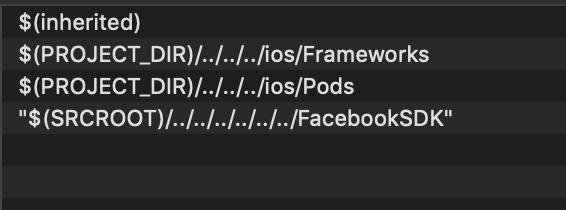
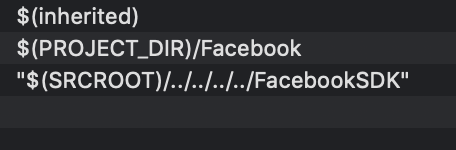
Thanks, everyone, in the end, I solved the issue just dragging and dropping FacebookSDK into the Libraries>RCTFBSDK.xcodeproj --> on the Build settings searched for Framework Search path
TO AVOID type error is better to drag and drop the complete folder.
RCTFBSDK.xcodeproj
Global project
 cristianPerez
on 3 May 2019
cristianPerez
on 3 May 2019
Hi
when this issue will be finally fixed? I have to implement this solution with $(HOME)/Documents/FacebookSDK after each react-native link
 optimatex
on 12 May 2019
optimatex
on 12 May 2019
@optimatex You can always fork the repository, change the file on your forked version and import it with npm/yarn
reyalpsirc
on 12 May 2019
@reyalpsirc great idea, but wait, I need to do this with each library updates, so probably no thanks
optimatex
on 21 May 2019
@rumbaa01 Try doing this in XCode (i have 10): go to RCTFBSDK.xcodeproj then build settings->framework search paths. And change ~/Documents/FacebookSDK to $(HOME)/Documents/FacebookSDK
It saved me a lot of time. Now it finally gets built.
@Helga108 Believe me, you are a lifesaver. I have spent hours debugging this.
 daniellamarr
on 22 May 2019
daniellamarr
on 22 May 2019
@rumbaa01 Try doing this in XCode (i have 10): go to RCTFBSDK.xcodeproj then build settings->framework search paths. And change ~/Documents/FacebookSDK to $(HOME)/Documents/FacebookSDK
It saved me a lot of time. Now it finally gets built.@Helga108 Believe me, you are a lifesaver. I have spent hours debugging this.
and
@reyalpsirc great idea, but wait, I need to do this with each library updates, so probably no thanks
The problem with fixing it manually, is that it will "reset" your change every time you run yarn or react-native link, so you have to keep re-fixing it every time.
Please check my fix above to do it automatically for you :)
kg-currenxie
on 22 May 2019
Thanks @kg-currenxie I’m lucky to have stumbled on this link. I’ve been on this for HOURS. I can at least close one eye when I sleep😅
daniellamarr
on 22 May 2019
My workaround! 🛠
_The problem with fixing it manually, is that it will "reset" your change every time you run
yarnorreact-native link_Using https://www.npmjs.com/package/patch-package will do this automatically for you!
- Open the file
node_modules/react-native-fbsdk/ios/RCTFBSDK.xcodeproj/project.pbxprojin your editor- Replace
~/Documentwith$(HOME)/Documents. There should be 2 places in this file.yarn add patch-package postinstall-postinstall -dnpx patch-package react-native-fbsdk- Add this to
package.json"scripts": { + "postinstall": "patch-package" }Done :) Never fix it manually from now on!
It worked for me, I just had to change the order because yarn add patch-package postinstall-postinstall -d overwritten the changes inside node_modules/react-native-fbsdk...
 luisaverza
on 27 May 2019
luisaverza
on 27 May 2019
I have a different workaround as I don't like the idea that those frameworks would not end up in repo and new person would have to redownload them - stupid.
This is Framework Search Paths of the RCTFBSDK Project
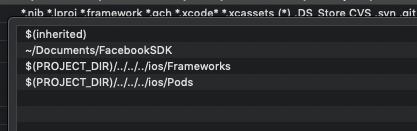
So you can utilise one of last two directories and put there framework files and viola.
 ssuchanowski
on 29 May 2019
ssuchanowski
on 29 May 2019
I have a different workaround as I don't like the idea that those frameworks would not end up in repo and new person would have to redownload them - stupid.
This is
Framework Search Pathsof theRCTFBSDKProject
So you can utilise one of last two directories and put there framework files and viola.
Agreed, I had the same problem, and while Importing the Framework files, I thought they were being imported to $(PROJECT_DIR)/../../../ios/Frameworks; they are instead imported to $(PROJECT_DIR)/../../../ios, so the simplest way is what you propose, import the files to the Frameworks subfolder
 madandrija
on 2 Jul 2019
madandrija
on 2 Jul 2019
@rumbaa01 Try doing this in XCode (i have 10): go to RCTFBSDK.xcodeproj then build settings->framework search paths. And change ~/Documents/FacebookSDK to $(HOME)/Documents/FacebookSDK
It saved me a lot of time. Now it finally gets built.
thank you so much you save my time.
 umar0107
on 28 Aug 2019
umar0107
on 28 Aug 2019
Related issues
 pranny
·
6Comments
pranny
·
6Comments
 coryb08
·
4Comments
coryb08
·
4Comments
 santilorenzo
·
3Comments
santilorenzo
·
3Comments
 smzeeshan91
·
4Comments
smzeeshan91
·
4Comments
 stevesaygoodbuycom
·
5Comments
stevesaygoodbuycom
·
5Comments
Most helpful comment
@rumbaa01 Try doing this in XCode (i have 10): go to RCTFBSDK.xcodeproj then build settings->framework search paths. And change ~/Documents/FacebookSDK to $(HOME)/Documents/FacebookSDK
It saved me a lot of time. Now it finally gets built.