React-native-fast-image: You must not call setTag() on a view Glide is targeting
Hello,
I'm using the latest version (4.0.14) of fast-image with React-Native 0.53.0.
Today, I was doing some testing on several android devices (Samsung S7 Edge, Nexus 6P, etc) and I'm getting this exception logged in our sentry instance.
You can see the entire stack trace here: https://sentry.keenvil.com/share/issue/a1a259ad75a44809a33943c503bf4229/
Did something change in the android implementation that I should be aware of and are there any code changes I need to make?
Searching through Glide issues I found these ones: 1531 and 370 but they both are for Glide 3.7.0 and Fast-Image is on 4.7.1 if I'm not wrong.
Any idea how this can be fixed?
Thanks!
 fmonsalvo
All 12 comments
@fmonsalvo The Glide 4 code hasn't been published to npm yet. It will be in the next major update.
Not sure what could be causing that error. Apparently though you must not call "setTag" on a view glide is targeting, are you possibly doing that somehow? Might be relevant: https://github.com/bumptech/glide/issues/1531
 DylanVann
on 14 Jun 2018
DylanVann
on 14 Jun 2018
So do I.
I used in Flatlist, and when I slided the list over and over again, quickly I got this exception.
@fmonsalvo could u share the solution? thanks.
 PangGua00
on 21 Jun 2018
PangGua00
on 21 Jun 2018
Hey @DylanVann this is still happening on latest version (5.0.11). Any chance this will get fixed soon?
Thanks.
fmonsalvo
on 17 Oct 2018
Guys, on my app, whenever I press the back button on Android to close the app or try to log out, this error appears on the android studio logcat. I went and looked up some of the files reported, and the issue for my case seems to be from the FastImageViewManager.java. Below is a snippet of the function reported to be causing the error.
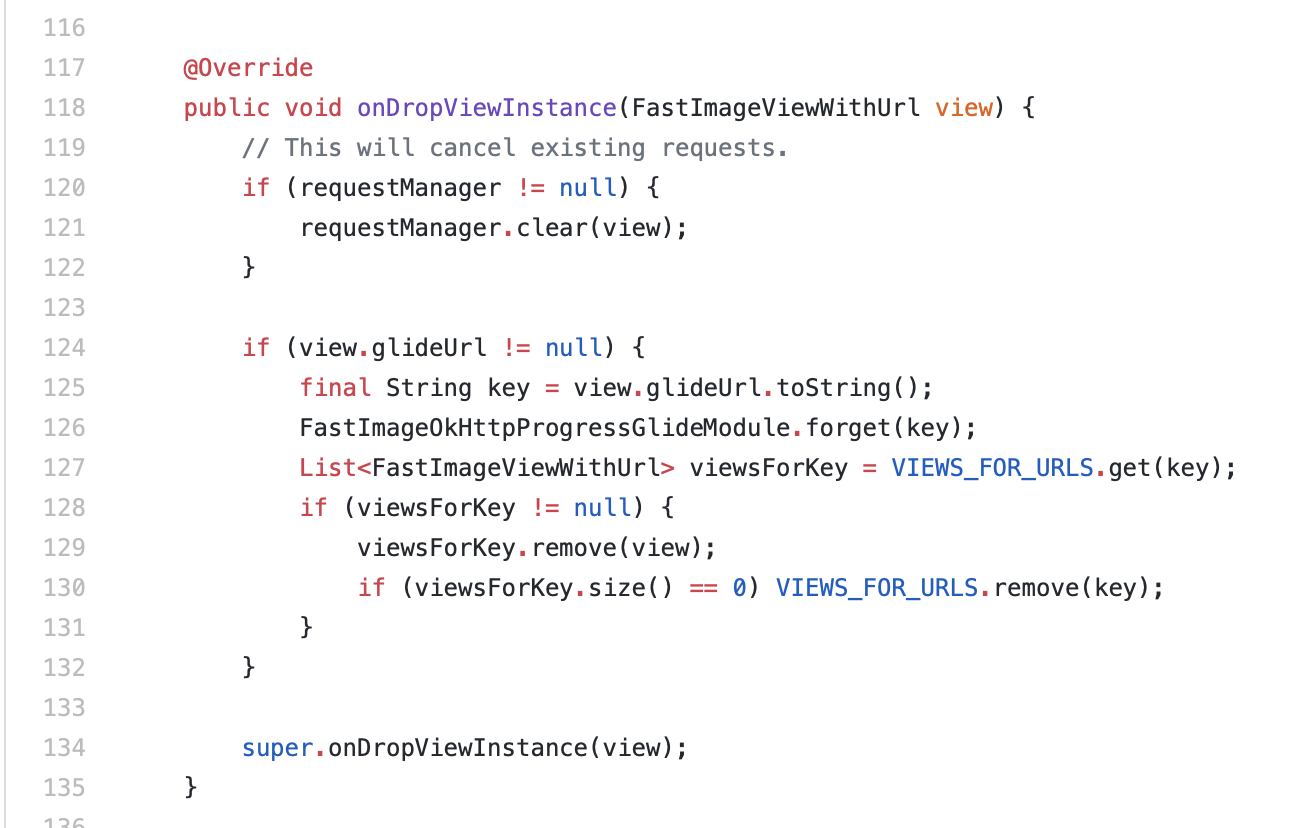
The "requestManager.clear(view)" seems to be causing the issue for my app. I tried the brute force approach to see if this was really affecting my app, basically removing the requestManager.clear(view), and the app no longer crashes whenever I press the back button on the home screen or log out.
I don't completely understand the entire library myself or glide since I've only looked at small parts here and there, but this is what I speculate: this function seems to be getting rid of the images, deallocating memory, while glide is still holding onto that view and its images, trying to keep the memory there. With the deallocation, glide is trying to allocate more memory to fill up the lost memories, so the two actions conflict and cause the app to crash.
Not sure if my speculation is near the ballpark or not at all. Can I get someone to tell me the logic behind glide getting rid of the cached images?
Thanks.
 DavidYangCbre
on 20 Dec 2018
DavidYangCbre
on 20 Dec 2018

 Damoness
on 9 Jan 2019
Damoness
on 9 Jan 2019
In my case, it worked when I removed the property called "testID" in
PangGua00
on 9 Jan 2019
@PangGua00 you are right! Removing testID on the FastImage component worked for me as well.
But remember to also add the proguard-rules for android.
This issue can be closed imo. Solution was: upgrading to the latest version (v6), adding proguard rules for android & removing testID for any FastImage component 🎉
 Monte9
on 31 May 2019
Monte9
on 31 May 2019
I'm had to upgrade everything to react native >0.6 and got everything working for iOS, but haven't figured out android yet. I am getting an error- error while updating propety 'source' of a view managed by 'FastImageView'... null ... You must not call setTag() on a view Glide is targeting
I tried to add the proguard-rules in the READ.me. I wasn't sure what testID people were talking about, but tried commenting out/ removing the following (from picture below).
Any other suggestions would be great.
"react-native": "0.60.5",
"react-native-fast-image": "^7.0.2"

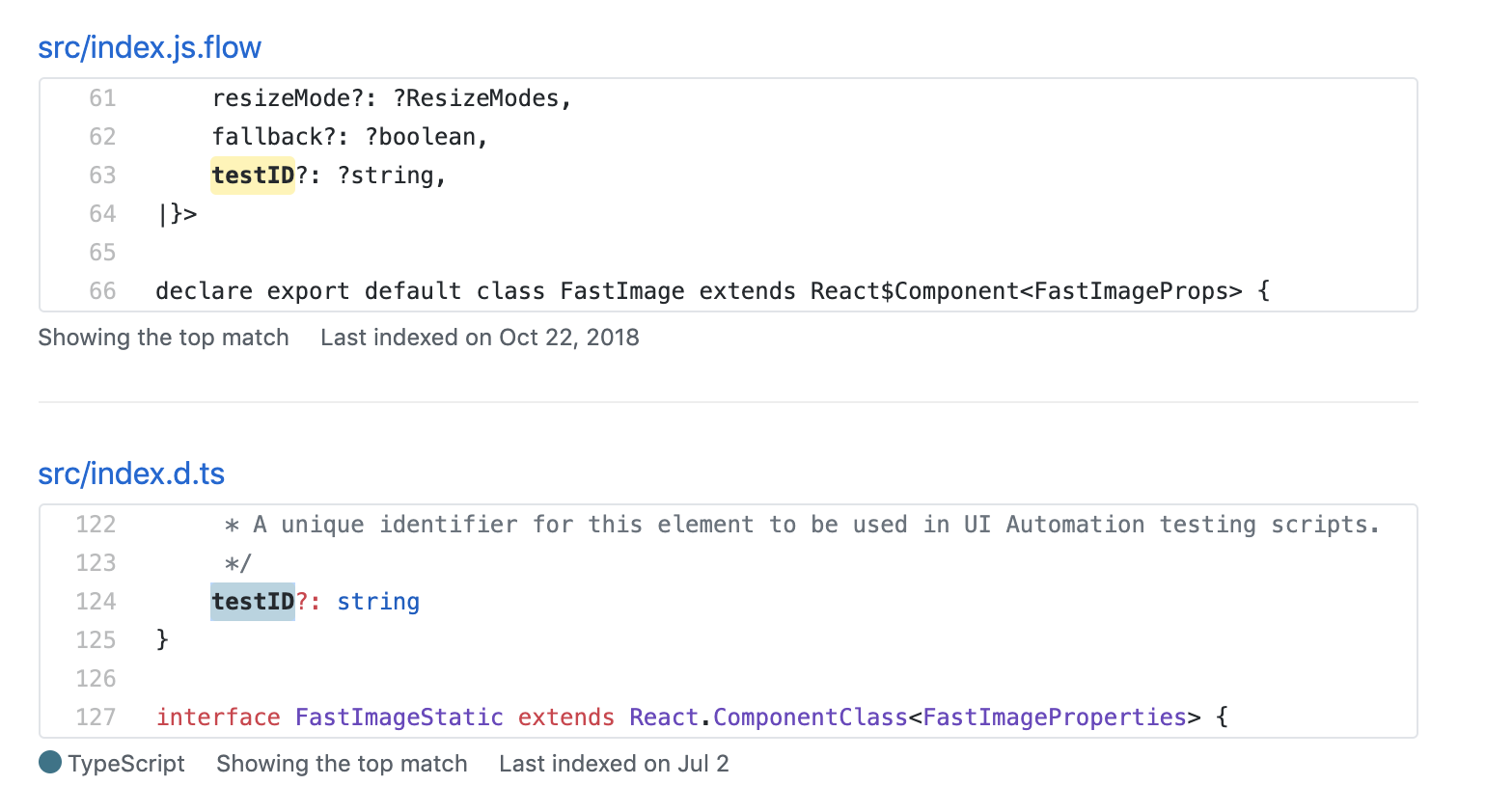
 Sbphillips19
on 10 Oct 2019
Sbphillips19
on 10 Oct 2019
We were receiving this crash on Android release builds because we were passing testID in FastImage component.
Does FastImage not support the testID prop? If not then how do we support jest testing using the FastImage component?
 beisert1
on 5 Nov 2019
beisert1
on 5 Nov 2019
@beisert1 are you passing testID anywhere else. Still haven't been able to get around this and have been just disabling for android and only using in IOS.
Sbphillips19
on 4 Dec 2019
I had this issue with using react-native-elements Avatar component. Seems like it adds the testID under the hood.
Currently just using FastImage for Avatars on iOS:
<Avatar
            ImageComponent={Platform.OS === 'ios' ? FastImage : undefined}
            source={{
              uri: picture
            }}
            size={size}
            {...rest}
/>
 okarlsson
on 22 Dec 2019
okarlsson
on 22 Dec 2019
@okarlsson you can create a custom Image component like this which will work for both Android and iOS and then pass this component in ImageComponent prop of Avatar.
import React from 'react';
import { Platform } from 'react-native';
import FastImage from 'react-native-fast-image';

export const Image = React.forwardRef((props, ref) => {
  const { testID, ...otherProps } = props;

  return (
    <FastImage
      ref={ref}
      testID={Platform.OS !== 'android' ? testID : undefined}
      {...otherProps}
    />
  );
});

Image.propTypes = FastImage.propTypes;
Image.priority = FastImage.priority;
Image.resizeMode = FastImage.resizeMode;
Image.cacheControl = FastImage.cacheControl;
Image.preload = FastImage.preload;

export default Image;
 vaibhavhrt
on 25 Feb 2020
vaibhavhrt
on 25 Feb 2020
Related issues
 clay-morgan
·
3Comments
clay-morgan
·
3Comments
 kkarmalkar
·
4Comments
kkarmalkar
·
4Comments
 StiffFy
·
3Comments
StiffFy
·
3Comments
 Andarius
·
3Comments
Andarius
·
3Comments
 ryoid
·
3Comments
ryoid
·
3Comments
Most helpful comment
In my case, it worked when I removed the property called "testID" in.