React-native-fast-image: Memory issues when showing a ton of images.
People have reported memory issues when using this module to show a lot of images.
The example app does work fine showing hundreds of images so I think something else must be at play.
It could be that the images people are showing in these large lists are also all very large images.
I will attempt to replicate this issue and I will summarise findings here.
 DylanVann
All 43 comments
We probably do need a way to hook into low memory warnings and clear the in-memory cache.
I'm not actually aware of how to get low memory warnings on the JS side of react-native. We might just be able to do it automatically on the native side though.
DylanVann
on 27 Apr 2018
@DylanVann You may be able to use AppState.addEventListener('memoryWarning', this.handleLowMemoryWarning) to detect low memory on the JS side.
 varungupta85
on 27 Apr 2018
varungupta85
on 27 Apr 2018
What about not only cache in memory, but also cache in disk. If the memory cache is too much, clear the previous cache and retrieve it from disk cache if necessary.
 markrookie
on 28 Apr 2018
markrookie
on 28 Apr 2018
It already does disk and memory caching. We just need to clear the memory cache on a low memory warning. Actually running out of disk space would be a rare occurrence.
DylanVann
on 4 May 2018
I found many OOM errors in my user crash logs after changed ImageCache to fast-image.
Seems add android:largeHeap="true" to AndroidManifest.xml solved this problem.
Sometimes there is memory issue caused by SDWebImage too and I found this issue issue2252. SDWebImage will clear memory cache when receive memory warning, so I am not sure what's the problem here.
 daqiuqu
on 16 May 2018
daqiuqu
on 16 May 2018
I had to pull this library out of project because of OOM errors. Even with android:largeHeap="true" I could still get the app to crash. I even managed to generate an OOM error on an iphoneX. If a user uses our app for a substantial amount of time they can load 1000+ images. It would be awesome to get a fix in for this.
 L-Yeiser
on 16 May 2018
L-Yeiser
on 16 May 2018
@L-Yeiser Do you unmount FastImage components that are off the screen?
 n1ru4l
on 16 May 2018
n1ru4l
on 16 May 2018
@n1ru41 yes. Most of the images are in FlatLists which unmounts components off screen. In one case the images are in a ScrollView but we manually unmount the images off screen.
L-Yeiser
on 16 May 2018
@L-Yeiser I used two android devices with small memory, after set android:largeHeap="true" fixed OOM crash problem, I am going to test this in production mode this week.
Still confused with iOS memory issue.
daqiuqu
on 18 May 2018
I am facing the same issue on iPhone in debugging mode. Moreover, the scrolling is also laggy in both debug and release mode.
However, the performance is better on iPad wherein I show a grid of 3 columns and on iPhone I'm showing a grid of 1 column.
One observation, if the number of images is less than there is no issue while scrolling.
Code for reference :
```
render() {
Moment.locale('en');
let documentsList = this.state.documentsList;
var DeviceInfo = require('react-native-device-info');
return (
style={Style.container}>
{
!documentsList &&
}
textContent={this.state.title}
textStyle={{ color: '#FFF' }}
percent={this.state.progress}
loadingType={this.state.loaderStyle}
/>
{
                documentsList &&
                <View style={Style.container}>
                    <FlatList
                        data={documentsList}
                        numColumns={DeviceInfo.isTablet() ? 3 : 1}
                        ItemSeparatorComponent={this.renderSeparator}
                        renderItem={this._renderItem}
                        removeClippedSubviews={false}
                        keyExtractor={(item, index) => { return index }}
                       // extraData={this.state.screen_width} //TODO : Why ?
                    />
                </View>
            }
        </View>
    )
}

_renderItem = data => {
    const { item, index } = data;
    let DeviceInfo = require('react-native-device-info');
    let numColumns = DeviceInfo.isTablet() ? 3 : 1;
    let screen_width = this.state.screen_width;
    let screen_height = this.state.screen_height;
    let myWidth = (screen_width) / (numColumns)
    let imageHeight = DeviceInfo.isTablet() ? screen_height / 2 : screen_height / 3;
    let documentUrl;
    if (item.cacheFilePath) {
        documentUrl = `file://${item.cacheFilePath}`;
    } else {
        documentUrl = `${api.BASE_URL}/api/v1/download/fs/${item.output_location}/${item.actual_name}`;
    }

    return (

        <View style={{ margin: 4, overflow: 'hidden', borderRadius: 3, width: myWidth, flexDirection: 'column' }}>

            <TouchableOpacity
                onPress={this.opendocViewer.bind(this, item)}>
                <View style={{ padding: 10 }}>
                    <FastImage
                        style={{ width: '100%', height: imageHeight }}
                        source={{
                            uri: documentUrl,
                            priority: DeviceInfo.isTablet() ?FastImage.priority.normal:FastImage.priority.low, //TODO : Test
                        }}
                    // resizeMode={FastImage.resizeMode.cover}
                    />
                    <View style={styles.sectionRow}>
                        <Icon
                            type='font-awesome'
                            color={item.type == 'application/pdf' ? '#F94C3F' : '#0082F4'}
                            name={item.type == 'application/pdf' ? 'file-pdf-o' : 'image'} />
                        <Text style={styles.details}>{item.user_document_name}</Text>
                    </View>
                    <View style={styles.touchable}>
                        <Text style={styles.text_createdon}>Created on :</Text>
                        <Text style={styles.text_createdon}>{Moment(item.created_on).format('DD-MM-YYYY')}</Text>
                    </View>

                    {
                        item.comments !== null && <View style={styles.touchable}>
                            <Text style={styles.text_createdon}>Comments:</Text>
                            <Text style={styles.text_createdon}>{item.comments}</Text>
                        </View>
                    }

                </View>
            </TouchableOpacity>
        </View>
    )
}
```
Will this be related to size of images?. The average size of image is in KBs
@daqiuqu Any alternative of android:largeHeap="true" for iOS
Any inputs will be helpful
 iosfitness
on 20 May 2018
iosfitness
on 20 May 2018
@iosfitness Use pure component, implement shouldComponentUpdate, don't change state in onLayout. Some tips but I am not sure if these are useful.
daqiuqu
on 22 May 2018
I used PureComponent, added removeClippedSubviews property inside FlatList, added android:largeHeap="true", still, this happened from time to time (only in Android, iOS is fine)
 s123121
on 4 Jun 2018
s123121
on 4 Jun 2018
Also getting this issue, mainly with repetition of the same images in a list (you'd understand if you saw the app as to why there is repetition).
My experience simple, with FastImage enabled the usage jumps from 250MB to 800+ memory usage, it then doesn't release that memory when I go to another area (collection in out case) to repeat the process with different assets.
 flikQ
on 11 Jun 2018
flikQ
on 11 Jun 2018
Could it have anything to do with transparency on PNGs @DylanVann ? A lot of our images that have the most impact are PNGs with transparency, about 80kb each image so hardly large.
flikQ
on 11 Jun 2018
Using removeClippedSubviews={false} will prevent some memory from being available.
There was a memory leak in Android that has been fixed in master, although I'm not sure that code is in a production ready state. Hoping to do a new major version on the weekend with it in it though.
DylanVann
on 15 Jun 2018
@DylanVann sadly setting to false or true makes no difference to the overall performance. Here is a good example - skip the first 20 seconds. https://d.pr/D9WWQN
As you can see the moment we output the cards, the memory usage sky rockets. There is a lot of repetition in assets and each file (player image, card border and card background) are around 80kb tops. This memory isn't released when you navigate away.
If I switch to standard Image rendering (which is visually rubbish as it loads each time) the memory performance is not effected in any way.
It's worth noting that the performance hog on the first 30 seconds was due to the Finish Collection component having a memory leak. This has since been resolved and not connected to Fast-Image issue above. (memory usage is around 250mb now).
Any advice or thoughts would be useful.
flikQ
on 20 Jun 2018
I just hit this issue myself. Unfortunately, in my case I'm showing a relatively small amount of images (~20) in a FlatList, and then doing some work with FastImage.preload. This crashes my app on an iPhone 6 running iOS 11, and is reproducible 10 times out of 10. I am only seeing crashes on a real iOS device - iOS simulators and all Android emulators/devices work just fine.
Replacing FastImage with RN's standard Image component completely alleviates the issue, and performance is great.
Disappointing, as this project is otherwise absolutely fantastic. I'm glad I caught this before submitting to Apple for review. I'll report back here if I find a temporary solution.
Update: I found a solution to my particular implementation, and thought I'd share as it might shed light on part of the issue. This lib seems to be best suited for _one_ full-size image (1mb+), or lots of thumbnail-size images (~100kb). I'd assume this is a linear relationship.
Notably though, memory seems to spiral out of control even when full-size images with _local filesystem_ URIs are provided. I'm not sure why/how a local file would need to be cached or held in memory - this is probably just a simple bug. I'm aware react-native-fast-image is not (yet) intended for local images, but my understanding was that it was supposed to fallback to a standard Image component if the URI was local. From what I've seen, it's not. Literally a simple ternary fixed perf issues in my case:
{uriIsLocal ?
  <Image
    source={{ uri: imageSource }}
    style={styles.image}
  />
  :
  <FastImage
    source={{ uri: imageSource }}
    style={styles.image}
  />
}
 isaachinman
on 17 Jul 2018
isaachinman
on 17 Jul 2018
I had this issue on iOS as well.
and thanks to @daqiuqu comment regarding
SDWebImage too and I found this issue issue2252.
I managed to fix my crash issue by setting _shouldDecompressImage = NO
it might be helpful if there will be an options to control this setting via info.plist
 pilot4u
on 19 Jul 2018
pilot4u
on 19 Jul 2018
What is this _shouldDecompressImage flag? What is it actually doing?
isaachinman
on 19 Jul 2018
When SDWebImage downloads image it may save it in memory as extracted format or save as it was received.
e.g. if you download jpg, which is compressed image format, your system need to extract it in order to render the image, but it causes extra CPU cycles.
So using SDWebImage you may choose to save the image in extracted format so decompress cycle will be executed only once.
But it uses large amount of memory, which caused our iPhone 6 test devices to crash.
Therefor, for our case it was better to turn this feature off.
but I had to change it within pods project, which isn't recommended and cannot be committed to git,
So In order to easily use this setting, I proposed to expose this setting to info.plist file so every project may customize this amazing library with needed optimization.
pilot4u
on 20 Jul 2018
@pilot4u DO you know https://github.com/ds300/patch-package ? I am using this for some libraries 😅
n1ru4l
on 20 Jul 2018
Patching is fine, but if @pilot4u has found something genuinely helpful, it would be good to discuss with @DylanVann and submit a PR.
isaachinman
on 20 Jul 2018
Update: After set android:largeHeap="true" in production env, our crash quantity reduced.
Hope @pilot4u 's solution could solve this memory issue in iOS, thanks a lot.
daqiuqu
on 20 Jul 2018
So, this lib solves some rendering issues, but, unfortunately, provides much worst - memory issues.
I just got some crashes on slow old devices and tried to investigate using AndroidStudio and Xcode profilers.
So, here is what we've got on iPhone6 simulator when all images was rendered by FastImage.
Yeah, it is debug mode, but numbers isn't important.

What is important - is the difference between RN Image and FastImage. Here is the same conditions, but FastImage replaced by RNImage.

On android was the same correlation.
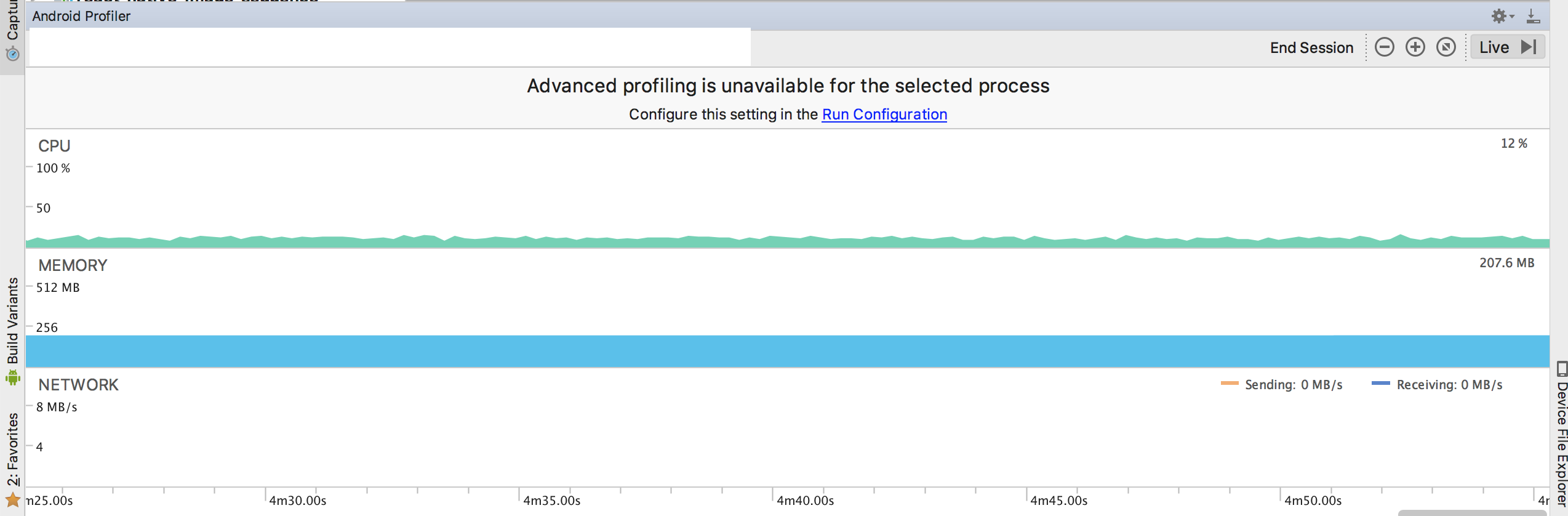
So, I don't know exactly how to fix this, but there should be the way.
 korgara
on 13 Aug 2018
korgara
on 13 Aug 2018
So to share my experiences since my original post regarding memory usage and bad performance here are some of things we did to solve.
Fast Image is terrible if images are above a certain pixel size, we had accidentally uploaded a logo that was 6000px and killed memory usage, changing it to a realistic size solved that performance issue. This isn't a lesson in fast-image but making sure you do your part!
We decided to create a thumbnail of each image we uploaded and making sure that images we uploaded didn't exceed 1200px wide (for our assets like photos, borders etc). This means that we aren't trying to render 100+ 3000px images on top of each other.
Don't try and use Fast-image for local files.
All in all, we created a majority of our own issues, expecting Fast-Image to do all the work, which overall shouldn't be expected, think about the images you are throwing at the library. If you are displaying a photograph, do you need to throw a 6000px photograph at your app? The answer is no, throw a photo that matches the res of the highest res phone you support, within reason and make concessions on size where needed. If you want people to access the full size offer it as a download.
Building an app now is like building for web 10 years ago, we had to make all kinds of concessions and we were way more cautious about the types of images we were throwing at the browser taking into account slower connections, different browsers, difference devices etc the same should be done now.
This won't solve everyones issues but will help you avoid issues that Fast-Image isn't and shouldn't be designed to counter. It's a learning curve :)
@DylanVann thanks for the library!
flikQ
on 13 Aug 2018
I have same this issue. I can't load list with about 300 images and each image have dimension 600x600 and size 840KB.
I think we should solution for this issue as:
- Auto reduce image base style of image
- Auto clear cache memory or store cache in storage
 navata
on 15 Nov 2018
navata
on 15 Nov 2018
@DylanVann Any idea about how we might start work on this? I am more than happy to help.
isaachinman
on 15 Nov 2018
Hi, I ran into this bug today. Showing a list of ~90 images (max image size is about 1.1 MB) causes a crash on iOS. Testing on a few different devices I have access to shows that it crashes 100% of the time on iOS version 11.0.3 and below, but works fine on 11.3 and above. Hope this helps!
 henrikland
on 15 Jan 2019
henrikland
on 15 Jan 2019
@DylanVann is this resolved?
 evanjmg
on 5 May 2019
evanjmg
on 5 May 2019
@DylanVann Any update on this issue? Look like it still happen both on android and ios that run on low-end devices.
 NoRamadon
on 24 May 2019
NoRamadon
on 24 May 2019
I am building similar app with infinite scroll of images.
Some suggestions:
1) You don't need more than 600 * 600 images on a phone especially you are showing thumbnail
2) Check shouldComponentUpdate and use PureComponent. Extra render makes app runs very slowly.
3) PNG seems to take more space than JPG, though I saw some post online suggesting using PNG, no idea why is that.
After doing above, I got smooth scroll on debug mode on ios. But if I scroll super fast, after 50 - 100 images, my phone turns hotter and I saw it is starting to lag
 dejavu20180307
on 29 May 2019
dejavu20180307
on 29 May 2019
This may not be a problem with the library but rather your phone is rendering a lot of items/images at once. A temporary solution for this is to use the maxToRenderPerBatch prop for your lists. This makes it so you only have so much rendered a much. The problem went away when I did this.
evanjmg
on 29 May 2019
When scrolling through an images flatlist on ios (which is not very long, about 20 images), scrolling becomes laggy and the scrolling position keeps flickering while scrolling. It works fine on Android. Also, it works fine on iOS using normal Image from react-native, but I need to use react-native-fast-image for caching. Also, rendering 4x4 columns of images, so 16 images present on the screen at once causes the app on iOS to crash. It is really disappointing that this library works very smoothly on android, yet totally unusable on iOS.
 OmarBasem
on 11 Jun 2019
OmarBasem
on 11 Jun 2019
@ramon90 I don't have this issue when using maxRenderPerBatch and I use a lot more images - have you tried rendering only what you see (recycling)?
evanjmg
on 11 Jun 2019
I tried using maxRenderPerBatch and did not work. I am using FlatList so only what on the screen is rendered. I tried using react-native-web-image and still had the same issues, so I guess the problem is with the native implementation of SDWebImage.
OmarBasem
on 11 Jun 2019
@ramon90 for me, i use the image component from react native only on iOS and the cache is working well.
It can be a workaround until the problem with fast image on ios is fixed.
 tmjordan
on 11 Jun 2019
tmjordan
on 11 Jun 2019
const StyledImage = styled(FastImage)
  height: 250;
  width: null;
  flex: 1;
;
Above is what I set the style to my FastImage.
When I set the height to "250", it causes slow performance.
When I set the height to "150", it becomes smooth.
 yongloon
on 27 Sep 2019
yongloon
on 27 Sep 2019
@DylanVann I'm going to share my experience on android with v7.0.2. I'm using an old device a Samsung SM-J200M with 1GB RAM.
For a grid of photos like instagram, 3 images per row, only thumbnails 150x150, my app crashes after scrolling the list for a while, between 1.5k and 2k images.
The app also crashes if after scrolling through a long list of thousands images i send it to background for a minute or so and try to bring it back.
I did the same test with the default Image component and while slower to load images, my app did not crash.
So to compare, i installed the current instagram app and tried to scroll through a large list, after a while the app crashed as well with the error "java.lang.outofmemoryerror"
It's out of my expertise to try to solve this, i just can guess that the images are not being removed from memory after i scroll or something else is being left in memory.
Testing on iPhone 5s, it takes more content to crash but it does too.
 immortalx
on 22 Oct 2019
immortalx
on 22 Oct 2019
@immortalx Did you find any solution?
 ashokkumar88
on 17 Nov 2019
ashokkumar88
on 17 Nov 2019
@ashokkumar88 Sorry, no workaround in my case yet.
immortalx
on 19 Nov 2019
I had this issue on iOS as well.
and thanks to @daqiuqu comment regardingSDWebImage too and I found this issue issue2252.
I managed to fix my crash issue by setting _shouldDecompressImage = NO
it might be helpful if there will be an options to control this setting via info.plist
Where do you set this in the app?
 aibrahim3546
on 12 Dec 2019
aibrahim3546
on 12 Dec 2019
same issue,any update?
 KarenQiao
on 25 May 2020
KarenQiao
on 25 May 2020
Still a big issue
 jbromberg
on 26 Jan 2021
jbromberg
on 26 Jan 2021
Related issues
 hawkup
·
3Comments
hawkup
·
3Comments
 kmilodenisglez
·
3Comments
kmilodenisglez
·
3Comments
 Doko-Demo-Doa
·
3Comments
Doko-Demo-Doa
·
3Comments
 clay-morgan
·
3Comments
clay-morgan
·
3Comments
 Andarius
·
3Comments
Andarius
·
3Comments
Most helpful comment
So to share my experiences since my original post regarding memory usage and bad performance here are some of things we did to solve.
Fast Image is terrible if images are above a certain pixel size, we had accidentally uploaded a logo that was 6000px and killed memory usage, changing it to a realistic size solved that performance issue. This isn't a lesson in fast-image but making sure you do your part!
We decided to create a thumbnail of each image we uploaded and making sure that images we uploaded didn't exceed 1200px wide (for our assets like photos, borders etc). This means that we aren't trying to render 100+ 3000px images on top of each other.
Don't try and use Fast-image for local files.
All in all, we created a majority of our own issues, expecting Fast-Image to do all the work, which overall shouldn't be expected, think about the images you are throwing at the library. If you are displaying a photograph, do you need to throw a 6000px photograph at your app? The answer is no, throw a photo that matches the res of the highest res phone you support, within reason and make concessions on size where needed. If you want people to access the full size offer it as a download.
Building an app now is like building for web 10 years ago, we had to make all kinds of concessions and we were way more cautious about the types of images we were throwing at the browser taking into account slower connections, different browsers, difference devices etc the same should be done now.
This won't solve everyones issues but will help you avoid issues that Fast-Image isn't and shouldn't be designed to counter. It's a learning curve :)
@DylanVann thanks for the library!