React-native-document-picker: I'm not seeing the options for Google Drive or Dropbox, when running ios simulator I get taken right to iCloud document selection.
I'm not seeing the options for Google Drive or Dropbox, when running ios simulator I get taken right to iCloud document selection. Any ideas why that would be?
Code:
try {
const results = await DocumentPicker.pickMultiple({
type: [DocumentPicker.types.pdf],
});
for (const res of results) {
console.log(
res.uri,
res.type, // mime type
res.name,
res.size
);
}
} catch (err) {
if (DocumentPicker.isCancel(err)) {
// User cancelled the picker, exit any dialogs or menus and move on
} else {
throw err;
}
}
 AdamMoffitt
All 13 comments
I am facing the same issue, is there a way to upload from photos? or take a photo directly from camera.
 aasalshehhi
on 8 Feb 2020
aasalshehhi
on 8 Feb 2020
+1
 SwitiSM
on 10 Feb 2020
SwitiSM
on 10 Feb 2020
same issue
 Prabha-Ragavan
on 13 Feb 2020
Prabha-Ragavan
on 13 Feb 2020
any one solved the issue?
aasalshehhi
on 3 Mar 2020
+1
 Touqeer-Hussain
on 6 Mar 2020
Touqeer-Hussain
on 6 Mar 2020
If no one has a solution, does anyone have a suggestion for alternate library?
 Dror-Bar
on 31 Mar 2020
Dror-Bar
on 31 Mar 2020
+1
 himanshu-tiwari
on 29 Apr 2020
himanshu-tiwari
on 29 Apr 2020
+1
 cassiobt
on 21 Jul 2020
cassiobt
on 21 Jul 2020
+1. Happening on physical device as well (made sure i had the google drive app installed, but still only the iCloud files window came up).
 kraj011
on 17 Aug 2020
kraj011
on 17 Aug 2020
Figured it out. What you have to do is:
- Make sure you have google drive downloaded on the phone (not sure if you could download apps on simulator)
- Run the example code, then click on browse in the tab bar menu in the bottom when the i cloud drive window opens
- You should see either Google Drive appear right away or you might have a location that says "More locations". If this is the case, click on more locations and google drive should be there. From there, simply enable google drive and you should be able to use files from google drive!
Hope this helps!
kraj011
on 17 Aug 2020
Figured it out. What you have to do is:
- Make sure you have google drive downloaded on the phone (not sure if you could download apps on simulator)
- Run the example code, then click on browse in the tab bar menu in the bottom when the i cloud drive window opens
- You should see either Google Drive appear right away or you might have a location that says "More locations". If this is the case, click on more locations and google drive should be there. From there, simply enable google drive and you should be able to use files from google
drive!Hope this helps!
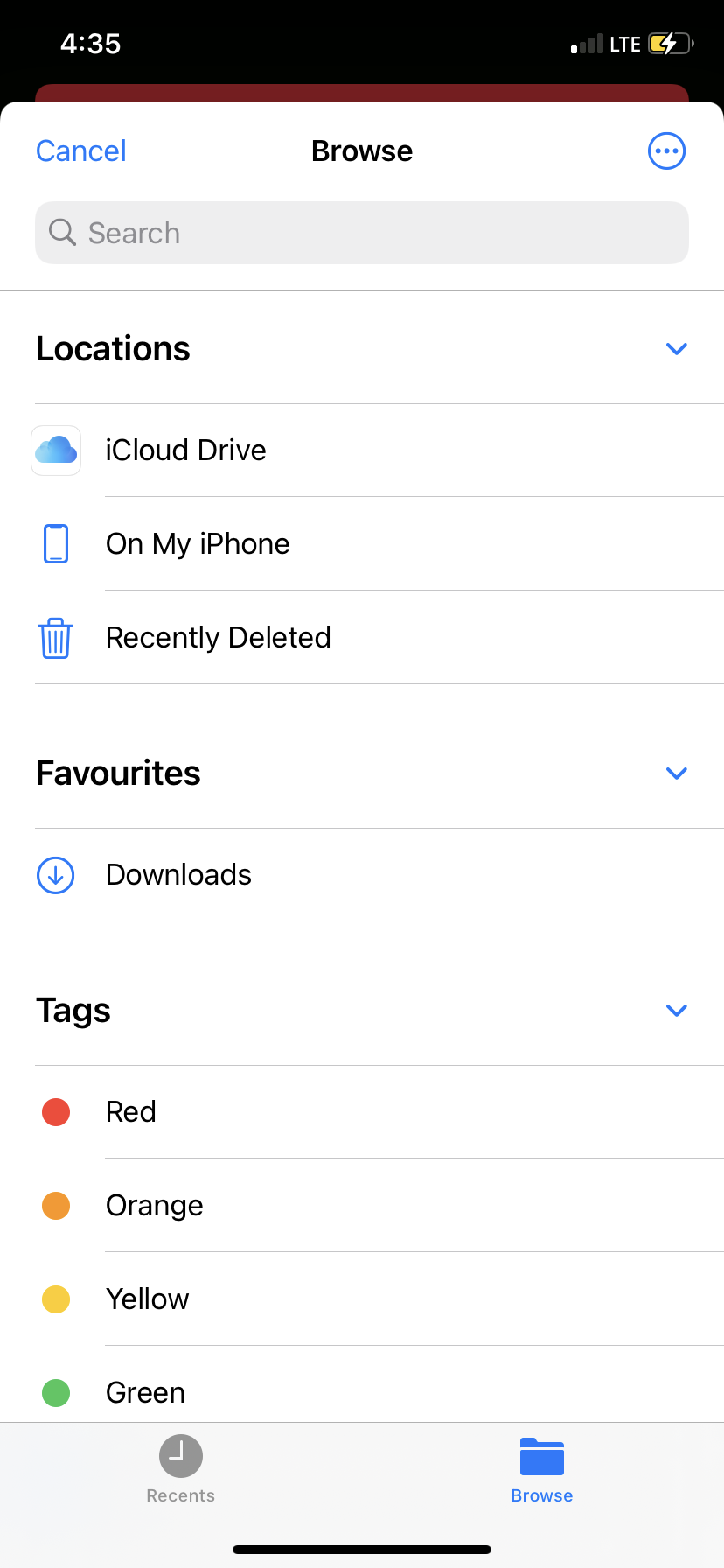
tried this but still not getting google drive option (Drive app is installed on device)
 ali14a
on 9 Dec 2020
ali14a
on 9 Dec 2020
+1
 edinpuzic
on 9 Feb 2021
edinpuzic
on 9 Feb 2021
+1, has anyone figured this out?
 7patricia
on 26 Apr 2021
7patricia
on 26 Apr 2021
Related issues
 VinitBhavsar
·
4Comments
VinitBhavsar
·
4Comments
 obstruction6761
·
6Comments
obstruction6761
·
6Comments
 ashish-algorythma
·
7Comments
ashish-algorythma
·
7Comments
 MuneebJS
·
5Comments
MuneebJS
·
5Comments
 Gentlee
·
8Comments
Gentlee
·
8Comments
Most helpful comment
tried this but still not getting google drive option (Drive app is installed on device)