React-native-document-picker: How to get Absolute Path of the file ?
Hey Guys, I have already resolved this issue for me. I have posted the solution in this link
Absolute Path Solution
RNFetchBlob.fs
          .stat(res.uri) // Relative path obtained from document picker
               .then(stats => {
                 console.log(stats);
                var str1 = "file://";
                var str2 = stats.path;
                var correctpath = str1.concat(str2);
                 this.setState({ absolutepath: correctpath });
      })
      .catch(err => {
        console.log(err);
      });
* Enable read/write permission*
Do Test it and reply if it works !
 ronastlelobo
All 30 comments
same issue
 AlexandrDobrovolskiy
on 25 Sep 2018
AlexandrDobrovolskiy
on 25 Sep 2018
You don't, use the URI. The OSes do not provide canonical file paths for document providers and generally do not allow you to access a file outside your control by its canonical file path.
 dantman
on 25 Sep 2018
dantman
on 25 Sep 2018
@dantman I'm using https://github.com/ivpusic/react-native-image-crop-picker
and the returned file is looks like this:

But when use react-native-document-picker it looks like this and can't be uploadable with axios:

 cybercoder
on 8 Oct 2018
cybercoder
on 8 Oct 2018
@cybercoder react-native-image-crop-picker isn't a simple document picker, it doesn't return the document URI provided by the OS. It copies the image to a local file in a cache folder in your app's data folder, so the cropper can edit the image and return the path to that file instead of giving you the actual document.
dantman
on 8 Oct 2018
@dantman Also react-native-image picker has access to absolute path. I'm testing React-native-file-selector
cybercoder
on 8 Oct 2018
@cybercoder react-native-image-picker does something you should never do, it hardcodes patterns of a subset of document providers. This of course falls apart when you pick a file from a document provider other than those. It would break if any of those document providers decided to change their patterns a bit. And you cannot actually use the paths returned by this code to read files, other libraries have tried doing so and it results in errors because you're not supposed to access the file that way and newer versions of Android completely reject you attempt to do so.
react-native-file-selector is not a native document picker, it's a custom file picker UI which in order to work requires your app to ask the user for the invasive permission to read every file on their storage. The whole point of using the native document picker like react-native-document-picker does is to only ask for access to files we need to access.
dantman
on 8 Oct 2018
So how i can upload it with axios? is it possible?
cybercoder
on 8 Oct 2018
@cybercoder It should be. I don't know the exact code you should use. Other people have said that using FormData and the URI are enough (search other issues). But even if that doesn't work all that should be necessary is to fetch(...) the content:// URI, this will let you get a Blob. And that Blob can be used when uploading.
dantman
on 8 Oct 2018
Hey Guys, I have already resolved this issue for me. I have posted the solution in this link
Absolute Path SolutionRNFetchBlob.fs .stat(res.uri) // Relative path obtained from document picker .then(stats => { console.log(stats); var str1 = "file://"; var str2 = stats.path; var correctpath = str1.concat(str2); this.setState({ absolutepath: correctpath }); }) .catch(err => { console.log(err); });Do Test it and reply if it works !
i'm trying the same, but no response data..show error like:
failed to list pathnullfor it is not exist or it is not a folder.
my code is below:
DocumentPicker.show({
          filetype: [DocumentPickerUtil.pdf()],
        },(error,res) => {
            if(!error){
                console.log(res.uri)
                setTimeout(function(){
                    RNFetchBlob.fs.stat(res.uri)
                    .then(stats => {
                        var str1 = "file://";
                        var str2 = stats.path;
                        var correctpath = str1.concat(str2);
                        this.setState({ absolutepath: correctpath });
                    })
                    .catch(err => {
                        console.log("Error:" + err);
                    });
                },1000);
            }
        });
 ElangoPrince
on 20 Mar 2019
ElangoPrince
on 20 Mar 2019
Any idea, about why still getting same error?
ElangoPrince
on 20 Mar 2019
Hi,
I tried the same but it gives me error : 'Cannot read fs of undefined'. I am getting same error while readFile and while using stat.
Kindly help.
 NKGS
on 18 Apr 2019
NKGS
on 18 Apr 2019
@NKGS add read and write user-permission in AndroidManifest.xml. Thereafter, go-to app settings and manually give storage permission to the app.
ronastlelobo
on 18 Apr 2019
@ElangoPrince I got error on
RNFetchBlob.fs.stat(res.uri) // failed to stat path null because it does not exist or it is not a folder
 pk936
on 26 Apr 2019
pk936
on 26 Apr 2019
    import { DocumentPicker, DocumentPickerUtil } from 'react-native-document-picker';
    import RNFetchBlob from 'rn-fetch-blob';

    DocumentPicker.show({
      filetype: [DocumentPickerUtil.allFiles()],
    }, (error, result) => {
      if (result) {
        const realPath = `file://${RNFetchBlob.fs.dirs.SDCardDir}/${result.fileName}`;
      }
    });
 dick3741
on 8 May 2019
dick3741
on 8 May 2019
im having this kind of problem.. did someone fix this?
 eskiesirius
on 1 Jul 2020
eskiesirius
on 1 Jul 2020
I solved on Android by requesting some permissions as below:
`export async function requestStoragePermission() {
if (Platform.OS === "android") {
const pm1 = await PermissionsAndroid.check(PermissionsAndroid.PERMISSIONS.READ_EXTERNAL_STORAGE);
const pm2 = await PermissionsAndroid.check(PermissionsAndroid.PERMISSIONS.WRITE_EXTERNAL_STORAGE);
    if (!pm1 || !pm2) {
        const userResponse = await PermissionsAndroid.requestMultiple([
            PermissionsAndroid.PERMISSIONS.READ_EXTERNAL_STORAGE,
            PermissionsAndroid.PERMISSIONS.WRITE_EXTERNAL_STORAGE
        ]);

        if (
            userResponse['android.permission.READ_EXTERNAL_STORAGE'] === 'granted' &&
            userResponse['android.permission.WRITE_EXTERNAL_STORAGE'] === 'granted'
        ) {
            return true
        } else {
            return false
        }
    } else {
        return true
    }
} else { // case is IOS
    return true
}
}`
 MaiconGilton
on 3 Jul 2020
MaiconGilton
on 3 Jul 2020
Hey Guys, I have already resolved this issue for me. I have posted the solution in this link
Absolute Path SolutionRNFetchBlob.fs .stat(res.uri) // Relative path obtained from document picker .then(stats => { console.log(stats); var str1 = "file://"; var str2 = stats.path; var correctpath = str1.concat(str2); this.setState({ absolutepath: correctpath }); }) .catch(err => { console.log(err); });Do Test it and reply if it works !
i'm trying the same, but no response data..show error like:
failed to list pathnullfor it is not exist or it is not a folder.my code is below:
DocumentPicker.show({
        filetype: [DocumentPickerUtil.pdf()],
      },(error,res) => {
          if(!error){
              console.log(res.uri)
              setTimeout(function(){
                  RNFetchBlob.fs.stat(res.uri)
                  .then(stats => {
                      var str1 = "file://";
                      var str2 = stats.path;
                      var correctpath = str1.concat(str2);
                      this.setState({ absolutepath: correctpath });
                  })
                  .catch(err => {
                      console.log("Error:" + err);
                  });
              },1000);
          }
      });
This one wroks for me
 DocumentPicker.pick({ type: [DocumentPicker.types.allFiles] }).then((res) => {
            if (res) {
                alert(res.uri)
                setTimeout(function () {
                    RNFetchBlob.fs.stat(res.uri)
                        .then(stats => {
                            var str1 = "file://";
                            var str2 = stats.path;
                            var correctpath = str1.concat(str2);
                            alert(correctpath);
                            this.setState({ absolutepath: correctpath });
                        })
                        .catch(err => {
                            console.log("Error:" + err);
                        });
                }, 100);
            } else {
                alert('e' + JSON.stringify(error));
            }
        })
 nivas412
on 5 Aug 2020
nivas412
on 5 Aug 2020
Hey, Guys, I found a solution for this after 3 hours I found this
First, you have called this method it's very important
 requestStoragePermission = async () => {

        if (Platform.OS !== "android") return true

        const pm1 = await PermissionsAndroid.check(PermissionsAndroid.PERMISSIONS.READ_EXTERNAL_STORAGE);
        const pm2 = await PermissionsAndroid.check(PermissionsAndroid.PERMISSIONS.WRITE_EXTERNAL_STORAGE);

        if (pm1 && pm2) return true

        const userResponse = await PermissionsAndroid.requestMultiple([
            PermissionsAndroid.PERMISSIONS.READ_EXTERNAL_STORAGE,
            PermissionsAndroid.PERMISSIONS.WRITE_EXTERNAL_STORAGE
        ]);

        if (userResponse['android.permission.READ_EXTERNAL_STORAGE'] === 'granted' &&
            userResponse['android.permission.WRITE_EXTERNAL_STORAGE'] === 'granted') {
            return true
        } else {
            return false
        }
    }
Then try this code it should work
  DocumentPicker.pick({ type: [DocumentPicker.types.allFiles] }).then((res) => {
            if (res) {
                alert(res.uri)
                setTimeout(function () {
                 RNFetchBlob.fs.stat(res.uri)
                        .then(stats => {
                            var str1 = "file://";
                            var str2 = stats.path;
                            var correctpath = str1.concat(str2);
                            alert(correctpath);
                            this.setState({ absolutepath: correctpath });
                        })
                        .catch(err => {
                            console.log("Error:" + err);
                        });
                }, 100);
            } else {
                alert('e' + JSON.stringify(error));
            }
        })
Hey Guys, I have already resolved this issue for me. I have posted the solution in this link
Absolute Path SolutionRNFetchBlob.fs .stat(res.uri) // Relative path obtained from document picker .then(stats => { console.log(stats); var str1 = "file://"; var str2 = stats.path; var correctpath = str1.concat(str2); this.setState({ absolutepath: correctpath }); }) .catch(err => { console.log(err); });* Enable read/write permission*
Do Test it and reply if it works !
Not working in Android
 priyak-sdei
on 3 Nov 2020
priyak-sdei
on 3 Nov 2020
@vonovak same issue i faced, and its not working
 jaydips2020
on 24 Mar 2021
jaydips2020
on 24 Mar 2021
@vonovak same issue i faced, and its not working
@ElangoPrince I got error on
RNFetchBlob.fs.stat(res.uri) // failed to stat pathnullbecause it does not exist or it is not a folder
try this non-native workaround
const getResolvedPath = async (uri) => {
    try {
      return await RNFetchBlob.fs.stat(uri)
    } catch (err) {
      let resolvedPath = decodeURIComponent((uri.split("/").pop()))
      resolvedPath = resolvedPath.indexOf('primary') !== -1 ? `${RNFetchBlob.fs.dirs.SDCardDir}/${resolvedPath.split(":").pop()}` : `/storage/${(resolvedPath.replace(/:/g, "/"))}`
      return ({ path: resolvedPath })
    }
  }
Working in Android
 AbdulBsit
on 7 Apr 2021
AbdulBsit
on 7 Apr 2021
Hello @AbdulBsit
I tried your function, which returns when logged:
{"_U": 0, "_V": 0, "_W": null, "_X": null}
And then throws this error:
You attempted to set the key_Vwith the value1on an object that is meant to be immutable and has been frozen.
Do you have any idea why this is happening?
I'm using the react-native-sound-player library for reference
 Malthehave
on 15 Jun 2021
Malthehave
on 15 Jun 2021
hey @Malthehave,
As it was a work around, so probably it will somehow throw exceptions in cases,
I have been facing the same problem since long as mentioned by you https://github.com/johnsonsu/react-native-sound-player/issues/126,
So I solved it finally using
1) read content from the content:// URI returned by document picker as base64
2) write to temp file using https://github.com/RonRadtke/react-native-blob-util
3) Get the file uri and use in react-native-sound-player
Usage
import ReactNativeBlobUtil from 'react-native-blob-util'
import DocumentPicker from 'react-native-document-picker';
import SoundPlayer from 'react-native-sound-player'

 const getResolvedPath = async (uri) => {

   // step1 read content from file
    const fileBase64 = await ReactNativeBlobUtil.fs.readFile(uri, "base64")
    const path = `${ReactNativeBlobUtil.fs.dirs.CacheDir}/${Date.now()}.mp3`

    // step 2 write content to temp file
    await ReactNativeBlobUtil.fs.writeFile(path, fileBase64, "base64")
    const tempFileInfo = await ReactNativeBlobUtil.fs.stat(path)
    return tempFileInfo.path
  }

  const accessFile = async () => {
    try {
        const audioRes = await DocumentPicker.pick({
            type: [DocumentPicker.types.audio],
        });

        // get resolved file uri from temporary file
        const soundFileUri=await getResolvedPath(audioRes.uri)

        SoundPlayer.playSoundFile(soundFileUri, 'mp3')
    } catch (err) {
        if (DocumentPicker.isCancel(err)) {
            // User cancelled the picker, exit any dialogs or menus and move on
        } else {
            throw err;
        }
    }

}
Hope it help!
AbdulBsit
on 15 Jun 2021
Thanks so much for your reply @AbdulBsit !
This line: await ReactNativeBlobUtil.fs.write(path, fileBase64, "base64") , gave me an error like so:
TypeError: _reactNativeBlobUtil.default.fs.write is not a function..
So I changed it to:
await ReactNativeBlobUtil.fs.writeFile(path, fileBase64, "base64")
But unfortunately I still get the error mentioned in this issue: johnsonsu/react-native-sound-player#126 .
I don't know what's going wrong, as it's the same result on my emulator as my physical Android.🤔 . Does the above code work for you?
Malthehave
on 15 Jun 2021
@Malthehave Ooh sorry typo error,
I'll update the code, it should be writeFile not write
But still you got the error, Strange, it works for me,
Can you show me the log the result of temp file returning from, Is it still content://... uri or file://... uri ?
or try this one
 const getResolvedPath = async (uri) => {
    const pathToTempFile= `${ReactNativeBlobUtil.fs.dirs.CacheDir}/${Date.now()}.mp3`
    await ReactNativeBlobUtil.fs.createFile(pathToTempFile,uri, 'uri')
    const {path} = await ReactNativeBlobUtil.fs.stat(pathToTempFile)
    return path.startsWith('content://') ? pathToTempFile : path

  }
Hi @AbdulBsit. The output of your first getResolvedPath function returns: /data/user/0/com.purplelyd/cache/1623861156744.mp3. So the protocol is neither content:// uri or file:// .
According to the react-native-sound-player docs they manually place the audio files in {project_root}/android/app/src/main/res/raw/ . You don't think this has anything to do with it not working right? Since that won't let a user play a file from their own device.
The complete log of the first getResolvedPath function is as follows:
const getResolvedPath = async (uri) => {
    console.log("uri in: ", uri);

    // step1 read content from file
    const fileBase64 = await ReactNativeBlobUtil.fs.readFile(uri, "base64")
    console.log("fileBase64 out: ", uri);
    const path = `${ReactNativeBlobUtil.fs.dirs.CacheDir}/${Date.now()}.mp3`
    console.log("created path: ", path);

    // step 2 write content to temp file
    await ReactNativeBlobUtil.fs.writeFile(path, fileBase64, "base64")
    const tempFileInfo = await ReactNativeBlobUtil.fs.stat(path)
    console.log("tempFileInfo: ", tempFileInfo);
    return tempFileInfo.path
}
 LOG  uri in:  content://com.android.providers.media.documents/document/audio%3A31
 LOG  fileBase64 out:  content://com.android.providers.media.documents/document/audio%3A31
 LOG  created path:  /data/user/0/com.purplelyd/cache/1623861156744.mp3
 LOG  tempFileInfo:  {"filename": "1623861156744.mp3", "lastModified": 1623861156000, "path": "/data/user/0/com.purplelyd/cache/1623861156744.mp3", "size": 764176, "type": "file"}
Weirdly enough this latest getResolvedPath function:
 const getResolvedPath = async (uri) => {
    const pathToTempFile= `${ReactNativeBlobUtil.fs.dirs.CacheDir}/${Date.now()}.mp3`
    await ReactNativeBlobUtil.fs.createFile(pathToTempFile,uri, 'uri')
    const {path} = await ReactNativeBlobUtil.fs.stat(pathToTempFile)
    return path.startsWith('content://') ? pathToTempFile : path

  }
Gives me an error when calling ReactNativeBlobUtil.fs.stat :
[Error: Source file : content://com.android.providers.media.documents/document/audio%3A31 does not exist]. Sort of like the createFile function not creating the file correctly.
*I appreciate you taking time to help me out here 😃
Malthehave
on 16 Jun 2021
@Malthehave Ooh, I got it, My first one returns: /data/user/0/com.purplelyd/cache/1623861156744.mp3.
So it has missing the protocol, You had to append the file:// in the start , it should work then!
So final code will be
const getResolvedPath = async (uri) => {

    const fileBase64 = await ReactNativeBlobUtil.fs.readFile(uri, "base64")
    const path = `${ReactNativeBlobUtil.fs.dirs.CacheDir}/${Date.now()}.mp3`

    await ReactNativeBlobUtil.fs.writeFile(path, fileBase64, "base64")
    const tempFileInfo = await ReactNativeBlobUtil.fs.stat(path)
    return `file://${tempFileInfo.path}`
  }
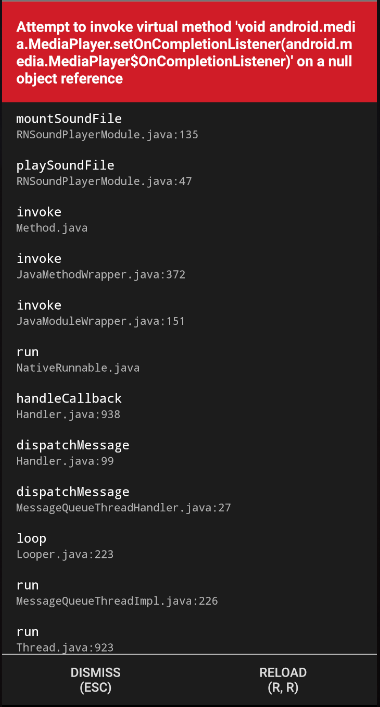
Hello again @AbdulBsit. Weirdly enough I still get the same error, after prepending file:// . The output of getResolvedPath is now: file:///data/user/0/com.purplelyd/cache/1623924387351.mp3. I believe that I have added the correct permissions as well. These are in my android/app/src/main/AndroidManifest.xml file:
<uses-permission android:name="android.permission.READ_EXTERNAL_STORAGE" />
<uses-permission android:name="android.permission.WRITE_EXTERNAL_STORAGE" />
<uses-permission android:name="android.permission.DOWNLOAD_WITHOUT_NOTIFICATION" />
It seems that I get the error on multiple android devices :thinking:. Could it be that some permissions aren't properly configured?
This is a screenshot of the error:
Malthehave
on 17 Jun 2021
@Malthehave , This seems to be a problem with a sound player, I am using https://github.com/zmxv/react-native-sound try this one, check if it fits in your case and solve the error
AbdulBsit
on 17 Jun 2021
Just tried react-native-sound instead react-native-sound-player. This does indeed seem to work :smiley: . Thanks so much @AbdulBsit!
In case someone else is wondering this is the code that ended up working for me:
const getResolvedPath = async (uri) => {

  const fileBase64 = await ReactNativeBlobUtil.fs.readFile(uri, "base64")
  const relativePath = ReactNativeBlobUtil.fs.dirs.CacheDir
  const fileName = `${Date.now()}.mp3 `
  const path = `${relativePath}/${fileName}`

  // Create temporary file
  await ReactNativeBlobUtil.fs.writeFile(path, fileBase64, "base64")
  return { relativePath, fileName }
}

const accessFile = async () => {
  try {
      const audioRes = await DocumentPicker.pick({
          type: [DocumentPicker.types.audio]
      });

      // Get resolved file uri from temporary file
      const { relativePath, fileName } = await getResolvedPath(audioRes.uri)

      const localAudio = new Sound(fileName, relativePath, (error) => {
          if (error) {
              console.log('failed to load the sound', error);
              return;
          }
          // Loaded audio successfully
          const audioDuration = localAudio.getDuration()
          if (!audioDuration) return; // Audio length could not be estimated
          console.log(audioDuration);
      });
  } catch (err) {
      if (DocumentPicker.isCancel(err)) {
          // User cancelled the picker, exit any dialogs or menus and move on
      } else {
          throw err;
      }
  }

}
Related issues
 rajeshkos
·
6Comments
rajeshkos
·
6Comments
 IvanCaceres
·
6Comments
IvanCaceres
·
6Comments
 ashish-algorythma
·
7Comments
ashish-algorythma
·
7Comments
 Gentlee
·
8Comments
Gentlee
·
8Comments
 VinitBhavsar
·
4Comments
VinitBhavsar
·
4Comments
Most helpful comment
@ElangoPrince I got error on
RNFetchBlob.fs.stat(res.uri) // failed to stat path
nullbecause it does not exist or it is not a folder