React-native-document-picker: iOS 11 and Dropbox
In iOS 11 the native behaviour is different. Now there is a new option menu:

If click on "Browse":

"Browse" tab:

If click on "Locations":

There are all storage apps, if you pick a document from iCloud Drive or Drive, the component works all right but if you pick one from Dropbox there is no response, the callback is not called.
Does anyone know why?
 sergiocloud
All 13 comments
Dang. I don't own an Iphone anymore, this looks tricky...
 Elyx0
on 27 Sep 2017
Elyx0
on 27 Sep 2017
Hi @sergiocloud,
Have you solved this issue? I meet the same problem with you. Or do you know how to hide Dropbox selection in the list of Locations?
Thank you.
 anbnb
on 27 Oct 2017
anbnb
on 27 Oct 2017
Sorry, I haven't time to look for solutions
sergiocloud
on 27 Oct 2017
@anbnb @sergiocloud any luck with this issue?
 KubaGL
on 23 Jan 2018
KubaGL
on 23 Jan 2018
@KubaGL nothing, sorry
sergiocloud
on 23 Jan 2018
It looks like UIDocumentMenuViewController has been deprecated in iOS 11.
Seems like Apple intends to use the Present the Most Recently Used Document Picker approach which would launch the picker immediately.
Otherwise, as suggested here, one could combine the above with your own action sheet.
 LordParsley
on 8 Feb 2018
LordParsley
on 8 Feb 2018
@LordParsley this is done in v3
https://github.com/Elyx0/react-native-document-picker/commit/2675553a67a9cf7ee46f8faf04c0533c2cba1778
 dantman
on 8 Feb 2018
dantman
on 8 Feb 2018
It is not showing all other options(dropbox, googledrive etc)Just showing one option "Browse".I tried the changes of commit : " https://github.com/Elyx0/react-native-document-picker/commit/2675553a67a9cf7ee46f8faf04c0533c2cba1778" it direct me to browse detail view without displaying any actionsheet but I need all other options in action-sheet.
 navibrar
on 20 Feb 2018
navibrar
on 20 Feb 2018
@navibrar You're not supposed to see an ActionSheet, the point of that commit is that Apple has deprecated the action sheet pattern and you're supposed to go directly to the detail view and use the menu if you want to switch to another option.
dantman
on 21 Feb 2018
How to display "Dropbox", "Documents" and "Google Drive" under Locations? During my test, only "iCloud Drive" is shown.
 Muran-Hu
on 8 May 2018
Muran-Hu
on 8 May 2018
Same as Muran-Hu, only iCloud documents can be selected via v3 on ios11 (not checked <=ios10 yet). Any way to get the other options? In particular I need the user to be able to select a local file from the device.
 JeremyBradshaw7
on 21 Jul 2018
JeremyBradshaw7
on 21 Jul 2018
Me too. Why only iCloud documents can be selected?
 ggunti
on 4 Sep 2018
ggunti
on 4 Sep 2018
I am facing same issue only Icloud option is visible. have you got any solution on this.
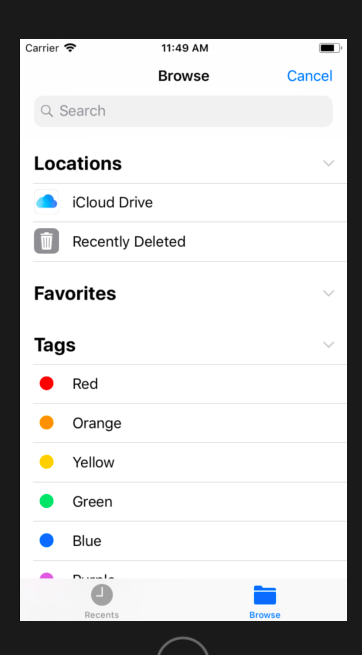
How can i access the local files ?
 kalyanijamunkar10
on 10 Sep 2018
kalyanijamunkar10
on 10 Sep 2018
Related issues
 andrey-shostik
·
9Comments
andrey-shostik
·
9Comments
 johuder33
·
5Comments
johuder33
·
5Comments
 VinitBhavsar
·
4Comments
VinitBhavsar
·
4Comments
 ShaubertIlya
·
6Comments
JeremyBradshaw7
·
6Comments
ShaubertIlya
·
6Comments
JeremyBradshaw7
·
6Comments
Most helpful comment
I am facing same issue only Icloud option is visible. have you got any solution on this.

How can i access the local files ?