React-native-document-picker: [RFC] 3.0.0
I had a number of issues with the implementation of this library, enough that I ditched it and started working on my own document picker implementation internally to fit my needs.
I'd be willing to instead help overhaul this library if the community and package owner are willing to accept the changes I want to make.
- [x] iOS idea:
TheUse Apple's UTI handling to implicitly get a mime type from a file extension.hfsTypeCodeshould be used to attempt to return a mime type. (hfsTypeCode doesn't seem to return anything) - [x] iOS bug: A callback should be called with an error instead of exiting and never responding.
- [x] iOS bug: Migrate from the deprecated
UIDocumentMenuViewControllertoUIDocumentPickerViewController. - [x] Android:
ACTION_PICKshould never be used, it is intended for choosing data from a media provider, not choosing any document of a mime type. - [x] Android:
ACTION_GET_CONTENTshould be used by default instead ofACTION_OPEN_DOCUMENTto match the intent of the iOS behavior: iOS declares the mode asimportrather thanopen, which matches the semantics ofACTION_GET_CONTENT(just reading/importing data) rather thanACTION_OPEN_DOCUMENT(long term persistent access to a document/editing of it).
- [ ] Optional: We could provide an option to allow the user to choose between import/get_content mode and persistent open mode. Maybe a
mode,forOpen: true, orpersistentoption.
- [ ] Optional: We could provide an option to allow the user to choose between import/get_content mode and persistent open mode. Maybe a
- [x] Android: Intent handler should guard against nonexistent current activity and failure to show the document picker due to a throw.
- [x] Support multiple document selection: Do this with a second method that always returns a promise for an array to keep the possibility of supporting flow types (rename
show->pickand addpickMultiple). I already have code for this on Android. On iOS support for this is coming in iOS 11. - [x] Return a Promise instead of using a callback: RN's native documentation recommends using promises for async js/native handling instead of callbacks (callbacks to native on iOS are marked as experimental). And almost all of react-navigation's own public APIs now use Promises instead of callbacks.
- [x] Errors returned by the library should include a string error code that makes it possible to identify the error.
- [x] Add a
.isCancel(err)method to check if an error is due to the user canceling the document picking and actually bother to check forActivity.RESULT_CANCELED. - [x]
filetypeis poorly named, refactor this to justtype. - [x] Android: A document picker should not implicitly download a file if it gets a network URL.
- [x] Android: Use
getInt(sizeIndex)to get the file size, it should not be converted to a string and than parsed back into an int. - [x] Android: Drop all file path and http handling from the document picker. Both
ACTION_GET_CONTENTandACTION_OPEN_DOCUMENTexplicitly state that the URI returned by the intent must be acontent:URI that can be used with a content provider. - [x] Android: Update content resolver handler to use
DocumentsContract.Document.COLUMN_MIME_TYPEon KitKat+ instead of justgetTypeto get the mime type. - [x] Change
fileNametoname: The DISPLAY_NAME on Android is not guaranteed to be a file name. - [x]
DocumentPickerUtilshould usePlatform.OS === 'ios'instead ofPlatform.OS === 'android'. - [x] Default to an
*/*/allFileswhen type is not defined. - [x] Cleanup the public API:
DocumentPickershould be the default export. And types selection should not be named "*Util" or require a verbose extra import. I recommendDocumentPicker.types.images. The function invocation can safely be dropped while still avoiding{type: DocumentPicker.types.somethingThatDoesNotExist}bugs and supporting "allFiles by default" by checking for types that are undefined but are present (ie:'type' in optsis true butopts.type === undefined) and a similar test for arrays. - [x] Android: Rename
DocumentPicker.javatoDocumentPickerModule.javaandReactNativeDocumentPicker.javatoDocumentPickerPackage.java. - [x]
com.reactnativedocumentpickeris a poor namespace name that's a reverse domain that this project does not own, refactor the library to use a github repo based namespace. - [x] Add a warning when native code is not available
- [x] Make sure a chooser is used on Android API level 18 where the new DocumentProvider picker is not available
- [x] #50 Fix make
typeoption with more than 1 types work on Android
 dantman
All 54 comments
Hey, fellow canadian! I'm totally swamped and 100% open to contributors, RNDP really needs a v3 bump to work with the 2017 specs of various OS and provide more granularity. I've seen a lot of people fork it over time to add some little tweaks here and then without a MR back.
I've reviewed all your points and I agree with them, so I'm up for it!
 Elyx0
on 27 Sep 2017
Elyx0
on 27 Sep 2017
Ok, most of these are required by one of the features in the app I'm writing for a client. So I'd be happy to work on this once I get them to prioritize features and get to that part of the list.
dantman
on 27 Sep 2017
It too all day to write multiple file selection (I had to learn more Objective C than I ever wanted to know), but it's working now.
I was finally able to get files into the iOS simulator so I could test most of it. (requires signing in to iCloud and is quite unreliable in when files actually get synced, so that doesn't help for tests)
However while Apple is saying iOS 11 supports multiple file selection in the document picker, they haven't said how it works. I have no clue how to actually pick multiple files in the picker, even though I made certain I properly enabled it (explicitly passing true and defining the required delegate). So I can't test the actual selection of multiple documents.
However I'm sure the new delegates I implemented are working because I verified that iOS 11 exclusively calls the new didPickDocumentsAtURLs instead of the old didPickDocumentsAtURL even when you only have one file and I tested in iOS 11 and iOS 9.
dantman
on 14 Oct 2017
@Elyx0 The only things left are to fix the license and figure out what you want to do about the outdated screenshot and questionable react-native-fs recommendations in the readme.
dantman
on 14 Oct 2017
Update all the things!
Elyx0
on 18 Oct 2017
Bumping, how are we doing on v3 <3 ?
Elyx0
on 27 Nov 2017
@Elyx0 Same as before. Could you fix the license #76. What do you want to do about the questionable react-native-fs recommendations in the readme?
dantman
on 3 Dec 2017
Any news on v3 @Elyx0 @dantman?
 armanatz
on 12 Dec 2017
armanatz
on 12 Dec 2017
Can we safely use the v3 branch in the meantime?
 CptMaumau
on 3 Jan 2018
CptMaumau
on 3 Jan 2018
Theoretically it should be completely functional.
dantman
on 3 Jan 2018
@dantman is there a way to supply a limit number of files for multi picker?
CptMaumau
on 17 Jan 2018
@CptMaumau I do not know of that being available as an option on any os.
dantman
on 17 Jan 2018
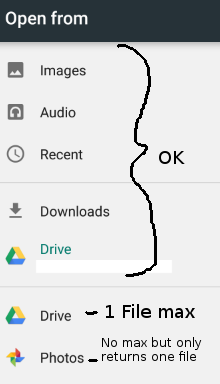
@dantman re multiple file selection on Android, when using the Google Photos picker it only returns a single file despite allowing you to select many files, and the Google Drive picker only allows selecting and returning a single file.
It's a bit weird because you can access the same files in multiple ways and some work, some don't. Not sure how easy it would be to solve but I'm happy to take a look if you can point me in the right direction.
This screenshot might make it clearer. The first Drive item uses the standard file picker so does work with multiple files but the second Drive and Photos items use their own custom pickers which is probably why they don't work properly.
Either way I'm incredibly grateful for your changes for v3, nothing else I've found so far has worked at all for picking documents! Thanks :+1:
 mjmasn
on 7 Feb 2018
mjmasn
on 7 Feb 2018
When will release new version?
 javascriptmiracle
on 13 Mar 2018
javascriptmiracle
on 13 Mar 2018
Issues needing solving for v3:
- Decide what to do about questionable "How to send it back ?" readme section
- Update screenshot
- Updated documentation
- Windows somehow got shoved into 3.0.0 instead of 3.1.0, so we need to make that stable
- Possibly need to integrate web version
- Fix the license tag
- We need people actually testing out and using v3, I suppose I should push a beta to the next tag once these other issues are handled
Right now I'm not working on the project that needs this for awhile, so that is limiting the development I can directly do on this until I return to it.
dantman
on 13 Mar 2018
@dantman
on ios the applications the plugin opens the explorer by default
can I open media files, photos like android app
javascriptmiracle
on 15 Mar 2018
You can go ahead and pick any open source license you see fit @dantman For the How to send it back, maybe we can put in place a Wiki instead but I really think it is going to be a recurring question amongst users
Elyx0
on 15 Mar 2018
For the How to send it back, maybe we can put in place a Wiki instead but I really think it is going to be a recurring question amongst users
I just checked. React Native 0.54.0 has finally been released with Blob support!!! Once I get back to the project feature that needs this, I think we can come up with documentation that recommends how to use Blob instead and release v3 with a recommendation to use RN >= 0.52
@dantman
on ios the applications the plugin opens the explorer by default
can I open media files, photos like android app
I'm not clear on what you're asking. On iOS there should be a Back/Menu button to switch between document providers/storage locations, iCloud/on device/Drive/Dropbox/...
dantman
on 15 Mar 2018
I'm not clear on what you're asking. On iOS there should be a Back/Menu button to switch between document providers/storage locations, iCloud/on device/Drive/Dropbox/...
yes
can i open photos
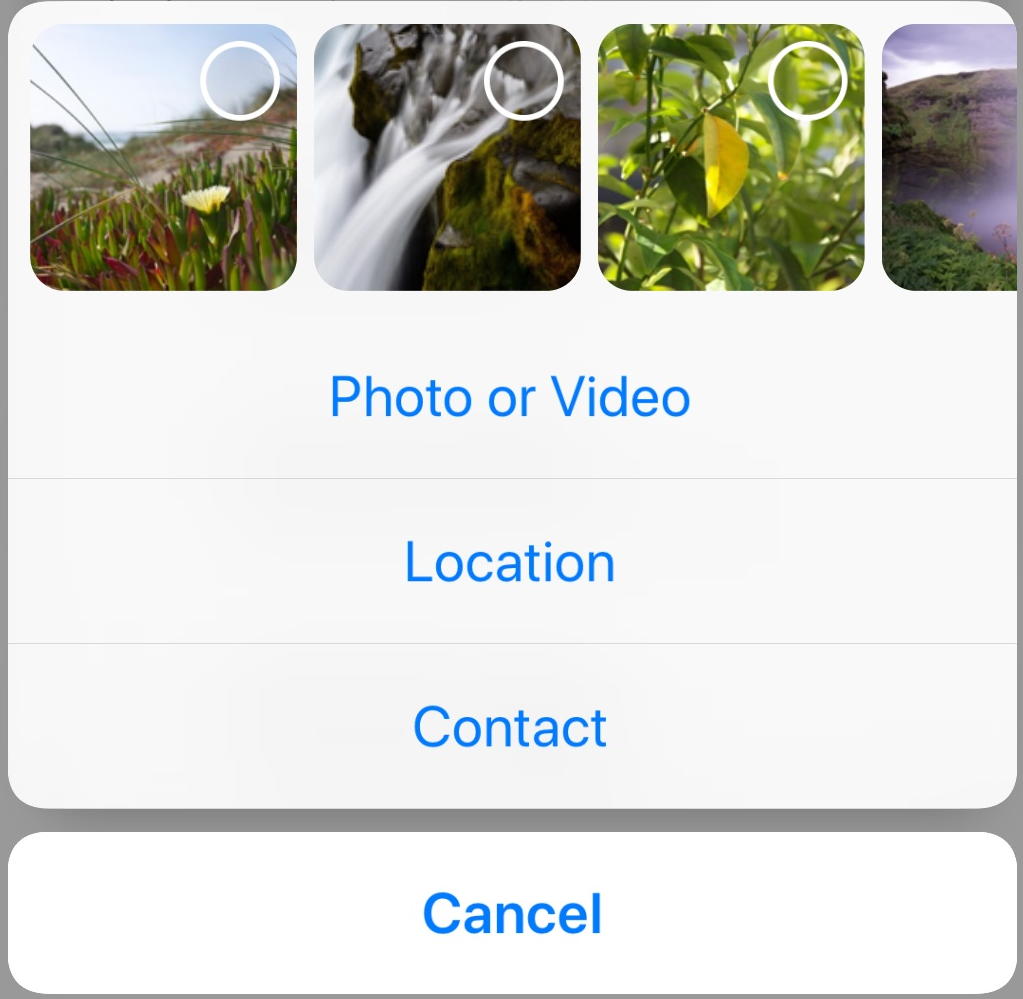
something like this
javascriptmiracle
on 16 Mar 2018
@javascriptmiracle Check out the sample code in #84
dantman
on 16 Mar 2018
@dantman I know it's already been asked but would you say the v3 branch is stable enough to use right now? Some of your improvements would really help, particularly handling the cancel action
 MyGuySi
on 21 Mar 2018
MyGuySi
on 21 Mar 2018
@MyGuySi Yes, it was working fine when I wrote it. And the v2 code was so problematic any bugfixes should go straight to v3.
dantman
on 21 Mar 2018
how are we on the v3 release @dantman @Elyx0 ? What is blocking it?
 vonovak
on 16 May 2018
vonovak
on 16 May 2018
- New screenshot
- RNFS documentation in the Readme needs to be replaced with an explanation on how to use fetch/blob/FormData/etc
- People need to actually test it out so we know it works
dantman
on 16 May 2018
In my company we have extended react-native-document-picker to add option to pick images from the camera both for Android and iOS, and maybe we would extend it to also pick videos and audios, at least for Android. Web platform already does it in mobile due to how the input tag works (nobody has implemented this in desktop, I'm thinking if I should do a polyfill...) but didn't add this feature on Windows because that platform was not a requeriment of our client. Would this feature make the cut to be included in 3.0.0 if we do a pull-request?
 piranna
on 16 May 2018
piranna
on 16 May 2018
@dantman can confirm v3 is working for us in production. Only issue I've come across is the one described in my comment above. Edit: I should add it's only Android builds we're doing currently, so no idea about iOS.
mjmasn
on 16 May 2018
@piranna That depends on how you've "extended" the picker.
dantman
on 18 May 2018
@piranna That depends on how you've "extended" the picker.
The changes are available at https://github.com/QuantumBA/react-native-document-picker/commits/example_re-start. The way is done is transparent to the user, by checking the requested mime type and if it's */* or image/* it shows a selector that allow both the file selector or the camera, and for picking the camera image is using the future-proof FileSelector API. I've added a new private flag to indicate if the camera image must to be stored in the images gallery or being private to the app itself. Appart from that, some improvements that could be added are an option to opt-in to pick camera images or just only filesystem files, to add support for the video and audio mime types, and a selector between using only the default system camera app or show Intents for all the installed camera apps. The iOS part was done by a work colleage, but seems similar options could be added.
The commits you'll see there have some extra work regarding the web platform support and added an example project that I did both for speed up debug process (the FileSelector has been a PITA because Android docs are wrong) but also as an usage example for the project, but I could be able to cherry-pick them and do independent pull-requests for them.
piranna
on 19 May 2018
Another thing I was thinking too, since now the generation of the Intent is more complex and mostly agnostic of the app, is to move it to its own class so code gets cleaner, by separating the DocumentPickerModule from the Intent generation, how do you see it?
piranna
on 19 May 2018
Hey guys im getting this error using android any tip?
RNFS.readFile Error: Permission Denial: reading com.google.android.apps.docs.storagebackend.StorageBackendContentProvider uri content://com.google.android.apps.docs.storage/document/acc=1;doc=17 from pid=25792, uid=10315 requires that you obtain access using ACTION_OPEN_DOCUMENT or related APIs
    at createErrorFromErrorData (841fc1ae-e32a-4f10-a24e-47d472e304cf:2051)
    at 841fc1ae-e32a-4f10-a24e-47d472e304cf:2003
    at MessageQueue.__invokeCallback (841fc1ae-e32a-4f10-a24e-47d472e304cf:2445)
    at 841fc1ae-e32a-4f10-a24e-47d472e304cf:2190
    at MessageQueue.__guardSafe (841fc1ae-e32a-4f10-a24e-47d472e304cf:2358)
    at MessageQueue.invokeCallbackAndReturnFlushedQueue (841fc1ae-e32a-4f10-a24e-47d472e304cf:2189)
    at t (RNDebuggerWorker.js:1)
 heitorpr
on 5 Jun 2018
heitorpr
on 5 Jun 2018
@heitorpr Try using fetch and the Blob API instead of RNFS.
dantman
on 5 Jun 2018
thx for quick answer but didnt work too...
item.uri = content://com.android.providers.downloads.documents/document/raw:/storage/emulated/0/Download/Digitalizar 4 de mai de 2017 11.35.pdf
  RNFetchBlob.fs.readFile(item.uri, 'base64')
    .then((data) => {
      console.log(data)
    })
    .catch(error => console.log(error))
Error: Permission Denial: reading com.android.providers.downloads.DownloadStorageProvider uri content://com.android.providers.downloads.documents/document/raw:/storage/emulated/0/Download/Digitalizar 4 de mai de 2017 11.35.pdf from pid=7801, uid=10104 requires that you obtain access using ACTION_OPEN_DOCUMENT or related APIs
    at createErrorFromErrorData (NativeModules.js:121)
    at NativeModules.js:78
    at MessageQueue.__invokeCallback (MessageQueue.js:398)
    at MessageQueue.js:137
    at MessageQueue.__guardSafe (MessageQueue.js:314)
    at MessageQueue.invokeCallbackAndReturnFlushedQueue (MessageQueue.js:136)
    at t (RNDebuggerWorker.js:1)
@heitorpr You aren't doing what I suggested. RNFetchBlob.fs.readFile is another filesystem utility just like RNFS. Also RNFetchBlob itself has a broken implementation for handling content:// URIs. And it's not even needed anymore because React Native has native support for the Blob API and fetching content:// URIs.
Please try using fetch(item.uri).then(res => res.blob()) to fetch the content:// URI using the browser [Fetch API] (https://developer.mozilla.org/en-US/docs/Web/API/Fetch_API) and use the browser Blob API to read the file data.
dantman
on 7 Jun 2018
@dantman thank you very much for your support, but this problem was a huge mistake I did =). The fetch api help me to find it. It worked too.
To end this subject, the problem was with the URI at all. I was parsing the response of document-picker with: utf8.decode(unescape(uri)) when I removed it to Android System, the RNFS.readFile(item.uri, 'base64') started working again with version 2.9.12. Also to anyone that want to display a pdf file the uri provided by document-picker, worked with react-native-pdf: 3.0.16. Thank you very much and it was my mistake.
Thanks!
heitorpr
on 7 Jun 2018
@piranna and others, I have some miss-understanding. I need to implement photo, video and file picker in my app like in WhatsApp (I need only photo&video and Document options):

Can I do this with v3 branch or I should use https://github.com/QuantumBA/react-native-document-picker fork?
 antonsivogrivov
on 9 Jul 2018
antonsivogrivov
on 9 Jul 2018
My fork currently only add support for camera pictures, I'm working on audio and camera video.
piranna
on 13 Jul 2018
I have done several pull-requests using cherry-pick for the different features, so they can be easily reviewed and merged upstream:
Support for video and audio capturing depends on some changes done on support for Camera for Android, so I'll continue doing them in the example_re-start branch.
On a side note, with the changes I've done to add support for camera capturing, the code to create the Intent has got a lot more complex, but at the same time it's independent of the DocumentPicker Activity itself, so I was thinking to move it to its own class just for clarity. What do you think?
piranna
on 13 Jul 2018
Hi, we've encountered an issue with 3.0.
When selecting from the SD Card, the path has an issue. Up to the sd card it is fine but once the path reach inside the slash are encoded and after decoding they actually are : and we are getting a permission denied.
Example:
- before decoding:
content://com.android.externalstorage.documents/document/0FF1-3314%3Ah20_workshop_proposal.hwp - after decoding:
content://com.android.externalstorage.documents/document/0FF1-3314:h20_workshop_proposal.hwp
Tried to replace it with a slash but even this give us permission denied.
Has anyone run into this issue?
CptMaumau
on 10 Aug 2018
@CptMaumau
- How are you reading the file?
- React Native Document picker v3 just returns the URI that is provided to use by Android. Does that content: URI not work when resolved with the ContentResolver?
:is a reserved character, it's not really unexpected for a provider to decide to encode it's usage in filenames- The external storage provider uses
:as a special character in the path segment, so of course user provided:s are escaped
dantman
on 10 Aug 2018
Using RNFS because we're still on RN 0.53
CptMaumau
on 10 Aug 2018
Then that's the issue, file system libraries should not be used to open URIs.
dantman
on 10 Aug 2018
Issue actually came from the fact we were decoding the Uri, we had to for iOS because of special characters in filename but decoding the uri seems to break in android when there's a specific path like this. So only decoding in iOS fixed the problem.
Thank you for you help and time.
CptMaumau
on 10 Aug 2018
Could you be able to provide the details? Probably DocumentPicker should do the decoding on iOS itself too...
piranna
on 10 Aug 2018
Sure, I work in a Korean company and when uploading files with Korean characters in the name we run into this problem. But it seems to be an iOS issue only.
CptMaumau
on 10 Aug 2018
Interesting... it should be just a matter of correctly using the Unicode characters, I think Apple HFS filesystem should work with utf-8 flawlessly. Can you provide a code snippet of how have you done the decoding on iOS?
piranna
on 10 Aug 2018
What methods are available with React Native Document Picker v3?
Is there anyway to specify that I want only pictures? only videos? and only audios?
How do we install this v3?
 smithaitufe
on 20 Aug 2018
smithaitufe
on 20 Aug 2018
What methods are available with React Native Document Picker v3?
Is there anyway to specify that I want only pictures? only videos? and only audios?
How do we install this v3?
https://github.com/Elyx0/react-native-document-picker/tree/v3
piranna
on 20 Aug 2018
@Elyx0 can we release this?
 leoek
on 7 Feb 2019
leoek
on 7 Feb 2019
I'll want to coordinate with v3 contributors before releasing this if breaking changes happen
Elyx0
on 7 Feb 2019
@Elyx0 understandable, are they aware that now could be a good be a good time to release v3? At least for me v3 seems to be stable :)
leoek
on 7 Feb 2019
Please add #202
 jsamr
on 3 May 2019
jsamr
on 3 May 2019
What's the status on this, @Elyx0 @dantman ?
Can I help with something to facilitate this moving forward?
 nabati
on 3 Jul 2019
nabati
on 3 Jul 2019
I merged V3 into master, let's address all the new bugs PR into master now :)
Elyx0
on 4 Jul 2019
thanks everyone for contributing, I'm closing this because the discussion is too long and not focused, plus v3 is public. If you have some problems, please open an issue.
vonovak
on 17 Apr 2020
Related issues
 Gentlee
·
8Comments
Gentlee
·
8Comments
 kashifaliquazi
·
7Comments
kashifaliquazi
·
7Comments
 St1ma
·
5Comments
St1ma
·
5Comments
 VinitBhavsar
·
4Comments
VinitBhavsar
·
4Comments
 andrey-shostik
·
9Comments
andrey-shostik
·
9Comments
Most helpful comment
Any news on v3 @Elyx0 @dantman?