React-native-device-info: isTablet() is not a function
Bug
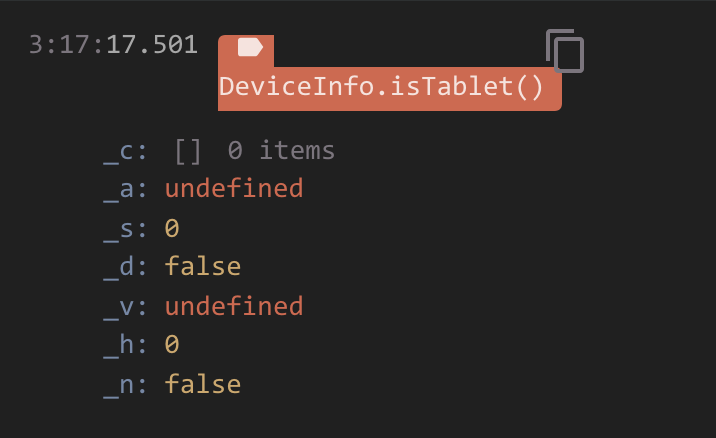
My team recently upgraded from 2.2.2 to 3.1.4 and I'm finding that DeviceInfo.isTablet() is no longer working for iOS. It seems like the change on #760 might have broken it. At the moment it only returns some native nonsense.

Environment info
React Native Environment Info:
    System:
      OS: macOS 10.14.6
      CPU: (8) x64 Intel(R) Core(TM) i7-7820HQ CPU @ 2.90GHz
      Memory: 677.45 MB / 16.00 GB
      Shell: 3.2.57 - /bin/bash
    Binaries:
      Node: 8.11.3 - /var/folders/ss/ll2z6rls43lgf37lrrddhnl40000gn/T/yarn--1569356393754-0.7365804751992113/node
      Yarn: 1.17.3 - /var/folders/ss/ll2z6rls43lgf37lrrddhnl40000gn/T/yarn--1569356393754-0.7365804751992113/yarn
      npm: 5.6.0 - ~/.nvm/versions/node/v8.11.3/bin/npm
      Watchman: 4.9.0 - /usr/local/bin/watchman
    SDKs:
      iOS SDK:
        Platforms: iOS 12.4, macOS 10.14, tvOS 12.4, watchOS 5.3
      Android SDK:
        API Levels: 24, 26, 27, 28
        Build Tools: 26.0.2, 27.0.3, 28.0.3
        System Images: android-24 | Google Play Intel x86 Atom, android-27 | Google APIs Intel x86 Atom, android-27 | Google Play Intel x86 Atom, android-28 | Google APIs Intel x86 Atom, android-28 | Google Play Intel x86 Atom, android-29 | Google Play Intel x86 Atom
    IDEs:
      Android Studio: 3.4 AI-183.6156.11.34.5692245
      Xcode: 10.3/10G8 - /usr/bin/xcodebuild
    npmPackages:
      react: 16.8.6 => 16.8.6
      react-native: 0.59.10 => 0.59.10
Library version: 3.1.4
Steps To Reproduce
import DeviceInfo from 'react-native-device-info'DeviceInfo.isTablet();
Describe what you expected to happen:
- Returns a boolean if the device is a tablet device.
Work around
Since I'm not needing it for android at the moment I've opted for using react-native's own Platform calling Platform.isPad to get the info I need.
 CoryWritesCode
All 2 comments
That's what a Promise looks like if you console.log() it
You either want to use isTabletSync() or convert to async in order to actually resolve the Promise and inside an async function to try/await isTablet()/catch (or I guess in a non-async function do isTablet().then(boolean => { /* do something */ });
I know isTablet works because the example demonstrates it
 mikehardy
on 24 Sep 2019
mikehardy
on 24 Sep 2019
I will add that I really wanted to put in the docs somewhere (maybe the migration guide) an example of what a Promise looked like if you logged it but couldn't find one for the life of me. If you wanted to edit the wiki (after you got your code running again) to add a note for people that they'll see that specific gobbledy-gook if they use the async API in a sync style that might help future devs
mikehardy
on 24 Sep 2019
Related issues
 clozr
·
5Comments
clozr
·
5Comments
 HAPENLY
·
5Comments
HAPENLY
·
5Comments
 robertherber
·
3Comments
robertherber
·
3Comments
 pgonzalez-santiago
·
3Comments
pgonzalez-santiago
·
3Comments
 Sotatek-NinhTran
·
4Comments
Sotatek-NinhTran
·
4Comments
Most helpful comment
That's what a Promise looks like if you console.log() it
You either want to use isTabletSync() or convert to async in order to actually resolve the Promise and inside an async function to try/await isTablet()/catch (or I guess in a non-async function do isTablet().then(boolean => { /* do something */ });
I know isTablet works because the example demonstrates it