React-native-debugger: Perfomance issue with React-Profiler
After upgrading to RN0.57 dev tools become very slow. If I turn off the React dev-tools it works well. I guess it might be related to the recent addition of Performance tab in React tools?
React Native Debugger app version: 0.8.1
React Native version: 0.57.4
Platform: iOS
Is real device of platform: Yes
Operating System: macOS
 usrbowe
All 6 comments
I am also experiencing this issue, but on both platforms: Android and iOS
Only occurs when connected to the debugger. It is pretty noticeable since the upgrade to 0.57.0
was working fine in 0.56.x, or at least not this slow.
 DISKONEKTeD
on 6 Nov 2018
DISKONEKTeD
on 6 Nov 2018
Same problem... Almost unusable when debugging. I wish to know at least a workaround for that matter.
 jpolo
on 19 Nov 2018
jpolo
on 19 Nov 2018
👉 TEMPORARY WORKAROUND 🔥
This how I use it on daily basis.
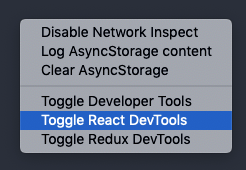
right click and
Toggle React DevTools(to hide React DevTools)
Use standalone React DevTools:
yarn global add react-devtools
after that. Whenever need just pop open the tools from command line:
react-devtools
usrbowe
on 21 Nov 2018
i've noticed just restarting the debugger (and sometimes the ios simulator, too) also temporatily helps.
 mxmzb
on 21 Nov 2018
mxmzb
on 21 Nov 2018
right click and Toggle React DevTools (to hide React DevTools)
super hack 🥰
 heyman333
on 23 Aug 2019
heyman333
on 23 Aug 2019
@usrbowe
right click and Toggle React DevTools (to hide React DevTools)
is super hack 🕺
heyman333
on 23 Aug 2019
Related issues
 AndrejGajdos
·
4Comments
AndrejGajdos
·
4Comments
 idrakimuhamad
·
3Comments
idrakimuhamad
·
3Comments
 khomyakov42
·
4Comments
khomyakov42
·
4Comments
 NathHorrigan
·
6Comments
NathHorrigan
·
6Comments
 chaitanyadeorukhkar
·
6Comments
chaitanyadeorukhkar
·
6Comments
Most helpful comment
👉 TEMPORARY WORKAROUND 🔥
right click and

Toggle React DevTools(to hide React DevTools)Use standalone React DevTools:
yarn global add react-devtoolsafter that. Whenever need just pop open the tools from command line:
react-devtools