React-native-contacts: Contacts.getAll works on emulator but crashes on mobile phone.
Here is my code:
import React from 'react'
import { View, Text } from 'react-native'
import Contacts from 'react-native-contacts'

export default class ContactTab extends React.Component {

    componentDidMount() {

        console.log("Hello", Contacts)

        Contacts.getAll((err, contacts) => {
            console.log("dude")
        })
    }

    render() {
        return (
            <View style={{ flex: 1, justifyContent: 'center', alignItems: 'center' }}>
                <Text>Settings!</Text>
            </View>
        )
    }
}
It works fine on emulator but crashes on phone.
The crash report only says
I/ReactNativeJS(19364): 'Hello', { addContact: { [Function: fn] type: 'async' },
I/ReactNativeJS(19364):   checkPermission: { [Function: fn] type: 'async' },
I/ReactNativeJS(19364):   getAll: { [Function: fn] type: 'async' },
I/ReactNativeJS(19364):   getAllWithoutPhotos: { [Function: fn] type: 'async' },
I/ReactNativeJS(19364):   getContactsMatchingString: { [Function: fn] type: 'async' },
I/ReactNativeJS(19364):   getPhotoForId: { [Function: fn] type: 'async' },
I/ReactNativeJS(19364):   openContactForm: { [Function: fn] type: 'async' },
I/ReactNativeJS(19364):   requestPermission: { [Function: fn] type: 'async' },
I/ReactNativeJS(19364):   updateContact: { [Function: fn] type: 'async' } }
D/ReactNative(19364): ReactInstanceManager.detachViewFromInstance()
As the Contacts.getAll function gets called app crashed.
What might be the issue ? I checked the permission and it returns "authorized".
Any solution to this ?
 aaeronn
All 10 comments
i get same error
 hungdev
on 5 Apr 2018
hungdev
on 5 Apr 2018
The issue was from getting birthday from contacts in react-native-contact. I simply uncommented the else block that was doing logic for birthday and it works fine.
aaeronn
on 5 Apr 2018
@aaeronn what did you comment out exactly? near https://github.com/rt2zz/react-native-contacts/blob/master/android/src/main/java/com/rt2zz/reactnativecontacts/ContactsProvider.java#L257
 morenoh149
on 5 Apr 2018
morenoh149
on 5 Apr 2018
Everything was working fine in my emulator but for my mobile the code inside the else if block was not working and raising error. I tried formatting the birthday code without double hiphen too but it didnt worked either so I commented the whole else if block, as I was not neeeding birthday from contacts.
As it was working fine on my emulator, I looked at the response but it was not giving birthday in the response. I dont know if it returns empty if not birthday or the birthday key will not be provided in the response.
aaeronn
on 5 Apr 2018
if you share exactly what lines you commented out it would narrow down my investigation @aaeronn
morenoh149
on 6 Apr 2018
@morenoh149 I think @aaeronn means that he commented the whole block which parses birthday :)
We encountered the same issue today, one of our customers on Galaxy S7 has a contact record with the birthday "1972. 1. 15.". Will comment this block for now too.
 DimGun
on 6 Apr 2018
DimGun
on 6 Apr 2018
As a possible solution it might worse to wrap each block into try/catch, because for most of the apps it's better to skip some field than crash.
JFYI, I searched for similar issues and there are possible formats for START_DATE
From https://stackoverflow.com/questions/5106722/android-event-start-date-format:
- TEXT as ISO8601 strings ("YYYY-MM-DD HH:MM:SS.SSS").
- REAL as Julian day numbers, the number of days since noon in Greenwich on November 24, 4714 B.C. according to the proleptic Gregorian calendar.
- INTEGER as Unix Time, the number of seconds since 1970-01-01 00:00:00 UTC.
Other possible formats mentioned by developers:
- "Jun 12, 1985"
- "1972. 1. 15."
DimGun
on 6 Apr 2018
@morenoh149 Here is what I have commented
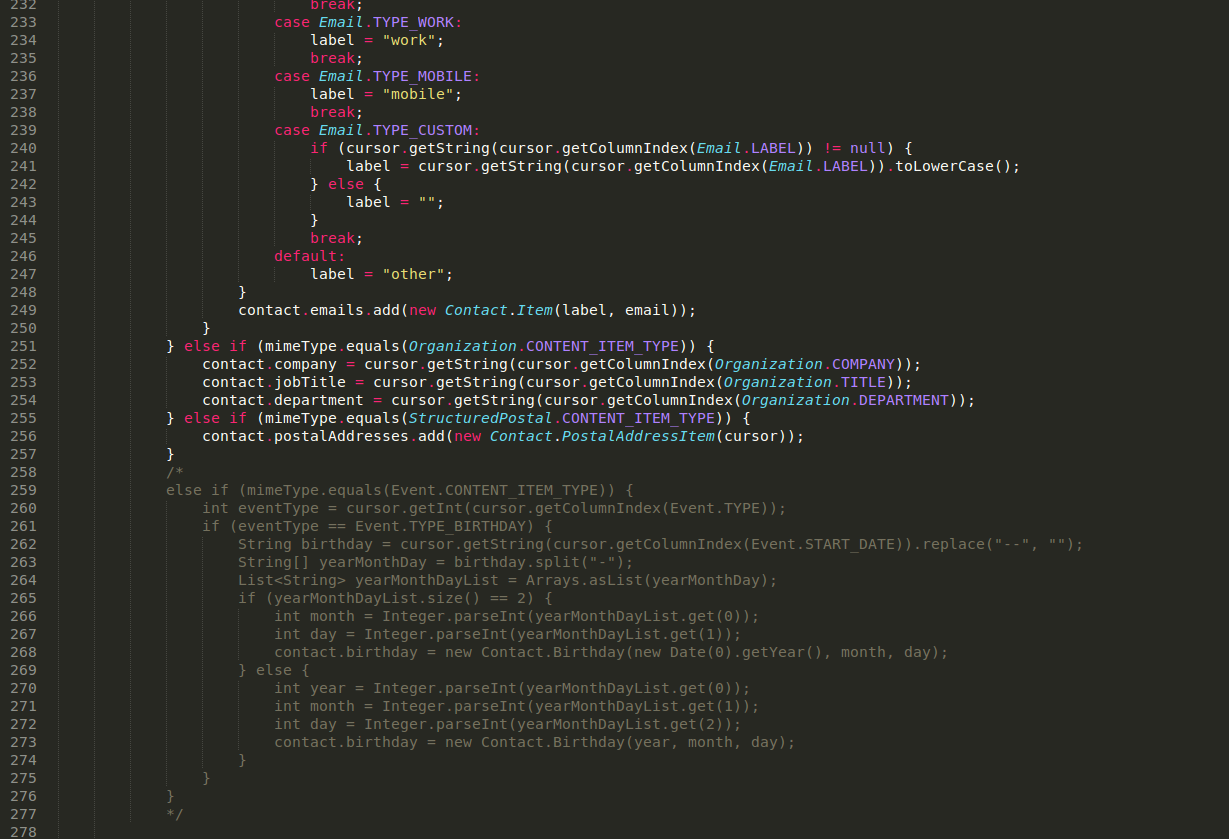
aaeronn
on 6 Apr 2018
Do we need to edit node modules ?
 faizalshap
on 13 Apr 2018
faizalshap
on 13 Apr 2018
@faizalshap yes you need to edit in node modules
aaeronn
on 13 Apr 2018
Related issues
 luism3861
·
9Comments
luism3861
·
9Comments
 prathd
·
5Comments
prathd
·
5Comments
 syedibrahimt
·
4Comments
syedibrahimt
·
4Comments
 salisaim
·
8Comments
salisaim
·
8Comments
 farrukhhashmi65
·
7Comments
farrukhhashmi65
·
7Comments
Most helpful comment
@morenoh149 Here is what I have commented
