React-native-config: Cant build witch Xcode 12
Xcode 11 worked perfectly, but when downloading Xcode 12 today build stopped working.
Following error is given:
include "/Users/martinagnalv/Library/Developer/Xcode/DerivedData/Veckopengen-gvcjpitunusuppdhjbhqnelgdjra/Build/Products/GeneratedInfoPlistDotEnv.h"
^~~~~~~~~~~~~~~~~~~~~~~~~~~~~~~~~~~~~~~~~~~~~~~~~~~~~~~~~~~~~~~~~~~~~~~~~~~~~~~~~~~~~~~~~~~~~~~~~~~~~~~~~~~~~~~~~~~~~~~~~~~~~~~~~~~~~~~~~~~~
1 error generated.
Command Preprocess failed with a nonzero exit code
 SuperDuperMartin
All 8 comments
I'm also getting this error (only when trying to build for a simulator; building for a real device works fine).
I'm on react-native-config 1.3.3, and I can confirm that I have done the following:
* Go to your project -> Build Settings -> All
* Search for “preprocess”
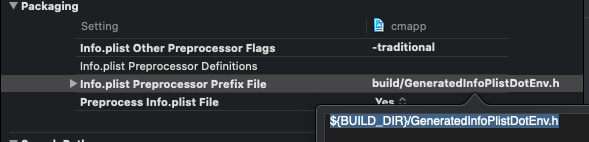
* Set `Preprocess Info.plist File` to `Yes`
* Set `Info.plist Preprocessor Prefix File` to `${BUILD_DIR}/GeneratedInfoPlistDotEnv.h`
* Set `Info.plist Other Preprocessor Flags` to `-traditional`
 sunweiyang
on 23 Sep 2020
sunweiyang
on 23 Sep 2020
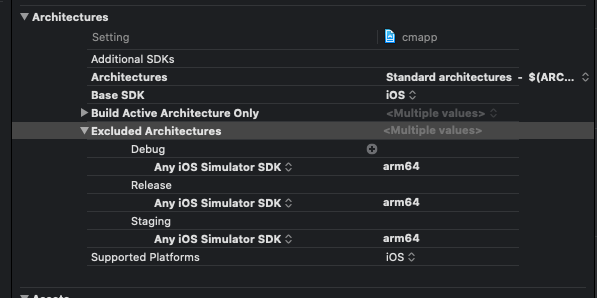
I don't know if it will help anyone else, but after I changed valid and excluded architectures in project.pbxproj, I was able to build. Basically, I included x86_64 and excluded arm64.
These links pointed me in the right direction for both:
https://github.com/CocoaPods/CocoaPods/issues/10059#issuecomment-695876995
sunweiyang
on 23 Sep 2020
@sunweiyang thank you for this!! Gold!!
SuperDuperMartin
on 25 Sep 2020
I'm trying to Upgrade from React Native 0.61.5 to 0.63.3 and from XCode 11 to Xcode 12 too, but no success.
I've tried the @sunweiyang suggestions. No lucky.
I'm trying to update react-native-config from 1.2.1 to 1.3.3
I'm still getting GeneratedInfoPlistDotEnv.h file not found
These are my configs:

 AnthonyTailer
on 1 Oct 2020
AnthonyTailer
on 1 Oct 2020
@AnthonyTailer, I'm having the same issue, trying to upgrade from React Native 0.61.2 to 0.63.3 and I'm using Xcode 12. Did you find a solution to this issue?
 yberstad
on 22 Oct 2020
yberstad
on 22 Oct 2020
Same issue here. So far it only happens when building with circleci
 toytonic
on 23 Oct 2020
toytonic
on 23 Oct 2020
@AnthonyTailer, I'm having the same issue, trying to upgrade from React Native 0.61.2 to 0.63.3 and I'm using Xcode 12. Did you find a solution to this issue?
@yberstad Sorry for not getting back to you sooner. But in my case it's was a problem with my Gems. I installed cocoapods with Bundler so I just update the cocoapods by running bundle update cocoapods. https://guides.cocoapods.org/using/a-gemfile.html
AnthonyTailer
on 17 Dec 2020
@AnthonyTailer, thanks for getting back at me! No worries, I solved the issue, from what I recall there was some config issue on my side.
yberstad
on 17 Dec 2020
Related issues
 jemise111
·
4Comments
jemise111
·
4Comments
 Quadriphobs1
·
3Comments
Quadriphobs1
·
3Comments
 joncursi
·
4Comments
joncursi
·
4Comments
 jstlaurent
·
4Comments
jstlaurent
·
4Comments
 iadcg
·
3Comments
iadcg
·
3Comments
Most helpful comment
I don't know if it will help anyone else, but after I changed valid and excluded architectures in project.pbxproj, I was able to build. Basically, I included
x86_64and excludedarm64.These links pointed me in the right direction for both:
https://stackoverflow.com/questions/63607158/xcode-12-building-for-ios-simulator-but-linking-in-object-file-built-for-ios
https://github.com/CocoaPods/CocoaPods/issues/10059#issuecomment-695876995