React-native-config: Undefined symbols for architecture x86_64: "_OBJC_CLASS_$_ReactNativeConfig"
I'm getting this error despite having installed the library with yarn, having run
react-native link react-native-config, and having followed the "Extra step for iOS to support Info.plist".
Here are my build settings :
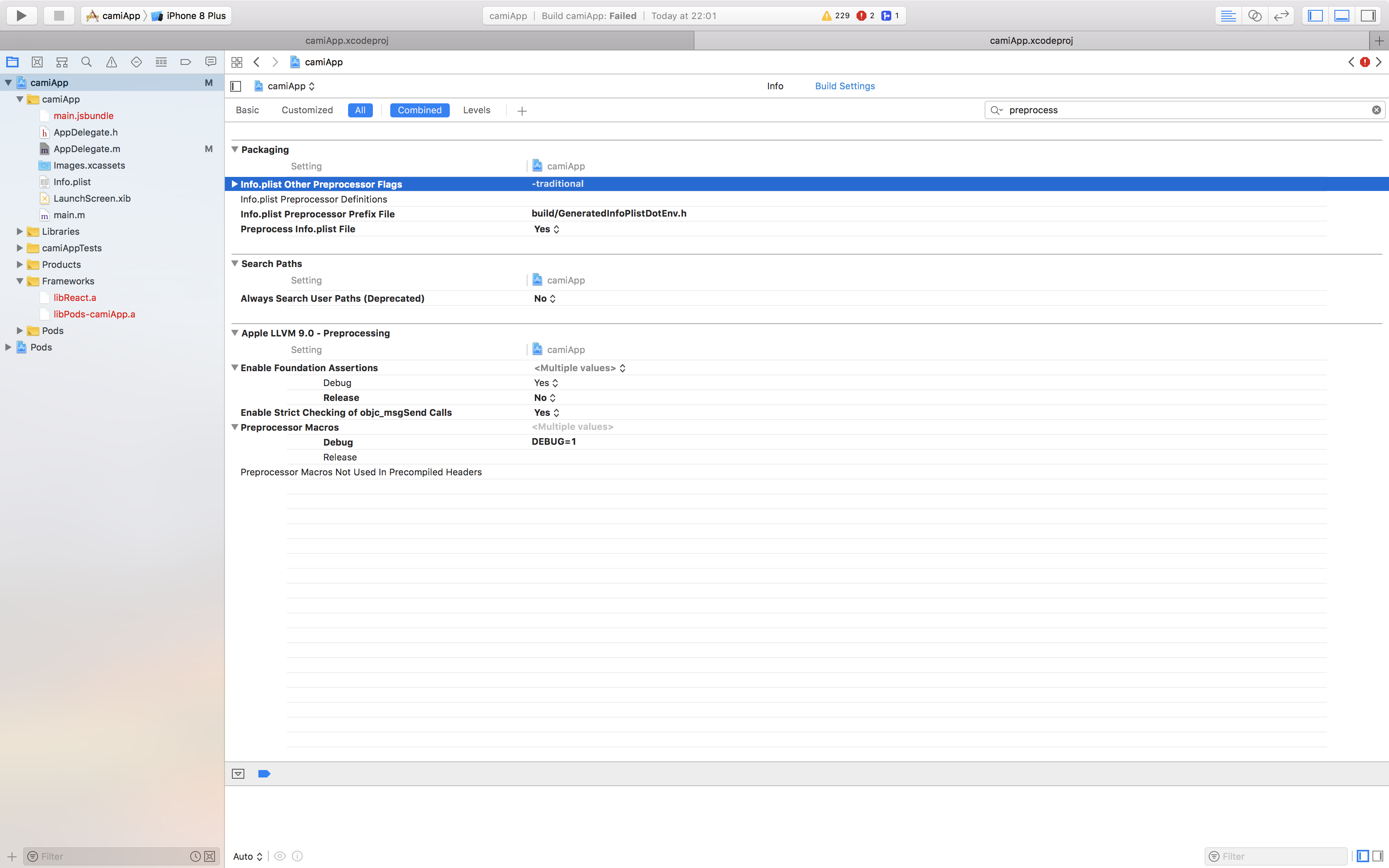
, and here is my code :
/**
 * Copyright (c) 2015-present, Facebook, Inc.
 *
 * This source code is licensed under the MIT license found in the
 * LICENSE file in the root directory of this source tree.
 */

#import "AppDelegate.h"

#import <React/RCTBundleURLProvider.h>
#import <React/RCTRootView.h>
// import header
#import "ReactNativeConfig.h"

@import GoogleMaps; //add this line if you want to use Google Maps

@implementation AppDelegate

- (BOOL)application:(UIApplication *)application didFinishLaunchingWithOptions:(NSDictionary *)launchOptions
{
  NSString *apiUrl = [ReactNativeConfig envFor:@"API_KEY"];//if I comment this line, no error

  //[GMSServices provideAPIKey:apiUrl];

  NSURL *jsCodeLocation;

  jsCodeLocation = [[RCTBundleURLProvider sharedSettings] jsBundleURLForBundleRoot:@"index" fallbackResource:nil];

  RCTRootView *rootView = [[RCTRootView alloc] initWithBundleURL:jsCodeLocation
                                                      moduleName:@"camiApp"
                                               initialProperties:nil
                                                   launchOptions:launchOptions];
  rootView.backgroundColor = [[UIColor alloc] initWithRed:1.0f green:1.0f blue:1.0f alpha:1];

  self.window = [[UIWindow alloc] initWithFrame:[UIScreen mainScreen].bounds];
  UIViewController *rootViewController = [UIViewController new];
  rootViewController.view = rootView;
  self.window.rootViewController = rootViewController;
  [self.window makeKeyAndVisible];
  return YES;
}

@end
I've browsed the issues and the web, but I found nothing similar.
Thank you for your help.
 jonathanSimonney
All 2 comments
@jonathanSimonney you should try to manually link the library in Xcode
Open Xcode project navigator -> Right click "[Your Project Name]/Libraries" folder and select "Add File to [Your Project Name]" -> Select ReactNativeConfig.xcodeproj located in node_modules/react-native-config/ios.
Open "General Settings" -> "Build Phases" -> "Link Binary with Libraries" and add libReactNativeConfig.a
You should be good ! hope this helps
then add #import <ReactNativeConfig/ReactNativeConfig.h> (instead of #import "ReactNativeConfig.h" )
 guillaumemorin
on 27 Sep 2018
guillaumemorin
on 27 Sep 2018
Sorry, deleted the project since, and went with another way for configuration, but when I retried to get the exact same state in another project, it worked perfectly.
Only difference I see is the fact that when I had the problem, I used a cocoapods project, whereas I still didn't add cocoapods to my current project. Maybe react-native linkdoesn't work so well with .xcworkspace project, but does with .xcproject.
Thank you very much for your time anyway. (And if I see again the same error message, I'll make sure to use your suggestion and to give feedback).
Given the circonstance, I don't know whether the issue should be closed or not.
jonathanSimonney
on 27 Sep 2018
Related issues
 francisrod01
·
3Comments
francisrod01
·
3Comments
 timscott
·
5Comments
timscott
·
5Comments
 joncursi
·
4Comments
joncursi
·
4Comments
 swl367
·
4Comments
swl367
·
4Comments
 NachtRitter
·
4Comments
NachtRitter
·
4Comments
Most helpful comment
@jonathanSimonney you should try to manually link the library in Xcode
Open Xcode project navigator -> Right click "[Your Project Name]/Libraries" folder and select "Add File to [Your Project Name]" -> Select
ReactNativeConfig.xcodeprojlocated innode_modules/react-native-config/ios.Open "General Settings" -> "Build Phases" -> "Link Binary with Libraries" and add
libReactNativeConfig.aYou should be good ! hope this helps
then add
#import <ReactNativeConfig/ReactNativeConfig.h>(instead of#import "ReactNativeConfig.h")