React-native-config: The environment variables are inaccessible in the iOS example
Running the example in the repo runs as expected on android. However running ENVFILE=.env.production react-native run-ios launches the example app, with a config object with no set properties. The image below shows what I see in iOS
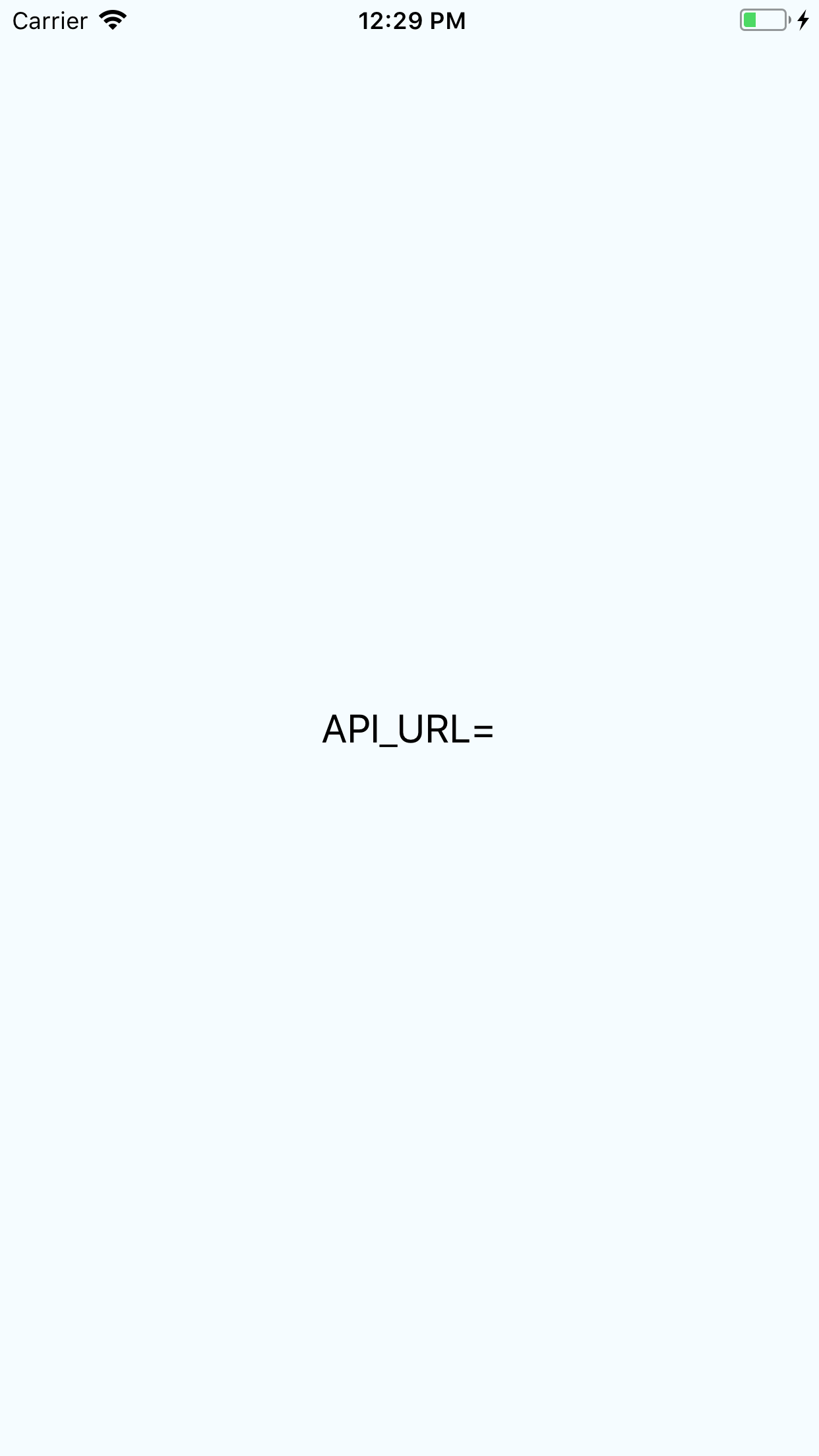
Also I do not see a scheme for 'example (Production)' as suggested by the example readme. Everything works as expected on android.
System Info
OS: OSX High Sierra
React-Native: 0.50.4
Node: 7.3.0
XCode: Version 9.2
 jbiotid
All 16 comments
after much trouble shooting, the issue seems to be related with the latest release of react-native-config. I ended up down grading to 0.8.1 as suggested in https://github.com/luggit/react-native-config/issues/129.
jbiotid
on 7 Mar 2018
My be fixed in IOS but still there on Android I am getting the config as undefined :(
 Ayyagaries
on 7 Mar 2018
Ayyagaries
on 7 Mar 2018
So tried working on it for a little while longer and I later realize I had spaces in properties. Android accepts it, but IOS simply return undefined for the properties.
So if you have
API=www.yahoo.com/api ✓ this is good
API=www.yahoo.com/api ✖this is bad
Also just to make sure, did you implement this part of the documentation
`project.ext.envConfigFiles = [
debug: ".env.development",
release: ".env.production",
anothercustombuild: ".env",
]
apply from: project(':react-native-config').projectDir.getPath() + "/dotenv.gradle"`
jbiotid
on 7 Mar 2018
https://medium.com/the-react-native-log/how-to-rename-a-react-native-app-dafd92161c35 This worked for me in both IOS and ANDROID
Hope this helps
Ayyagaries
on 9 Mar 2018
I'm facing the exact same issue. Followed all the steps to a tee. Everything works in android, but in iOS, I get an empty Config. I tried basically all the fixes suggested here
- react-native:
0.54.2 - react-native-config:
0.11.5 - react-native-cli:
2.0.1
 romandecker
on 17 Mar 2018
romandecker
on 17 Mar 2018
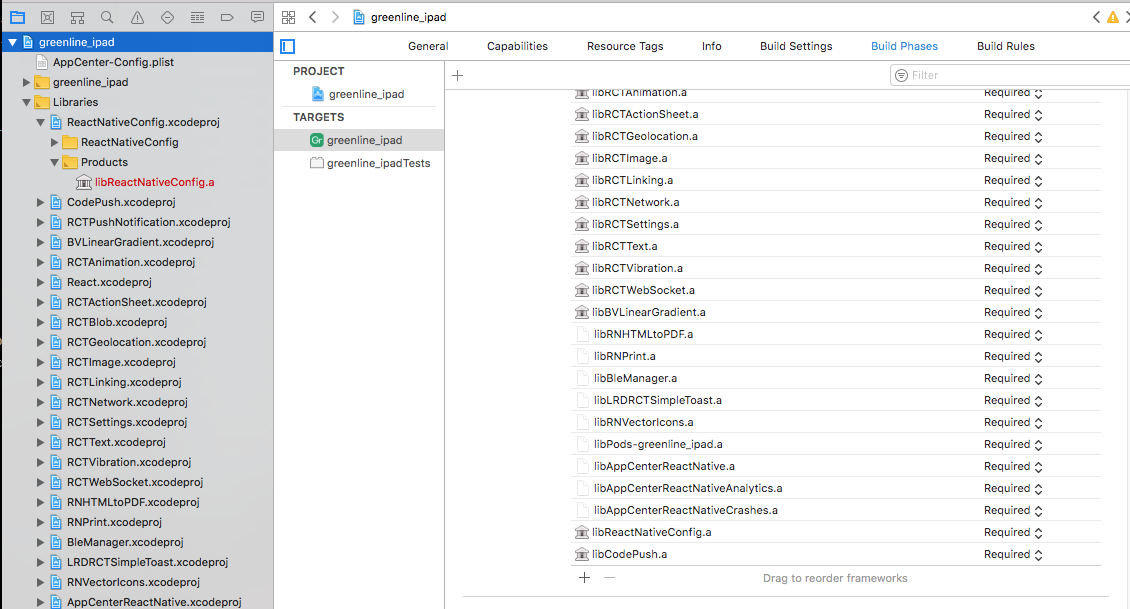
@DeX3 Currently react-native link react-native-config doesn't work correctly with RN 0.50+
You can either downgrade to a previous react-native e.g. version 0.49.3 and then do the react-native link, then upgrade back to the current version. Or try to just add it manually by add the library and linking it into the build phase:
 Sam-Hoult
on 19 Mar 2018
Sam-Hoult
on 19 Mar 2018
@Sam-Hoult I downgraded to 0.49 and then linked before returning to 0.51. the method and header files are being generated as expected but xcode is still having trouble finding GeneratedDotEnv.m when building ReactNativeConfig.m, presumably because it's not actually looking in SYMROOT. any ideas?
 alxyuu
on 20 Mar 2018
alxyuu
on 20 Mar 2018
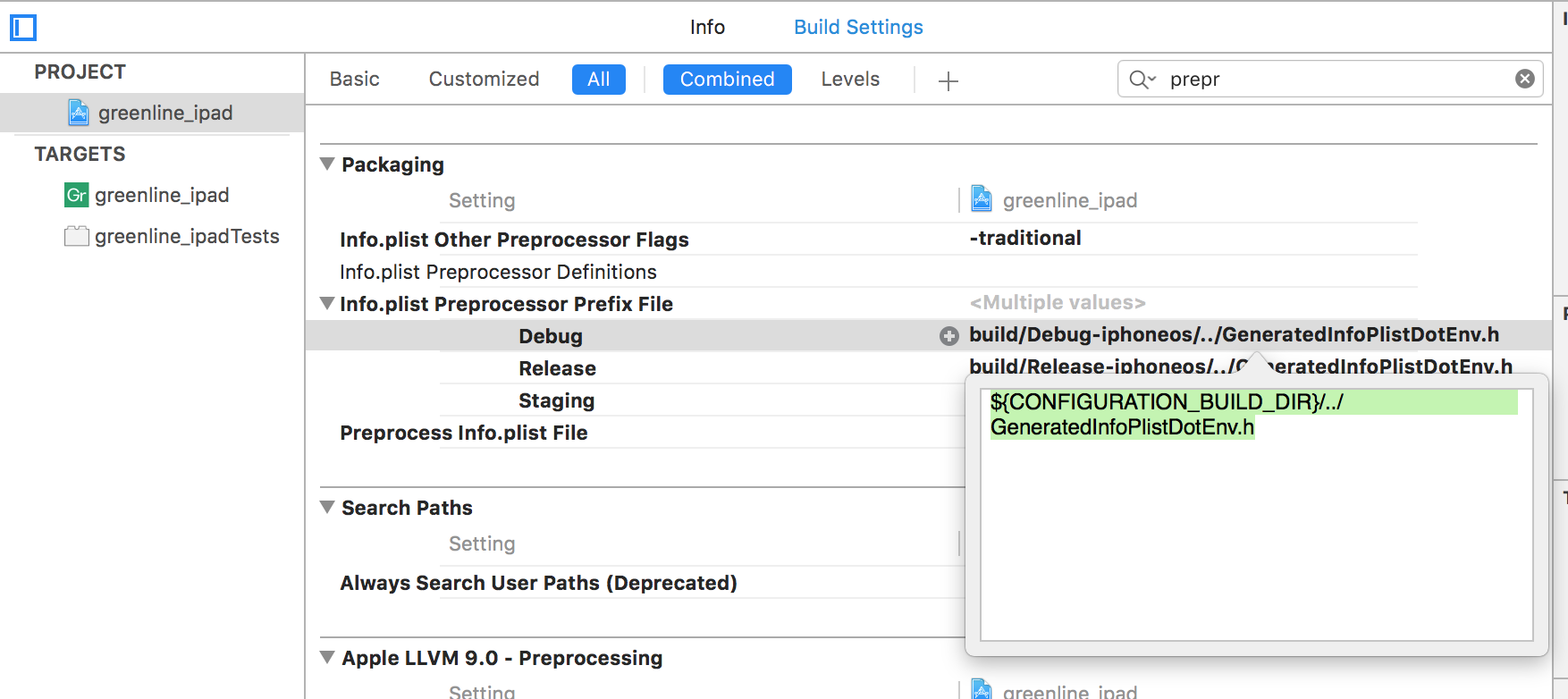
@alxyuu Yea, the docs also give a wrong location for that. here's mine using ${CONFIGURATION_BUILD_DIR}/../GeneratedInfoPlistDotEnv.h as the Info.plist preprocessor path
Sam-Hoult
on 20 Mar 2018
@Sam-Hoult I'm referring to GeneratedDotEnv.m when building ReactNativeConfig.m, not the header for preprocessing info.plist. This makes the project unable to compile even if info.plist preprocessing is not used
alxyuu
on 20 Mar 2018
Thanks @Sam-Hoult.
My case is - two targets, first one was ok and running, while the second one didn't. Turns out the linker didn't add the framework.
Then I got the /ios/build/Build/Products/GeneratedDotEnv.m and GeneratedInfoPlistDotEnv.h generated.
 avioli
on 16 Apr 2018
avioli
on 16 Apr 2018
This tutorial helped me: https://medium.com/differential/managing-configuration-in-react-native-cd2dfb5e6f7b.
 ferlopezm94
on 3 Jul 2018
ferlopezm94
on 3 Jul 2018
I was able to get it working on iOS, When I write constants like this
SERVER_URL = http://example.com
it's seen on android but not on iOS. Somehow after I closed the gap and make it look like this SERVER_URL=http://example.com
iOS started seeing the constants too. Now both platforms are cool 👍 .
Note: This was on a real project not the Example project.
"react": "16.4.1",
    "react-native": "^0.56.0",
    "react-native-config": "^0.11.5",
 timotew
on 27 Jul 2018
timotew
on 27 Jul 2018
I am not able to run this thing in IOS. I have done all the settings, still no success. My configuration files are located in config folder. I have added a pre action in the build of the scheme and that is
echo "config/.env.prod" > /tmp/envfile.
Please help
 tarun29061990
on 5 Feb 2019
tarun29061990
on 5 Feb 2019
facing the same issue here, seems like IOS is not loading the constants from .env files. I created a custom scheme for DEV environment. When I check cat /tmp/envfile I am seeing the string .env.dev . Is this expected I was thinking I will see the contents? anybody faced/solved this ?
 pradhul
on 27 Feb 2019
pradhul
on 27 Feb 2019
Same issue to @pradhul .
On Android all works fine.
But on iOS my env file seems to be unread. At this time I tries only the "play" button on Xcode.
Any ideas?
Regards
EDIT : After some tests it's works!
I've rebuild my projects many times but the solutions seems to be here: https://github.com/luggit/react-native-config/issues/83#issuecomment-362359389
 Dbroqua
on 28 Feb 2019
Dbroqua
on 28 Feb 2019
Faced the same issue to @pradhul .
I removed ios/build folder and it worked.
 Iamhere
on 23 Apr 2019
Iamhere
on 23 Apr 2019
Related issues
 jstlaurent
·
4Comments
jstlaurent
·
4Comments
 francisrod01
·
3Comments
francisrod01
·
3Comments
 NachtRitter
·
4Comments
NachtRitter
·
4Comments
 aajkishore
·
3Comments
aajkishore
·
3Comments
 himanshu-satija
·
3Comments
himanshu-satija
·
3Comments
Most helpful comment
@DeX3 Currently

react-native link react-native-configdoesn't work correctly with RN 0.50+You can either downgrade to a previous react-native e.g. version 0.49.3 and then do the react-native link, then upgrade back to the current version. Or try to just add it manually by add the library and linking it into the build phase: