React-native-collapsible: Recalculate height issue
I'm using this collapsible wrapper with Algolia facets.
Starts like this:

Then I select a facet options and the updated list from Algolia has no empty options in it, so in this case, the "No" value disappears. The collapsed area shrinks down. All is good in the world!
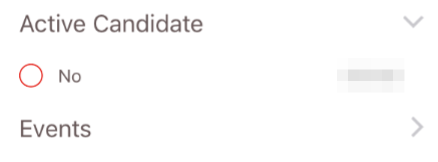
However, when I deselect the facet, the container does not expand out again. In this case, only the first option is visible
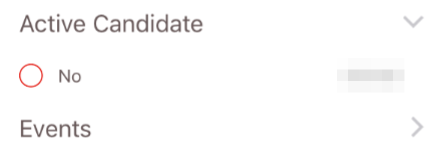
Had the previous step shown 2 or 3 items, then that's all I'd see now.
If I remove the Collapsible wrappers, these filters work fine.
Any ideas? Is there anything I need to apply style-wise?
 njt1982
All 26 comments
If I toggle the collapsed state, then "Yes" Reappears, under "No". It's like I need to somehow trigger _handleLayoutChange again?!
njt1982
on 14 Jun 2017
When I expand the box, _handleLayoutChange is triggered and contentHeight is 52. When I select Yes, that method triggered again (I assume via onLayout on the sub view?) and the height is 26. This is expected...
However, when I remove the checkbox, onLayout is not triggered. I have tried removing the animation check on it, but it made no difference. It never gets called a second time.
I have checked and my List is rendering the child ListItem. (or at least the render method gets called on it).
njt1982
on 15 Jun 2017
  render() {
    if (this.props.items.length > 0)
      return (
        <Content>
          <ListItem style={styles.listItem} onPress={() => { this.setState({isCollapsed: !this.state.isCollapsed}) }}>
            <Body>
              <Text style={styles.listText} >{this.props.heading}</Text>
            </Body>
            <Right>
              <Icon name={this.state.isCollapsed ? 'arrow-forward' : 'arrow-down'} />
            </Right>
          </ListItem>

          <Collapsible collapsed={this.state.isCollapsed}>
            <List dataArray={this.props.items}
                  onLayout={() => {console.log('List Layout')}}
                  renderRow={(row) => <CheckboxRefinementListItem row={row} refine={this.props.refine} /> } />
          </Collapsible>
        </Content>
      );

    return null;
  }
I just added that onLayout to the List... interestingly, that fires with the same behaviour as the Collapsible (ie, it does not console log when it is means to expand back out again).
njt1982
on 15 Jun 2017

So what you can see here:
- Initial expand. We have 2 items.
- I tick Yes and to collapsible area shrinks to encompass just the Yes result.
- Toggle the collapse twice and we still see Yes. All good so far
- Untick Yes and the No item its re-rendered, pushing Yes off the list (as the container is not resizing).
- Toggle the collapse twice again and both options are visible again.
njt1982
on 15 Jun 2017
Oh the List is from Native Base...
njt1982
on 15 Jun 2017
Hmm so this seems to have solved the issue:
<Collapsible collapsed={this.state.isCollapsed}>
  {this.props.items.map((item) => <CheckboxRefinementListItem key={item.label} row={item} refine={this.props.refine} />  )}
</Collapsible>
There is appears to be a bug with how Native Base List (or maybe ListView in core?) works with Collapsible.
njt1982
on 15 Jun 2017
@njt1982 Is the issue resolved?
 iRoachie
on 21 Jul 2017
iRoachie
on 21 Jul 2017
It's resolved in that I fixed it by rendering ListItems myself. Although I consider that a workaround.
Options;
1) fix the renderer to support List
2) document clearly that dynamic changing List is not supported and that you should just render the items individually using something like the snippet above.
njt1982
on 22 Jul 2017
I also had issues with using a Flatlist inside the Collapsible component. When opening it, the Collapsible would basically double the height of the Flatlist, leaving a ton of blank space below it.
After switching the Flatlist out for a item.map function, the height works correctly now. Definitely not a fix, but a workaround.
 csumrell
on 13 Oct 2017
csumrell
on 13 Oct 2017
@iRoachie Heya - not sure this should be closed IMHO. There is a work around, but it's not fixed.
Has either option 1 or 2 from my comment in July been addressed (ie either fixed or documented?) - or is there a third way? ;)
njt1982
on 8 Jan 2018
This is already fixed in 0.10.0 with this commit. The version isn't on npm as yet as the author has to publish. However you can use it directly from the GitHub repo.
In your package.json:
"react-native-collapsible": "https://github.com/oblador/react-native-collapsible.git"
Here's an example gif:

iRoachie
on 8 Jan 2018
Also the above example I posted is using FlatList
iRoachie
on 8 Jan 2018
I have a similar issue to @csumrell on Android using a FlatList inside the Collapsible component.
It is random however in that it will work the majority of the time, but toggle a few collapsible areas on/off eventually one will double the height of the collapsible area.
Using:
"react-native-collapsible": "^0.10.0",
"react": "16.0.0",
"react-native": "0.50.3",
P.s. likewise worked around the problem by removing the FlatLists and replacing with map functions.
 paulpopiel
on 11 Jan 2018
paulpopiel
on 11 Jan 2018
This might solve your issue: could you have a try?
https://github.com/oblador/react-native-collapsible/pull/147
 eduardomoroni
on 7 Feb 2018
eduardomoroni
on 7 Feb 2018
Closing this as inactive. Ping me if the issue persists with the latest version.
iRoachie
on 15 Apr 2018
Also Just merged #147. Release will be out in a few mins.
iRoachie
on 15 Apr 2018
The issue with FlatList inside Collapsible component is still present. The Collapsible component randomly adds additional blank space after the list items.
Please reopen the issue.
react-native-collapsible: 0.12.0
react-native: 0.57.2
react: 16.5.0
 mhazda-eleks
on 22 Oct 2018
mhazda-eleks
on 22 Oct 2018
I'm also unable to get consistent rendering with a FlatList inside of an Accordion
├── [email protected]
├── [email protected]
├── [email protected]
Everytime collapsible is expanded I get different heights (or rather, it seems to alternate between working and one with a lot of padding). I've reverted to .map() and skipping FlatList altogether which is not ideal.
 zivester
on 23 Oct 2018
zivester
on 23 Oct 2018
If anyone is still having issues with the height re-rendering for a Collapsible component, try to set the duration prop, you can even set it to the default (300), just make sure you set it when in the Collapsible's prop.
 jayellul
on 20 Feb 2019
jayellul
on 20 Feb 2019
The problem still exists (even when using a .map function), I did find that setting a minHeight style prop on each item within the collapsible has solved the issue for me until a permanent fix is available.
 vincentvella
on 8 Apr 2019
vincentvella
on 8 Apr 2019
I also had issues with using a Flatlist inside the Collapsible component. When opening it, the Collapsible would basically double the height of the Flatlist, leaving a ton of blank space below it.
After switching the Flatlist out for a item.map function, the height works correctly now. Definitely not a fix, but a workaround.
Can you explain more. Is you remove using
 ndphuong
on 21 May 2019
ndphuong
on 21 May 2019
@ndphuong Instead of using <FlatList /> and passing items as a parameter, the "map method" is the one mentioned in this comment:
https://github.com/oblador/react-native-collapsible/issues/91#issuecomment-308791666
<Collapsible collapsed={this.state.isCollapsed}>
  {this.props.items.map((item) => <CheckboxRefinementListItem key={item.label} row={item} refine={this.props.refine} />  )}
</Collapsible>
Using accordion with react-native-collapsible will not dynamically change its content height.
I used a flatlist inside accordion and faced similar problem.. I solved it by setting a flag and re-rendering the view of accordion.
This is my flatlist.
<FlatList
data={section.content}
renderItem={this.renderItem}
extraData={this.state.refresh}
ListEmptyComponent={this.ListEmptyView}
/>
I re-rendered my accordion view like this when i add new content to flatlist.
{this.state.refresh ? (
<View style={styles.flatlistMainContainer}>
<Accordion
sections={this.state.accordionArray}
activeSections={this.state.activeSections}
renderHeader={this.renderAccordionHeader}
renderContent={this.renderAccordionItem}
onChange={this._updateSections}
touchableComponent={TouchableOpacity}
/>
</View>
) : null}
When i make any change in its content dynamically i will set the flag as :
this.setState({ refresh: false }, () => {
this.setState({ refresh: true });
});
By doing like this component refresh its content height.
 gilshaan
on 17 Sep 2019
gilshaan
on 17 Sep 2019
I followed @gilshaan's approach but there is a pretty ugly white flash there. Would be nice to get this patched somehow.
 pedromcunha
on 13 Jan 2021
pedromcunha
on 13 Jan 2021
That bug still active, it specifically always in case on dynamic data fetching
 GTSConserve
on 20 Mar 2021
GTSConserve
on 20 Mar 2021
Could we reopen this issue? The bug still exists for dynamic contents.
 benazir46
on 31 May 2021
benazir46
on 31 May 2021
Related issues
 SaberRiryi
·
3Comments
SaberRiryi
·
3Comments
 sohanpatil44
·
3Comments
sohanpatil44
·
3Comments
 tiaaaa123
·
5Comments
tiaaaa123
·
5Comments
 alexstoyanov
·
6Comments
alexstoyanov
·
6Comments
 abdulkhaliquem9
·
5Comments
abdulkhaliquem9
·
5Comments
Most helpful comment
I also had issues with using a Flatlist inside the Collapsible component. When opening it, the Collapsible would basically double the height of the Flatlist, leaving a ton of blank space below it.
After switching the Flatlist out for a item.map function, the height works correctly now. Definitely not a fix, but a workaround.