React-native-collapsible: Poor performance on Android
Hi there!
First I want to thank you for this awesome plugin. It works fine, and do its job. Thanks!
The only thing bugging me is the perfomance; I'm using it as an accordion, 0.8 version with RN 0.41, and when I tap the accordion header, it takes a little while to close the current active and open the new one. I noticed it's not FPS related.. the FPS does drop down from 60fps to 43fps in my case, but I really don't think it is the cause to feel a little bit sluggish.
I first thought it could be related with the size of the text rendering inside the accordion, but changing the accordion content to a simple text string does not make it fluid; at best just make it a little bit quicker.
Right now I think the blame is on me, because no one else reported it here, but I've no idea what can be causing it.
Any help?
Thanks a lot!
 ammichael
All 10 comments
I got the same problem. It takes about half a second until the item starts to expand. The animation is relatively smooth. The only problem is the time it takes to start.
Thanks for help
 marvinernst
on 29 Mar 2017
marvinernst
on 29 Mar 2017
I too have a similar issue. In my collapsible, it renders some component with a collapsible in itself. The inner component's collapsible works fine. But the outer one is heavy. I learned that when I change the state in the component, I actually re-render everything therefore making it slow. Not sure if that's the same with everyone else.
 JeffreyLeeSpokeo
on 30 Mar 2017
JeffreyLeeSpokeo
on 30 Mar 2017
How did you use it anyway? The
The only solution I can think about right now is implementing a ListView with a Touchable and Collapsible as row item. But with this way the "accordion" nature is lost.
 Doko-Demo-Doa
on 30 Mar 2017
Doko-Demo-Doa
on 30 Mar 2017
Hi,
I'm having the same problem but worst: the animation takes time to start (transitionToHeight called late) + the animation FPS is very low, on both iOS and Android (run inside an Expo app, published or in debug mode)
My code is pretty simple (I use Glamorous-native View, but with plain ReactNative views it's not better)
class PendingShootings extends React.PureComponent {
  state = {
    collapsed: false,
  };
  toggle = () => {
    this.setState({collapsed: !this.state.collapsed});
  };

  render() {
    return (
      <View>
        <TouchableWithoutFeedback onPress={this.toggle}>
          <View
            height={80}
            backgroundColor={Colors.tertiary}
            padding={10}
            alignItems="center"
            justifyContent="center"
          >
            <Texts.Normal white>Vous avez un shooting a confirmer</Texts.Normal>
          </View>
        </TouchableWithoutFeedback>
        <Collapsible
          collapsed={this.state.collapsed}
          align="center"
          duration={1000}
        >
          <CollapsedView/>
        </Collapsible>
      </View>
    );
  }
}

class CollapsedView extends React.PureComponent {
  render() {
    return (
      <View
        height={80}
        borderTopColor={Colors.primary}
        borderTopWidth={1}
        backgroundColor={Colors.tertiary}
        padding={10}
        alignItems="center"
        justifyContent="center"
      >
        <Texts.Normal white>Accepter ou refuser?</Texts.Normal>
      </View>
    );
  }
}
Any idea what could be the problem? I've even tried to copy-paste the Collapsible example in my app and also got this problem, so I'll try with the exact same example to see if I'm able to run at least the example fine...
 slorber
on 5 Jul 2017
slorber
on 5 Jul 2017
I've opened another issue because I encounter a more general performance problem affecting iOS + Android on latest Expo client: https://github.com/oblador/react-native-collapsible/issues/96
slorber
on 6 Jul 2017
Hello!
I've experienced the same issue, so I ran a couple of tests.
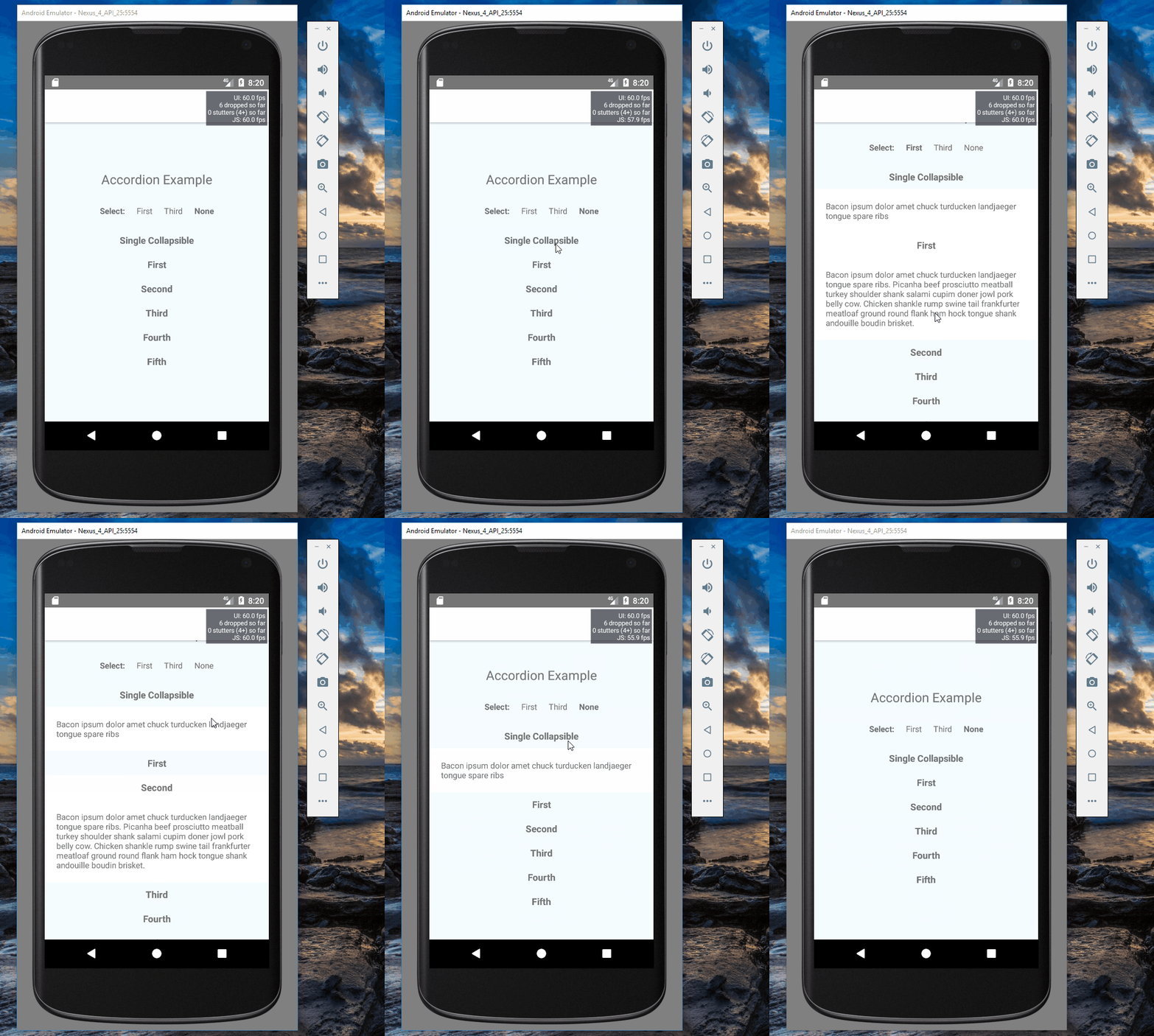
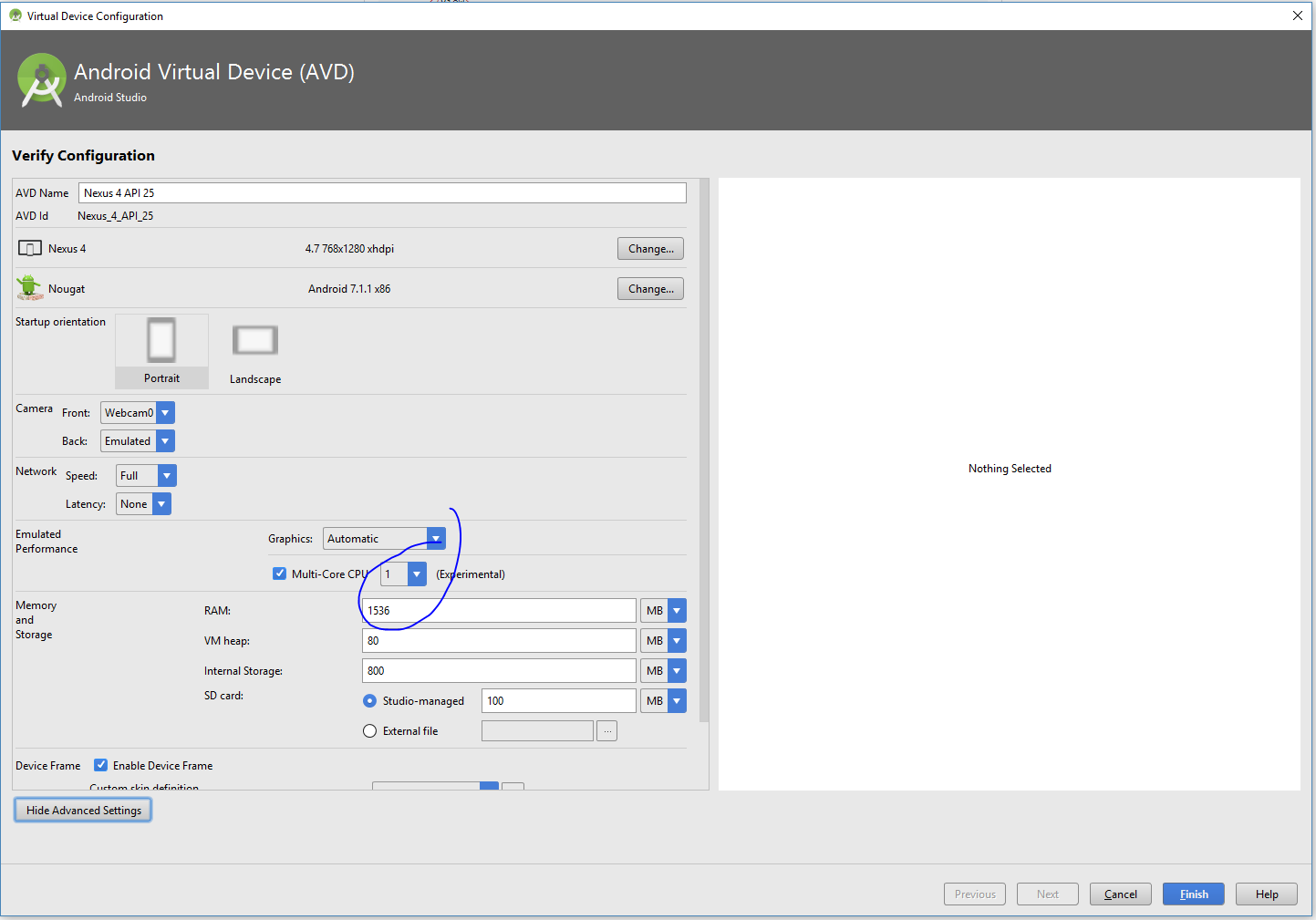
I changed the config of the Android emulator a little and managed to get some decent results.
Animation runs like crap if single core is selected in the emulator settings. In dual core config it runs pretty smooth.
Although, in either case Perf Monitor doesn't show any issues.
I do not understand why on earth do I need a dual-core config to expand a single section containing a simple sentence =)
Here are the screenshots

The only difference in config is here:
 cvvspb
on 11 Jul 2017
cvvspb
on 11 Jul 2017
Also, try running your app in release mode. On Android the performance difference between debug and release is usually huge.
IIRC you can do react-native run-android --variant=release to quickly test.
 FruitieX
on 19 Jul 2017
FruitieX
on 19 Jul 2017
Closing this as inactive as there's been no activity for over 30 days. If the problem re-occurs on the latest version of react-native-collapsible then ping me to reopen or create a new issue.
 iRoachie
on 15 Oct 2017
iRoachie
on 15 Oct 2017
I am also facing same issue. I have also testing in release mode.
 ansarikhurshid786
on 12 May 2020
ansarikhurshid786
on 12 May 2020
how did this issue fix?
 tiffanym19
on 12 Jan 2021
tiffanym19
on 12 Jan 2021
Related issues
 mrusmanali
·
5Comments
mrusmanali
·
5Comments
 vijay-dadhich09
·
8Comments
vijay-dadhich09
·
8Comments
 nertilzhuri
·
4Comments
nertilzhuri
·
4Comments
 Korysam15
·
4Comments
Korysam15
·
4Comments
 technicallyty
·
4Comments
technicallyty
·
4Comments
Most helpful comment
Also, try running your app in release mode. On Android the performance difference between debug and release is usually huge.
IIRC you can do
react-native run-android --variant=releaseto quickly test.