React-native-code-push: [iOS] CodePush update lost after restarting the App
Hello there.
I’m experiencing a strange behavior when pushing updates with CodePush on iOS Platform.
My binary has the version 2.0. When I make a CodePush update targeting the 2.0 version, the update gets successfully installed on device. But when I restart the app (close and open again), it returns to the original binary bundle.
This issue is happening only on iOS, Android is working fine.
Expected Behavior
After restarting the app, keep the installed codePush version
Actual Behavior
After restarting the app, i get the old bundle version.
Scenario
Using release mode to take the updates from Codepush server instead of the local package server.
Already replaced this line on AppDelegate.m as the documentation points out:
jsCodeLocation = [CodePush bundleURL];
````
I’m using the JS wrapper this way:
let codePushOptions = {
checkFrequency: codePush.CheckFrequency.ON_APP_START
};
export default UpdatesHandler = codePush(codePushOptions)(UpdatesHandler);
And I sync with the codePush server calling the proper method on componentDidMount:
componentDidMount() {
codePush.sync({
updateDialog: false,
installMode: codePush.InstallMode.IMMEDIATE
});
}
```
I also tried calling codePush.notifyAppReady() before the sync call but no luck.
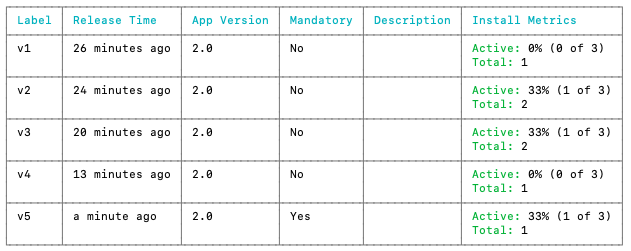
I've already checked on mscenter and there are not rollbacks registered. And as you can see here I’m targeting the 2.0 version in all releases:
Environment
- react-native-code-push version: 6.2.1
- react-native version: 0.60.5
- iOS/Android/Windows version: iOS 13.3.1
- Does this reproduce on a debug build or release build? Release build
- Does this reproduce on a simulator, or only on a physical device? physical device, haven't tried on simulator yet
 vssalcedo
All 17 comments
We experienced the same issue:
react-native-code-push: 6.2.0
react-native: 0.62.2
iOS: 13.5.1
 joshua-davis-rose
on 20 Jul 2020
joshua-davis-rose
on 20 Jul 2020
Any updaye on this - same issue on droid.
 ankitsolanki
on 24 Jul 2020
ankitsolanki
on 24 Jul 2020
Hi @vssalcedo!
Thanks for reporting!
Unfortunately, I can't reproduce this issue. Could you please provide a demo app with reproducing issue and reprosteps? I would like to reproduce and investigate this issue.
 Krasavinigor
on 27 Jul 2020
Krasavinigor
on 27 Jul 2020
We experienced the same issue:
react-native-code-push: 6.2.0
react-native: 0.62.2
iOS: 13.5.1
We're experiencing this same issue. Update is downloaded and applied immediately. Code changes are reflected as expected. On next app start, codepush reverts to running bundle shipped with binary. Please help.
 iqfantasysports
on 3 Aug 2020
iqfantasysports
on 3 Aug 2020
@joshua-davis-rose @vssalcedo Were you able to figure out a solution to this problem? I've had an app running the same manual code sync logic for a couple of years now without issues until recently. Any help is appreciated.
iqfantasysports
on 3 Aug 2020
Hi @iqfantasysports i've been a little bit busy these days. I tried again but i was not able to solve this problem. I'll try to create a reproducible demo during this week so they can help us with this issue. (If someone could provide his own demo, do it aswell so we can get more feedback).
Btw are u experiencing this issue on both iOS and Android or just iOS?
vssalcedo
on 3 Aug 2020
Hi @iqfantasysports i've been a little bit busy these days. I tried again but i was not able to solve this problem. I'll try to create a reproducible demo during this week so they can help us with this issue. (If someone could provide his own demo, do it aswell so we can get more feedback).
Btw are u experiencing this issue on both iOS and Android or just iOS?
@vssalcedo Only on iOS. Android is fine.
iqfantasysports
on 3 Aug 2020
I tried to create a reproducible demo with the same steps but it works. I ship the new bundle with codepush and after restarting the app i get the updated bundle.
But when i try the same on my personal project it does not work, idk what is going on. Could someone provide a non-working demo with his own issue?
vssalcedo
on 6 Aug 2020
Same issue here! We've tried everything. Everything works as expected until app restarts, then the update gets flagged as a failed install and rolls back. I've confirmed that the app delegate is in fact using the [CodePush bundleURL]. We have also tried all variations of notifying codepush that the update was successful and no luck on our end. Hopefully the maintainers will have more information soon.
 luskin
on 8 Aug 2020
luskin
on 8 Aug 2020
One interesting point to note is that if you simply just wrap your entire application with codepush, it does not roll back:
let codePushOptions = {
checkFrequency: codePush.CheckFrequency.ON_APP_RESUME,
installMode: codePush.InstallMode.IMMEDIATE,
mandatoryInstallMode: codePush.InstallMode.IMMEDIATE,
}
export default codePush(codePushOptions)(App)
I'm not sure why this works but calling sync() when an update is available rolls back but for now this is... "unblocking" us...
UPDATE & RESOLUTION:
We were able to get our custom sync flow working without rollbacks by simply adding the following the root of the application:
let codePushOptions = {
checkFrequency: codePush.CheckFrequency.MANUAL,
}
export default codePush(codePushOptions)(App)
To anyone else having this problem, first, check to make sure you are actually using the [CodePush bundleURL]; in your AppDelegate.m, then, make sure you root app is wrapped like a posted above. This is the code we use on RN0.63.0 to have a super clean update experience.
export const checkForUpdate = async (): Promise<boolean> => {
try {
const remotePackage = await codePush.checkForUpdate()
console.log('I received the remote package: ', remotePackage)
if (remotePackage && !remotePackage?.failedInstall) {
return true
}
} catch (e) {
// TODO - log error
}
return false
}
export const restartAppAndInstall = async () => {
RNBootSplash.show({ duration: 250 })
await timeout(300)
codePush.restartApp()
}
export const installUpdateIfAvailable = () => {
const TimeoutMS = 10000
const checkAndUpdatePromise = new Promise(async (resolve: Function) => {
const updateAvailable = await checkForUpdate()
if (updateAvailable) {
const syncStatus = (status: codePush.SyncStatus) => {
console.log('SyncStatus = ', status)
switch (status) {
case codePush.SyncStatus.UP_TO_DATE:
case codePush.SyncStatus.UPDATE_IGNORED:
console.log('App is up to date...')
resolve()
break
case codePush.SyncStatus.UPDATE_INSTALLED:
console.log('Update installed successfully!')
// DO NOT RESOLVE AS THE APP WILL REBOOT ITSELF HERE
break
case codePush.SyncStatus.UNKNOWN_ERROR:
console.log('Update received an unknown error...')
resolve()
break
default:
break
}
}
// Install the update
codePush.sync(
{
installMode: codePush.InstallMode.IMMEDIATE,
mandatoryInstallMode: codePush.InstallMode.IMMEDIATE,
},
syncStatus,
)
} else {
resolve()
}
})
return Promise.race([checkAndUpdatePromise, timeout(TimeoutMS)])
}
This can be invoked in two ways, 1, when application is first launched:
useEffect(() => {
console.log('Launching app and checking for codepush update....')
installUpdateIfAvailable().finally(() => {
timeout(300).finally(() => {
RNBootSplash.hide({ duration: 350 })
})
})
}, [])
Or when the application comes back from an inactive state (we force check all the time currently but will move this to a periodic check). On resume active state, we call checkForUpdate, if that returns true we display a screen in the app telling them it's time to update. When they click that button it calls restartAppAndInstall - which simply actually just restarts the application and flow #1 takes over. We use react-native-bootsplash to make this a clean seamless experience without any flashing. I hope this helps the next person.
luskin
on 8 Aug 2020
Hi @luskin Thank you so much for your reply. After hours and hours of researching i finally got this working.
In my case it was not the code structure itself but a misconfiguration due to incompatibility with other libraries.
For those who are using React Native Navigation by Wix. Make sure that you are using the proper bundle URL inside the _didFinishLaunchingWithOptions_ method on AppDelegate.m:
- (BOOL)application:(UIApplication *)application didFinishLaunchingWithOptions:(NSDictionary *)launchOptions
{

  //NSURL *jsCodeLocation = [[RCTBundleURLProvider sharedSettings] jsBundleURLForBundleRoot:@"index" fallbackResource:nil];
//This was the original setup. So it was grabbing the original bundle instead of the update of the codepush server

  NSURL *jsCodeLocation = [CodePush bundleURL]; // Use this when you make the release build

  [ReactNativeNavigation bootstrap:jsCodeLocation launchOptions:launchOptions];

  [RNSplashScreen show];
  return YES;
}
After this change, i was able to successfully download the last update from the Codepush server.
I hope this can help.
vssalcedo
on 11 Aug 2020
Hi @vssalcedo!
I'm going to close this issue for now as It was resolved.
Please feel free to reopen it if you have any questions.
Krasavinigor
on 14 Aug 2020
Hey all,
Hate to re-open but this is happening to me as well.
Code Push: ^6.3.0
React Native: 0.63.3
Seems that I open the application, on first load the package gets installed no problem. App restarts and then says there no update. Perfect.
I then manually restart the app and the app seems to use the version that was released with the binary, yet my app still shows the latest version when calling getUpdateMetadata.
I used some code from @luskin to modify what I had in place for sanity check because what I've been using just stopped. I have other projects this works fine on, not sure what is going on with the latest version.
Here is the hook I wrote using this, feel free to use.
const decodeSyncStatus = (status: CodePush.SyncStatus) =>
  Object.entries(CodePush.SyncStatus)
    .filter(([name, value]) => (status === value ? name : ''))
    .reduce(([name, value]) => [String(name), value])[0]

const timeout = (timeoutMS = 10000): Promise<any> =>
  new Promise((_, reject: Function) => {
    const timeoutErr = {
      message: 'Timed out.',
      code: 'ETIMEDOUT'
    }

    setTimeout(reject, timeoutMS, timeoutErr)
  })

const checkForUpdate = async (): Promise<boolean> => {
  try {
    const remotePackage = await CodePush.checkForUpdate()

    logger.log('CodePush Package Recieved:', remotePackage)
    if (remotePackage && !remotePackage?.failedInstall) {
      return true
    }
  } catch (e) {
    logger.error('CodePush Update Failing, `checkForUpdate`', e)
  }

  return false
}

const downloadProgress = ({
  totalBytes,
  receivedBytes
}: {
  totalBytes: number
  receivedBytes: number
}) => {
  logger.log(`Download Progress: ${Math.round((receivedBytes / totalBytes) * 100)}%`)
}

const updateApplication = (): Promise<boolean> => {
  const handleUpdate: Promise<boolean> = new Promise(async (resolve: Function) => {
    const updateAvailable = await checkForUpdate()

    // If we have an update (should be an object) then we should try to apply it via `sync`
    if (updateAvailable) {
      const statusDidChange = (status: CodePush.SyncStatus) => {
        logger.log('CodePush Package Status:', decodeSyncStatus(status))

        switch (status) {
          case CodePush.SyncStatus.UP_TO_DATE:
          case CodePush.SyncStatus.UPDATE_IGNORED:
            console.log('App is up to date...')
            resolve(true)
            break
          case CodePush.SyncStatus.UPDATE_INSTALLED:
            console.log('Update installed successfully!')
            // DO NOT RESOLVE AS THE APP WILL REBOOT ITSELF HERE
            break
          case CodePush.SyncStatus.UNKNOWN_ERROR:
            console.log('Update received an unknown error...')
            resolve(true)
            break
          default:
            break
        }
      }

      // Sync with CodePush
      CodePush.sync(
        {
          installMode: CodePush.InstallMode.IMMEDIATE,
          mandatoryInstallMode: CodePush.InstallMode.IMMEDIATE
        },
        statusDidChange
      )
    } else {
      logger.log('No CodePush Update Available...')
      resolve(true)
    }
  })

  // Give it a max of 5 seconds to get the update in order, we don't want to leave the user hanging for much longer.
  return Promise.race([handleUpdate, timeout(5000)])
}

export const useCodePushSync = () => {
  const [codePushIsSynced, setSyncStatus] = useState(false)

  useEffect(() => {
    const handleUpdate = async () => {
      try {
        await updateApplication()
      } catch (e) {
        logger.error(e)
      }

      // Regardless of what happens, we need to push the user into the app...
      setSyncStatus(true)
    }

    handleUpdate()
  }, [])

  return codePushIsSynced
}
@SnidelyWhiplash is right about his comment, make sure you have this
export default CodePush({
  checkFrequency: CodePush.CheckFrequency.MANUAL
})(App)
I did end up fixing this issue by recompiling, which started working recently and hasn't been in the past? I've had an app on TestFlight that hasn't been working with CodePush for weeks and the versions are the same but recompiling seemed to fix it.
 mikehuebner
on 4 Nov 2020
mikehuebner
on 4 Nov 2020
@luskin's answer saved me. Even if you're handling all the CP logic yourself, like via a modal/button, you still need to wrap your main App component with codePush and a manual checkFrequency flag. Without this, updates will rollback upon next app boot.
@codePush({
  checkFrequency: codePush.CheckFrequency.MANUAL,
})
export default class App extends Component {
  // ...
}
 SnidelyWhiplash
on 6 Nov 2020
SnidelyWhiplash
on 6 Nov 2020
We are experiencing the same issue on iOs, Android works fine. Our app manages to fetch and download the lastest CodePush bundle, but once the app is rebooted it reverts back to the binary version.
We wrap our app with codePush, we checked thatwe have the correct bundle JS location. We do not call sync though.
const codePushOptions = {
  checkFrequency: codePush.CheckFrequency.ON_APP_RESUME,
  installMode: codePush.InstallMode.ON_NEXT_RESUME,
  minimumBackgroundDuration: 60
}

if (!__DEV__) {
  App = codePush(codePushOptions)(App)
} else {
  console.log("Code Push has been disabled in development.")
}
export default App
 antoinedelp
on 17 Nov 2020
antoinedelp
on 17 Nov 2020
Still experiencing this issue on iOS with react-native code-push, even after using @luskin solution
 neildevas
on 11 Dec 2020
neildevas
on 11 Dec 2020
-Edit-
I fixed this issue by updating our iOS setup for react-native-code-push.
We followed the instructions here
Namely, these steps:
Open up the AppDelegate.m file, and add an import statement for the CodePush headers:
#import <CodePush/CodePush.h>
Find the following line of code, which sets the source URL for bridge for production releases:
return [[NSBundle mainBundle] URLForResource:@"main" withExtension:@"jsbundle"];
Replace it with this line:
return [CodePush bundleURL];
 tdoran
on 5 Feb 2021
tdoran
on 5 Feb 2021
Related issues
 panarasi
·
4Comments
panarasi
·
4Comments
 quanzaiyu
·
3Comments
quanzaiyu
·
3Comments
 Fuhrmann
·
3Comments
Fuhrmann
·
3Comments
 Adr1ann
·
3Comments
Adr1ann
·
3Comments
 sergey-akhalkov
·
4Comments
sergey-akhalkov
·
4Comments
Most helpful comment
Hi @luskin Thank you so much for your reply. After hours and hours of researching i finally got this working.
In my case it was not the code structure itself but a misconfiguration due to incompatibility with other libraries.
For those who are using React Native Navigation by Wix. Make sure that you are using the proper bundle URL inside the _didFinishLaunchingWithOptions_ method on AppDelegate.m:
After this change, i was able to successfully download the last update from the Codepush server.
I hope this can help.