React-native-code-push: Unable to push code from command line
Thanks so much for filing an issue or feature request! Please fill out the following (wherever relevant):
Steps to Reproduce
- Attempt to codepush from command line
Expected Behavior
What you expected to happen?
App would assemble and release to CodePush
Actual Behavior
What actually happens?
App seems to assemble and upload for a while, then fail suddenly without a useful error message.
  Detecting android app version:

Using the target binary version value "3.9.0" from "android/app/build.gradle".

Running "react-native bundle" command:

node node_modules/react-native/local-cli/cli.js bundle --assets-dest /var/folders/hz/gnn5zh5d6tlb96cs9rhhn65xrl7r_6/T/code-push119101-10568-1oknb3a.ouar/CodePush --bundle-output /var/folders/hz/gnn5zh5d6tlb96cs9rhhn65xrl7r_6/T/code-push119101-10568-1oknb3a.ouar/CodePush/index.android.bundle --dev false --entry-file index.android.js --platform android
warn The following packages use deprecated "rnpm" config that will stop working from next release:
  - react-native-code-push: https://microsoft.github.io/code-push
  - react-native-extra-dimensions-android: https://github.com/Sunhat/react-native-extra-dimensions-android#readme
  - react-native-fabric: https://github.com/corymsmith/react-native-fabric
  - react-native-sms: https://github.com/tkporter/react-native-sms
Please notify their maintainers about it. You can find more details at https://github.com/react-native-community/cli/blob/master/docs/configuration.md#migration-guide.
Loading dependency graph, done.

info Writing bundle output to:, /var/folders/hz/gnn5zh5d6tlb96cs9rhhn65xrl7r_6/T/code-push119101-10568-1oknb3a.ouar/CodePush/index.android.bundle
info Done writing bundle output
info Copying 993 asset files
info Done copying assets

Releasing update contents to CodePush:

Error:
Reproducible Demo
- Download https://github.com/Microsoft/react-native-code-push/archive/master.zip and unzip. From
Examplesfolder runnode create-app.js appName [email protected] [email protected]command to generate plain CodePushified React Native app. Please see description on top ofcreate-app.jsfile content if needed - If you can't reproduce the bug on it, provide us as much info as possible about your project
Environment
- react-native-code-push version: 3.0.1
- react-native version: 0.61.3
- iOS/Android/Windows version: Android (any)
- Does this reproduce on a debug build or release build? debug
- Does this reproduce on a simulator, or only on a physical device? n/a
(The more info the faster we will be able to address it!)
I was able to release the iOS version of the same app just a few minutes prior.
 jpr-longgame
All 25 comments
A subsequent try resulted in some 502 error HTML being displayed where I've previously only seen Error:
The try after that yielded only the nondescript Error:
jpr-longgame
on 2 Nov 2019
I also can't code push anymore. Every attempt errors with:
Error: <html>
<head><title>413 Request Entity Too Large</title></head>
<body>
<center><h1>413 Request Entity Too Large</h1></center>
<hr><center>nginx/1.15.8</center>
</body>
</html>
This appears like it might be a configuration issue on appcenter's side. I hope this can get resolved quickly! I need to release an update to my users!
 AndrewMorsillo
on 2 Nov 2019
AndrewMorsillo
on 2 Nov 2019
@AndrewMorsillo Seeing the same error.
 mlazari
on 3 Nov 2019
mlazari
on 3 Nov 2019
@AndrewMorsillo same error
 SasukeJimmyChang
on 4 Nov 2019
SasukeJimmyChang
on 4 Nov 2019
@AndrewMorsillo same error here too. I tried uploading an bundle identical to one that successfully uploaded last week, but I got this error.
 Lalksy
on 5 Nov 2019
Lalksy
on 5 Nov 2019
Same issue. Unable to push the update.
 hamzaehsan95
on 5 Nov 2019
hamzaehsan95
on 5 Nov 2019
Getting same error since yesterday.
 yogeshchoudhary147
on 5 Nov 2019
yogeshchoudhary147
on 5 Nov 2019
Same here
 factionfour
on 5 Nov 2019
factionfour
on 5 Nov 2019
Same here! Is there any solution to fix this problem?
 wenlynnchen
on 5 Nov 2019
wenlynnchen
on 5 Nov 2019
Please help us in this matter
 abdulbasit1248
on 5 Nov 2019
abdulbasit1248
on 5 Nov 2019
Is there any alternative approach to create a release bundle? I need to push something out for a customer ASAP.
BTW, I am encountering this on cordova.
factionfour
on 5 Nov 2019
What is the ETA to fix this issue? Blocking a release for me.
 amit4j
on 5 Nov 2019
amit4j
on 5 Nov 2019
Any movement on this issue? Codepush still appears to be broken on Appcenter's side. Nothing has changed about my build or process and CodePush suddenly stopped working.
AndrewMorsillo
on 5 Nov 2019
@amit4j @factionfour @abdulbasit1248 @wenlynnchen @yogeshchoudhary147 @hamzaehsan95 @Lalksy @SasukeJimmyChang @mlazari You can message the appcenter team though intercom on appcenter.ms, it might be worth trying to get their attention. I did it 4 days ago but unfortunately they have been very slow with responses and haven't acknowledged the issue yet. Could also try twitter.
Are there alternative solutions for hot code push for react-native and Cordova? If AppCenter is going to go down for 4+ days at a time without warning and no response from the team I might need to use a different solution.
AndrewMorsillo
on 5 Nov 2019
Hey there! Apologies for the slow reply. Thanks for the report, we are investigating!🕵️♂️
 cainejette
on 5 Nov 2019
cainejette
on 5 Nov 2019
@cainejette Thanks! Is there a better way to reach the AppCenter team in critical outage cases like this? I tried intercom but the person who responded to me there didn't appear to take the issue seriously and communication was painfully slow.
AndrewMorsillo
on 5 Nov 2019
@cainejette @AndrewMorsillo Some movement on this issue. Instead of 403 error I am seeing a "Bad Gateway" error.
Lalksy
on 5 Nov 2019
@AndrewMorsillo Intercom is the correct method. I am sorry you did not have a good experience there.
We are deploying a fix, stay tuned.
cainejette
on 5 Nov 2019
We should no longer be seeing 413s! :tada: Please let me know if you are still seeing issues.
cainejette
on 5 Nov 2019
It's fixed for us.
mlazari
on 5 Nov 2019
Is anybody else still seeing these issues? We're trying to make sure we caught everything with our fix.
 pfleidi
on 5 Nov 2019
pfleidi
on 5 Nov 2019
All fixed! Thanks for patching it up =)
AndrewMorsillo
on 5 Nov 2019
We should no longer be seeing 413s! 🎉 Please let me know if you are still seeing issues.
It's all fixed! Thank you :)
wenlynnchen
on 6 Nov 2019
From what we can see, this issue seems to be resolved. I'm closing it for now.
pfleidi
on 6 Nov 2019
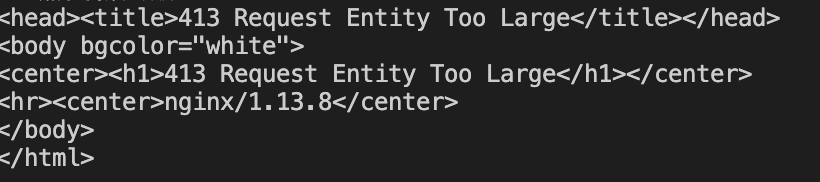
Getting same error since today
 lilicoder
on 10 Nov 2020
lilicoder
on 10 Nov 2020
Related issues
 ACCTFORGH
·
3Comments
ACCTFORGH
·
3Comments
 vira-khdr
·
3Comments
vira-khdr
·
3Comments
 sergey-akhalkov
·
4Comments
sergey-akhalkov
·
4Comments
 chrisjrex
·
4Comments
chrisjrex
·
4Comments
 EdmundMai
·
4Comments
EdmundMai
·
4Comments
Most helpful comment
I also can't code push anymore. Every attempt errors with:
This appears like it might be a configuration issue on appcenter's side. I hope this can get resolved quickly! I need to release an update to my users!