React-native-code-push: [CodePush] An unknown error occurred
Steps to Reproduce
react-native init codetest
yarn add react-native-code-push
autolinkstrings.xml
key android/app/src/main/assets/appcenter-config.json
{
"app_secret": "key"
}
Actual Behavior
What actually happens?
this is log when I start react-native project
LOG Running "codetest" with {"rootTag":31}
LOG [CodePush] Checking for update.
LOG [CodePush] Downloading package.
LOG [CodePush] An unknown error occurred.
LOG [CodePush] Error in getting binary resources modified time
codepush does not work properly. What is the reason?
Environment
- react-native-code-push version:5.7.0
- react-native version:0.61.2
- iOS/Android/Windows version:Android
buildToolsVersion = "28.0.3"
minSdkVersion = 16
compileSdkVersion = 28
targetSdkVersion = 28 - Does this reproduce on a debug build or release build?debug build
- Does this reproduce on a simulator, or only on a physical device? simulator
(The more info the faster we will be able to address it!)
 flutterhope
All 11 comments
Same on Anrdroid debug and release build
iOS works fine
react-native-code-push version:5.7.0
react-native version:0.61.2
 qwertypomy
on 24 Oct 2019
qwertypomy
on 24 Oct 2019
same issue
 tnghia944
on 25 Oct 2019
tnghia944
on 25 Oct 2019
for react native v61 you can add into MainApplication
@Override
protected String getJSBundleFile() {
return CodePush.getJSBundleFile();
}
tnghia944
on 25 Oct 2019
Works on android with manually linked code-push.
qwertypomy
on 25 Oct 2019
@qwertypomy We're having issues getting this to work on RN 0.61.4 on iOS - how did you get this working? We are plagued with the following problem:
https://github.com/microsoft/react-native-code-push/issues/1704
Would you mind providing some quick guidance on how you got this properly setup on iOS?
UPDATE: Downgrading react-native to 0.60.5 fixed our issues.
 luskin
on 19 Nov 2019
luskin
on 19 Nov 2019
The same issue.
I use debug build and physical device.
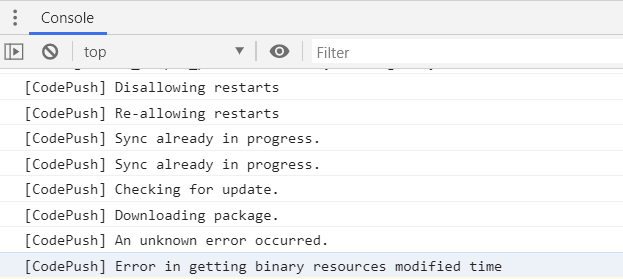
 quanzaiyu
on 21 Nov 2019
quanzaiyu
on 21 Nov 2019
@quanzaiyu removing the --development flag from my codepush release build process resolved this error for me.
 ahartzog
on 24 Nov 2019
ahartzog
on 24 Nov 2019
The solution that worked for me was manually linking it. To do that, you just need to follow all instructions on this link: Android Setup RN 0.60+
 guiherzog
on 12 Dec 2019
guiherzog
on 12 Dec 2019
Hi all,
Yeah, @guiherzog is right. Thanks!
Please ensure that you have did all in that docs: https://github.com/microsoft/react-native-code-push/blob/master/docs/setup-android.md#plugin-installation-and-configuration-for-react-native-060-version-and-above-android
Also, please update your react-native-code-push to 6+ version if you would like to use [email protected]+ versions.
I'm going to close this issue for now. Please feel free to reopen it if you have any questions.
 alexandergoncharov
on 12 Feb 2020
alexandergoncharov
on 12 Feb 2020
Thanks @guiherzog your solution works !
 gagangoku
on 23 Feb 2020
gagangoku
on 23 Feb 2020
bro, thank you very much @guiherzog
 maxdelemos
on 8 Jun 2020
maxdelemos
on 8 Jun 2020
Related issues
 DeDuckProject
·
3Comments
DeDuckProject
·
3Comments
 chrisjrex
·
4Comments
quanzaiyu
·
3Comments
chrisjrex
·
4Comments
quanzaiyu
·
3Comments
 osdnk
·
3Comments
osdnk
·
3Comments
 ACCTFORGH
·
3Comments
ACCTFORGH
·
3Comments
Most helpful comment
The solution that worked for me was manually linking it. To do that, you just need to follow all instructions on this link: Android Setup RN 0.60+