React-native-code-push: react-native 0.60 support and documentation
The release of react-native v0.60 brings with it lots of changes to the way in which 3rd party dependencies such as react-native-code-push are linked and consumed. react-native-code-push needs to update it's project files to support the new autolinking structure and update it's documentation to reflect the installation steps.
Reference Links:
https://facebook.github.io/react-native/blog/2019/07/03/version-60
https://github.com/react-native-community/cli/blob/master/docs/autolinking.md
https://github.com/react-native-community/cli/blob/master/docs/dependencies.md
iOS
Because react-native-code-push already has a podspec defined, I had hoped that autolinking would work for the current version OOB. Attempting to do so and build on iOS, however, results in xcode raising an error about duplicate symbols. The error message encountered is the same as listed in Issue #1597 .
At this time I'm forced to disable autolinking of the module and link it manually.
Android
I have not yet tested the autolinking capability on Android. Based on the information in Issue #1462 it appears the react-native-code-push does not have any direct depdencies on the deprecated android support library.
I believe that this means react-native-code-push should have no problem working with the switch to AndroidX that came with the latest react-native version.
I'll add comments to this issue with any problems I encounter when I begin testing the Android build.
Documentation
The react-native-code-push documentation does not currently contain any mention of the new react-native version or the setup process with autolinking.
Update:
(Related to Issue #1626)
With the release of react-native 0.60.2 the android build process now has an opt in option for using Hermes as the javascript engine on android. See https://facebook.github.io/react-native/docs/hermes
The documentation update should also include any relevant details regarding Hermes support. e.g. Does it have to be disabled to use react-native-code-push? If not, are there any additional setup steps required to make it work?
Deprecated rnpm configuration
Using rnpm configuration settings has been deprecated and will be removed in the next release. A warning is raised during packaging about dependencies still using the old config format. The config values need to be moved into a react-native-config.js file.
The full migration details are documented here: https://github.com/react-native-community/cli/blob/master/docs/configuration.md#migration-guide
 RyanThomas73
All 11 comments
Hi @RyanThomas73,
Thanks for reporting!
I've tested different react-native versions with react-native-code-push 5.6.1.
My method
I want to describe my steps so everyone could try it out.
react-native init rn0604 --version [email protected](tested with0.60.0,0.60.1,0.60.2,0.60.3,0.60.4)cd rn0604- Open
./androidin android studio - Change build variant to "Release"
- Run and test application
- Enable Hermes
gradle project.ext.react = [ entryFile: "index.js", enableHermes: true // clean and rebuild if changing ] - Test with Hermes enabled (clean, rebuild and run)
- Open
rn0604.xcworkspacein Xcode - Edit Scheme... -> Build Configuration = Release
- Fix some strange react-native issue (can't build without this option changed to "No" in Release)

- Test on virtual device
yarn add react-native-code-pushcode-push app add rn0604-android android react-nativecode-push app add rn0604-ios ios react-nativereact-native link react-native-code-pushcd ios && pod install && cd ..- Replace
App.jswith my example app - Test on android (with and without Hermes)
- Launch application
- Change text in
App.js code-push release-react rn0604-android android- Check for update - Install update - Restart app
- Test in XCode ()
- Launch application
- Change text in
App.js code-push release-react rn0604-ios ios- Check for update - Install update - Restart app
Here's my summary:
0.60.0
Without CodePush
- [x] Android
- [x] iOS
With CodePush
- [x] Android
- [x] iOS
0.60.1
Without CodePush
- [x] Android without Hermes
- [ ] Android with Hermes (can't build)
- [x] iOS
With CodePush
- [x] Android without Hermes
- [ ] Android with Hermes (same as without CodePush)
- [x] iOS
0.60.2
Without CodePush
- [x] Android without Hermes
- [ ] Android with Hermes (can't build)
- [x] iOS
With CodePush
- [x] Android without Hermes
- [ ] Android with Hermes (same as without CodePush)
- [x] iOS
0.60.3
Without CodePush
- [x] Android without Hermes
- [x] Android with Hermes
- [x] iOS
With CodePush
- [x] Android without Hermes
- [x] Android with Hermes
- [x] iOS
0.60.4
Without CodePush
- [x] Android without Hermes
- [x] Android with Hermes
- [x] iOS
With CodePush
- [x] Android without Hermes
- [x] Android with Hermes
- [x] iOS
Note: CodePush works with Hermes, but js bundle is not compiled in this case so it's not so profitable at the moment.
Conclusion
At the moment the latest CodePush version can still work with react-native 0.60. I have some issues with Hermes on 0.60.1 and 0.60.2, but it's not something CodePush-related.
Also, we know that rnpm is deprecated, but we can't fix it quickly. We are fully focused on our backend changes and it's number one priority right now:
(from README)
UPDATE: Over the next few months, we will be working on a new version of CodePush that will address some of the most common performance issues our customers are facing. This updated version will allow a better experience, our team to better support CodePush moving forward and have a faster development cycle for new features. We are prioritizing this work because we believe this to be the most valuable thing we can do for our CodePush customers in the long run. Starting June 11th 2019, support will slow down, bug fixes will be limited to critical bugs, and new feature development will pause until we finish this core update.
but we definitely have autolinking and Hermes support on the list.
 yuri-kulikov
on 31 Jul 2019
yuri-kulikov
on 31 Jul 2019
@yuri-kulikov Some questions/notes about your setup instructions.
- I notice you mention using
react-native linkto manually linkreact-native-code-push. You didn't mention disabling autolinking codepush in thereact-native.config.jsstep. Are you disabling autolinking here?
- Are you able to build the app from the command line using the xcodebuild cli tools? Our build pipeline requires us to be able to do this and any time I try with react native 0.60.x I get an error. (The same error described in this issue: https://github.com/microsoft/react-native-code-push/issues/1598). I can build locally using xcode.
RyanThomas73
on 31 Jul 2019
Hermes support can be done form the CLI level without any change to client side's code, just opened a PR for this, feel free to comment my PR. :)
 eggli
on 5 Aug 2019
eggli
on 5 Aug 2019
I face this issue when using 0.60.
I don't know how to config codepush when I remove the initialization code in MainApplication.java:
        @Override
        protected String getJSBundleFile() {
            return CodePush.getJSBundleFile();
        }
        @Override
        protected List<ReactPackage> getPackages() {
          @SuppressWarnings("UnnecessaryLocalVariable")
          List<ReactPackage> packages = new PackageList(this).getPackages();
          packages.add(new CodePush(BuildConfig.CODEPUSH_KEY, getApplicationContext(), BuildConfig.DEBUG, "https://xxxx.com"));
          return packages;
        }

 FaiChou
on 10 Oct 2019
FaiChou
on 10 Oct 2019
I've made an update to the documentation just detailing how to get codepush working on v0.60 and above.
 zanechua
on 17 Oct 2019
zanechua
on 17 Oct 2019
Hi,
I have tried making codepush work for android for version number 0.60.4 without hermes enabled and I have tried the steps listed by @yuri-kulikov but I seem to have run into a few road-blocks somewhere near step 17-18 where I was running into errors when I was running react-native run-android --variant=release.
The first roadblock was a dependancy resolution error I was receiving due to my project apply plugin: 'com.google.gms.google-services' to support another library in my project. More details on that issue here. https://github.com/microsoft/react-native-code-push/issues/1640
The resolution given there was to add the line com.google.gms.googleservices.GoogleServicesPlugin.config.disableVersionCheck = true to the very bottom of build.gradle to ignore the dependancy error which worked for a few people and allowed my app to run too. But this could the reason for my current issues with codepush.
After disabling the version check, the react-native run-android --variant=release command runs and I am able to get a release version of the app (there is a cli error about autolinking react-native-code-push and the warning for rnpm being deprecated from the next version ).
warn The following packages use deprecated "rnpm" config that will stop working from next release:
  - react-native-code-push: https://microsoft.github.io/code-push
Please notify their maintainers about it. You can find more details at https://github.com/react-native-community/cli/blob/master/docs/configuration.md#migration-guide.
error React Native CLI uses autolinking for native dependencies, but the following modules are linked manually:
 react-native-code-push (to unlink run: "react-native unlink react-native-code-push")
This is likely happening when upgrading React Native from below 0.60 to 0.60 or above. Going forward, you can unlink this dependency via "react-native unlink <dependency>" and it will be included in your app automatically. If a library isn't compatible with autolinking, disregard this message and notify the library maintainers.
I have added the plugin to the app on App.js as per the guidelines given in the documentation https://github.com/microsoft/react-native-code-push#plugin-usage
let codePushOptions = { checkFrequency: codePush.CheckFrequency.ON_APP_RESUME };

class MyApp extends Component {
}

MyApp = codePush(codePushOptions)(MyApp);
When I run the code-push debug android command, I get these logs everytime I resume my app
Listening for android debug logs (Press CTRL+C to exit)
[07:39:14] Loading JS bundle from "assets://index.android.bundle"
[07:39:14] Checking for update.
[07:39:14] Reporting binary update (0.1.1)
[07:39:14] Report status failed: {"appVersion":"0.1.1"}
[07:39:14] An unknown error occurred.
[07:39:14] f.text is not a function. (In 'f.text()', 'f.text' is undefined)
These logs are the same both when I configure an update with code-push release-react and when I have no update configured.
I have also tried following the steps mentioned by @zanechua in his comment/PR above and still get the same error.
I understand that updates will be slower since this library is undergoing a major transition and would love some help in getting this up and running in the interim with 0.60. Feel free to comment/contact me for any additional information on this issue.
Thanks a lot :)
 nikhilasrani
on 22 Oct 2019
nikhilasrani
on 22 Oct 2019
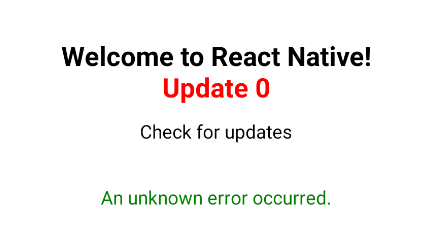
Hi @yuri-kulikov, I'm trying to use code push with react native 0.61.5 (the latest right now). I followed your steps but I can't replace the js on Android.
I can detect the update and the prompt to install that update appears, but when the app try to replace the js an unknown error appears. Do you know what happen?, I'm getting this error from CodePush.SyncStatus.UNKNOWN_ERROR
 RodolfoGS
on 29 Nov 2019
RodolfoGS
on 29 Nov 2019
Hi all,
We prepared PR https://github.com/microsoft/react-native-code-push/pull/1735 for supporting [email protected] and above. We added react-native.config.js and updated docs.
Could someone please review and test it?
Please let us know if you have any questions.
Thanks,
Alexander
 alexandergoncharov
on 2 Dec 2019
alexandergoncharov
on 2 Dec 2019
Hi @yuri-kulikov, I'm trying to use code push with react native 0.61.5 (the latest right now). I followed your steps but I can't replace the js on Android.
I can detect the update and the prompt to install that update appears, but when the app try to replace the js an unknown error appears. Do you know what happen?, I'm getting this error fromCodePush.SyncStatus.UNKNOWN_ERROR
Finally I found the solution, I was using this command:
appcenter codepush release-react -a rodolfogs/React-Native-0.61
But the correct command is:
code-push release-react React-Native-0.61 android
my fault 🤦♂️
RodolfoGS
on 2 Dec 2019
Hi All,
As issue was resolved, I'm going to close this iissue for now. Please feel free to reopen it if you have any questiosn.
alexandergoncharov
on 12 Feb 2020
Hi all,
Can you tell me if I can add some push notification with position condition and update with codepush ?
Thanks
 Rafikounis
on 9 Jun 2020
Rafikounis
on 9 Jun 2020
Related issues
 Adr1ann
·
3Comments
Adr1ann
·
3Comments
 EdmundMai
·
4Comments
EdmundMai
·
4Comments
 panarasi
·
4Comments
panarasi
·
4Comments
 ninjz
·
4Comments
ninjz
·
4Comments
 SudoPlz
·
4Comments
SudoPlz
·
4Comments
Most helpful comment
Hi @RyanThomas73,
Thanks for reporting!
I've tested different
react-nativeversions withreact-native-code-push 5.6.1.My method
I want to describe my steps so everyone could try it out.
react-native init rn0604 --version [email protected](tested with0.60.0,0.60.1,0.60.2,0.60.3,0.60.4)cd rn0604./androidin android studiogradle project.ext.react = [ entryFile: "index.js", enableHermes: true // clean and rebuild if changing ]rn0604.xcworkspacein Xcodeyarn add react-native-code-pushcode-push app add rn0604-android android react-nativecode-push app add rn0604-ios ios react-nativereact-native link react-native-code-pushcd ios && pod install && cd ..App.jswith my example appApp.jscode-push release-react rn0604-android androidApp.jscode-push release-react rn0604-ios iosHere's my summary:
0.60.0
Without CodePush
With CodePush
0.60.1
Without CodePush
With CodePush
0.60.2
Without CodePush
With CodePush
0.60.3
Without CodePush
With CodePush
0.60.4
Without CodePush
With CodePush
Note: CodePush works with Hermes, but js bundle is not compiled in this case so it's not so profitable at the moment.
Conclusion
At the moment the latest CodePush version can still work with
react-native 0.60. I have some issues with Hermes on0.60.1and0.60.2, but it's not something CodePush-related.Also, we know that
rnpmis deprecated, but we can't fix it quickly. We are fully focused on our backend changes and it's number one priority right now:(from README)
but we definitely have autolinking and Hermes support on the list.