React-native-code-push: Unable to receive update on Release Mode
Hi there, Im very sorry to ask this here but I have been pulling my hair for the past 7 hours.
As the title states, I am unable to receive update when I build the app using ./gradlew assembleRelease. The app version at the moment in play store is 1.0.0
This is what I did:
source changes => commit => npm version 1.0.1 =>
code-push release-react <appname-android> android =>
code-push promote <appname-android> Staging Production

code-push debug android

I wrapped the codePush sync with try/catch and it's not throwing any error, but its logs : App is up to date (which is not actually)
react-native log-android

it works with debug or --variant=release only . Please help!
Environment
- react-native-code-push version: ^5.5.2
react-native version: 0.57.8
Does this reproduce on a debug build or release build?
Release Build- Does this reproduce on a simulator, or only on a physical device?
Only when building a release./gradlew assembleRelease
 yasir-netlinks
All 15 comments
Hi @yasir-netlinks,
Thanks for reporting!
Could you please provide info about how you use deployment key? Is it just in string.xml file? Or you used some global variable or something like this?
My suggestion is just your apk has issue with deployment key.
 alexandergoncharov
on 25 Feb 2019
alexandergoncharov
on 25 Feb 2019
@yasir-netlinks @alexandergoncharov I have the same problem. Previously I used single codepush app for distributing updates both for IOS and Android, however as I understood - one repo should be devoted only to one platofrm(IOS/Android), so that user of both platforms receive updates correctly and immediately. So I decided to create one more codepush App, and here comes the problem. I'm trying to change deployment keys without re-uploading binary to store, so my plan is to change deployment key string through codePushOptions variable, as {.. deploymentKey: Config.MY_ANDROID_STAGING_KEY ..}, HOWEVER when I build release apk and run my app on physical device, nothing happens after updates are pushed. HELP!!!
 rvssvl
on 25 Feb 2019
rvssvl
on 25 Feb 2019
Hi @rvssvl,
Thanks for reporting!
Possible your have some issue deployment key. Could you please share logs during update? You can grab it with AndroidStudio. There should be logs with [CodePush] tags.
alexandergoncharov
on 25 Feb 2019
I found out the target version was wrong. npm version in Store is 1.0.0 , the target version was 1.0.1
once I changed it to 1.0.0. It seems that I miss-understood this, I thought the version will be updated, the initial version can't be changed
yasir-netlinks
on 26 Feb 2019
Yeah, that's correct. THis implemented like so because CodePush can't update native code part. And for preventing native and js version conflicts. For example if JS part call some native module which was removed in previous version.
So, everything is working correctly now? Do you have any other questions?
alexandergoncharov
on 26 Feb 2019
@alexandergoncharov Yes , it seems to work fine now. So for clarification. the Live app now is in version '1.0.0' . And I make changes in and then apply npm version 1.0.1 , when I run code-push release-react <appname>-android android it automatically displays the App Version to what I have set (1.0.1) , do I have to explicitly add the --targetVersion ?
or is it that when I applying npm version 1.0.1 , and it does bring changes in the native code, does that break CodePush
yasir-netlinks
on 26 Feb 2019
@yasir-netlinks , Yeah, code-push release-react command set --targetVersion as native version from build.gradle from android or from info.plist for IOS and you don't have to set additionally --targetVersion but you can to do it if you want change target version :)
From client device side, Codepush check if --targetVersion of available update is correct(it also can be range of versions) for native version then CodePush downloads it.
Please let me now if it was helpful or you have other questions.
alexandergoncharov
on 26 Feb 2019
@alexandergoncharov Does bringing changes in Version, like running npm version 1.0.+ , this is bring changes in build.gradle and info.plist , is it considered a native change! will it break the CodePush ?
yasir-netlinks
on 26 Feb 2019
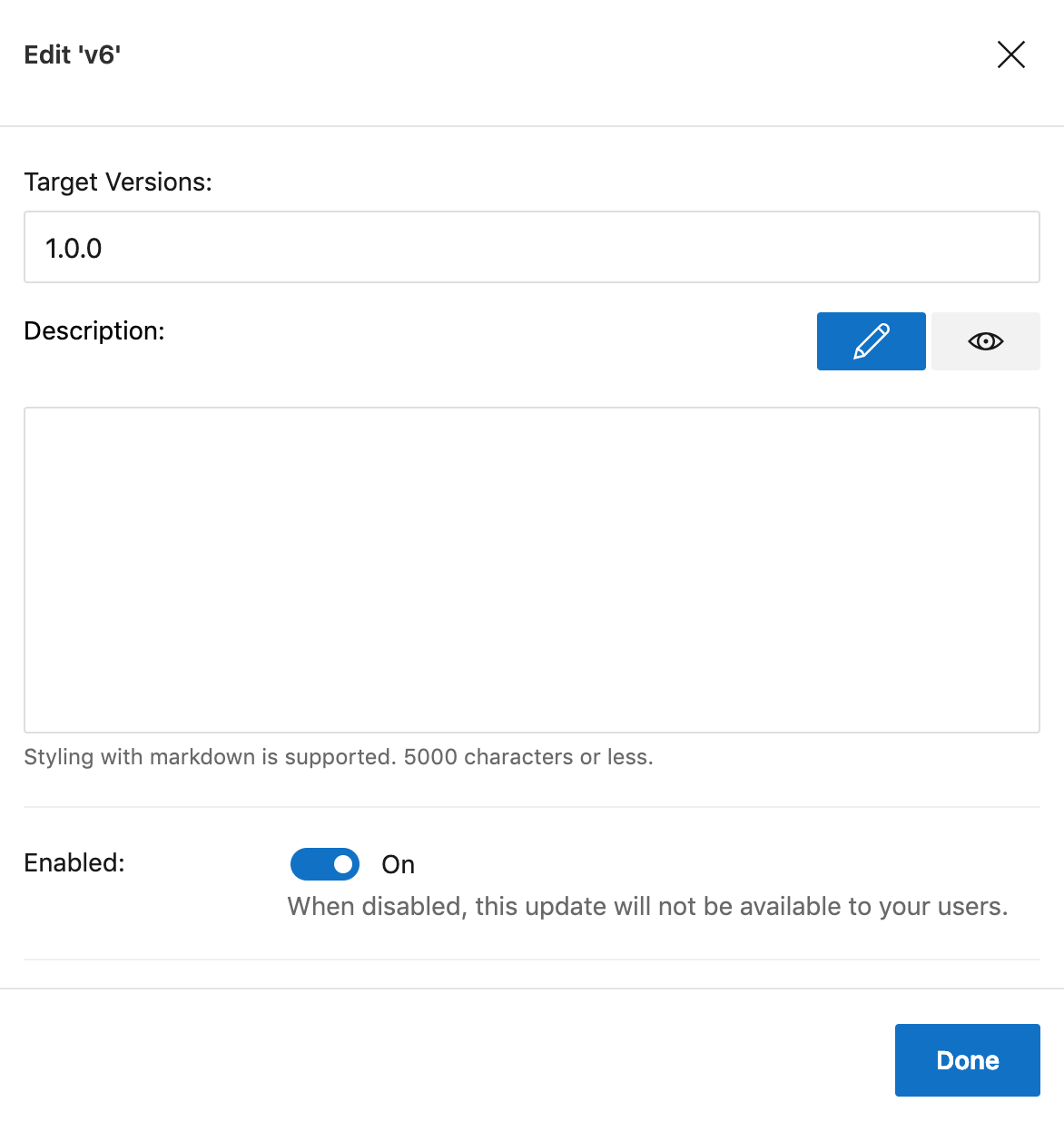
this is the last question, sorry for taking you time. In Appcenter, is the Description here is what displayed as a message when the update message appear to the user (asking them to update)
yasir-netlinks
on 26 Feb 2019
@yasir-netlinks For your case yeah, it breaks codepush as your target version is 1.0.0 and your binary version will be 1.0.1. Client CodePush part just check that versions mismatch and update should be downloaded. For fixing this your can set target version of update as 1.0(this equals 1.0.X). But this depends on your changes if this js bundle will work with this new bundle version then it's fine. Please be careful with versions and test this cases before promote it to your users.
About description: This is just release description with some additional info which should be visible for developers but if you want you can also print it in update dialog window. For this you should use descriptionPrefix of updateDialog option. For more info please check this docs: https://github.com/Microsoft/react-native-code-push/blob/master/docs/api-js.md#codepushoptions
For getting description message from release metadata you should use getUpdateMetadata method. For more info please check this docs: https://github.com/Microsoft/react-native-code-push/blob/master/docs/api-js.md#codepushgetupdatemetadata
Please let me know if it was helpful for or you have any questions.
alexandergoncharov
on 26 Feb 2019
Hi @alexandergoncharov , I was wondering why changes in codePush.sync itself didn't reflect in the next update. Previously I did not set it up with much options(new to all this)
codePush.sync({
  updateDialog: true,
  installMode: codePush.InstallMode.IMMEDIATE
})
And now:
codePush.sync({
      updateDialog: true,
      installMode: codePush.InstallMode.IMMEDIATE,
    }, (status) => {
      switch (status) {
        case codePush.SyncStatus.DOWNLOADING_PACKAGE:
          this.setState({ showUpdateModal: true })
          break;
        case codePush.SyncStatus.INSTALLING_UPDATE:
          this.setState({ showUpdateModal: false })
          break;
      }
    },
      ({ receivedBytes, totalBytes }) => {
        const progress = (receivedBytes / totalBytes) * 100
        this.setState({ updateProgress: Math.round(progress) })
      }
    )
but those new changes in the codePush.sync didn't appear and behaved as the previous setup when installing the update!
yasir-netlinks
on 28 Feb 2019
@yasir-netlinks , Yeah, you think correct. It's strange. It should be updated as this settings in jsBundle. CodePush just replace old jsBundle with new codePush jsBundle. Could you please ensure that your update contains this changes?
alexandergoncharov
on 28 Feb 2019
Hi @alexandergoncharov , sorry for the late reply. How to check if the change has been brought to the update! The code I have pushed does contain the new changes I added to codePush.sync. This is the only change that doesn't update, the rest of the changes I made are updated fine
yasir-netlinks
on 2 Mar 2019
If you would like to check existing code in update bundle you should download this bundle from UI:
Go to Distribute -> CodePush -> choose release -> "Download bundle" in the upper right corner.
Downloaded file will contain JSBundle file and check it there.
Please let me know your results or if you have any questions.
alexandergoncharov
on 5 Mar 2019
Hi @yasir-netlinks,
I'm going to close this issue for now as I haven't heard from you in a while unfortunately.
Please feel free to reopen it if you have any questions.
Thanks,
Alexander
alexandergoncharov
on 16 Mar 2019
Related issues
 jpr-longgame
·
25Comments
jpr-longgame
·
25Comments
 fungilation
·
27Comments
fungilation
·
27Comments
 ps-swaroop
·
48Comments
ps-swaroop
·
48Comments
 marf
·
25Comments
marf
·
25Comments
 afilp
·
54Comments
afilp
·
54Comments