React-native-code-push: js and css files (from assets) not loaded in device
Currently working on react native app and using codepush to update the app data. I am terribly stuck in a problem where js and css files on webView are not downloading. I checked the 'application support' from home directory. I found that only images are downloaded from codePush but cannot see js or css files.
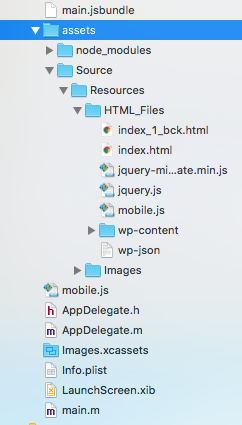
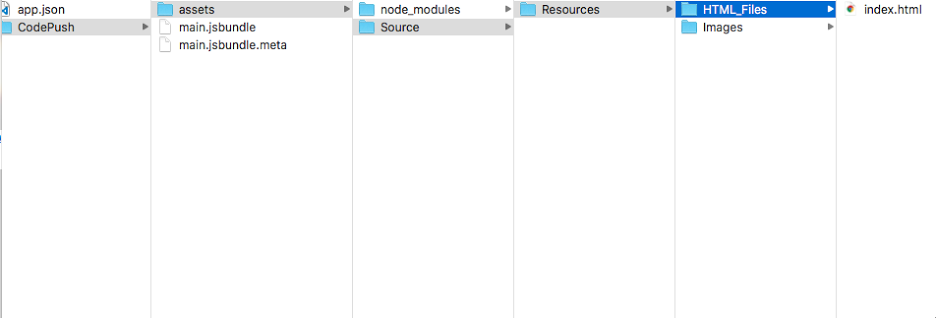
Provided the folder structure from Xocde and the response getting from CodePush in application support path.
Following command used to create main.jsbundle.
react-native bundle --platform ios --assets-dest ./ --dev false --entry-file index.ios.js --bundle-output iOS/main.jsbundle
To send update to codePush used following command.
code-push release-react app_name ios --description "message"
I will really appreciate if you can at least point me in a right direction.
 sujitpk-perennial
All 14 comments
Hi @sujitpk-perennial
code-push release-react runs bundler inside, and seems like react-native bundle doesn't bundle index.html dependencies.
Could you please try to publish CodePush release with code-push release command, e.g.:
code-push release app_name iOS/ *
 iTOYS
on 15 Feb 2018
iTOYS
on 15 Feb 2018
@iTOYS
Sorry for the late reply. I tried above command. But it is saying command is not correct.
I tried other options from suggestions but no luck.
- code-push release app_name ios/ *
- code-push release app_name ./ios *
- code-push release app_name specitic_path_a_single_js_file *
sujitpk-perennial
on 19 Feb 2018
Please try to wrap asterisk in quotes:
code-push release app_name ./ios "*"
@iTOYS I am getting error as
[Error] ENOENT: no such file or directory, stat 'ios/build/Intermediates/ArchiveIntermediates/AppName/BuildProductsPath/Release-iphoneos/AppName.app'
sujitpk-perennial
on 19 Feb 2018
Seem like it's not a CodePush error, pleas try to bundle you app in separate folder and add needed assets manually:
$ react-native bundle --platform ios --assets-dest /tmp/codepush/app_name --dev false --entry-file index.ios.js --bundle-output /tmp/codepush/app_name/main.jsbundle
$ code-push release app_name /tmp/codepush/app_name "*"
If it's possible, could you please create some example project that i can use to reproduce your error.
iTOYS
on 19 Feb 2018
I tried now above command. Now it is not giving me any error. But still not getting all files.
I will share sample app.
sujitpk-perennial
on 19 Feb 2018
@iTOYS I have uploaded sample project and you will find it here . Here I am just loading js on webView to show a alert.
sujitpk-perennial
on 22 Feb 2018
@sujitpk-perennial
Thanks a lot! I'll take a look ASAP!
iTOYS
on 22 Feb 2018
@iTOYS have you find any reason. There is a same question asked https://github.com/Microsoft/react-native-code-push/issues/1086#issuecomment-367747052.
sujitpk-perennial
on 23 Feb 2018
Hi @sujitpk-perennial
Unfortunately React doesn't bundle assets that not mentioned directly in JS(RN) code and we can't include they in a patch. You can try to add required files to ./assets folder and publish new CodePush release
Just for clarification. If you publish(or build release) your application without CodePush is it work?
iTOYS
on 1 Mar 2018
@iTOYS Thanks for your reply. I have already added js, css files into assets folder. But again it is not downloading those files on the phone. iOS app is not yet released on App Store as I am stuck at this stage.
sujitpk-perennial
on 5 Mar 2018
follow my answer
i hope it help you
i used RN 0.54 and i'm using ckeditor
this
 Arshiamidos
on 24 Apr 2018
Arshiamidos
on 24 Apr 2018
@Arshiamidos I already installed the app on my iPhone. Now I am doing some changes in js file which loads on webView. I am not able to update the app for those js files using codepush. Are you ?
sujitpk-perennial
on 25 Apr 2018
@sujitpk-perennial all assets and bundles are readonly so you can't change them if you want a config just save them in DOCEMUENT (NSHOMEDIRE i think)
so you can't modify read only objects
Arshiamidos
on 25 Apr 2018
Related issues
 ACCTFORGH
·
3Comments
ACCTFORGH
·
3Comments
 fanzhiri
·
3Comments
fanzhiri
·
3Comments
 Adr1ann
·
3Comments
Adr1ann
·
3Comments
 chrisjrex
·
4Comments
chrisjrex
·
4Comments
 diegocouto
·
4Comments
diegocouto
·
4Comments
Most helpful comment
follow my answer
i hope it help you
i used RN 0.54 and i'm using ckeditor
this